
Guides
Fallout 4 Best Starting Stats

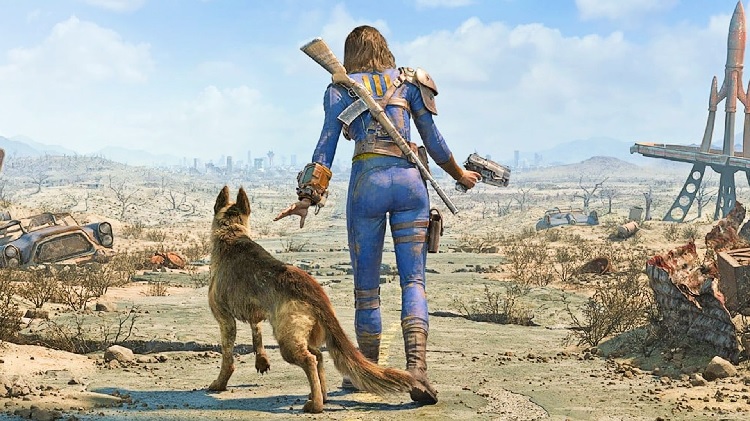
Games like Fallout are versatile and accommodating and stand out on the graphics front. But what makes them even more accessible is their playability. Fallout is a highly playable game, irrespective of your experience in gaming.
As you venture into the post-apocalyptic scenario in the game, standing out with your resources, strengths, and build makes all the difference in the long run.
If you need clarification about the Fallout 4 starting stats, this article will explore more in detail.
Know About SPECIAL in Fallout 4
SPECIAL is an acronym that represents different stats that are quintessential to the game of Fallout 4. An in-depth understanding of each of these primary statistics can further elevate your gameplay, improving your chances of securing the big win.
Here’s a quick breakdown of the factors making up S.P.E.C.I.A.L:
Strength – Improves melee damage and the potential to carry more weight.
Perception – Improves the Vault-Tec Assisted Targeting System (VATS) accuracy.
Endurance – Improves the Hitpoints and the Action points in the game.
Charisma – Improves the player’s ability to charm and bewitch others in the game.
Intelligence – Improves overall mental acuity.
Agility – Improves the action points (AP).
Luck – Improves and boosts the Critical Hit Recharge to get players out of unfortunate situations.
Once you master these individual stats, there’s nothing more you’d have to worry about while traipsing through the game.
Perks You Will Get with Each Primary Stat
Now that you have a basic overview of each of the stats that make up SPECIAL in Fallout 4, knowing about their impacts is equally essential. What kind of benefits and perks do you get out of each one of these?
Each stat introduces a variety of bonuses that you need to know. Here’s a quick rundown:
Strength
| Perk | What does it do? |
| Iron fist | Inflict better damage when punching someone |
| Big leagues | Improves melee damage |
| Blacksmith | Easy access to better weapon modification |
| Armorer | Introduce better armor modification |
| Strong back | Be able to carry more weight |
| Basher | Improves gun bashing damage |
| Pain train | Improved damage when wearing Power Armor |
Perception
| Perk | What it does? |
| Pickpocket | Pickpocket other players in the game for resources |
| Awareness | Better knowledge of opponent’s weakness |
| Locksmith | Master breaking complicated locks |
| Night person | Improved perception and intelligence at night |
| Sniper | Better shot accuracy for the rifles |
| Concentrated fire | Inflict more damage with VATS |
| Rifleman | Involves non-automation weapons for inflicting more damage |
Endurance
| Perks | What it does? |
| Toughness | Improved resistance against damage |
| Lifegiver | Improved health regeneration |
| Chem resistant | Reduced affinity towards addiction |
| Rad resistant | Improved resistance towards radiation |
| Cannibal | Able to eat Ghouls |
| Solar powered | Improved stats during day |
| Lead belly | Reduced radiation while drinking or even eating |
Charisma
| Perks | What it does? |
| Cap collector | Improved buying and selling prices |
| Lone wanderer | Improved stats without a companion |
| Attack dog | Better chances of destroying the enemy with a dog |
| Animal friend | Train, pacify and command animals |
| Party girl/boy | Improved resistance to alcohol |
| Inspirational | Improved resistance for the companions |
| Intimidation | Being able to pacify humans |
Intelligence
| Perks | What it does? |
| VANS | Improved Perception |
| Gun nut | Access to better gun modifications |
| Scrapper | Get your hands on better scraping components |
| Robotics expert | Hack and control the robots |
| Nerd Range! | Increase stats when below 20% |
| Science! | Improved ranking in tech modifications |
| Chemist | Better resilience for Chem effects |
Agility
| Perks | What it does? |
| Commando | Access to automatic weaponry |
| Sneak | Move around unnoticed |
| Mister Sandman | Inflict damage with silent weapons |
| Ninja | Unique damage attacks |
| Blitz | Improved VATS melee distance |
| Moving target | Better resistance while running |
| Quick hands | Better action plan |
Luck
| Perks | What it does? |
| Scrounger | Better ammunition loot opportunities |
| Mysterious stranger | Improved critical strike |
| Idiot Savant | Improve experience |
| Critical banker | Saving the critical hits in VATS |
| Four leaf clover | Restore Critical Hits meter |
| Fortune finder | Find loot |
| Better criticals | Easy access to improved criticals |
Recommended Fallout 4 Builds
Once you familiarize yourself to the perks and the different stats, the next thing worth exploring is the Fallout 4 builds.
Beginner Starting Stats
Mastering the beginner build is potentially the most important part of Fallout 4. If you start the game with an unstable build, chances are that it will take down the entire progress in the game.
Here’s a quick rundown of the required stats:
- Strength: 3
- Perception: 3
- Endurance: 5
- Charisma: 5
- Intelligence: 8
- Agility: 3
- Luck: 1
Although these above stats are for beginner build, we’d recommend collecting more special stats if you want to improve the final build in the game.
To make Stealth work in Fallout 4, you first need to understand every move of your enemy. Trust us when we say this, it is a crucial marker. As you level up in the game, that’s where you start building up the stealth stats to support your progress better.
Here’s a quick rundown of the stats for Stealth:
- Strength: 2
- Perception: 3
- Endurance: 1
- Charisma: 1
- Intelligence: 10
- Agility: 10
- Luck: 1
Your primary aim to improving Stealth stats is to acquire more intelligence along the way. It is about how well you can bypass the enemies and keep them out of your way. So, collect more and more Intelligence stats as you progress through the different levels in the game.
For Melee Builds
There are a handful of Melee Builds available in Fallout 4. However, to make it big, you must focus on acquiring as many Melee builds as possible. Factors like brutes, stealthy assassins, etc., make a lot of difference in the game.
Here’s a quick rundown of the Melee builds stats you have to keep into consideration:
- Strength: 9
- Perception: 3
- Endurance: 5
- Charisma: 2
- Intelligence: 5
- Agility: 5
- Luck: 4
Since it involves manual building requirements, there’s no surprise that you need to have better strength stats. You will also do well-acquiring intelligence, agility, and luck along the way.
For Guns
You can’t have Fallout 4 without the prospect of guns involved in the equation. So, when handling the enemies, being on top of the game with the guns is crucial.
Here’s a quick rundown of all the stats you have to keep in check:
- Strength: 3
- Perception: 4
- Endurance: 5
- Charisma: 3
- Intelligence: 5
- Agility: 7
- Luck: 1
More or less, you need access to all the defined perks to make it big in the game. Ideally, we’d recommend you focus on the individual stats and prioritize agility over anything else.
For Stealth Sniper,
Stealth Sniper build is undoubtedly one of the game’s most popular builds. It allows the players to demolish the enemies but from a distance. However, you need high perception and agility to make it happen.
Here’s a quick rundown of the stats you need to consider:
- Strength: 3
- Perception: 8
- Endurance: 3
- Charisma: 1
- Intelligence: 3
- Agility: 7
- Luck: 3
Also, while you are collecting all the stats, ensure that you prioritize awareness in the equation as well.
For Power Armor
Having access to the right arms and ammunition in an action game is crucial. It allows you to demolish just about anyone that crosses your path. Amidst all the options, one that stands out is Power Armor.
Here’s a quick rundown of the stats you need to keep in mind:
- Strength: 5
- Perception: 4
- Endurance: 3
- Charisma: 3
- Intelligence: 9
- Agility: 1
- Luck: 3
It is quite a rough build, which means that you need to be extremely careful of the stats you are collecting along the way.
FAQs
What are the Most Important Stats in Fallout 4?
Almost every single one of the stats in Fallout 4 is important. This includes your S.P.E.C.I.A.L stats, including strength, perception, endurance, charisma, intelligence, agility, and luck. Depending on the build and situation, the need for these individual stats changes depending on the build and situation.
What is the best Build of Fallout 4?
Amidst all the available builds, the best of the lot is either the Beginner Build or the Melee build.
Does Fallout 4 Get harder as you Level Up?
Like any other game in the lot, even Fallout 4 will progressively get challenging as you level up. That keeps the gamer hooked to the game instead of feeling everything is catered to them on a plate.
What Stats should I start with in Fallout 4?
If you are beginning Fallout 4, we’d recommend having enough stats for the Beginner build. This is quintessential and can’t be changed in the game.

Download Minecraft PE 1.21.131 APK for Android
Minecraft Bedrock 1.21.131 is a focused hotfix update — improved Spear combat, two important bug fixes, and better overall stability on Android. No new content, but a noticeably smoother experience.
Spear Knockback Improvement
The window during which a charged Spear attack can apply knockback has been extended. This makes combat feel more reliable — the attack now connects as expected without requiring pinpoint timing, especially useful when fighting multiple mobs at once.
Spear Animation Alignment
Charge attack animations now accurately sync with the Spear’s three gameplay phases: Engaged, Tired, and Disengaged. What you see on screen now matches what the game engine is actually doing — making combat more readable and reducing guesswork in fights.
Performance & Stability
Frame drops on mid-range Android hardware have been reduced. Memory handling improvements prevent sudden freezes during long play sessions. World loading and chunk generation are more reliable, reducing terrain “pop-in” when exploring or moving quickly.
Multiplayer Improvements
Backend updates improve session stability when players join or leave. Fewer disconnects and smoother synchronisation across Bedrock servers. Marketplace content and add-ons also load more consistently during multiplayer sessions.
Adventuring Time Achievement Fixed — The achievement no longer unlocks early. It now correctly requires visiting at least 17 biomes on PC, matching the intended design.
Marketplace Escape Key Fixed — Pressing Escape after using the Marketplace search now reliably returns players to the previous menu instead of getting stuck in a loop.
Add-on World Loading Fixed — A bug that triggered a “Block” error when loading or creating worlds with multiple add-ons installed has been resolved.
Download the APK
Tap one of the Download buttons above. Choose the Standard (no music) version if storage is limited, or the Full version for the complete experience. The ARM64 build is recommended for modern phones.
Enable “Install Unknown Apps”
Go to Settings → Security (or Privacy) → Install unknown apps. Enable the permission for your browser or file manager. Android requires this for any APK installed outside Google Play.
Open the APK File
Open your Downloads folder, find the Minecraft 1.21.131 APK, and tap it to launch the system installer. Follow the on-screen prompts.
Install Over Existing Version
In most cases you can install 1.21.131 directly over your existing Minecraft without losing any worlds or progress. If you see a signature conflict error, uninstall first — but back up your worlds beforehand.
Launch and Sign In
Open Minecraft, sign in with your Microsoft/Xbox Live account, and your existing worlds will load normally. Online multiplayer, Realms, and Marketplace content all work as before.
Download Minecraft PE 1.20 APK for Android
Get the full Minecraft Bedrock 1.20 (Trails and Tales) APK for Android. Supports Xbox Live sign-in. Multiple versions available — stable releases and preview builds.
Download the APK File
Tap the Download button above for the version you want. The APK file will save to your device’s Downloads folder.
Enable “Install Unknown Apps”
Go to Settings → Security or Privacy → Install unknown apps. Enable it for your browser or file manager. Android requires this for any APK installed outside of Google Play.
Open the Downloaded File
Open your Downloads folder (or tap the notification), find the Minecraft APK, and tap it to start the installer.
Confirm Installation
Tap Install and wait for the process to complete. If you see a “signature conflict” error, uninstall your existing Minecraft version first, then retry.
Launch and Sign In with Xbox Live
Open Minecraft, sign in with your Microsoft/Xbox Live account to access multiplayer, Realms, and cross-platform features.
-
 Guides6 years ago
6 Proven Ways to Get more Instagram Likes on your Business Account
-
Mainstream12 years ago
BioWare: Mass Effect 4 to Benefit From Dropping Last-Gen, Will Not Share Template With Dragon Age: Inquisition
-
 Mainstream8 years ago
How to Buy Property & Safe Houses in GTA 5 (Grand Theft Auto 5)
-

 Guides2 years ago
Free Fire vs PUBG: Comparing Graphics, Gameplay, and More
-

 Guides2 years ago
50+ Free Fire ID and Passwords Login List (Giveaway) 2025
-
 Casual3 years ago
8 Ways to Fix Over-Extrusion and Under-Extrusion in 3D Printing
-

 Other2 years ago
Ajjubhai UID: Free Fire Details & Earnings
-

 Features2 years ago
Exploring Valorant eSports Stats: Unveiling the Metrics Behind Competitive Excellence