
Guides
Elden Ring Confessor Build: A Beginner Guide


Starting with Elden Ring as a beginner can impose many challenges and roadblocks, especially with setting up the builds according to the stats and classes. The Confessor build utilizes the strong starting stats, making it a much superior option to the other classes.
Given the diversity in weapons, armors, spells, and accessory equipment, it isn’t surprising that Elden Ring’s classes can go in multiple directions. However, this article will specifically focus on the Confessor Build and guide you through the entire process.
Elden Ring Confessor Builds
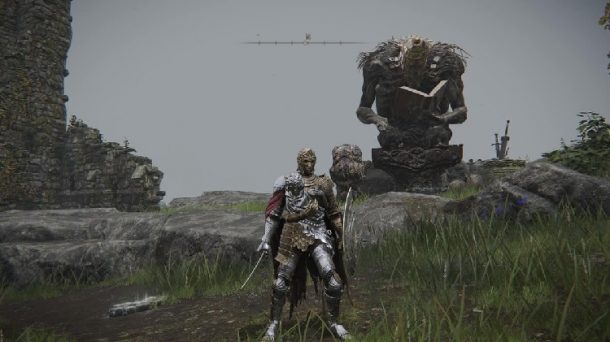
To make the article beginner friendly and easy to understand, we have managed to scale through the different elements that constitute the overall Confessor build. From the weapons to the talisman, everything is discussed in detail for a better understanding.
Starting And Leveling
When starting the game as a Confessor, your initiation starts at Level 10. By this time, your faith stat is at its peak. Some other stats that are close range are Mind, Strength, and Dexterity.
The Confessor stat especially focuses on two factors – magic and melee weaponry. That’s something you’d exhibit throughout the build process, despite lacking any obvious advantage with the current stats.
Confessor build also starts with some machinery and equipment, including Broadsword, Finger Seal, and Kite Shield.
As you commence the Confessor build, we recommend that you focus on two important stats – Faith and Strength. Keep these two factors in the foreground. Follow this up with Vigor and Dexterity and keep Mind and Endurance in the last. The latest stats will be a backup if you run out of the primary ones.
Best Weapons
Since you are starting the Confessor build at Level 10, you must practice patience throughout the process. The best way to acquire some of the most notable weapons is by waiting since they come in a little later in the game.
As you gradually progress in the game, aim for the Zweihänder. This is your first weapon of choice. You will find it from the Isolated Merchant at the Weeping Peninsula. It is a powerful sword and will cost you 3500 runes.
Since the cost is quite steep, you need to acquire enough by farming, especially because it requires around 19 Strengths for the purchase.
Once you acquire the first weapon of the target, the next in line is the Dragon Communion Seal. This one is popular for casting Faith incantations and is available at the Fringefolk Hero’s Grave. It is present right before you step into the open world. Entry to acquire this weapon requires the Stonedword Keys for access.
Your aim with Confessor build is to acquire more of the Faith-based weaponry. Later as you progress into the advanced levels, aim for the Godslayer’s Greatsword. This is the ultimate sword and is quite expensive. However, purchasing it will take a lot, including 20 Strength Faith and Dexterity.
Another important build you can look into is Blasphemous Blade which requires a hefty purchase price, including 22 Strength, 21 Faith, and 15 Dexterity. However, acquiring this sword isn’t as easy since it requires the player to defeat the Elden Ring Rykard boss.
Best Armor
Moving on from the weaponry, the next thing in the line of focus is the armor of the build. The first thing in line is Mausoleum Knight set that can be available in the Liurnia of the Lakes or around the Walking Mausoleum. The primary significance of this armor set lies in the physical and magical protection.
Besides that, the Briar set is another popular armor worth considering because its level of protection is immaculate. You do need to beat Elemer of the Briar to acquire that armor. If possible, replace the helmet with a Ruler’s Mask. More than improving the strength or protection, this armor improves the Faith stat, which is crucial for the Confessor build.
Best Talismans
What is an Elden Ring stat build if we don’t talk about the Talismans? The first of the lot is the Two Fingers Heirloom, which gives the player an extra flat bonus of five to the existing Faith stat.
Besides the standard talisman, another one worth considering is Faithful’s Canvas Talisman. Acquiring this will immediately raise the potency of all the incantations available. So, if you want to heal yourself after an injury, this is one of the talismans that can support that.
Primarily, focus on acquiring the relevant weaponry first, and once you do, we’d recommend you shift to getting the Carian Filigreed Crest. Getting this purposefully reduces the FP consumption of almost all the skills around.
Best Stats
Since Confessor build starts with high Faith, keeping a check on all the best stats is crucial. Your aim is to keep Faith at the top and balance Strength and Dexterity on the side. The Vigor is quite low, so you might have to work on overdrive to sort that out.
Keeping a check on the stats should be aligned with the various milestones you achieve. Here’s a quick breakdown of the same:
Level 30 Stats
- Vigor: 20
- Mind: 13
- Endurance: 10
- Strength: 22
- Dexterity: 12
- Intelligence: 9
- Faith: 14
- Arcane: 9
Level 60 Stats
- Vigor: 24
- Mind: 15
- Endurance: 15
- Strength: 35
- Dexterity: 12
- Intelligence: 9
- Faith: 20
- Arcane: 9
Level 90 Stats
- Vigor: 30
- Mind: 16
- Endurance: 20
- Strength: 40
- Dexterity: 20
- Intelligence: 9
- Faith: 24
- Arcane: 9
Keeping these Confessor build stats can be a little difficult as a beginner, but these are some of the best stat configurations that can optimize your chances of winning.
Best Spells
Once you have all the equipment, exploring the Confessor’s abilities is crucial. This is where the spells and incantations come into play. Since they are armed with the Sacred Seal, knowing about the divine Incantation spells is very important.
Some of the top spells and incantations in the Elden Ring Confessor Build:
Black flame – throw a black ball of fire
Lord’s aid – removes poison and sleep and even blood loss in allies
Lord’s heal – heal self and the allies around
Lightning spear – throw a bolt of lightning
Ancient Dragon’s Lightning Spear – throw a red lightning spear from above
Electrify Armament – right side weapon to correct lightning damage
Besides these spells and incantations, there are several involvements of Ashes or war and Spirit ashes that you should learn about gradually.
Best Skills
When discussing the Confessor’s best skills, they include a variety. The Class Scythe and Melee Build are directly responsible for crowd control, especially when you are stuck in the middle, surrounded by your enemy.
Integrating “Ash of War: Quickstep” is a skill that optimizes survivability and helps the players get themselves out of stuck and unwanted situations.
Summoning the Spirit Ashes also improves the defense and the damage by offering more protective elements.
Best Gear
The last element in the Confessor build is worth considering. This typically encompasses all the important weapons, armors, and talismans acquired throughout the game.
When getting the best gear, focus on Strength and Faith, the two pillars in the Confessor build. Once you master that, acquiring the rest wouldn’t be as difficult as you think.
What Should I Level as A Confessor?
As mentioned before, as a Confessor in Elden Ring, you will begin your game at Level 10. Faith will be the highest stat during this point, closely followed by Strength, Mind, and Dexterity.
What’s The Best Confessor Build in Elden Ring?
Since the Confessor’s ability heavily depends on Strength and Faith, you must focus on the build to improve those two stats. The best Confessor build comprises the ultimate weapons, spells, machinery, incantations, and gear – all of which elevate the stats by the end.
Conclusion
If you are new to Elden Ring, especially with the Confessor build, we hope this article gives you an in-depth understanding of all the necessary pointers. Ensure that you focus on the correct elements because that makes all the difference by the end of the game.
Image Source – Reddit

Download Minecraft PE 1.21.131 APK for Android
Minecraft Bedrock 1.21.131 is a focused hotfix update — improved Spear combat, two important bug fixes, and better overall stability on Android. No new content, but a noticeably smoother experience.
Spear Knockback Improvement
The window during which a charged Spear attack can apply knockback has been extended. This makes combat feel more reliable — the attack now connects as expected without requiring pinpoint timing, especially useful when fighting multiple mobs at once.
Spear Animation Alignment
Charge attack animations now accurately sync with the Spear’s three gameplay phases: Engaged, Tired, and Disengaged. What you see on screen now matches what the game engine is actually doing — making combat more readable and reducing guesswork in fights.
Performance & Stability
Frame drops on mid-range Android hardware have been reduced. Memory handling improvements prevent sudden freezes during long play sessions. World loading and chunk generation are more reliable, reducing terrain “pop-in” when exploring or moving quickly.
Multiplayer Improvements
Backend updates improve session stability when players join or leave. Fewer disconnects and smoother synchronisation across Bedrock servers. Marketplace content and add-ons also load more consistently during multiplayer sessions.
Adventuring Time Achievement Fixed — The achievement no longer unlocks early. It now correctly requires visiting at least 17 biomes on PC, matching the intended design.
Marketplace Escape Key Fixed — Pressing Escape after using the Marketplace search now reliably returns players to the previous menu instead of getting stuck in a loop.
Add-on World Loading Fixed — A bug that triggered a “Block” error when loading or creating worlds with multiple add-ons installed has been resolved.
Download the APK
Tap one of the Download buttons above. Choose the Standard (no music) version if storage is limited, or the Full version for the complete experience. The ARM64 build is recommended for modern phones.
Enable “Install Unknown Apps”
Go to Settings → Security (or Privacy) → Install unknown apps. Enable the permission for your browser or file manager. Android requires this for any APK installed outside Google Play.
Open the APK File
Open your Downloads folder, find the Minecraft 1.21.131 APK, and tap it to launch the system installer. Follow the on-screen prompts.
Install Over Existing Version
In most cases you can install 1.21.131 directly over your existing Minecraft without losing any worlds or progress. If you see a signature conflict error, uninstall first — but back up your worlds beforehand.
Launch and Sign In
Open Minecraft, sign in with your Microsoft/Xbox Live account, and your existing worlds will load normally. Online multiplayer, Realms, and Marketplace content all work as before.
Download Minecraft PE 1.20 APK for Android
Get the full Minecraft Bedrock 1.20 (Trails and Tales) APK for Android. Supports Xbox Live sign-in. Multiple versions available — stable releases and preview builds.
Download the APK File
Tap the Download button above for the version you want. The APK file will save to your device’s Downloads folder.
Enable “Install Unknown Apps”
Go to Settings → Security or Privacy → Install unknown apps. Enable it for your browser or file manager. Android requires this for any APK installed outside of Google Play.
Open the Downloaded File
Open your Downloads folder (or tap the notification), find the Minecraft APK, and tap it to start the installer.
Confirm Installation
Tap Install and wait for the process to complete. If you see a “signature conflict” error, uninstall your existing Minecraft version first, then retry.
Launch and Sign In with Xbox Live
Open Minecraft, sign in with your Microsoft/Xbox Live account to access multiplayer, Realms, and cross-platform features.
-
 Guides7 years ago
6 Proven Ways to Get more Instagram Likes on your Business Account
-
Mainstream12 years ago
BioWare: Mass Effect 4 to Benefit From Dropping Last-Gen, Will Not Share Template With Dragon Age: Inquisition
-
 Mainstream8 years ago
How to Buy Property & Safe Houses in GTA 5 (Grand Theft Auto 5)
-

 Guides2 years ago
Free Fire vs PUBG: Comparing Graphics, Gameplay, and More
-

 Guides2 years ago
50+ Free Fire ID and Passwords Login List (Giveaway) 2025
-
 Casual3 years ago
8 Ways to Fix Over-Extrusion and Under-Extrusion in 3D Printing
-

 Other3 years ago
Ajjubhai UID: Free Fire Details & Earnings
-

 Features2 years ago
Exploring Valorant eSports Stats: Unveiling the Metrics Behind Competitive Excellence