
Guides
100 Rooms Level 22 Walkthrough

100 Rooms walkthrough for level 22 is here – the latest update of the game brought us level 22 also and I am here to share with you all the details on how to complete the level in this guide. So if you can’t get the cryptic puzzle messages or you’re simply not as good at maths as you should be, I am here to share with you the secrets.
So let’s check out the 100 Rooms Level 22 Walkthrough below for 100 Rooms for Android!
First of all, this is once again one of those puzzles where the code is in the decor. The image to the top right shows us the order in which we should consider the code.
This was really difficult! On the first wall, the code is different from what I initially thought: we have to divide all the framed numbers by 2 and those who end with a .0 decimal are the right ones. Only 2 and 4 are like this, so the first number is 24. Then we have 4 furniture pieces there, which means that our second number is 4
On the next image, we have the sun thing, where we have to think that one day is 24 hours long, which means that divided by 2 (as seen in the image) is 12 – this is the third number.
Next, the final one is waaaay too much: after counting the fish and birds, remove the number of fish that the birds would eat, so you end up with 10 birds and 11 fish (the final 2 numbers).
So the code for the door is: 244121011
-
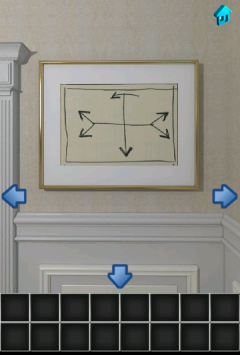
- 100 Rooms Level 22- Step 1
-
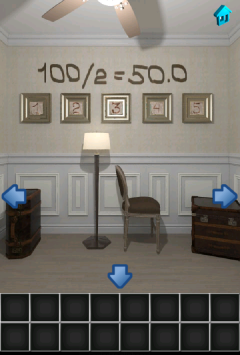
- 100 Rooms Level 22- Step 2
-
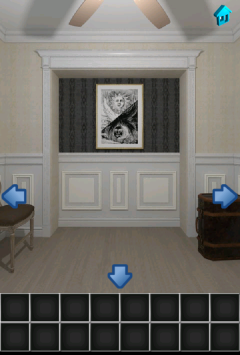
- 100 Rooms Level 22- Step 3
-
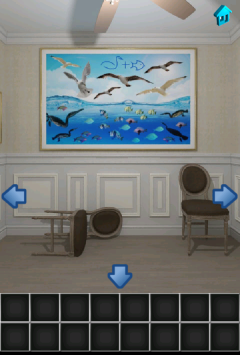
- 100 Rooms Level 22- Step 4
-
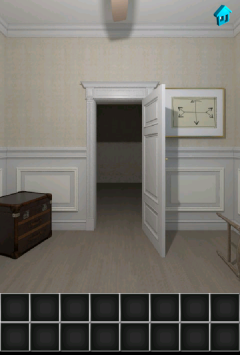
- 100 Rooms Level 22- Step 5
Thanks to everybody who commented and helped us get this walkthrough done!
Until then, we have the 100 Rooms Level 21 walkthrough ready and you can also follow the link for the 100 Rooms Level 23 walkthrough.


Download Minecraft PE 1.21.131 APK for Android
Minecraft Bedrock 1.21.131 is a focused hotfix update — improved Spear combat, two important bug fixes, and better overall stability on Android. No new content, but a noticeably smoother experience.
Spear Knockback Improvement
The window during which a charged Spear attack can apply knockback has been extended. This makes combat feel more reliable — the attack now connects as expected without requiring pinpoint timing, especially useful when fighting multiple mobs at once.
Spear Animation Alignment
Charge attack animations now accurately sync with the Spear’s three gameplay phases: Engaged, Tired, and Disengaged. What you see on screen now matches what the game engine is actually doing — making combat more readable and reducing guesswork in fights.
Performance & Stability
Frame drops on mid-range Android hardware have been reduced. Memory handling improvements prevent sudden freezes during long play sessions. World loading and chunk generation are more reliable, reducing terrain “pop-in” when exploring or moving quickly.
Multiplayer Improvements
Backend updates improve session stability when players join or leave. Fewer disconnects and smoother synchronisation across Bedrock servers. Marketplace content and add-ons also load more consistently during multiplayer sessions.
Adventuring Time Achievement Fixed — The achievement no longer unlocks early. It now correctly requires visiting at least 17 biomes on PC, matching the intended design.
Marketplace Escape Key Fixed — Pressing Escape after using the Marketplace search now reliably returns players to the previous menu instead of getting stuck in a loop.
Add-on World Loading Fixed — A bug that triggered a “Block” error when loading or creating worlds with multiple add-ons installed has been resolved.
Download the APK
Tap one of the Download buttons above. Choose the Standard (no music) version if storage is limited, or the Full version for the complete experience. The ARM64 build is recommended for modern phones.
Enable “Install Unknown Apps”
Go to Settings → Security (or Privacy) → Install unknown apps. Enable the permission for your browser or file manager. Android requires this for any APK installed outside Google Play.
Open the APK File
Open your Downloads folder, find the Minecraft 1.21.131 APK, and tap it to launch the system installer. Follow the on-screen prompts.
Install Over Existing Version
In most cases you can install 1.21.131 directly over your existing Minecraft without losing any worlds or progress. If you see a signature conflict error, uninstall first — but back up your worlds beforehand.
Launch and Sign In
Open Minecraft, sign in with your Microsoft/Xbox Live account, and your existing worlds will load normally. Online multiplayer, Realms, and Marketplace content all work as before.
Download Minecraft PE 1.20 APK for Android
Get the full Minecraft Bedrock 1.20 (Trails and Tales) APK for Android. Supports Xbox Live sign-in. Multiple versions available — stable releases and preview builds.
Download the APK File
Tap the Download button above for the version you want. The APK file will save to your device’s Downloads folder.
Enable “Install Unknown Apps”
Go to Settings → Security or Privacy → Install unknown apps. Enable it for your browser or file manager. Android requires this for any APK installed outside of Google Play.
Open the Downloaded File
Open your Downloads folder (or tap the notification), find the Minecraft APK, and tap it to start the installer.
Confirm Installation
Tap Install and wait for the process to complete. If you see a “signature conflict” error, uninstall your existing Minecraft version first, then retry.
Launch and Sign In with Xbox Live
Open Minecraft, sign in with your Microsoft/Xbox Live account to access multiplayer, Realms, and cross-platform features.
-
 Guides7 years ago
6 Proven Ways to Get more Instagram Likes on your Business Account
-
Mainstream12 years ago
BioWare: Mass Effect 4 to Benefit From Dropping Last-Gen, Will Not Share Template With Dragon Age: Inquisition
-
 Mainstream8 years ago
How to Buy Property & Safe Houses in GTA 5 (Grand Theft Auto 5)
-

 Guides2 years ago
Free Fire vs PUBG: Comparing Graphics, Gameplay, and More
-

 Guides2 years ago
50+ Free Fire ID and Passwords Login List (Giveaway) 2025
-
 Casual3 years ago
8 Ways to Fix Over-Extrusion and Under-Extrusion in 3D Printing
-

 Other2 years ago
Ajjubhai UID: Free Fire Details & Earnings
-

 Features2 years ago
Exploring Valorant eSports Stats: Unveiling the Metrics Behind Competitive Excellence
MarcelusH
August 25, 2012 at 10:07 am
We are at the door, the image to the top right indicates us to go left also there are two arrows (one left=100? And one right =50?) Or is it pointing at the numbers below? 1 and 5? Hmm!?!
I’m stuck too.
Patrick Rourke
August 26, 2012 at 12:44 pm
My older brother figured it out on my phone after an hour of trying different things. It’s actaully not as hard as it seems to be. I don’t want to spoil it and give away the answer, so i’ll give you a clue. For one of the digits to the code, you simply have to multiply 2 numbers, and then divide by another. The hardest part is figuring out the order.(just don’t over think it, and you’ll get it right)
brenda
August 25, 2012 at 1:11 pm
I think there will be a code from the chairs.
tony
August 25, 2012 at 3:58 pm
I’m not sure about one of the fish but I counted 13 creatures pointed to the right …. this is a tough one :/
lynnette
August 25, 2012 at 5:45 pm
I’ve tryed every code I can find nothing works someone plz help
Steph
August 25, 2012 at 9:15 pm
Why wouldnt the picture with the sun and moon mean 12?
mike b
August 25, 2012 at 10:07 pm
The suns picture looks like the number 8
mike b
August 25, 2012 at 10:19 pm
I also count a total number of creatures in the picture at 31
sara
August 26, 2012 at 12:01 am
Just a lil heads up on the pik wit the birds an fish there are 31 not 32
Vicki
August 26, 2012 at 1:21 am
There are 5 arrows so I assumed it is a 5 digit code. The one arrow pointing to the wall with sun & moon means one digit to me. If you look at picture as a whole you will see the number 8… Hope this helps!!!
erioob
August 26, 2012 at 2:21 am
I was thinking that thesun picture represents an 8 but the picture is split in half so it becomss 4, thr highlighted number 3 looks as if it may reprrsent the square indents at the bottom of the wall however it has 100/2 =50.0 so i was guessing the half indents? And with the fish and birds facing right i got 13. If you can tell you can see the lighting upon the # 1-5 frames. Two lines to the left (1-2), 3 is highlighted all around but 4-5 is highlighted to the right butim not sure if it represents anything
mike b
August 26, 2012 at 2:44 am
Everything in the room is supposed to be halved? So the 8 in the sun picture is a four? Half of the birds and fish is 15.5 and what about the numbers? 1.5 for the three? None of the codes like that have worked… even going counterclockwise like the map says…
bb
August 26, 2012 at 3:50 am
I might be way off but I noticed 1 lamp 2 chests and 3 chairs total of 6 items / by 2 = 3 (highlighted frame) or not…
hejining
August 26, 2012 at 5:07 am
I though the sun and moon picture means “/”. And it will follow the 100/2=50.0. So the 100 is left side wall, the / is the picture of sun and moon, and the birds and fish will 2 of that function. But still doesnt work. Plz find the answer!
sarah
August 26, 2012 at 8:21 am
I counted 31 creatures in all. also I thought the arrows were pointing to the 1 and 5 and the Sun and moon picture is related to the clue 100/2=50.0 since the image is split as well. also I think the decimal 0 in 50.0 has significance.
Lisa
August 26, 2012 at 9:44 am
Each picture is divided in two. That has something to do with the formula on the wall.
Lisa
August 26, 2012 at 10:30 am
The panels on the wall are part of the equation. Notice the suitcases and chairs cover up parts and leave the small one as a divider
Elo
August 26, 2012 at 12:20 pm
Hello i didn’t find the f****code but if we look the sun turning your phone we find the number 13 on is mouth sorry for my english
yohann
August 26, 2012 at 2:27 pm
31 for the moon if you turn your phone in the over side
Nikki K
August 26, 2012 at 10:33 pm
That code works.. i just can’t figure out where the numbers came from? Would you mind elaborating?
jen
August 26, 2012 at 10:47 pm
Any word on level 23??
laura
August 27, 2012 at 1:43 am
The code is 24-4-12-10-11
laangel56
August 27, 2012 at 1:49 am
code 244121011
una
August 27, 2012 at 1:57 am
Level 23 count bads- in the yellow submarine there ar 8 windows, as you see in the room are 3 bads so it is 8*3. Then count seats in the map- every circle is chear so it is 43. And at the end racoons 38. sorry for my english
una
August 27, 2012 at 2:00 am
level 24 when you find a code you must input numbers from back
charli
August 27, 2012 at 2:12 am
244121011 is the door code
beciie
August 27, 2012 at 2:26 am
24,4,12,10,11
Michele Crostofani
August 27, 2012 at 2:26 am
244121011 is the answer.
Amber
August 27, 2012 at 4:55 am
Answer is 244121011
Dont ask why(:
Amber
August 27, 2012 at 5:03 am
Heres an explanation <3
http://tinypic.com/r/35aks28/6
Amber
August 27, 2012 at 5:04 am
Heres an explanation <3 http://tinypic.com/r/35aks28/6
Calin Ciabai
August 27, 2012 at 7:39 am
Thank you so much guys for being here and helping us get this sorted out. It was a really difficult level!