
Guides
Zee and the Alien Machine – Detailed Walkthrough + Simple Guide

– Introduction –
Zee and the Alien Machine is the latest free online Flash Game by Zeebarf, the creator of the Reemus and Liam series. This game came totally unexpected, as the author is very busy working on a Reemus Game for PC, which is coming soon! I totally enjoyed playing this game from the Beginning to the End. The Graphics are quite notable and familiar, only Zeebarf makes this kind of animation, which is totally Awesome. Just like all of his other games, this one is a Point ‘n’ Click game, but with another style, and I like it. Zeebarf is very creative, and his unique games only attract more and more people! This game, like all of his other Adventure Games, is not easy, but logical and creative, and therefore I’ve written this Text Walkthrough :)
– Step-by-Step Walkthrough –
NOTE: This Walkthrough will literally walk you through the game. So, if you’re stuck, restart the game and follow this Walkthrough, or use the other guide for individual help :)
Walkthrough:
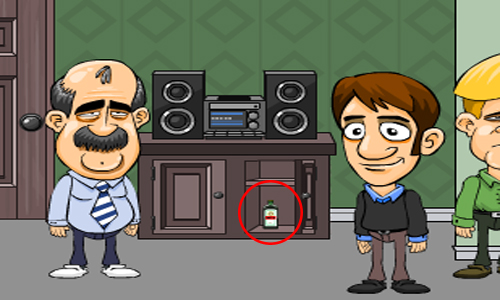
1. Walk right outside the Kitchen, were the Stereo is. Open the Right-side part of the Cupboard/Cabinet, the Stereo is placed on. Take the LEBERKLEISTER (Zee will walk to the Kitchen, and add it to his collection)
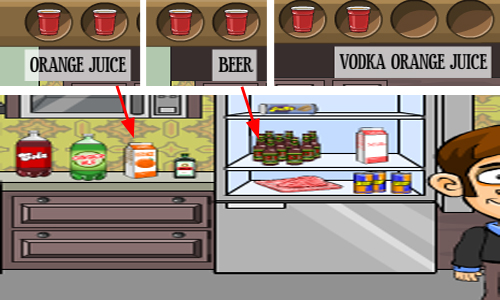
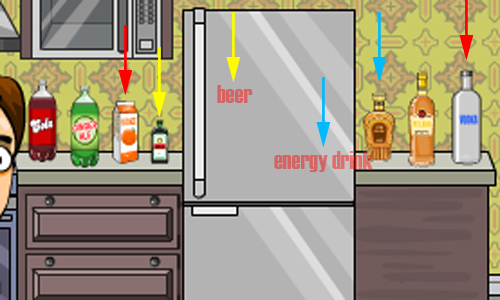
2. While you’re in the Kitchen, take 3 Cups from the Pile of Cups (on the Cupboard, left to the Oven), because that’s the limit to have at once. Use the First Cup on the Orange Juice Carton (White, Orange – left-side of Fridge), to get ORANGE JUICE. Open the Fridge, and take all the things that are possible to take: PUFF PASTRY, RAW GROUND PORK, MILK – once that’s done, use your Second Cup on the Bottles of Beer (Brown Bottles, Middle-Left in Fridge), to get BEER. Use your Third Cup on the Orange Juice, and then use the same cup you poured the Orange Juice in right now, on Vodka (Right-side of Fridge, the last one, White), to get VODKA ORANGE JUICE!
3. Find Barb (Woman with glasses, Red-Colore Outfit), and give her the Orange Juice. After you’re done talking to her, an Alarm will be set off inside Alex’s Room. Go back to the Kitchen, and Open the Top-Right Cupboard (above the sink). Take all the junk food there (it’s unnecessary, but you can give it to the Old Guy, Phil), in order to clean the Cupboard. After you’ve taken all of the junk food, you’ve probably found a BENT PAPERCLIP! Move in front of Alex’s Room (the Door, left-side of the Chips and other stuff, and Right-side of the Bathroom/Entrance). Use the Bent Paperclip to unlock the Door, and move inside!
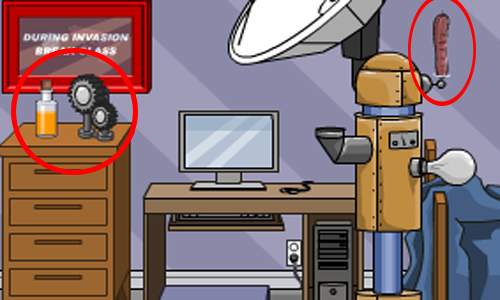
4. Zee will automatically shut off the Alarm. Can you see the Top-Right part of the Alien Machine, the part that looks like a Sausage/Hot Dog – where electricity is conducted? Take the HOT DOG/SAUSAGE. Take the PATCHOULI OIL and NOISY METAL GEARS from the surface of the Dresser/Drawer, next to the door. Once you’ve taken those items, leave the Room!
5. Whether you want to give the Old Guy, Phil, the junk food (4 in total, if you took ’em all), is up to you – its advantage is that it will get less messier in your inventory, and you’ll get an Achievement! And while you’re at it, give Phil (Old Guy with Moustache), the Vodka Orange Juice. Go to Lenny (The Rock Dude, T-shirt with Skull), and give him the Beer. And also, while you’re at it, give him the Noise Metal Gear, and move to the Kitchen!
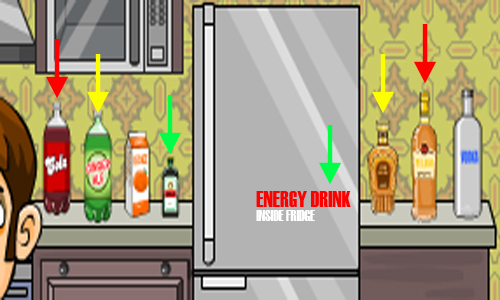
6. Take 3 New Cups. Use the First Cup on the Rum (Right-side of Fridge, in the Middle), and use the same cup on Cola (left-side of Fridge, most Left-side), to get RUM AND COLA. Use the Second Cup on the Ginger Ale (Let-side of Fridge, middle one), and then use the same cup on Rye Whiskey (right-side of Fridge, most left one), to get RYE AND GINGER. Use the Third Cup on Leberkleister (left-side of Fridge, most Right-side one, next to Orange Juice – must be collected from the Cabinet, read Step 1), and then open the Fridge, and use the Cup with Leberkleister, on the Energy Drinks (Bottom-Right in Fridge), to get LEBERKLEISTER AND ENERGY DRINK!
7. Find Richard (The Black Guy – no offense – Muscular), and give him Rum and Cola. The Alarm will be set on again. Get inside Alex’s room (in Middle of Chips and Bathroom). Click on his Computer Monitor, to shut off the alarm! Leave the room, Find Jim (the Sleepy Guy with Blonde Hair), and give him Rye and Ginger. Find Cyndi (Blondie Girl), and give her Leberkleister and Energy Drink!
If you give each of the guests, 3 portions of the same drink, you can get an Achievement!
8. Now to fulfill their wishes. Get inside Zee’s room (in Between the Stereo and the Chips, first door next to Kitchen). Take EMPTY COLOGNE BOTTLE on top of Drawer/Dresser, next to door. On Right-side of the picture of Cat, on top of Dresser/Drawer, there is a Dead plant. There is something reddish on Top of it. Take the DEFLATED BALLOON. Take the MP3 PLAYER/IPOD, Bottom-Right corner of the Monitor, on the desk. Leave the room. Go to the Bathroom (next to Entrance on Left-side of Living Room – your present room), and open the Mirror/Medicine Cabinet. Take the IPECAC SYRUP (it’s the only takeable item), and leave the room (or click on the Toilet, twice for Achievement)! Move to the Kitchen, and open the Cupboard, left-side of the Oven, the bottom one (open the left-side one). Take the BAKING TRAY! Also, take 3 Cups. Open the two Drawers, on right-side of the Oven, and take these items from inside: OVEN MITTS and TOWEL – and you’re ready to make your guests happy :)
ITEMS YOU SHOULD HAVE NOW: 3x Cups, Baking Tray, Deflated Balloon, Empty Cologne Bottle, Hot Dog, Ipecac Syrup, Milk, MP3 Player, Oven Mitts, Patchouli Oil, Puff Pastry, Raw Ground Pork, Towel = 15 ITEMS (12 w/o Cups)
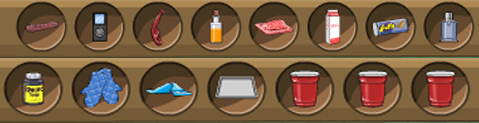
9. Move to the Kitchen, and use your First Cup on the Orange Juice (left-side of Fridge), and then the same cup on, Vodka (right-side of Fridge, last one), to get VODKA ORANGE JUICE. Use the Second Cup on the Beer (inside Fridge), and then on, Leberkleister (left-side of Fridge, most right-side), to get BEER COCKTAIL. Use the Third Cup on Energy Drink (inside Fridge, bottom-right corner), and then on, Rye Whisker (right-side of Fridge, most left-side), to get RYE AND ENERGY DRINK!
10. Go to Barb (Woman with glasses and all red), and give her Vodka Orange Juice. VOTE 1/6! Go to Lenny (The Rock Dude with T-shirt skull), and give him Beer Cocktail. VOTE 2/6! Go to Jim (the sleepy guy with blonde hair) and give him Rye and Energy Drink. VOTE 3/6!
11. Get inside Alex’s Room (Second door from Left to Right excluding the entrance), and hook up the MP3 Player, to the USB Cable, Bottom-Right corner of the Monitor, on the desk. Take MP3 PLAYER with DANCE MUSIC by taking the MP3 Player back. Leave the room, and go to the Stereo (huge Music Player, left to the Kitchen). Use the MP3 Player loaded with Dance Music on the Stereo, to play Dance Music. Talk to Cyndi (Dancing Blondie Girl). VOTE 4/6!
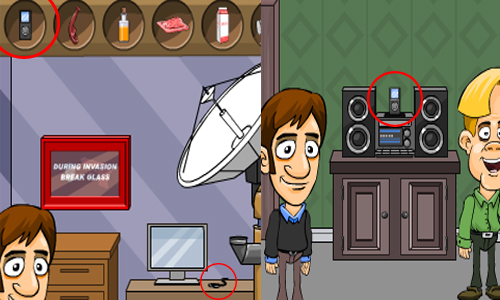
12. As Cyndi starts dancing, and Barb is from before, Richard will also start dancing, because we’ve automatically fulfilled his first part of his wish. Go to Richard (Black Muscular Guy). In your inventory, place the Palouchi Oil, left to the + mark (in the Combination Tool, Top-right corner). Place the Empty Cologne Bottle, right-side of the + sign (Right-side in the Combination Tool, Top-right corner), and press the + button, to combine the items, and get PACHOULI COLOGNE. Give the Pachouli Cologne to Richard (Black Muscular Guy). VOTE 5/6!

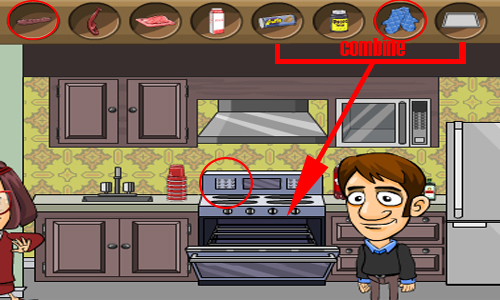
13. You’ll get a Text Message from Alex, read it. Go to Richard (Guy you gave Patchouli Cologne to, just seconds ago), and use Towel on him, to get PATCHOULI SOAKED TOWEL! Move inside Alex’s room, and use the Patchouli Soaked Towel on the Alien Machine. Leave the room! Go to the Kitchen. In your Combination Tool (Top-Right corner), combine Puff Pastry and Baking Tray, to get PASTRY TRAY. Open the Over (Middle of Kitchen, left for Fridge), and place the Pastry Tray in there. Close the Oven, and click on the Buttons at the Top of Oven (just click somewhere, on the most Top-part of the Oven). Then, open the Oven, and use Oven Mitts on the Baked Pastry, to get COOKED PASTRY. Combine the Cooked Pastry, and the Hot Dog, to get PIG IN A BLANKET. Go to Phil (Old Guy), and give him the Cooked Pastry with Hot Dog/Sausage, or Pig in a Blanket as it’s called. VOTE 6/6!
14. Alex will text message again. Combine the Deflated Balloon and the Raw Ground Meat, to get BALLOON HOT DOG! Move inside Alex’s room. Use Balloon Hot Dog on Alien Machine. Click on the LockBox, under the Computer Desk, to open it, after reading a couple of messages sent by Alex! Take the HAMMER. Use the Hammer on the Red Emergency Kit, on the wall, to smash open it. Take the ROTTEN EGG and SQUIRT GUN. Leave the room! On the Right-side of Alex’s Door, there are sweets in bowls. Click on the Middle Small Red Bowl, to get CHOCOLATE DROP. Combine Milk and Chocolate Drop, to get CHOCOLATE MILK. Combine Chocolate Milk and Squirt Gun, to get CHOCOLATE MILK SQUIRT GUN. Move to the Kitchen, and use Rotten Egg on Microwave (Just above the Beverages, left-side of the Fridge)!
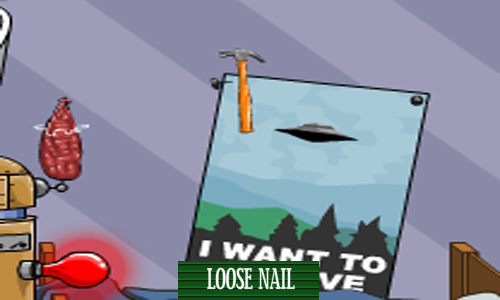
15. Wait for the Egg to explode. Go and check all the guests. Ask the ones, whose faces aren’t affected by the smell (they do think the smell is bad). There will always be 2 unaffected, and one of them is the Alien. After asking both of them, give the Ipecac Syrup to one of them ,and they’ll run to the bathroom. Goto Alex’s room! You see the Poster, on the wall of where the Bed is, saying “I WANT TO BELIEVE”. It has 2 Nails on each Top corner. Use the Hammer, on the Top-Left corner Loose Nail. Click on the Peephole, and see if it’s the Alien or not. If it isn’t, go back and try the other guest. If it IS, then, leave the Room, and enter the Bathroom (left-side of Alex’s room)!
Now it’s up to YOU, what you want to do. Follow one of the following:
- Talk to the Alien, and then Let him Go!
- Talk to the Alien, and use the Squirt Gun on it, to come to an agreement, and then let it leave
- Talk to the Alien, use the Squirt Gun at it, and then shoot it by clicking it
All of these 3 Endings will give you an Achievement. If you want them all, then choose to Replay Ending, after you’re done. For the Last achievement, you need to choose the Replay Ending with a Different Alien from the Main Menu, and then kill the ones you haven’t killed yet!
————–
– Individual Guide –
– Read This
- Most of the items you collect, will be displayed in your Inventory, which is the bar, at the Top of the screen
- Simply click on the Arrows on either side of the Inventory, in order to scroll. You’ve got unlimited space, so don’t worry about NOT collecting something you THINK you don’t have more space for
- In order to Combine two items. Place both of them, on each side of the + sign, on Top-Right corner of the screen, or at the right-side end of the Inventory – and then press the + button to combine
– Drinks for each Guest
- Barb (Woman with Glasses, and Full Red Outfit): Orange Juice
- Lenny (Roch Dude with Skull T-shirt): Beer
- Phil (Old Guy with Moustache): Vodka and Orange Juice
- Richard (Black Guy): Rum and Cola
- Jim (Sleepy Guy with Blonde Hair): Rye Whiskey and Ginger Ale
- Cyndi (Blondie Girl): Energy Drink and Leberkleister
– Each Guest’s Wish
- Barb (Woman with Glasses, and Full Red Outfit): Give her Orange Juice mixed with Vodka
- Lenny (Roch Dude with Skull T-shirt): Make him a Beer Cocktail and give it to him (Mix Beer with e.g. Leberkleister). And then, give him the Noisy Metal Gears, from Alex’s room
- Phil (Old Guy with Moustache): Make him a Pig in the Blanket (Cooked Pastry with Hot Dog) – read Step 13 in the Walkthrough
- Richard (Black Guy): Fulfill Barb’s and Cyndi’s wishes, and then give him Patchouli Oil
- Jim (Sleepy Guy with Blonde Hair): Give him Rye Whiskey mixed with Energy Drink
- Cyndi (Blondie Girl): Play Dance Music – read Step 11 in Walkthrough
—————–
WOW. These walkthroughs took almost 3 Hours to write, lol :P
But, with all the Trouble I went through getting this as simple as possible and making screenshots, it took me 4-5 Hours in total O_O
Hope it’s helpful for non-video walkthrough viewers :)


Download Minecraft PE 1.21.131 APK for Android
Minecraft Bedrock 1.21.131 is a focused hotfix update — improved Spear combat, two important bug fixes, and better overall stability on Android. No new content, but a noticeably smoother experience.
Spear Knockback Improvement
The window during which a charged Spear attack can apply knockback has been extended. This makes combat feel more reliable — the attack now connects as expected without requiring pinpoint timing, especially useful when fighting multiple mobs at once.
Spear Animation Alignment
Charge attack animations now accurately sync with the Spear’s three gameplay phases: Engaged, Tired, and Disengaged. What you see on screen now matches what the game engine is actually doing — making combat more readable and reducing guesswork in fights.
Performance & Stability
Frame drops on mid-range Android hardware have been reduced. Memory handling improvements prevent sudden freezes during long play sessions. World loading and chunk generation are more reliable, reducing terrain “pop-in” when exploring or moving quickly.
Multiplayer Improvements
Backend updates improve session stability when players join or leave. Fewer disconnects and smoother synchronisation across Bedrock servers. Marketplace content and add-ons also load more consistently during multiplayer sessions.
Adventuring Time Achievement Fixed — The achievement no longer unlocks early. It now correctly requires visiting at least 17 biomes on PC, matching the intended design.
Marketplace Escape Key Fixed — Pressing Escape after using the Marketplace search now reliably returns players to the previous menu instead of getting stuck in a loop.
Add-on World Loading Fixed — A bug that triggered a “Block” error when loading or creating worlds with multiple add-ons installed has been resolved.
Download the APK
Tap one of the Download buttons above. Choose the Standard (no music) version if storage is limited, or the Full version for the complete experience. The ARM64 build is recommended for modern phones.
Enable “Install Unknown Apps”
Go to Settings → Security (or Privacy) → Install unknown apps. Enable the permission for your browser or file manager. Android requires this for any APK installed outside Google Play.
Open the APK File
Open your Downloads folder, find the Minecraft 1.21.131 APK, and tap it to launch the system installer. Follow the on-screen prompts.
Install Over Existing Version
In most cases you can install 1.21.131 directly over your existing Minecraft without losing any worlds or progress. If you see a signature conflict error, uninstall first — but back up your worlds beforehand.
Launch and Sign In
Open Minecraft, sign in with your Microsoft/Xbox Live account, and your existing worlds will load normally. Online multiplayer, Realms, and Marketplace content all work as before.
Download Minecraft PE 1.20 APK for Android
Get the full Minecraft Bedrock 1.20 (Trails and Tales) APK for Android. Supports Xbox Live sign-in. Multiple versions available — stable releases and preview builds.
Download the APK File
Tap the Download button above for the version you want. The APK file will save to your device’s Downloads folder.
Enable “Install Unknown Apps”
Go to Settings → Security or Privacy → Install unknown apps. Enable it for your browser or file manager. Android requires this for any APK installed outside of Google Play.
Open the Downloaded File
Open your Downloads folder (or tap the notification), find the Minecraft APK, and tap it to start the installer.
Confirm Installation
Tap Install and wait for the process to complete. If you see a “signature conflict” error, uninstall your existing Minecraft version first, then retry.
Launch and Sign In with Xbox Live
Open Minecraft, sign in with your Microsoft/Xbox Live account to access multiplayer, Realms, and cross-platform features.
-
 Guides7 years ago
6 Proven Ways to Get more Instagram Likes on your Business Account
-
Mainstream12 years ago
BioWare: Mass Effect 4 to Benefit From Dropping Last-Gen, Will Not Share Template With Dragon Age: Inquisition
-
 Mainstream8 years ago
How to Buy Property & Safe Houses in GTA 5 (Grand Theft Auto 5)
-

 Guides2 years ago
Free Fire vs PUBG: Comparing Graphics, Gameplay, and More
-

 Guides2 years ago
50+ Free Fire ID and Passwords Login List (Giveaway) 2025
-
 Casual3 years ago
8 Ways to Fix Over-Extrusion and Under-Extrusion in 3D Printing
-

 Other2 years ago
Ajjubhai UID: Free Fire Details & Earnings
-

 Features2 years ago
Exploring Valorant eSports Stats: Unveiling the Metrics Behind Competitive Excellence
Thankyou
March 29, 2011 at 11:14 am
Thanks a lot, I wouldn’t have finished it without the guide! ^.^
great game btw
hjjckbfduvbiudchiupchndjbrhfbgdc
May 8, 2014 at 9:30 am
Where can i get the hammer?