
Social Games
FarmVille Bees Are Live – Get Your Beehive Guide Here!

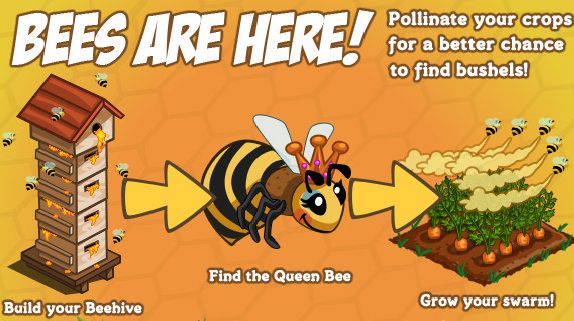 The launch of the FarmVille Beehive can in a perfect moment since it’s been a while since a new feature to change the gameplay has been released by Zynga. Farmers have been abuzz about wanting bees, so today FarmVille is proud to announce the arrival of Beehives! And The Unigamesity is proud to give you all the details you need to know about the beehive.
What is the FarmVille Beehive?
A new feature of the game: you will have to build a Beehive, then get a queenbee to increase the number of bees you have, and then you can pollinate your crops for a better chance to find bushels!
How to build your Beehive?
Check out your Gift Box and see the Beehive frame (or buy it for 5,000 coins from the market if you sold it by mistake) – place it on your farm and you can start collecting materials to build it. You will need a total of 50 materials from your friends, so make sure you check out our article with the Beehive Material Links to make things a lot easier!
Once the Beehive is ready, you can start building your Swarm. The first thing you need is a Queen Bee – you can get a Queen Bee by harvesting flower crops on your farm, fertilizing flower crops at your neighbors’ or by purchasing it from the Market for 10 FV cash. Whenever you find the Queen Bee, you will get a pop up and the queen will be placed automatically in your Beehive. Most likely, the beehive has to be built before you can get a Queen Bee.
If you find a Queen Bee and you are already in possession of one, you will have the option to share it with one of your friends by posting a feed to your wall. Once you have found your Queen Bee, you can start growing your colony by clicking “look inside” from your Hive’s menu:
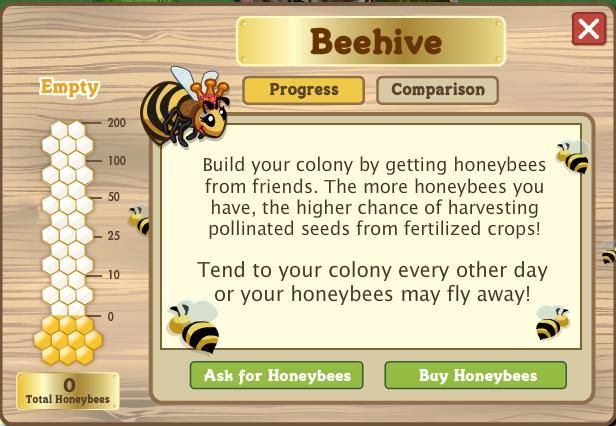
Now, once you have the Beehive ready and the Queen Bee in place, you can start building your colony of bees: you will need Honeybees for that, and you can get them as a free gift from friends or buy them from the Market. These honeybees allow you to find pollinated seeds from fertilized crops. The more honeybees you have, the higher your chances are of finding pollinates seeds. Pollinated seeds unlock special pollinated crops in the Market. Pollinated crops have a higher chance of producing bushels than normal crops and will last for two days. Please have in mind that you can’t have more than 200 honeybees in the Beehive at a time!
You will also have to tend the bees every couple of days, otherwise some of them will run away. But I’m sure you’ll keep them in a great shape, right?
Now please share this article with your friends to let them now everything about the FarmVille Beehive and don’t forget to comment below and share your opinion on this new feature!



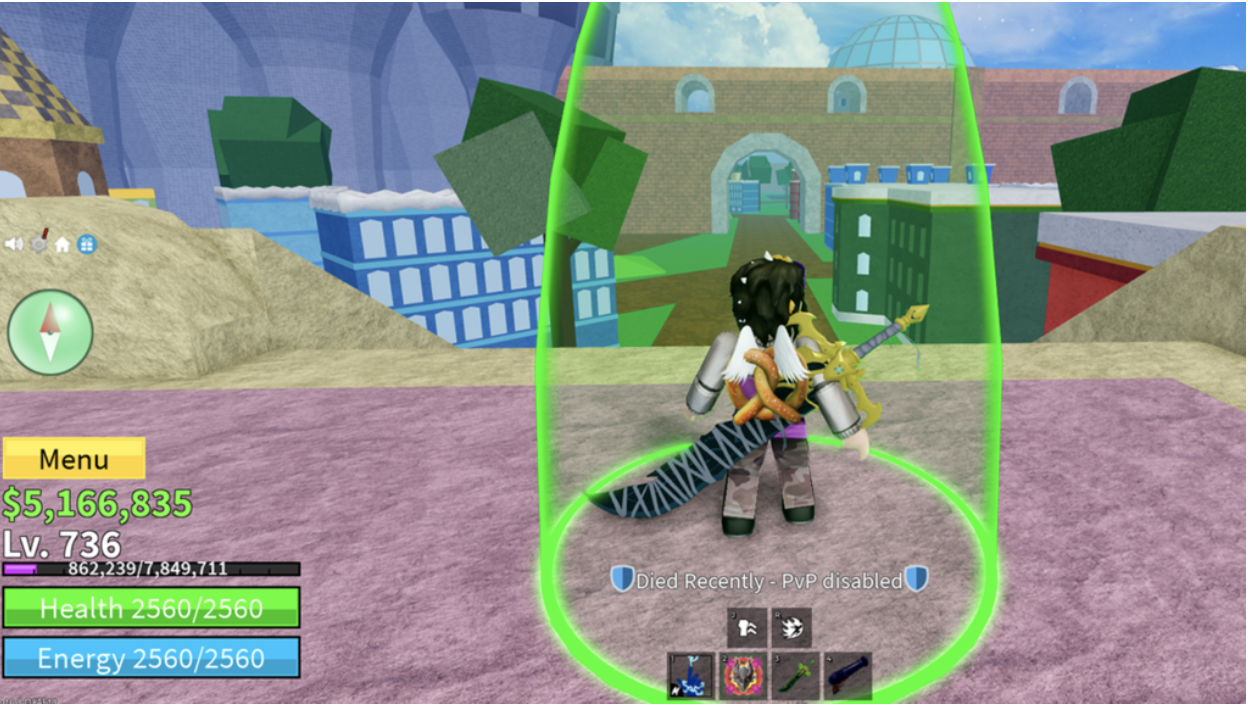
Money is one of three primary currencies in Blox Fruits. It lets players purchase items like Fighting Styles, Swords, Guns, Blox Fruits, Accessories, Abilities, and Raid Chips. While the prices are high, Money is the most accessible currency in the game, players can earn it quickly through straightforward methods.
Players can hold up to $1,000,000,000, giving them substantial purchasing power. In this guide, we’ll reveal the fastest ways to maximize your Money earnings in Blox Fruits, helping you afford the upgrades you need.
How to Get Money Fast in Blox Fruits
Blox Fruits offers multiple ways to earn money. Each method has its advantages, whether you’re looking for steady income or quick cash injections.
Money can be earned through:
- Purchasing with Robux
- Game Passes
- Defeating Enemies & Bosses
- Redeeming codes
- Quests
Let’s break down each method to help you choose the best approach for your gameplay style and goals.
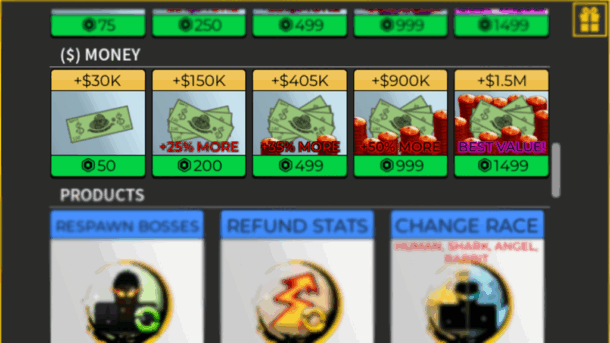
Purchasing With Robux
Buying Money with Robux offers instant access to the exact amount you need. Players can purchase:
- 30,000 Money (50 Robux)
- 150,000 Money (200 Robux)
- 405,000 Money (499 Robux)
- 900,000 Money (999 Robux)
- 1,500,000 Money (Best value at 1,499 Robux)
While 1,499 Robux may seem steep, many players choose this route for its immediacy and guaranteed results. Some even buy Robux specifically to acquire their target Money amount, skipping the grind of other earning methods.
To purchase Money in-game, open Menu, select “Shop,” scroll to ($) Money, and choose your amount. Alternatively, visit Blox Fruits on Roblox’s website, click “Subscriptions & Passes,” and buy your desired game pass without launching the game.
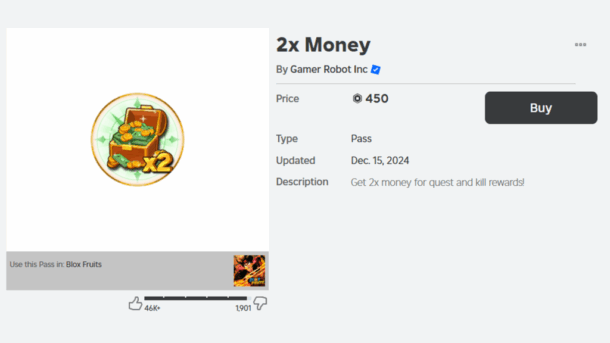
Game Passes – 2x Money
The 2x Money game pass doubles all Money earned from NPCs and Quests. It doesn’t affect chest rewards but maximizes earnings for players focused on combat and mission grinding.
This pass pairs well with questing strategies and NPC farming, making it a powerful tool for efficient Money earning. Players looking to earn money fast through active gameplay will find this especially valuable.
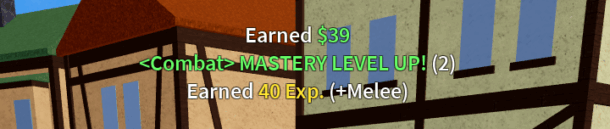
Defeating Enemies & Bosses
Enemies (NPCs) spawn in groups across different areas, providing steady Money drops when defeated. While regular enemies offer little rewards, bosses offer substantially higher Money and EXP.
Sea 1 introduces starter bosses like Gorilla King and Yeti, while Sea 3 features powerful ones like Stone and Hell’s Messenger. Your earnings scale with boss difficulty.
It is always recommended to equip strong fruits like Dragon or Kitsune for Boss farming. These premium fruits maximize your damage output and survival, leading to faster kills and more Money.
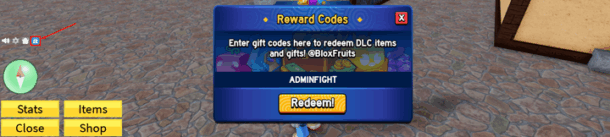
Redeeming Codes
Codes offer a simple path to free Money, though they require patience and timing. Developers give them away through social media, Discord servers, and in-game notifications.
To redeem simply click the gift icon on the left side of your screen and enter your code. While most codes grant EXP multipliers, some provide direct Money rewards. Check official channels regularly for new code releases.
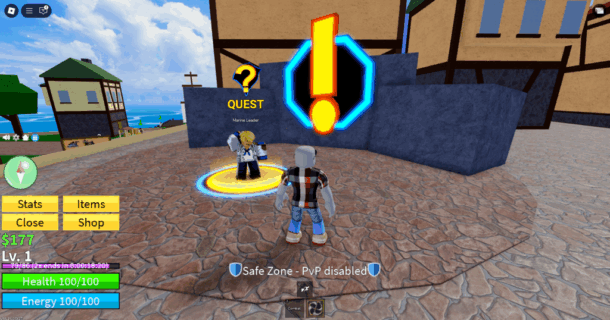
Quests
Quests provide steady Money while advancing your character. They scale in difficulty and reward as you progress. Each quest has a level requirement you must meet before accepting. Early quests might ask you to defeat a few NPCs for hundreds of Money. Later quests demand more challenging tasks but pay thousands. This makes questing an efficient way to earn while naturally leveling up.
Final Words
Money is your progression in Blox Fruits. Whether you choose to purchase it with Robux, farm bosses, complete quests, use codes, or combine multiple methods, consistent effort pays off. Pick the strategy that matches your playstyle and resources, then stick to it. The path to earning money is clear, you just need to choose your method.
As players accumulate wealth and unlock their desired fruits and equipment in the game, fans can express their love for the game by creating Neon Signs, bringing the unique aesthetics of Blox Fruits into their own rooms.
Fans can customize Blox Fruits-themed neon lights, replicating classic fruit silhouettes from the game or recreating the iconic combination of coins, swords, and fruits. Using bright, retro neon lights, they can capture the passion and fun of the game in a real-world setting.
Social Games
Ping, Not Panic: A Canadian Gamer’s 2025 Travel Stack – Steam Deck & Switch Updates, Remote Play, Con Wi-Fi Triage, and Instant Data Abroad

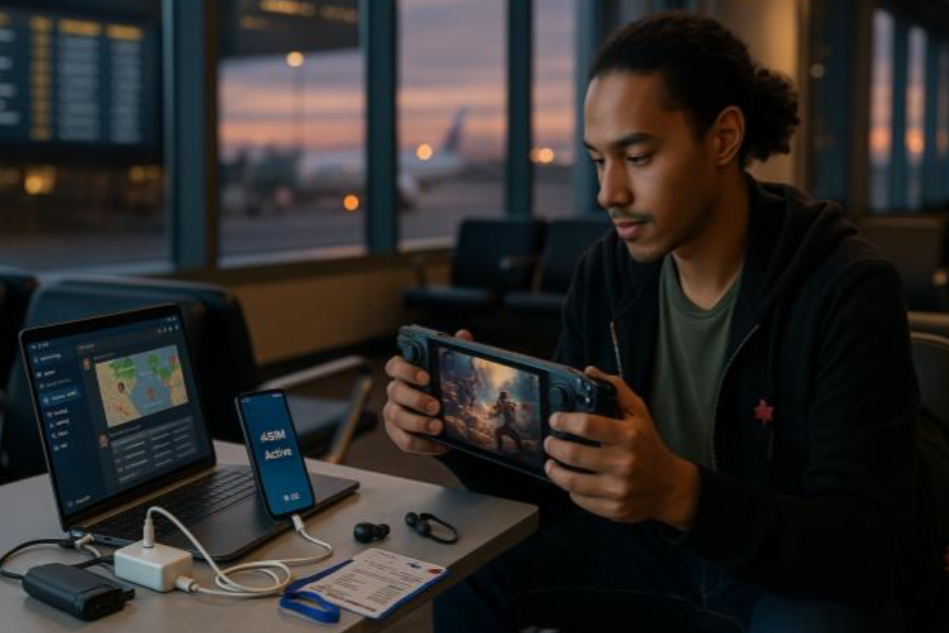
You’ve cleared security at YYZ with a backpack full of cables, a Steam Deck, and a wish to dodge Day-0 patch hell. Across the ocean, a con queue snakes past a venue that’s already melting its Wi-Fi. The goal is simple: play more, fiddle less. This field-tested guide gives Canadian gamers a clean travel stack—latency expectations, handheld tuning, hotspot etiquette, and a data setup that just works when you land.
Latency 101 (Know Your Ceiling Before You Chase Frames)
You can’t beat physics, but you can plan around it. Treat latency like weather: check it, adapt, win anyway.
Practical targets on the road
| Use Case | Target RTT | Bitrate Tip | Notes |
| Cloud gaming (Stadia-like/GeForce NOW) | ≤ 40–60 ms | 10–25 Mbps | Best in major metros; hotel Wi-Fi often too spiky |
| Remote Play (PS/Xbox → hotel/phone) | ≤ 60–80 ms | 5–12 Mbps | Cap at 720p/30 for reliability |
| Online shooters (native on handheld) | ≤ 40–70 ms | 3–6 Mbps | Prefer mobile data over café Wi-Fi |
| MMO/Co-op (native) | ≤ 70–120 ms | 1–3 Mbps | Slight input float is survivable |
Rule of thumb: In crowded venues, mobile data beats venue Wi-Fi for stability. Save giant downloads for hotel fiber; use cellular for sessions and comms.
Connectivity in 3 Minutes (No Kiosk Drama)
Skip airport SIM lines and roaming roulette. Install a travel eSIM at home so Discord, Remote Play, and patch checks work the second you land.
How to set it up
- Buy a plan online; you’ll receive a QR code.
- On your phone: Settings → Cellular/Mobile → Add eSIM → scan → label it Trip Data.
- Set Trip Data as Mobile Data, keep your Canadian number for calls/SMS/2FA.
- Turn Data Roaming ON for Trip Data only. Test once, then toggle data off until touchdown.
Want a simple option you can activate in minutes? Compare and set up Holafly’s esim for travelers.
If data naps after landing: Airplane Mode 10 seconds → confirm Trip Data is active → Data Roaming ON (that line only) → quick reboot.
Device Playbooks (Steam Deck, Switch, Remote Play)
Steam Deck / ROG Ally (and handheld PCs)
- Patch discipline: On hotel Wi-Fi, queue updates manually. Avoid “auto update everything” at 8 p.m. when everyone’s streaming.
- Shader cache sanity: Pre-cache big titles before you fly; it saves battery, heat, and stutter.
- Proton/version pinning (Deck): If a game breaks, roll back to the last known-good Proton. Keep a note of your stable pair.
- Performance caps: Lock to 40–45 fps with a frame limiter + half-rate vsync; drop TDP to keep temps—and fans—civilized.
Nintendo Switch
- eShop regions: Pre-download; don’t count on regional eShop switching abroad.
- Cloud saves: Confirm sync for your travel titles; manual upload before leaving home.
- RF survival: Pair controllers in your hotel room, not on the show floor where Bluetooth is chaos.
Remote Play (PS/Xbox/PC streaming)
- Encode targets: 720p/30 at ~5–8 Mbps is “it just works” on the road. 1080p/60 is hotel-fiber territory.
- Controller input: Wired (USB-C) or 2.4 GHz dongles beat Bluetooth in noisy RF environments.
- NAT hiccups: If your home router gets stubborn, enable UPnP or forward the official Remote Play ports before you travel.
Power & Thermals (The Silent Boss Fight)
- GaN charger: A dual-port 45–65W brick keeps phone + handheld happy.
- Power bank: 20,000 mAh with USB-C PD (at least 30W out) will top up a Deck on trains and in queues.
- Right-angle cables: Friendlier for hands; fewer port mishaps.
- Heat management: Pop a slim kickstand and lift the back off fabric surfaces. In flights, cap brightness and fps to cut heat and whine.
Security & Accounts (No Lockouts, No Leaks)
- 2FA: Keep your Canadian SIM active for OTPs; data rides on eSIM.
- Password manager: Ensure offline vault access for those check-in moments with bad Wi-Fi.
- VPN judgment: Use it for banking; avoid it for services that geo-fence streams/games unless you know the rules.
- Captive portals: Accept the splash page on your phone first, then tether the handheld.
Con & Tournament Survival (Queues, Badges, Backups)
- Badge & ticket hygiene: Screenshot every QR into a “Tickets” album—basements kill signal.
- Backpack loadout: Hard case for handheld, microfiber cloth, tiny stand, spare microSD, earplugs (hotel AC), cable ties for field fixes.
- Comms: Pin a Discord channel for your squad; set slow mode so plans don’t vanish in meme spam.
- Filming etiquette: Ask before filming cosplayers or booths; offer to DM selects.
Data Options: Quick Compare for Travellers
| Option | Setup | Multi-Country | Cost Predictability | Pros | Cons | Best For |
| Carrier roaming pass | None | Limited | Low | Familiar | Pricey daily caps | One-city sprints |
| Airport SIM per country | Queue | No | Medium | Local rates | Time sink + SIM swap | Long single stay |
| Pocket Wi-Fi | Pickup/return | Yes | Medium | Shareable | Extra device/battery | Groups/teams |
| Preinstalled eSIM | ~3 min | Yes | High | Land connected; keep CA number | Needs eSIM phone | Most trips |
Packing List (Gamer Edition, Carry-On Only)
- Handheld + rigid case
- 20k PD power bank + dual-port GaN charger
- Two short USB-C cables (one right-angle), 1x USB-A adapter
- Travel router (optional) to tame hotel Ethernet/Wi-Fi
- Spare microSD (formatted and empty)
- Foldable stand, microfiber, mini cable ties
- Earbuds with foam tips (better isolation on planes)
- Compact multitool (check airline rules if in carry-on)
A 24-Hour “Fly-to-Queue” Timeline (Copy & Tweak)
- T-18h (home): Pre-cache shaders, update core games, verify cloud saves, download offline maps. Install eSIM, test, then toggle data off.
- Airport: Join captive portal on phone, then tether the Deck to check for critical hotfixes.
- Flight: Battery mode: 30–40 fps cap, low brightness, story games > shooters.
- Hotel check-in: Speed test. Queue big downloads now, not at 8 p.m. when everyone’s streaming.
- Con morning: Phone data on, Discord open, badge QR ready. Handheld in case; power bank 100%.
- Evening: Batch-export clips, upload on hotel fiber; schedule posts for Canada prime time.
Troubleshooting in 30 Seconds
- Lag spike mid-fight? Drop res to 720p/30, move off congested Wi-Fi to mobile data, or stand near a window.
- Packet loss on venue Wi-Fi? Forget the network; tether to your phone.
- Deck won’t charge while playing? Use a PD port capable of >30W and a certified cable; lower TDP/fps to stay net positive.
Final Save: Play More, Fiddle Less
Travel gaming works when you make latency predictable, power abundant, and data boring. Pre-patch at home, cap frames smartly, treat venue Wi-Fi as suspect, and land with connectivity already solved. Do that—and keep your crew aligned on Discord—and your next PAX, Gamescom, or Tokyo pilgrimage will be about games, not guesswork.

Does gaming society need a reboot? Many people think so, with current platforms viewed by newcomers as either a mass of impenetrable content, or a world of strange and unwelcoming cliques. Nerd Culture aims to change that with a welcoming, engaging and accessible platform where all are welcome, and everyone can build their own hub, both for online celebration of all things nerdy, and for getting together offline in real life.
From PC and video gaming to board games, cosplay to fandom across movies, games and media, all areas of nerd culture are celebrated in smaller, safer hubs — including fun distractions like word games that bring people together through shared geekiness.. Places for fans to create their own spaces or join ones they feel at home in.
Features of Nerd Culture
Nerd Culture was built by a small team who felt like most of us do when facing the wall of social pressure around anything we love. It offers:
Easy and advanced group creation and search, allowing members to create, find and build groups dedicated to topics and events of interest. Note that members need to be 18+ to sign up, with fan, content creator and business categories delineating a level of interest.
Forums help create thematic communities focused on whatever is popular or niche, but important to fans with adjustable chat and feed features to help share fan voices in a reasonably-sized gathering, without being swamped by bots, trolls and other agent provocateurs. To keep them out, smart user safety features allow for intuitive moderation, chat mute and reporting tools to ensure safe social experiences.
When in the society and forum of their choice, fans can use real-time secure messaging to discuss the latest news or opinions, and collaborate in real time. Privacy settings can be customized to a level users are happy with, with privacy and safety settings that let them control who sees their content.
As part of the offline features, fans can arrange meetups and event management to link up with like-minded hobbyists in the real world, with event scheduling to promote and manage real-world events.
Fans Benefit from Rewards
To encourage engagement, contributions, responsible behavior and society-building, users can level-up their status, earning rewards through a built-in XP system. They can earn points by starting discussions, organizing events and helping people fall in love with new and familiar hobbies, unlocking levels, achievements and real-world prizes as they go.
“It’s like leveling up by helping build the community and fostering real connections,” said Nerd Culture co-founder Steven Weingarth. “Creators and members can also gain Nerd Cred for being a community advocate, and that unlocks more than just bragging rights.”
Nerd Culture is free to join and use, helping to recreate the social community of popular topics before they become swamped by low-quality content and bots. Designed for and by fans of gaming, fandom culture and creative hobbies, Nerd Culture welcomes new friends, helps them dive deeper into favorite interests or explore new worlds.
By helping users connect, discover and adventure together, with intuitive tools to help build meaningful communities, there’s plenty to see and do both online, through voice and video calls with your new buddies, and through new friends out in the real world through meetups and hangouts.
About Nerd Culture
As the founders (six lifelong nerds) put it, our new social platform sets out to fix the most frustrating problem: Why is it so hard, even in giant cities like LA, to find people who share my niche interests?
“When I moved to LA, I was shocked by how difficult it was to find a D&D group. Sites upon sites, Discord invites, bouncing between Reddit threads and Meetup and Facebook groups” writes Co-Founder Steven Weingarth. “It felt like yelling into a void. So our team set out to build the platform we all wish existed — a single place to connect and share stories with people over the things we love.”
Whatever your experience, many of us have felt unwelcome or overwhelmed in one place or another. Nerd Culture aims to offer a welcome hand to the nervous, or a new platform that we can build to create a more welcoming space about the topics we love.
-
 Guides7 years ago
6 Proven Ways to Get more Instagram Likes on your Business Account
-
Mainstream12 years ago
BioWare: Mass Effect 4 to Benefit From Dropping Last-Gen, Will Not Share Template With Dragon Age: Inquisition
-
 Mainstream8 years ago
How to Buy Property & Safe Houses in GTA 5 (Grand Theft Auto 5)
-

 Guides2 years ago
Free Fire vs PUBG: Comparing Graphics, Gameplay, and More
-

 Guides2 years ago
50+ Free Fire ID and Passwords Login List (Giveaway) 2025
-
 Casual3 years ago
8 Ways to Fix Over-Extrusion and Under-Extrusion in 3D Printing
-

 Other2 years ago
Ajjubhai UID: Free Fire Details & Earnings
-

 Features2 years ago
Exploring Valorant eSports Stats: Unveiling the Metrics Behind Competitive Excellence
Jan
July 17, 2010 at 9:29 pm
Hi, ok I have hive,bees,queen,pollinated and fertilized flowers..harvested bees for 3 days,.so far no pollination of crops.
Please tell me when and how bees pollinate?
Or is there a secret we don’t know.?
Thankyou.
Lee martin
July 22, 2010 at 12:11 pm
I read ‘you also have to tend to your bees every few days’ How? I just got a msg when I harvested my beehive stating that as i didn’t ‘tend’ to my bees for 5 days, 2 flew away. I WOULD tend to them if I knew wth I was supposed to do? lol. Help! :-)
cameron
July 31, 2010 at 8:39 pm
Does anyone know how to tend bees? I’ve been googling,and ..apparently,nobody knows,the only answer I’ve found is someone said you have to plant/harvest “at least one flower crop’..I can report,I have done this,and oh look..my bees flew away because I did not tend them..i had sunflowers,pink roses,clover,daffs,tulips..all at the same time,for three days,so that’s crap.Bees=useless.Selling mine ,more space for something better,I think..
Robin
July 31, 2010 at 10:08 pm
Yeah Cameron, I have done the same thing, planted all types of flowers and they still fly away….they are useless!!
Charita
August 3, 2010 at 12:11 am
same thing here too
Jacob
August 2, 2010 at 8:54 pm
Hi, Like many others I have the same problem. I can’t tend my beehive, because I don’t know how? There are no function called “Tend” .. :-(
Linda
October 5, 2010 at 5:14 pm
I have one beehive and would like to have another, but I can’t purchase one because it is locked. How do I unlock beehive so I can buy another one?
venkat
October 18, 2010 at 6:13 pm
How i get the Bee hive frame its in locked status in my market
ponin
July 29, 2011 at 7:37 am
how to unlock beehive and how to unlock home….. when we going to unlock beehive it locked and it ask to unlock the home to unlock the beehive….. help needed…..