data = about thegameland .net, mobile gaming @thegameland.net, thegameland.net, mobile gaming #thegameland.net
Connect with us

Guides

12 Best Minecraft Decoration Ideas

Published

on

Aquarium

Minecraft allows players to be creative and design their place with various accessible resources. The platform that this 3D game provides for your creativity is a significant component that has led to its success. Minecraft decor and construction are probably the game’s most popular diversions. So, here’s our opinion on some of the most creative Minecraft décor ideas.

Best Minecraft Decoration Ideas

Minecraft has tons of decoration ideas that you can next time. In this post, we have covered 12 best Minecraft decoration ideas your bedroom, house and outside.

For Bedroom

Couch with Pillows
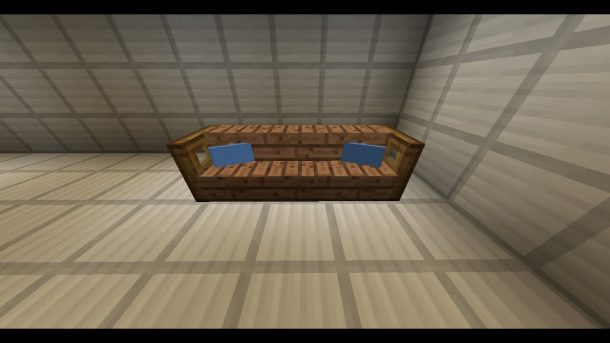
You must’ve already figured out how to create a basic sofa out of Quartz Stone Slabs and Quartz blocks in Minecraft. But you must also know that by adding a banner one block behind the couch to provide the appearance of a pillow, you could make it seem even better? 

The great part is that you can make the cushion into almost any pattern you may choose. Do you want to make pillows in the color and style of your choice? You are free to do so. Are you not a fan of quartz sofas? Other materials, such as colored concrete, wooden logs can also be used.

Flower Pot Table

BBlocks has created yet another adorable table! This can be made from just the three pieces of the same material — Spruce Trapdoors – and is extremely simple to replicate. But don’t be fooled by its simplistic nature; this table design works well in practically every decor type. This design will work in a pub, a school, or a virtual living room environment, and this simple Minecraft table will look great in any of them.

The flower pot above provides a natural touch cut fresh from your garden or the vast outdoors, which is the highlight of this clever Minecraft décor idea. You can also make the table as long as possible by adding an additional Spruce Trapdoor to the top.

Related – 20 Best Minecraft Building Ideas

Flat Screen TV
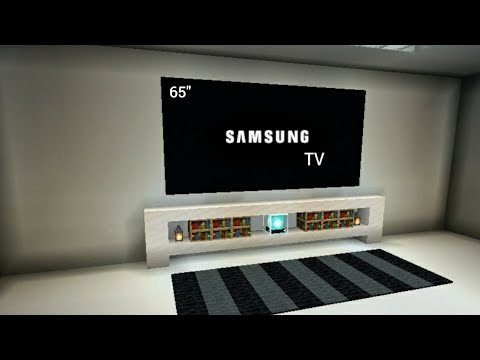
If you’re seeking a realistic and straightforward television set, the Flat Screen TV by BBlocks is the appropriate design for you. All you need are some black blocks, Spruce Trapdoors, Iron, a banner for table legs, a beehive for a drawer, and a carpet for the table topper, and you’re good to go! A Minecraft flat screen in a flash!

Isn’t it lovely to just sit back and relive your favorite television shows? While many of us would like to spend our time mining and traveling throughout the vast Minecraft world, having a TV allows us to do so!

For Outside

Water Tower
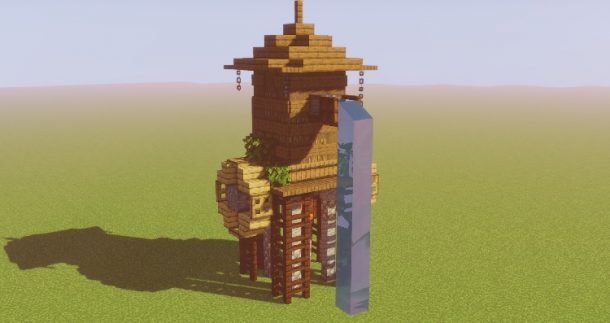
The best idea in this Minecraft decoration ideas list is this massive water tower. Because it takes a lot of vertical space and labor to construct, we recommend installing this decoration outside where there are plenty of flat terrains.

This water tower is a terrific addition to your Minecraft village’s design. Aside from the main building, a water trough just in front of it serves as a supply of water. If you’re searching for a big project, this decoration is perfect for you!

Related- 7 Best Cool Minecraft Staircase Ideas

Luxury Swimming Pool with Gazebo
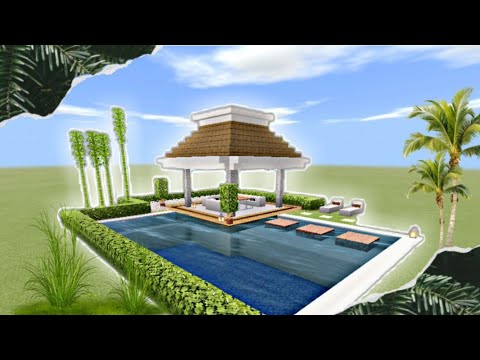
Swimming pools offer a contemporary touch to any home and maybe a pleasant and relaxing area to hang out with your Minecraft buddies.

You may make your Minecraft room appear more lavish by building a premium yet relaxing swimming pool. When creating a swimming pool, keep in mind that digging it deep is important since filling it with water might be difficult. Plant some trees alongside your collection for shade, and add torches for illumination. If you like, you may even construct a diving board! If you live the high life, a little gazebo next to your pool will make it appear even more luxurious.

Fountain
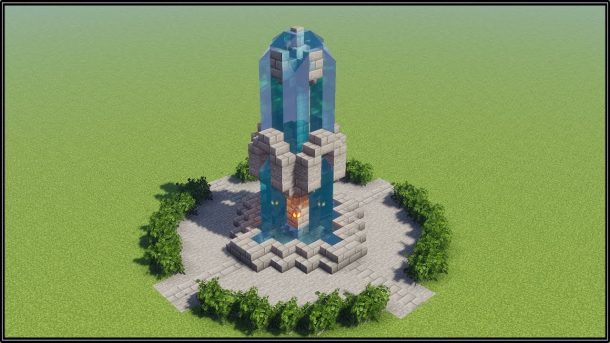
Nothing beats the splendor of a lavish fountain. Any player’s dream, this beautiful and peaceful fountain will be the ideal addition to your Minecraft creative collection. It’s one of our favorite decorating ideas, and it’s no surprise given how popular it is among Minecraft players.

Add some fish to your fountain to make it more interesting. You have complete autonomy in building your fountain and may add all your favorite details to it.

Related – Best Minecraft Wall Ideas

Flower Stall
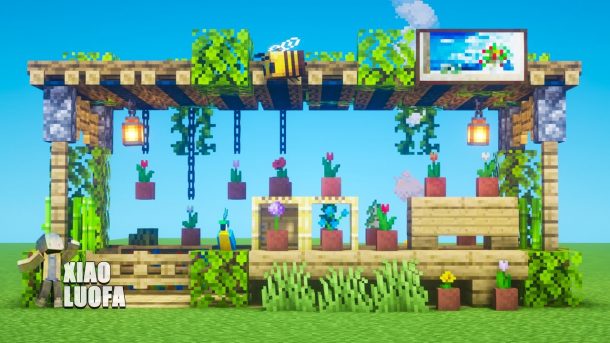
The Flower Stall concept was created by BlueNerd. Another outdoor Minecraft decorating concept that may serve as a great source of inspiration is Minecraft.

The construction resembles a modest starter house in miniature, yet it stands alone as a tiny shed with a flat roof and an open face. When you look inside, you’ll notice a variety of plant species resting in pots in various sections of the booth. In addition, a warm light source provides brightness to this flower stand.

The nice aspect of this project is that all supplies are readily available. You may start making this flower stall as early as the first day if you’re in a woodland environment or somewhere comparable.

Aesthetic Bridge
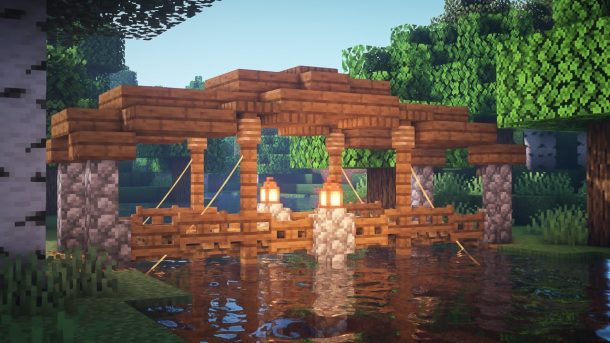
In Minecraft, you will occasionally need a bridge to transport materials and equipment or traverse from one location to another. They’re also helpful in hauling water, essential for Minecraft farming. Almost anything can be transported across bridges without being damaged by mobs. This beautiful bridge will make your Minecraft world seem even better and will be beneficial to you. This is one of the most relaxing Minecraft décor ideas on the list.

Flowers and ferns will enhance the aesthetic of this bridge. This bridge will also look 10 times better with spruce, oak blocks, and marble blocks. Add some lamps to the mix so you may cross the bridge at night. You may also build a stone bridge because the stone is plentiful and easy to get.

Related – 10 Best Minecraft Fountain Design Ideas

Floating Lanterns
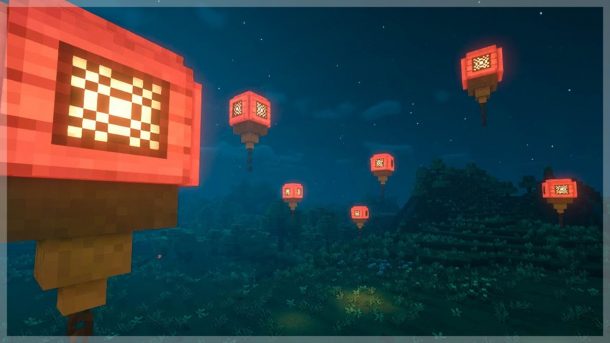
Floating lanterns are a fantastic example of a unique and wonderful concept. These floating lanterns are a great concept that will wow all your pals.

Floating lanterns can be made in a variety of ways. Build a stained glass tower as tall as you like, then shatter all pieces except the highest block and connect a lamp to it. The string can also be used to create floating lanterns. Lanterns can also be made out of candles. 

Floating lanterns may be utilized as ornamental elements inside and outside your home. You may create a very meditative and magical pond by placing them in a small pond.

For House

Slim Table
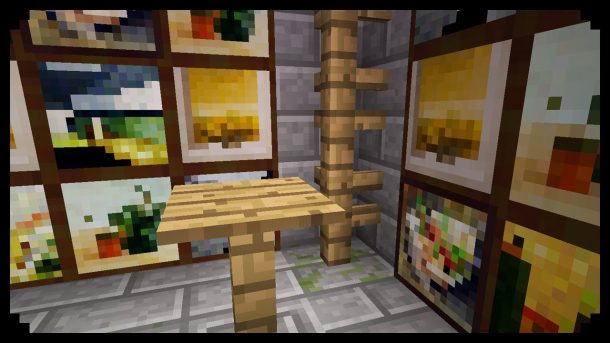
There are a lot of different Minecraft table designs out there, but this one by BBlocks is one of the nicest. It’s sleek and slender, and it avoids the full-on blocky look that most Minecraft constructions take. The usage of Banners as table legs is the centerpiece of this Minecraft decorating design. It saves space and also looks great with the White Carpet tabletop.

It’s one of the most excellent Minecraft décor ideas, and you’ll almost certainly utilize it in at least one room in your Minecraft fortress.

Related – 15 Creative Minecraft Interior Design Ideas

Aquarium
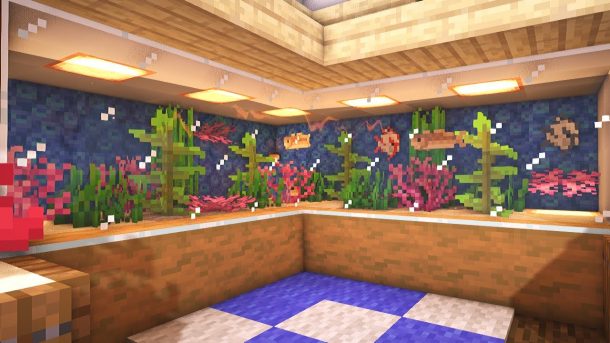
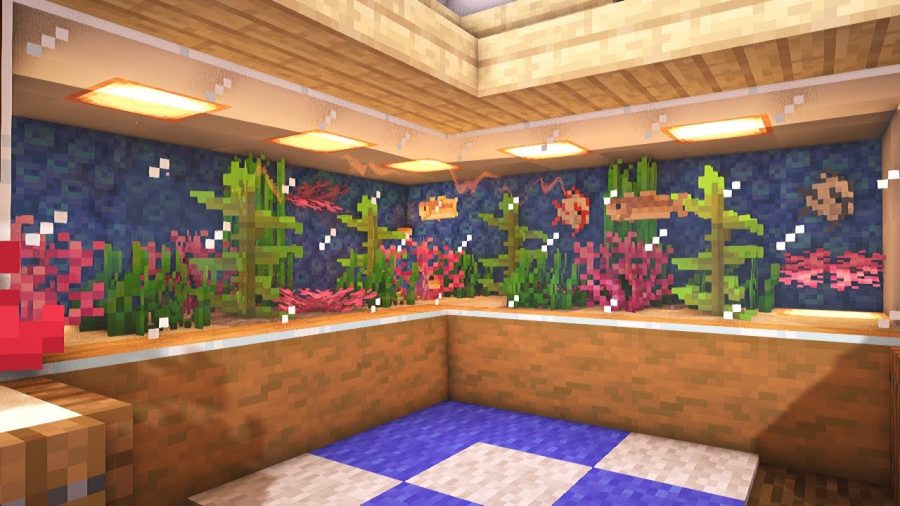
Making a Minecraft aquarium is one of the best Minecraft decoration ideas. Build this huge aquarium for yourself and display it if you want to create something unique for your home. Fill it with your favorite fish, cod, or puffer, and adorn it with ferns, plants, and seaweeds.

You may utilize quartz stairs and basic white marble blocks to build the tank armor’s top and bottom. Create the tank from a light blue stained glass window pane. Fill it to the brim with water. The nicest thing about this aquarium is that it has no walls and depends solely on water blocks for support. Decorate with kelp and corals, then fill it with your favorite fish.

Wooden Lantern Hanging
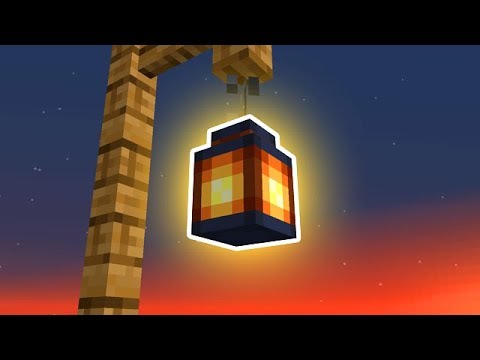
Build this lovely wooden lantern hanging to add a nice decoration feature to your Minecraft house. After making the wooden panel, adorn it with oak leaves, florals, and ferns. This lovely Lantern Hanging will distinguish your garden from others and will be a one-of-a-kind addition to your own area.

You can also utilize the asymmetric placement of spirit lanterns and ordinary lanterns to make the wooden lantern hanging seem more appealing.

Related – 10 Best Minecraft Garden Ideas

Indoor Bamboo Grove
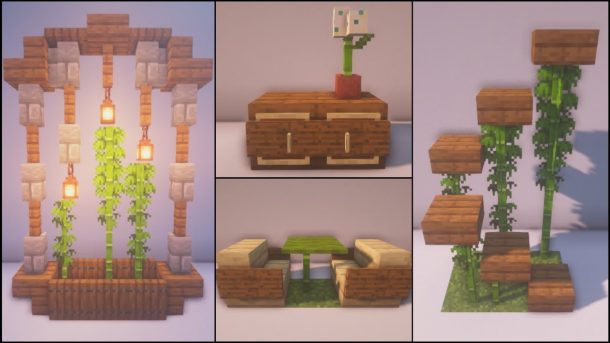
It’s never a bad idea to include flowers and plants in the interior of your base, and this tiny bamboo garden achieves just that. The use of twine to keep the bamboo from growing to the ceiling is a clever approach used in this Minecraft design.

While the bamboo alone adds a wonderful flowery touch, the banners behind it give the composition a themed flavor. Trapdoors serve as the bamboo’s pot while also contributing to the overall design’s serene and oriental vibes. Overall, this is an underappreciated item that would look excellent in any vacant area of your beginning house.

Conclusion

We hope that the information in the above article has sparked your imagination. Remember that these are only a few of the most extraordinary decorating ideas available. Anything is possible to create as long as you envision it, such as the most fabulous Minecraft home ideas.

Guides

Published

on

Minecraft PE 1.21.131 APK Download Latest Version for Android
Download Minecraft PE 1.21.131 APK for Android | Unigamesity
Verified Release Build
Free APK Download
Xbox Live Supported
Unigamesity › Android Games › Minecraft PE › 1.21.131 APK
⛏️
✔ Hotfix Release · Bedrock Edition

Download Minecraft PE 1.21.131 APK for Android

Minecraft Bedrock 1.21.131 is a focused hotfix update — improved Spear combat, two important bug fixes, and better overall stability on Android. No new content, but a noticeably smoother experience.

Version 1.21.131.01
Released December 2025
Developer Mojang Studios
Platform Android 8.0+
Xbox Live ✔ Supported
📥 Download Options — Minecraft 1.21.131
Minecraft 1.21.131 — Standard (No Music)
Xbox Live + Servers · Music excluded · Smaller download
~270 MB
⬇ Download
Minecraft 1.21.131 — Full Version
Xbox Live + Servers + Full Music · Complete experience
~700 MB
⬇ Download
Minecraft 1.21.131 — ARM64 Version
Optimised for ARM64 (arm64-v8a) processors · Best performance on modern devices
~270 MB
⬇ Download
Get on Google Play (Official)
Always up-to-date · Recommended for most users
▶ Play Store
⚠️ Installing APK files requires enabling Install unknown apps in Android Settings → Security. This is needed for any app installed outside of Google Play. You can disable it again after installation.
Version
1.21.131.01
OS
Android 8.0+
License
Free (APK)
Developer
Mojang Studios
Publisher
Microsoft
Xbox Live
✔ Yes
What’s New in 1.21.131
🗡️

Spear Knockback Improvement

The window during which a charged Spear attack can apply knockback has been extended. This makes combat feel more reliable — the attack now connects as expected without requiring pinpoint timing, especially useful when fighting multiple mobs at once.

🎞️

Spear Animation Alignment

Charge attack animations now accurately sync with the Spear’s three gameplay phases: Engaged, Tired, and Disengaged. What you see on screen now matches what the game engine is actually doing — making combat more readable and reducing guesswork in fights.

Performance & Stability

Frame drops on mid-range Android hardware have been reduced. Memory handling improvements prevent sudden freezes during long play sessions. World loading and chunk generation are more reliable, reducing terrain “pop-in” when exploring or moving quickly.

🌐

Multiplayer Improvements

Backend updates improve session stability when players join or leave. Fewer disconnects and smoother synchronisation across Bedrock servers. Marketplace content and add-ons also load more consistently during multiplayer sessions.

Bug Fixes
🏆

Adventuring Time Achievement Fixed — The achievement no longer unlocks early. It now correctly requires visiting at least 17 biomes on PC, matching the intended design.

🛒

Marketplace Escape Key Fixed — Pressing Escape after using the Marketplace search now reliably returns players to the previous menu instead of getting stuck in a loop.

📦

Add-on World Loading Fixed — A bug that triggered a “Block” error when loading or creating worlds with multiple add-ons installed has been resolved.

Minecraft PE 1.21 Version History
1.21.131 December 2025 · Spear fixes, achievement fix, multiplayer stability Latest
1.21.130 December 2025 · Stability updates, Mounts of Mayhem polish Stable
1.21.124 November 2025 · Bug fixes, performance improvements Stable
1.21.60 2025 · Spring Drop — Pale Garden biome, Creaking mob Stable
1.21.50 2025 · Bundles of Bravery update Stable
1.21.0 June 2024 · Tricky Trials — Trial Chambers, Breeze, Mace Stable
1.21.0.23 May 2024 · Final preview before 1.21 full release Preview
System Requirements
🤖
Android Version
8.0 or higher
💾
Minimum RAM
3 GB
Recommended RAM
4 GB
📦
Free Storage
1.5 GB minimum
🔧
Processor
ARM64 recommended
🌐
Internet
Required for Xbox Live
How to Install Minecraft 1.21.131 APK on Android
1

Download the APK

Tap one of the Download buttons above. Choose the Standard (no music) version if storage is limited, or the Full version for the complete experience. The ARM64 build is recommended for modern phones.

2

Enable “Install Unknown Apps”

Go to Settings → Security (or Privacy) → Install unknown apps. Enable the permission for your browser or file manager. Android requires this for any APK installed outside Google Play.

3

Open the APK File

Open your Downloads folder, find the Minecraft 1.21.131 APK, and tap it to launch the system installer. Follow the on-screen prompts.

4

Install Over Existing Version

In most cases you can install 1.21.131 directly over your existing Minecraft without losing any worlds or progress. If you see a signature conflict error, uninstall first — but back up your worlds beforehand.

5

Launch and Sign In

Open Minecraft, sign in with your Microsoft/Xbox Live account, and your existing worlds will load normally. Online multiplayer, Realms, and Marketplace content all work as before.

Frequently Asked Questions
What does Minecraft 1.21.131 actually change?
This is a focused hotfix — no new biomes, mobs, or items. It improves Spear combat by extending the knockback window and syncing animations with gameplay phases, fixes the Adventuring Time achievement and an Escape key bug in the Marketplace, and improves overall stability, frame rates, and memory usage on Android.
Will my existing worlds be safe after updating?
Yes. Minecraft 1.21.131 is fully compatible with worlds from earlier 1.21.x versions. Your builds, inventory, and progress are preserved. Always make a manual backup before any update if you want to be extra cautious.
Is the APK version safe to install?
It is safe when downloaded from reputable sources that distribute unmodified files. Verify the file size matches what is listed, and avoid repackaged or “modded” APK files from unknown sites. Once installed, you can revoke the “Install unknown apps” permission for security.
Which download option should I choose?
Most users should pick the Standard (No Music) APK — it’s smaller and gameplay is identical. If you want Minecraft’s full soundtrack, choose the Full Version. The ARM64 build offers the best performance on modern Android phones with arm64-v8a processors; if you’re unsure which chip your phone uses, the Standard version works on all compatible devices.
Do I need to uninstall my current Minecraft first?
Usually no — you can install the new APK directly over the existing version without losing your worlds. If Android shows a “signature conflict” or “version mismatch” error, you’ll need to uninstall first. Back up your world saves before doing this.
Does 1.21.131 work with friends on other platforms?
Yes. Minecraft Bedrock Edition supports cross-platform play across Android, iOS, PC (Windows), and consoles. Sign in with your Xbox Live/Microsoft account to join friends, access Realms, and play on public servers. Your server or friends’ worlds need to be running a compatible version for the connection to work.
What is the Spear in Minecraft 1.21?
The Spear is a melee weapon introduced in the Minecraft 1.21 Tricky Trials update. It offers longer reach than a sword and features a charge mechanic with three phases: Engaged, Tired, and Disengaged. Version 1.21.131 improves its knockback timing and animation accuracy, making it more reliable in combat.
Continue Reading

Guides

Download Minecraft PE 1.20 APK for Android (Latest Version Free)

Published

on

Download Minecraft PE 1.20 APK for Android | Unigamesity
Trusted & Verified File
Free Download
Xbox Live Supported
Unigamesity › Android Games › Minecraft PE 1.20 APK
⛏️
✔ Verified · Free

Download Minecraft PE 1.20 APK for Android

Get the full Minecraft Bedrock 1.20 (Trails and Tales) APK for Android. Supports Xbox Live sign-in. Multiple versions available — stable releases and preview builds.

Latest Version 1.20.81.01
Developer Mojang Studios
Platform Android 8.0+
Price Free (APK)
Xbox Live ✔ Supported
📥 Download Options — Minecraft 1.20.81
Minecraft 1.20.81 — Standard (No Music)
Xbox Live + Servers · Music tracks excluded · Smaller file
270 MB
⬇ Download
Minecraft 1.20.81 — Full Version
Xbox Live + Servers + Full Music · Complete experience
700 MB
⬇ Download
Get on Google Play (Official)
Always up-to-date · Recommended for most users
▶ Play Store
⚠️ To install the APK manually, you must enable Install unknown apps in your Android settings. This allows installation outside of Google Play. See the installation guide below.
Version
1.20.81.01
OS
Android
License
Free
Publisher
Microsoft
Author
Mojang Studios
Xbox Live
✔ Yes
All Minecraft 1.20 Versions
1.20.81 April 29, 2024 · Armored Paws — Wolf armor, Armadillo, Mace weapon Latest
1.20.80 April 23, 2024 · Armadillo + wolf variants added Stable
1.20.73 March 2024 · Stability and performance fixes Stable
1.20.70 March 2024 · Trial Chambers preview, Breeze mob Stable
1.20.41 November 2023 · Bug fixes, item duplication patch Stable
1.20.0 June 2023 · Initial Trails and Tales release Stable
1.20.0.23 May 2023 · Final preview before official release Preview
System Requirements
🤖
Android Version
8.0 or higher
💾
Minimum RAM
3 GB
Recommended RAM
4 GB
📦
Free Storage
1.5 GB minimum
🔧
Processor
ARM64 (arm64-v8a)
🌐
Internet
Required for Xbox Live
How to Install Minecraft APK on Android
1

Download the APK File

Tap the Download button above for the version you want. The APK file will save to your device’s Downloads folder.

2

Enable “Install Unknown Apps”

Go to Settings → Security or Privacy → Install unknown apps. Enable it for your browser or file manager. Android requires this for any APK installed outside of Google Play.

3

Open the Downloaded File

Open your Downloads folder (or tap the notification), find the Minecraft APK, and tap it to start the installer.

4

Confirm Installation

Tap Install and wait for the process to complete. If you see a “signature conflict” error, uninstall your existing Minecraft version first, then retry.

5

Launch and Sign In with Xbox Live

Open Minecraft, sign in with your Microsoft/Xbox Live account to access multiplayer, Realms, and cross-platform features.

Frequently Asked Questions
What is Minecraft PE 1.20?
Minecraft PE 1.20, officially called the Trails and Tales update, was released in 2023 for Minecraft Bedrock Edition. It introduced the Cherry Grove biome, the Sniffer mob, archaeology mechanics, bamboo wood, the Camel mob, Decorated Pots, and more. The 1.20.x series continued through 2024 with additional mobs like the Armadillo and Wolf Armor.
Is it safe to install Minecraft APK manually?
It is safe when downloading from a reputable source that distributes unmodified files. Always check the file size matches what’s listed, and avoid repackaged or “modded” installer files from unknown sites. Once installed, you can disable the “Install unknown apps” permission again for security.
Why do I need to turn on unknown sources?
Android blocks APK installation outside of the Play Store by default to protect users. Enabling “Install unknown apps” temporarily overrides this for a specific app (your browser or file manager). You can turn it off again after installation — it only needs to be active during the install process.
What if the APK fails to install?
Check that your Android version is 8.0 or higher, you have at least 1.5 GB of free storage, and “Install unknown apps” is enabled for the right app. If Android reports a signature or version conflict, uninstall your current Minecraft first. If the file seems corrupted, download it again.
Do I need to uninstall the previous version first?
Usually no — the APK installs over an existing build. However if you get a signature conflict error, you’ll need to uninstall the old version first. Back up your worlds before doing this, as uninstalling Minecraft can delete local save files.
Does the APK version support Xbox Live and multiplayer?
Yes. All official Minecraft Bedrock APK builds include Xbox Live sign-in support, which enables online multiplayer, Realms, and cross-platform play with PC, console, and other mobile players. A stable internet connection is required.
Which file should I download — with or without music?
Both versions have identical gameplay. The “no music” variant (270 MB) is significantly smaller and is ideal if you have limited storage or a slow connection. The full version (700 MB) includes Minecraft’s original music tracks for the complete experience.
Continue Reading

Guides

Lync Conf Game Mods: Ultimate Guide for Gamers in 2026

Published

on

Lync Conf Game Mods

Game mods have become an essential part of modern gaming culture. Short for “modifications,” mods are user-created additions or changes to video games that can transform everything from graphics to gameplay mechanics. They breathe new life into older titles, fix issues developers never addressed, and sometimes create entirely new experiences from existing games.

LyncConf has emerged as a leading platform in the modding world, serving as a central hub where gamers can discover, download, and manage high-quality mods safely. Unlike scattered forums or risky download sites, LyncConf organizes thousands of mods, verifies their safety, and connects talented mod creators with millions of players looking to enhance their gaming experience.

What Are Lync Conf Game Mods?

Lync Conf Game Mods

Lync Conf game mods are modifications to video games that alter or expand various aspects of gameplay, performance, visuals, or features. These can range from simple tweaks like changing a character’s outfit to massive overhauls that introduce entirely new storylines, worlds, or game mechanics.

LyncConf plays a unique role in the modding ecosystem. Rather than just hosting files, it acts as a trusted curator and organizer. The platform verifies mods for safety, checks compatibility across game versions, and provides detailed descriptions so players know exactly what they’re installing. This bridges the gap between creative mod developers and gamers who want reliable, quality content without the headache of searching through countless unreliable sources.

The evolution of game mods has been remarkable. What started in the 1990s as simple texture swaps and level edits has grown into sophisticated projects. Today’s mods include complete game conversions, professional-quality voice acting, complex scripting, and graphics that rival or exceed the original game’s production values. Some popular mods have even inspired official game features or spawned entirely new games.

FIFA 13 Career Mode Guide: Best Young Players

Why Gamers Choose LyncConf Mods

Gamers flock to LyncConf for several compelling reasons that set it apart from other modding sources.

The platform’s curation process ensures quality control. Every mod undergoes verification checks for malware, compatibility issues, and stability. This means you can download with confidence, knowing you won’t accidentally install something that crashes your game or compromises your computer’s security.

The benefits of using LyncConf mods are extensive. Visual enhancements can transform outdated graphics into stunning modern visuals with improved textures, lighting, and weather effects. Gameplay mods add new missions, quests, weapons, characters, and entire storylines that extend a game’s lifespan by hundreds of hours. Interface customization options let you tailor menus, HUDs, and controls to your personal preferences. Performance optimization mods can make games run smoother on older hardware or push newer systems to their limits.

Comparing modded games to their vanilla (unmodded) versions reveals stark differences. A vanilla game offers the developer’s original vision, which can be excellent but eventually becomes familiar and limiting. Modded games, however, offer nearly unlimited variety. You can adjust difficulty levels precisely to your skill, add quality-of-life improvements the developers never considered, fix bugs that were never patched, and keep the game feeling fresh years after release. Many gamers find that mods turn good games into great ones and keep them playing titles they might have otherwise abandoned.

Offline to Online: Engaging Games that Offer the Best of Both Modes

Top LyncConf Mods for Popular Games (2026)

 LyncConf Mods for Popular Games

Visual & Graphics Enhancements

Graphics mods remain among the most popular downloads on LyncConf. These transformations can make older games look modern or push new releases to photorealistic levels.

High-definition texture packs replace low-resolution game assets with crisp, detailed alternatives. Imagine playing a game from 2015 but with textures that look like they were made yesterday. Everything from character faces to building walls to natural landscapes gets the upgrade treatment.

Realistic weather and lighting improvements add atmospheric depth that dramatically changes how games feel. Dynamic shadows that shift with time of day, volumetric fog that rolls through valleys, rain that actually looks wet rather than like falling lines—these details create immersion that vanilla games often lack.

Popular examples include Fallout 4 ENB mods that transform the post-apocalyptic wasteland with cinematic color grading and lighting. Skyrim weather systems like “Vivid Weathers” make each climate region feel distinct and alive. Cyberpunk 2077 receives 4K enhancement packs that sharpen every neon sign and rain-slicked street in Night City, making an already beautiful game absolutely stunning.

Gameplay Overhauls

While graphics get attention, gameplay mods often provide the most lasting value by fundamentally changing how games play.

Mechanics overhaul mods reimagine core systems. Combat might become more tactical and challenging, with enemies that dodge, flank, and coordinate attacks. Crafting systems might expand to include hundreds of new recipes. Survival elements could add hunger, thirst, and temperature management to games that never had them.

New weapon types, armor sets, and equipment vastly expand player options. Rather than choosing from 20 weapons, you might have 200, each with unique properties, upgrade paths, and visual designs. This variety keeps gameplay fresh through multiple playthroughs.

Smarter AI transforms how games challenge you. Enemies that learn from your tactics, allies that actually help effectively, and NPCs with more realistic behaviors make game worlds feel alive rather than scripted.

Balanced progression systems fix common issues where games become too easy or grindy. These mods adjust experience curves, loot drops, and difficulty scaling so you’re always appropriately challenged without frustration.

Top 10 Sports Games To Play On PC and Consoles

Editor’s Picks — Most Downloaded Mods

Based on LyncConf’s 2025 download statistics, here are the community favorites:

The Witcher 3: HD Reworked Project (graphics overhaul with 12 million+ downloads)

Skyrim Special Edition: Legacy of the Dragonborn (museum and collection mod with massive content additions)

Fallout 4: Sim Settlements 2 (transforms settlement building with autonomous NPC-driven towns)

Minecraft: Create Mod (adds industrial machinery and complex engineering systems)

Stardew Valley: Stardew Valley Expanded (doubles game content with new locations, characters, and storylines)

Grand Theft Auto V: NaturalVision Evolved (photorealistic graphics transformation)

Dark Souls III: Cinders (complete gameplay overhaul with new classes, spells, and balanced difficulty)

How to Install Lync Conf Game Mods Safely

Installing mods might seem intimidating at first, but following proper steps ensures a smooth, problem-free experience.

Choosing the Right Mod Manager

Mod managers are essential tools that organize your mods, handle installation, and prevent conflicts. Don’t try to install mods manually by dropping files into game folders—that path leads to chaos.

Vortex is beginner-friendly with an intuitive interface. It automates most processes and works with numerous games. It’s the best starting point for newcomers to modding.

Mod Organizer 2 (MO2) offers advanced features for experienced users. It creates virtual file systems so mods never actually overwrite game files, making it easier to troubleshoot issues and switch between mod setups.

CurseForge specializes in games like Minecraft and World of Warcraft, with streamlined one-click installations for supported titles.

Choose based on your experience level and which games you’re modding. Most serious modders eventually use different managers for different games.

Harmonicode Gaming: Revolutionizing Performance and Player Experience

Installation Steps

Step 1: Download and Install Your Mod Manager

Visit the mod manager’s official website, download the installer, and follow the setup wizard. Most managers will automatically detect your installed games.

Step 2: Create a Mod Profile

Profiles let you maintain different mod setups. You might have a “vanilla plus” profile with just graphics improvements and a “full overhaul” profile with gameplay changes. This prevents conflicts and lets you switch between experiences easily.

Step 3: Download Mods from LyncConf

Browse LyncConf’s catalog, read mod descriptions carefully, and check the “Requirements” section. Click the download button, which will typically offer a “Download with Mod Manager” option that automatically adds the mod to your manager.

Step 4: Check Dependencies and Compatibility

Many mods require other mods to function. Your mod manager usually highlights missing dependencies. Install these first, then activate your desired mod. Also check the mod’s compatibility notes—some mods conflict with others and shouldn’t be used together.

Step 5: Arrange Load Order

Load order determines which mods take priority when multiple mods change the same game elements. Your mod manager provides tools to arrange this, and many have automatic sorting features.

Step 6: Launch and Test

Start your game through the mod manager (not the normal game launcher). Test that everything works as expected. If issues arise, you can disable mods one at a time to identify the problem.

Troubleshooting Common Issues

Load Order Problems: If certain mods aren’t working or you’re experiencing crashes, the load order may need adjustment. Tools like LOOT (Load Order Optimization Tool) can automatically sort mods into optimal order for many games.

Dependency Conflicts: Sometimes two mods try to change the same game file in incompatible ways. Check mod descriptions for known conflicts, and when in doubt, disable one of the conflicting mods to see if that resolves the issue.

Missing Assets or Textures: This usually means a required dependency wasn’t installed. Re-read the mod description’s requirements section carefully and install any missing pieces.

Game Won’t Launch: Start by disabling all mods to ensure your base game works. Then enable mods in small groups to identify which one causes the problem.

Where to Get Help: LyncConf’s community forums are excellent resources. Most mods also have comment sections where users share solutions. Reddit communities dedicated to specific games or modding in general (like r/modding) provide helpful troubleshooting support. Many games also have Discord servers where experienced modders answer questions in real-time.

Essential Tools & Platforms for Modding

Beyond mod managers, several specialized tools make the modding experience smoother and more stable.

LOOT (Load Order Optimization Tool) automatically sorts your mods into the optimal load order based on a master list maintained by the modding community. It prevents conflicts and ensures mods load in the correct sequence. Essential for games like Skyrim or Fallout with dozens of mods.

xEdit (also known as SSEEdit, FO4Edit, etc., depending on the game) lets you view and edit game files to resolve conflicts between mods. Advanced users can merge mods, clean dirty edits, and create compatibility patches.

ENB Manager helps you organize and switch between different ENB presets (advanced graphics mods). Instead of manually swapping files, you can change your entire visual setup with a few clicks.

SKSE, F4SE, and Other Script Extenders expand what mods can do by adding new scripting functions. Many advanced mods require these as dependencies. They’re safe community tools that have been thoroughly tested.

BodySlide and Outfit Studio let you customize character body and clothing models. Useful for games where appearance matters and you want everything to work together visually.

BethINI optimizes game INI configuration files for better performance and stability, particularly helpful when running many graphics mods.

These tools might seem excessive at first, but as you get deeper into modding, they become invaluable for creating stable, personalized game experiences.

Community & Collaboration

The modding community represents one of gaming’s most creative and collaborative spaces, and LyncConf serves as a major gathering point for this community.

LyncConf’s forums host thousands of discussions where modders share techniques, troubleshoot issues, and announce new projects. You’ll find guides written by experienced users, feedback threads for mods in development, and showcase areas where creators present their work.

Discord servers connected to LyncConf provide real-time communication. Whether you need quick help with an installation problem or want to chat with others who share your passion for a particular game, these communities offer immediate support and camaraderie.

Reddit threads like r/LyncConfMods (if available) aggregate news, showcase impressive mod combinations, and provide another avenue for discussion. Many individual games also have their own modding subreddits where LyncConf content gets shared and discussed.

For aspiring mod creators, LyncConf offers pathways to recognition and support. The platform lets you submit your own mods for review and publication. Successful creators gain exposure, receive donations from appreciative users, and sometimes even attract attention from professional game studios. Many professional game developers started as hobbyist modders.

The collaborative spirit extends to mod compatibility projects, where creators work together to ensure their mods function well alongside others. Translation teams localize mods for different languages. Testing groups volunteer to find bugs before public release. This cooperative approach benefits everyone in the ecosystem.

Latest Updates from LyncConf (2025)

LyncConf continues evolving with new features that make modding more accessible and reliable.

Automated Conflict Detection now scans your mod list before installation and warns about potential incompatibilities. This AI-powered system checks against a database of known conflicts, saving you from game-breaking combinations.

Smart Install Suggestions recommends complementary mods based on what you’ve already installed. If you download a graphics overhaul, the system might suggest compatible lighting mods or performance optimizers that work well together.

Enhanced Patch Notes now appear directly in the mod manager, showing exactly what changed between versions. This transparency helps you decide whether to update immediately or wait for further stability improvements.

Version Compatibility Guidance automatically checks which mods work with your current game version. When games update, this feature prevents you from installing outdated mods that might cause crashes.

2025 Roadmap Highlights reveal exciting developments coming soon:

Cross-Platform Syncing will let you access your mod profiles across multiple devices. Start modding on your desktop, then continue tweaking your setup from a laptop while traveling.

Console Support Expansion aims to bring more PC mods to console versions where possible, working within console manufacturers’ restrictions. While consoles will never have the freedom of PC modding, LyncConf is pushing to maximize what’s available.

Creator Monetization Tools will help mod developers earn sustainable income through optional supporter subscriptions, similar to Patreon but integrated directly into the platform.

VR Mod Optimization specifically flags and optimizes mods for virtual reality gaming, ensuring compatibility with VR hardware and controllers.

FAQs

Can LyncConf mods be used on consoles?

Limited options exist for consoles. Xbox and PlayStation have built-in mod support for certain games, but these use restricted versions with fewer capabilities than PC mods. LyncConf primarily focuses on PC modding, though they’re working to expand console compatibility where manufacturers allow it. Check individual game pages for console-specific mod availability.

Are these mods safe?

LyncConf implements rigorous safety checks on all hosted mods. Each file undergoes virus scanning, code review for malicious content, and community reporting systems. While no platform can guarantee 100% safety, LyncConf’s verification process makes it one of the safest sources for game modifications. Always download from official LyncConf links rather than third-party mirrors.

How does LyncConf compare with other mod platforms like Nexus Mods or Steam Workshop?

Each platform has strengths. Nexus Mods offers the largest overall library and has been around longest, making it the go-to for certain games. Steam Workshop provides seamless integration with Steam games through one-click installations. LyncConf differentiates itself through superior curation, advanced conflict detection, and a more modern interface. Many experienced modders use multiple platforms—Nexus for variety, Steam Workshop for convenience, and LyncConf for curated quality and safety. They complement rather than compete with each other.

Do mods disable achievements?

This depends on the game. Some games disable achievements when any mods are detected. Others allow mods without penalty. There are also achievement enabler mods for many games that restore achievements even when using modifications. Check your specific game’s policies and look for achievement-related mods on LyncConf if this matters to you.

Will mods break when my game updates?

Sometimes. Major game updates can make certain mods incompatible, especially those that rely on script extenders or modify core game files. LyncConf’s version compatibility system helps prevent these issues by warning you before installing outdated mods. When your game updates, check mod pages for updated versions before launching with your full mod list.

Can I use LyncConf mods alongside mods from other sources?

Yes, but carefully. Mod managers can handle files from multiple sources. However, ensure mods don’t conflict regardless of their origin. Read compatibility notes, check for duplicates, and test your setup thoroughly. The automated conflict detection helps identify issues across all your mods, regardless of source.

Conclusion

LyncConf game mods represent the cutting edge of player-driven gaming innovation. By providing a safe, organized, and community-focused platform, LyncConf makes the world of game modifications accessible to everyone from curious beginners to veteran enthusiasts.

The value proposition is clear: transform your gaming library into something uniquely yours. Fix that one annoying bug developers never addressed. Add hundreds of hours of new content to your favorite game. Make a decade-old title look and play like it launched yesterday. Connect with a passionate community of creators and players who share your interests.

Whether you’re looking to enhance graphics, overhaul gameplay, or simply make your gaming experience more convenient, LyncConf offers curated, verified mods that deliver results without the risks associated with unverified sources.

For gamers in 2025, the question isn’t whether to use mods—it’s which incredible modifications you’ll try first. With LyncConf’s comprehensive catalog, intuitive tools, and supportive community, you’re equipped to dive into the limitless possibilities of modded gaming. Your games will never be the same, and that’s exactly the point.

Continue Reading

Trending

© Copyright © 2008 - 2025 Unigamesity - The University for Gamers