
Guides
10 Best Minecraft Fountain Design Ideas

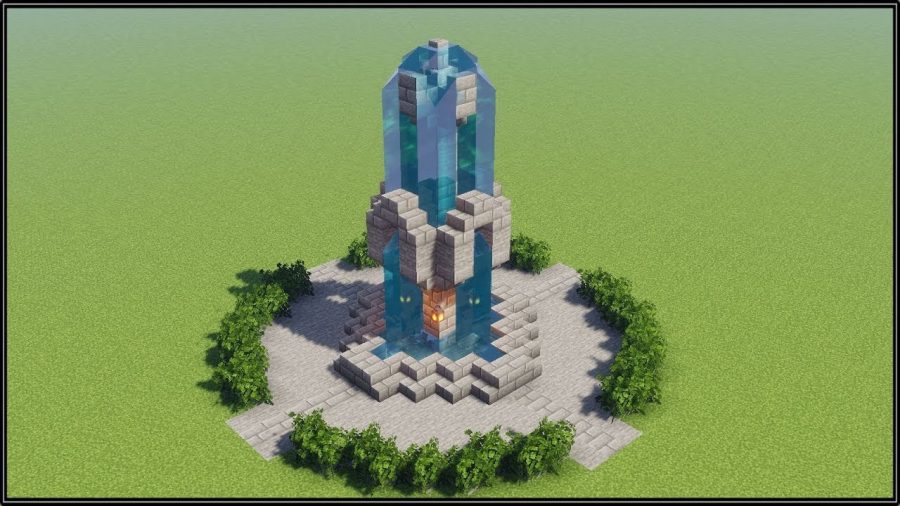
Minecraft is a game of creativity and imagination. There are so many wonderful structures that you can build in Minecraft. One of the beautiful ideas in the Minecraft world is the Minecraft fountain ideas. It is a popular decoration to build for Minecraft players. Fountains look great anywhere you put them, especially in gardens or courtyards. Minecraft is a game where players have to use their creativity and imagination to build a world of their dreams.
A fancy Minecraft fountain is a good addition to your base or any other build. It adds an elegant touch to your projects. Quite like statues, a cool Minecraft fountain beautifies any area and can be placed at the entrance of your house to make a bold statement. Minecraft fountain design can be a simple design or a complicated one as per the player’s preference. Players can build a Minecraft fountain anywhere and in any way they like it.
A simple Minecraft fountain can be built using water, stone, and wood. These materials are easily available in Minecraft which makes it easy for beginners as well. Other fancy Minecraft fountain designs include the usage of quartz, glowstone, and glass. The addition of glowstone which is a light source will illuminate the fountain at night. It is a thrilling task to build a Minecraft fountain.
A fountain in Minecraft can be used to decorate gardens, roads, and entrances. Players with large buildings love to put fountains on either side of the road that leads to a large building. Some players also place it between skyscrapers. It is essential to know how water flows to build an incredible Minecraft fountain.
If you are looking for Minecraft fountain ideas, we have lots to share with you. Excited to build a new fountain? Here are the 10 best Minecraft fountain design ideas that will blow your mind. These include Minecraft water fountain, small Minecraft fountain, Minecraft medieval fountain, Minecraft modern fountain, and many more.
Check out The Best Minecraft Fountain Design Ideas
1. Small Wooden Fountain
A small wooden fountain always looks great as a decoration. You can easily make this in Survival mode as the materials used to make this are easily available like wood and leaves. Because of its small size, players can fit this Minecraft fountain almost anywhere they want. Silk Touch Enhancement is a must if you want to build it in Survival mode with leaf blocks.
There is less use of water in this Minecraft fountain design, this makes setting up the water supply quite easy. You can also use this as well if not anything else.
Related – 7 Best Cool Minecraft Staircase Ideas
2. Four Corner Fountains
Another one of the many Minecraft water fountain ideas is this four corner fountain. This looks simple and easy but it takes a few complicated materials to build this one. This four-corner fountain is built with underwater lights, a central shelter or beacon, and quartz. This design is essentially a box of open water with four fountains in each corner and bridges that cross over the water.
A Planet Minecraft player calls this fountain, The Fountain Of Health because of the beacon in the center that can heal other players that are nearby.
Related – 20 Best Minecraft Building Ideas
3. Modern Minecraft Fountain
Unlike older designs, a modern Minecraft fountain uses long edges, rectangles, and squares. These modern Minecraft fountains tend to be taller than the other fountain ideas and use neutral color tones like grey, black or white.
The rectangles and squares are what give this fountain a modern look. There are many modern fountain designs that use glass but very tiny amounts of glass at the bottom of the fountain.
Related – 11 Best Minecraft Light Sources
4. Large Quartz Fountain
This cool Minecraft fountain design is quite large and broad as compared to other fountain design ideas here. It is made of Quartz, as the name of the fountain suggests. The good part about this design idea is that even though it is large, it isn’t too difficult to build. But while building this large Quartz fountain you have to be careful to place the blocks correctly to get a similar pattern. This fountain also uses a few glowstone, this will illuminate the fountain at night.
It looks beautiful in the day as well as the night.
Related – 3 Best Minecraft Survival House Ideas
5. Small Stone Fountain
A stone fountain that is small, gives a medieval feel to the fountain. It fits anywhere. This small stone fountain has a compact design that measures 3×5 blocks. This small stone fountain is easy to build in Survival mode. It will be a perfect addition to other medieval builds like castles and villages. There is a section of Minecraft players who love building everything in medieval style, if you are one of them you will love this Minecraft fountain idea.
6. Tall Spiral Fountain
Looking for Minecraft fountain ideas for creative building mode? This fountain design is perfect for you. It is fancier and easy to build in the creative building mode. In Survival mode, this would be a tab bit difficult to build given the curves and height it has. If you are looking for a Survival challenge in Minecraft, this is a fun challenge to take on. You will thoroughly enjoy building this Tall spiral fountain.
This fountain idea uses obsidian in a strategic manner that adds a unique color. But if you place even a single block incorrectly it would spoil everything and could be annoying. It takes a long time to break Obsidian as we know it.
Related – Top 5 Minecraft Interior Ideas (2022)
7. Nether Themed Fountain
Another unique idea for a Minecraft fountain is teh Nether themed fountain. It makes use of a large square, this large square is slightly elevated off the ground. There is a fountain in the middle on top of the square along with benches that are on the side. There is also enough privacy, thanks to the trees that are planted along the side.
The materials found in the Nether like nether bricks and glowstone are used in building this fountain. However, you can use other materials of your choice like wood or stone if you don’t yet have nether bricks. Use your creativity to build this Nether themed fountain and explore your options.
Related – 17 Best Easy Minecraft Castle Ideas
8. Small Quartz Fountain
This one is a small fountain made from Quartz. It is a cute, small design that is also easy to build. It has a unique spout and for the corners, it uses upside-down quartz. There are also flowers around the fountain that add more aesthetic value to the overall design of this fountain. It would look aesthetically pleasing in any garden. A small Quartz fountain with flowers around makes for a cute Minecraft fountain idea that you can experiment with. You can also add other decor elements to this design and make it even more unique.
9. Tall and Compact Fountain
Love the idea of a fountain being tall yet compact? This will be perfect for you. This Minecraft fountain idea has a fountain that is tall but not too wide. It would look stunning in a mansion or castle’s front entrance. Even more stunning if you use two or more such fountains. To make this fountain, you need slabs, pillars, and stairs. It would look even more beautiful if some source of light is added to the design. You can add maybe glowstone blocks or lamps. This would make it pop at night and look marvelous. Everything is possible in Minecraft so use your creative skills and make this fountain shine.
Related – 11 Best Minecraft Dock Ideas
10. Large Multi-Tier Fountain
If you love large fountains, you will love this Minecraft fountain idea. It is a unique design that is wide and has many tiers. The multiple tiers make it look bigger and bolder. As it is a large fountain design, it may take longer to build this fountain as compared to other Minecraft fountain ideas mentioned above.
There is a custom Minecraft texture pack used to build this Large multi-tier fountain. This is the reason it looks unique and different from the textures that are default. It also uses some glowstone lights under the water that make the fountain glow up in the dark. Be creative when it comes to building this large multi-tier fountain as there is a lot of room for changing the aesthetics of this fountain.
Conclusion
Everyone can build a fountain in Minecraft but it is your creativity and skills that will make your Minecraft fountain stand apart. Players that have an eye for detail and great building skills can build stunning fountains easily in Minecraft. Even if you are a beginner, you can build a simple yet beautiful fountain in Minecraft and decorate your builds with it.
Minecraft water fountain may not always be a top priority to build in Minecraft given the fact that you can build many other beautiful things in Minecraft. But a gorgeous fountain in Minecraft can elevate your gameplay and beautify your previous builds. You can take inspiration from the above-mentioned 10 best Minecraft fountain design ideas and build one on your own.
Image Source – https://www.youtube.com/watch?v=SKPMWz2PN2Y





Download Minecraft PE 1.21.131 APK for Android
Minecraft Bedrock 1.21.131 is a focused hotfix update — improved Spear combat, two important bug fixes, and better overall stability on Android. No new content, but a noticeably smoother experience.
Spear Knockback Improvement
The window during which a charged Spear attack can apply knockback has been extended. This makes combat feel more reliable — the attack now connects as expected without requiring pinpoint timing, especially useful when fighting multiple mobs at once.
Spear Animation Alignment
Charge attack animations now accurately sync with the Spear’s three gameplay phases: Engaged, Tired, and Disengaged. What you see on screen now matches what the game engine is actually doing — making combat more readable and reducing guesswork in fights.
Performance & Stability
Frame drops on mid-range Android hardware have been reduced. Memory handling improvements prevent sudden freezes during long play sessions. World loading and chunk generation are more reliable, reducing terrain “pop-in” when exploring or moving quickly.
Multiplayer Improvements
Backend updates improve session stability when players join or leave. Fewer disconnects and smoother synchronisation across Bedrock servers. Marketplace content and add-ons also load more consistently during multiplayer sessions.
Adventuring Time Achievement Fixed — The achievement no longer unlocks early. It now correctly requires visiting at least 17 biomes on PC, matching the intended design.
Marketplace Escape Key Fixed — Pressing Escape after using the Marketplace search now reliably returns players to the previous menu instead of getting stuck in a loop.
Add-on World Loading Fixed — A bug that triggered a “Block” error when loading or creating worlds with multiple add-ons installed has been resolved.
Download the APK
Tap one of the Download buttons above. Choose the Standard (no music) version if storage is limited, or the Full version for the complete experience. The ARM64 build is recommended for modern phones.
Enable “Install Unknown Apps”
Go to Settings → Security (or Privacy) → Install unknown apps. Enable the permission for your browser or file manager. Android requires this for any APK installed outside Google Play.
Open the APK File
Open your Downloads folder, find the Minecraft 1.21.131 APK, and tap it to launch the system installer. Follow the on-screen prompts.
Install Over Existing Version
In most cases you can install 1.21.131 directly over your existing Minecraft without losing any worlds or progress. If you see a signature conflict error, uninstall first — but back up your worlds beforehand.
Launch and Sign In
Open Minecraft, sign in with your Microsoft/Xbox Live account, and your existing worlds will load normally. Online multiplayer, Realms, and Marketplace content all work as before.
Download Minecraft PE 1.20 APK for Android
Get the full Minecraft Bedrock 1.20 (Trails and Tales) APK for Android. Supports Xbox Live sign-in. Multiple versions available — stable releases and preview builds.
Download the APK File
Tap the Download button above for the version you want. The APK file will save to your device’s Downloads folder.
Enable “Install Unknown Apps”
Go to Settings → Security or Privacy → Install unknown apps. Enable it for your browser or file manager. Android requires this for any APK installed outside of Google Play.
Open the Downloaded File
Open your Downloads folder (or tap the notification), find the Minecraft APK, and tap it to start the installer.
Confirm Installation
Tap Install and wait for the process to complete. If you see a “signature conflict” error, uninstall your existing Minecraft version first, then retry.
Launch and Sign In with Xbox Live
Open Minecraft, sign in with your Microsoft/Xbox Live account to access multiplayer, Realms, and cross-platform features.
-
 Guides7 years ago
6 Proven Ways to Get more Instagram Likes on your Business Account
-
Mainstream12 years ago
BioWare: Mass Effect 4 to Benefit From Dropping Last-Gen, Will Not Share Template With Dragon Age: Inquisition
-
 Mainstream8 years ago
How to Buy Property & Safe Houses in GTA 5 (Grand Theft Auto 5)
-

 Guides2 years ago
Free Fire vs PUBG: Comparing Graphics, Gameplay, and More
-

 Guides2 years ago
50+ Free Fire ID and Passwords Login List (Giveaway) 2025
-
 Casual3 years ago
8 Ways to Fix Over-Extrusion and Under-Extrusion in 3D Printing
-

 Other3 years ago
Ajjubhai UID: Free Fire Details & Earnings
-

 Features2 years ago
Exploring Valorant eSports Stats: Unveiling the Metrics Behind Competitive Excellence