
Guides
11 Best Minecraft Light Sources

Minecraft is quite a popular game in all age groups. It gives the players a chance to explore different levels of creativity along with imagination. If you can conjure up magnificent structures, you can build them in Minecraft. Players can build anything and everything using their imagination but without the correct lighting no structure will stand out. Minecraft light sources are as important to any structure as is the design of a building.
You can decorate your spaces with the fanciest decorative items but block light Minecraft offers adds more light and looks more attractive for your build. To make your gameplay more interesting there are light blocks Minecraft provides you with. You can use these Minecraft light ideas that look beautiful and provide a lot of light to keep away hostile mobs from your buildings.
There are many Minecraft light sources that you can use to brighten up your spaces and you can also use them to beautify your space. To make things easier we have curated a list of the 11 best Minecraft light sources that you can try out. These include fun Minecraft lighting ideas, the best lighting source Minecraft has, the brightest light in Minecraft, how to use glowing blocks Minecraft offers, and much more.
Role of Light in Minecraft
Light plays an important role in Minecraft, it keeps mobs from spawning inside your building, it affects plant growth and visibility. There are levels of lighting in Minecraft, first is light level, second is internal light level and third is rendered brightness. These levels of light usually come from blocks of light and the sun.
The levels of lights are a mechanic in Minecraft that you can use in many ways. There are a few blocks that can filter light like cobwebs, ice, and leaves but they don’t have the capability to emit light.
Let us focus on blocks that emit light in this article. These light-emitting blocks fall in level 15 which is the widest range for light.
Here are The Best Minecraft Light Sources
1. Lantern
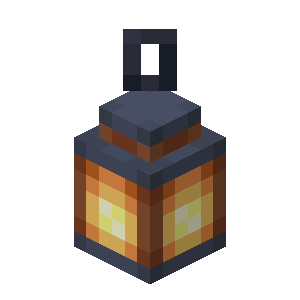
Want a cooler, brighter, and classier alternative for the torch? The lantern is what you need. One of the coolest Minecraft light sources is the lantern. Even though lanterns are a new addition to Minecraft as a light source it has become a favourite for many.
You can hang lanterns on the fences and walls. It has a light level of 15, making it one of the brightest blocks in the game. You can make your lantern on your own by keeping a torch in the centre of a table and keeping eight iron ingots surrounding it will give you a lantern.
2. Campfire

Campfire is another light source that is at light level 15 and it can be used for spawning in taiga or taiga snow villages. Campfire also helps you send smoke signals in the air that are 10 levels up. The rain cannot extinguish a campfire so you can use it as a compass marker if you ever get lost and can’t find your way back home.
Make a campfire with 3 logs for the base at the bottom, place one coal in the middle and form a triangle over it with three sticks and you have your own campfire.
3. Jack O Lantern
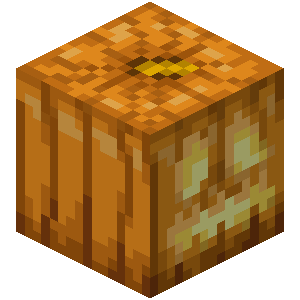
Interesting name for an interesting block. It is a pumpkin block that looks spooky. You can find it in taiga and taiga snowy villages. You can easily craft with these blocks, you only need to have a torch under a regular pumpkin to make this Jack o Lantern. This one also has a light level of 15.
Jack o Lantern when used as heads for snow and iron golems can bring them to life. With this spooky light source, you can take all your subservient creatures with you to The End.
4. Glowstone
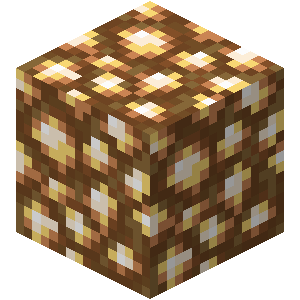
Glowstone has a mysterious force within it that makes it glow. This one is also at 15 levels of luminance which makes it one of the brightest sources of light in Minecraft. It is scattered around Neither for you to find.
If you wish to craft this you can use 4 Glowstone Dust that you can get if you break a block of Glowstone in the Nether. To make it easier for you, use a tool that has silk touch properties to break the Glowstone. This will prevent Glowstone dust from breaking and will only break the Glowstone. This one is 100% fireproof as well.
5. Four Sea Pickles
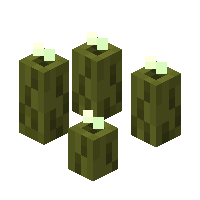
A light source that is water-based, yes that’s correct. Sea Pickles are found in the ocean biomes where they spawn, they are stationary creatures found underwater. The strength of the light source will depend on how many sea pickles are there within it. 4 sea pickles will give you level 15 luminance.
If you have less than four sea pickles, use bone meal to feed the block. This increases the chances of it spawning more sea pickles. They emit light only underwater.
6. Redstone Lamp
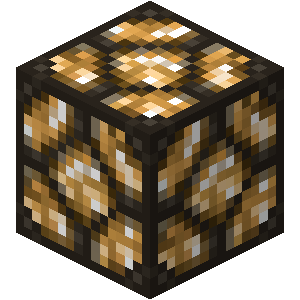
It is great if you know how to deal with Redstone, you can work your way around a Redstone lamp. It works in a similar fashion to Glow Stones but to activate Redstone like a button, Redstone torch, or lever you need a Redstone mechanism.
You can make this lamp by putting 4 Redstone dust in the crafting table’s exact NSEW quadrants. Place a Glowstone block in the center to finish the Redstone lamp. When lit up, it will give you level 15 luminance. This can be a nice alternative for indoor lighting on home bases or for fortresses.
7. Sea Lantern

This is Glowstone on the ocean floor. It is an underwater block that emits light and spawns in Underwater Ruins and Ocean Monuments. With a light level of 15, it is one of the brightest in the game.
To craft this sea lantern you need to collect 4 Prismatic Crystals and 5 Prismatic Shards. Place the Prismatic Crystals on the corners of the table and form a + sign with the Prismatic Shards. Voila! You can activate a Conduit with a sea lantern.
8. Conduit
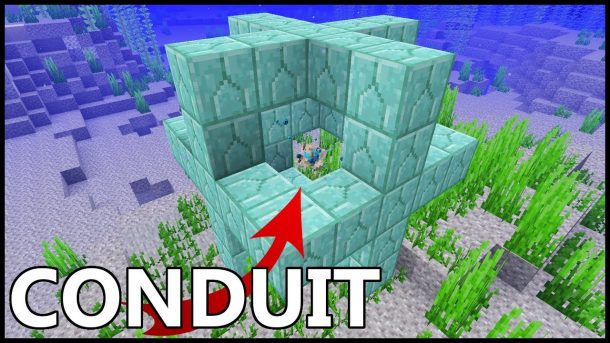
The Conduit is a welcoming sight thanks to the unique exterior it has. It also has 15 levels of luminance, both in water and on land. It works like an underwater Beacon. Through the Conduit Power, it provides status boosts and also attacks mobs that are hostile underwater.
Crafting this is a tad bit difficult thanks to its centerpiece item that is The Heart of the Sea and not the 8 Nautilus Shells. Finding these is also another task. The Heart of The Sea can be found as buried treasure but it can barely spawn. The best way to find this is by looking for a dolphin and allowing it to lead to the biomes where buried treasure is found spawning. You can feed the dolphin raw cod or salmon to help you find the Heart of The Sea.
9. Beacon
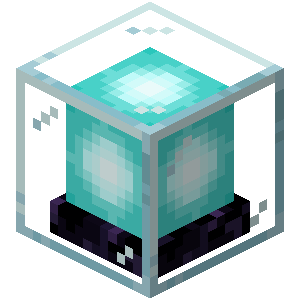
Beacon has a light level of 15, the highest source of light in Minecraft and that can project an upwards light beam. To craft this you have to go on long walks. To make this, at the bottom row you need 3 obsidian, at the center a Nether Star, and on the remaining squares 5 Glass blocks.
You even might have to beat The Wither at some point to make the Beacon. Beacon looks like a cool block that can emit light. If you can build your beacon atop a pyramid that has 4 tiers, you can unlock Secondary Powers. You get granted access to Regeneration.
10. End Rod
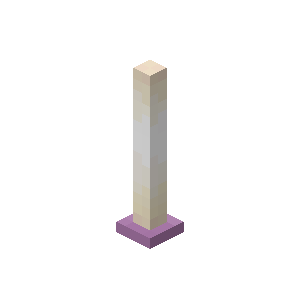
The end rod is similar to the torch. It is at Light Level 14, which is one level lower than others in this list. These are not block-like items, you can find them around End City towers. They are found in a position where a player has to climb on top of it. These End Rods don’t break even if the supporting blocks are destroyed.
To make this you require 1 Blaze Rod placed at the bottom and on top a Popped Chorus fruit. You can make 4 End Rods with one portion of each.
11. Torch

You might be familiar with the Torch. It has a light level of 14 like the End Rod. You might have also used it several times in your gameplay. For newbies, to make it you require coal and any type of stick. The stick makes the bottom and coal atop it, this will give you 4 torches.
How to make ceiling lights in Minecraft?
One way to make ceiling lights in Minecraft is with Pistons, armor stands, custom light heads, any kind of light source, building blocks, and Redstone blocks. Or you can use any of the light sources mentioned above and add your creativity to it to make ceiling lights.
Conclusion
Use these 11 best Minecraft light sources in your next project and make your gameplay shine brighter. The right light source will elevate the look of any build and these light sources also have various qualities as mentioned above.





Download Minecraft PE 1.21.131 APK for Android
Minecraft Bedrock 1.21.131 is a focused hotfix update — improved Spear combat, two important bug fixes, and better overall stability on Android. No new content, but a noticeably smoother experience.
Spear Knockback Improvement
The window during which a charged Spear attack can apply knockback has been extended. This makes combat feel more reliable — the attack now connects as expected without requiring pinpoint timing, especially useful when fighting multiple mobs at once.
Spear Animation Alignment
Charge attack animations now accurately sync with the Spear’s three gameplay phases: Engaged, Tired, and Disengaged. What you see on screen now matches what the game engine is actually doing — making combat more readable and reducing guesswork in fights.
Performance & Stability
Frame drops on mid-range Android hardware have been reduced. Memory handling improvements prevent sudden freezes during long play sessions. World loading and chunk generation are more reliable, reducing terrain “pop-in” when exploring or moving quickly.
Multiplayer Improvements
Backend updates improve session stability when players join or leave. Fewer disconnects and smoother synchronisation across Bedrock servers. Marketplace content and add-ons also load more consistently during multiplayer sessions.
Adventuring Time Achievement Fixed — The achievement no longer unlocks early. It now correctly requires visiting at least 17 biomes on PC, matching the intended design.
Marketplace Escape Key Fixed — Pressing Escape after using the Marketplace search now reliably returns players to the previous menu instead of getting stuck in a loop.
Add-on World Loading Fixed — A bug that triggered a “Block” error when loading or creating worlds with multiple add-ons installed has been resolved.
Download the APK
Tap one of the Download buttons above. Choose the Standard (no music) version if storage is limited, or the Full version for the complete experience. The ARM64 build is recommended for modern phones.
Enable “Install Unknown Apps”
Go to Settings → Security (or Privacy) → Install unknown apps. Enable the permission for your browser or file manager. Android requires this for any APK installed outside Google Play.
Open the APK File
Open your Downloads folder, find the Minecraft 1.21.131 APK, and tap it to launch the system installer. Follow the on-screen prompts.
Install Over Existing Version
In most cases you can install 1.21.131 directly over your existing Minecraft without losing any worlds or progress. If you see a signature conflict error, uninstall first — but back up your worlds beforehand.
Launch and Sign In
Open Minecraft, sign in with your Microsoft/Xbox Live account, and your existing worlds will load normally. Online multiplayer, Realms, and Marketplace content all work as before.
Download Minecraft PE 1.20 APK for Android
Get the full Minecraft Bedrock 1.20 (Trails and Tales) APK for Android. Supports Xbox Live sign-in. Multiple versions available — stable releases and preview builds.
Download the APK File
Tap the Download button above for the version you want. The APK file will save to your device’s Downloads folder.
Enable “Install Unknown Apps”
Go to Settings → Security or Privacy → Install unknown apps. Enable it for your browser or file manager. Android requires this for any APK installed outside of Google Play.
Open the Downloaded File
Open your Downloads folder (or tap the notification), find the Minecraft APK, and tap it to start the installer.
Confirm Installation
Tap Install and wait for the process to complete. If you see a “signature conflict” error, uninstall your existing Minecraft version first, then retry.
Launch and Sign In with Xbox Live
Open Minecraft, sign in with your Microsoft/Xbox Live account to access multiplayer, Realms, and cross-platform features.
-
 Guides7 years ago
6 Proven Ways to Get more Instagram Likes on your Business Account
-
Mainstream12 years ago
BioWare: Mass Effect 4 to Benefit From Dropping Last-Gen, Will Not Share Template With Dragon Age: Inquisition
-
 Mainstream8 years ago
How to Buy Property & Safe Houses in GTA 5 (Grand Theft Auto 5)
-

 Guides2 years ago
Free Fire vs PUBG: Comparing Graphics, Gameplay, and More
-

 Guides2 years ago
50+ Free Fire ID and Passwords Login List (Giveaway) 2025
-
 Casual3 years ago
8 Ways to Fix Over-Extrusion and Under-Extrusion in 3D Printing
-

 Other2 years ago
Ajjubhai UID: Free Fire Details & Earnings
-

 Features2 years ago
Exploring Valorant eSports Stats: Unveiling the Metrics Behind Competitive Excellence