
Reviews & Previews
How to Fix FIFA 12 Crashes and Freezes Problems


The highly anticipated release of probably the most popular soccer game ever, FIFA 12, didn’t come as easy as it did in the past years and unfortunately PC gamers have started to report all sort of problems when playing FIFA 12, from simple game stuttering to freezes, fifa 12 not working on windows 10 and even crashes. Until EA (hopefully) releases a patch to fix all these problems, let’s see if we can, together, fix FIFA 12 crashes and freezes!
The first thing for you to do before even trying to attempt these crash fixes and freezing fixes is to make sure that your computer meets the minimum system requirements to run FIFA 12:
FIFA 12 System Requirements
– CPU with Dual core processor (Core duo 2 or better), Intel Core2Duo @ 1.8Ghz
– 1 GB of RAM (2 GB required for Windows Vista / Windows 7)
– Video card: ATI Radeon HD 3600, NVIDIA GeForce 6800 GT, Intel’s Sandy Bridge (HD Graphics 2000) and Ivy Bridge (HD Graphics 3000)
– DirectX 9.0c Compatible 3D accelerated 256 MB video card or equivalent (must support Shader Model 3.0 or above)
– DirectX 9.0c Compatible Sound Card
If you miss these requirements and you’re still having problems, then you should try the fixes listed below. Let’s start with a simple problem:
How to Fix the unable to install FIFA 12 problem
For some reason, it appears that you can’t install FIFA 12 until you have completely uninstalled FIFA 11… Also, running the install file with admin privileges might fix the installing problem with no error message.
Game crashes during the FIFA 12 welcome screen
This is probably the most wide-spread problem in FIFA 12. It is caused by the fact that the game has no support for generic gamepads, so unplug your gamepad and start FIFA 12 again – it should run fine now!
FIFA 12 Crashes and Shuts Down computer
This usually happens when you start the second half of a match and right now we’re still searching for solutions to this problem. If you happen to find any, please share it in the comment section below!
FIFA 12 Crashes randomly to the desktop (FIFA 12 stuck on loading screen pc)
This again could be caused by using generic controllers, so make sure that you have none plugged when playing the game!
How to fix FIFA 12 Freezes or stuttering problems
– Disable Vsync and Antialising (run fifaconfig.exe for this) the force Vsync with D3DOverrider (download it here).
– After starting the game, click Ctrl + Alt + Del to bring up the Task Manager and set priority for FIFA 12 to high or Above Normal. Please note that this must be done every time you start playing.
– If FIFA 12 freezes when using the Xbox 360 controller, reinstall the drivers for the controller
– If you have updated your nVidia drivers to the latest beta (for Battlefield 3 demo), roll back your drivers
And this should be it. Please let us know below if you have any other problems when playing FIFA 12 and also if you have any sort of solutions to fix the game.



When Wendy’s launched Feast of Legends in 2019, I initially regarded it as a clever marketing gimmick. A tabletop role-playing game from a fast-food chain? It seemed like a subject for laughter at a D&D players’ gathering. But after going through the accompanying rulebook and even playing a one-shot, I came to the conclusion that it’s not merely a publicity stunt but rather, a well-thought-out and humorous parody of old-school fantasy RPGs. The game succeeds in intertwining humor, brand images, and fun gameplay in such a manner that it is both delightful and practical. It’s partly a marketing ploy and partly a fun campaign with more fun than one might guess from a setting around burgers and fries.
In the following review, I will recount my sincere adventure with the land of Beef’s Keep, fighting the Frozen Fiends, and checking if Feast of Legends remains a real RPG. Spoiler: it does – with the condition that you prepare for an equal measure of comedy and chaos.
Setting the Scene: The World of Beef’s Keep

The game is set in the Kingdom of Freshtovia, a land where the kind-hearted Queen Wendy, whose aim is to save her subjects from the frozen threats of the wicked Ice Jester and his Frozen Beef Clan, rules with her benevolence. A fantasy world with funny names and metaphors of fast food, yet quite detailed and complex. The different areas are a distorted representation of competing fast-food chains – the Deep Freeze is akin to the frozen food section, while The Box stands as a symbol of the generic “combo meal” rivalry.
What I found most impressive is that the game indirectly brand jokes but it actually creates the atmosphere that is like a campaign world. The players assume the position of the champions who have pledged to uphold the fresh, never frozen principles – a humorous reference to Wendy’s long-standing slogan. It is like the writing is playing a tightrope between satire and sincerity, but it is very skilled and it works somehow. Even if one is not a regular at Wendy’s, the playful background of the game will give a lot of amusement.
Simple Rules, Fresh Flavor
Feast of Legends has its own simplified system that is quite different from other systems like D&D’s 5E. Players roll a twenty-sided die (d20) for most actions, making it instantly recognizable to anyone who has ever played a tabletop game before. Instead of having character classes like the typical fighter or wizard, players pick “Orders” that are inspired by the different items in the Wendy’s menu – Order of the Beef, Order of the Chicken, Order of the Fries, and so on.
Each Order brings its own unique sets of abilities. For example, the Order of the Beef has the main emphasis on the frontline combat sector, while the Order of the Chicken has a tendency or inclination towards being quick and versatile. These differences in abilities still make the game lighthearted but at the same time are mechanically distinct enough to have an effect. The system is so easy that even a novice can understand it, which is the reason it is perfect for the casual game nights or even the convention sessions.
The humor that is part of every mechanic is what really sells it. “Feasts” are the names given to buffs, a hero’s well-fed state determines his/her stats, and eating Wendy’s food at the table even gives your character in the game bonus points! It is outrageous but in a very good way.
The Adventure: Rise from the Deep Freeze

The free PDF campaign that is the main part of the core campaign features the adventure Rise from the Deep Freeze with five chapters. The plot begins when the frozen armies of the Ice Jester threaten the Queen’s domain, and thus, the players have to go on a mission to melt the whole kingdom and overpower his crooked power with their thawing influence.
The narrative of each chapter has its own depicts, characters, and side quests that are the RPG standard ones but with a fast-food laugh. Among such bizarre things there are traveling vendors selling “artisanal buns,” dungeons shaped like kitchen freezers, and villains with names like The Beef Bandit and the Fry Fiends. It is silly, but at the same time, it is well-timed.
What impressed me most was the adventure’s accessibility. It has little structure which is easy for newcomers to follow, but, at the same time, it allows a lot of space for improvisation. The joke is never at the expense of the gameplay, rather it is a major triumph for a system that is mainly meant to be fun. The designers have gone the extra mile to ensure that the game was a proper playing experience rather than merely a marketing tool.
Art, Layout, and Design
Feast of Legends, an RPG that is part of a free promotional campaign, is no less than marvelous. The design of the rulebook is neat, vibrant, and very professional. The pictures combine old-fashioned fantasy elements with the bizarre nature of fast-food – some knights in armor wielding spatulas instead of swords, mystical fries glowing with golden light, and of course, Queen Wendy herself as a glorious princess.
Every part of it is really simple to go through, and the font used gives the feeling of being specifically reminiscent of the popular RPG books. It is obvious that the makers intended it to look real, and they have achieved that very quality. I have spent money on indie RPGs that appeared to be less polished than this free one. The maps and encounter tables are simple yet serving their purpose, providing the Dungeon Masters (or “Game Masters” as it is called in this case) just the right amount to get started and plenty of room for imagination to fill in.
Gameplay Experience: Fast, Funny, and Surprisingly Functional

My expectations for Feast of Legends, when I decided to run it for my group, were mostly limited to laughing. However, what turned out to be was a night filled with wonderful fun and awesome creativity. The rules were so easy and simple no one ever had to refer to the book for rules, and the humor that was incorporated in the game kept everybody participating and involved. The idea of taking part in a fight against “frozen bull beef monsters” while at the same time using “spicy chicken magic” was a bit humorous but it also helped the players to be more creative than usual.
The combat vs. roleplay divide is faint but it works. The encounters are quick and there are a good number of different types of enemies to keep the players uncertain about what will happen next. While the hardcore RPG players may consider it shallow for a long-term campaign, it is just right for a one-shot or a fun gaming night. Think of it as the fast-food of RPGs – quick, delightful, and best when not overdone.
Cultural Impact and Legacy
Feast of Legends certainly was a marketing stunt but soon enough it became a real hit with the board games lovers. It indicated that games with a logo do not have to be bad-quality tie-ins at all. On the contrary, it opened a discussion about how companies could tell stories and build worlds in new, more conscious ways. The game was a free download, so nobody had to spend money on playing it.
It is also a very interesting case of tabletop RPGs that have moved from being looked at as niche hobbies to being a part of mainstream pop culture. The fact that a fast-food chain went to the extent of launching a whole playable RPG is proof of the great popularity of roleplaying games. For both D&D fans and the rare players, it is a reminder that good humor and smart design can come from the most unanticipated places.
Conclusion
Feast of Legends may not take away the crown from Dungeons & Dragons in the near future, but still it is worth the recognition of what it accomplishes. It is hilarious, surprisingly functional, and completely playable – the mix that a few branded games do manage to pull off. The text is smart without being strained, the rules are easy for the first players, and the place is respectably silly for its humor.
Since I am a person who has played more RPGs than I can imagine, my expectation was to roll my eyes but instead, I rolled dice with a smile on my face. Whether you are an experienced Dungeon Master in search of a change from the regular fantasy campaigns or you just want to bring your friends into tabletop gaming through a fun way, Feast of Legends is a good choice. It is a demonstration that, sometimes, the most exciting adventures come with a portion of fries.
Introduction: Enter the World of Valorant
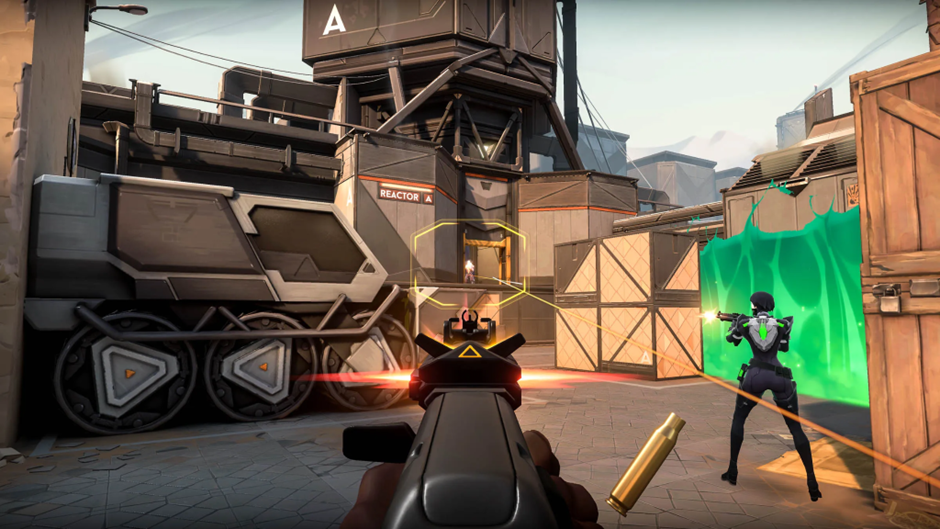
Riot Games’ Valorant has become one of the most influential tactical shooters in recent years, blending precise gunplay with hero-style abilities. Unlike traditional FPS titles, Valorant requires players not only to aim well but also to think strategically about agent abilities, team synergy, and map control.
As players explore the game, many are drawn to unlocking weapon skins, battle passes, and premium bundles that enhance the overall experience. These items require in-game currency, which can be acquired when you choose to buy Valorant points. For a secure and smooth transaction, I’ve found LootBar to be one of the most reliable platforms, offering fast service and peace of mind when topping up.
Core Gameplay and Mechanics
Valorant is built on competitive integrity and teamwork. Each match pits two teams of five against each other, with one side attacking and the other defending. The attackers plant the “Spike” (similar to a bomb), while the defenders aim to prevent detonation.
What makes Valorant stand out is its unique blend of classic FPS gunplay with hero-based abilities. Unlike pure shooters, where winning relies solely on aim, Valorant demands strategic use of smokes, flashes, heals, and other utility skills. This layered complexity ensures that no two matches feel the same.
For casual players, the game offers quick modes like Spike Rush and Deathmatch, making it easy to enjoy Valorant in short sessions. Hardcore players, meanwhile, can grind ranked matches, aiming to climb from Iron all the way to Radiant.
Agents and Customization
The roster of agents in Valorant is one of its biggest attractions. Each agent has unique abilities that can turn the tide of a match, from duelists designed to secure kills to controllers that manipulate the battlefield with smokes and walls.
Customization plays a huge role in keeping the game fresh. Skins for weapons are more than just cosmetic—they provide sound effects, finishers, and animations that add flair to your victories. While skins don’t alter gameplay balance, they are highly sought after in the community, becoming a way to show identity and prestige.
This is where Valorant Points (VP) come in. Skins, bundles, and event passes all require VP, making them the primary currency for players who want to personalize their gameplay.
Valorant’s Payment System and Monetization
Overview of In-Game Purchases
Valorant uses two main currencies:
· Valorant Points (VP): Purchased with real money and used for skins, bundles, and event passes.
· Radianite Points (RP): Primarily used to upgrade weapon skins, often acquired alongside VP.
Players frequently invest VP to unlock exclusive cosmetics, such as seasonal collections, limited bundles, or battle passes. These time-sensitive offers often create a sense of urgency, encouraging players to recharge quickly so they don’t miss out.
Pay-to-Win Considerations
One of the strongest aspects of Valorant’s system is that it avoids being “pay-to-win.” Spending money does not grant raw gameplay advantages—accuracy, reflexes, and teamwork still determine victory. Instead, purchases enhance the game’s aesthetic and social experience.
That said, investing in skins can save time compared to grinding for smaller rewards, and it allows players to participate fully in seasonal events without limitations.
Safe, Fast, and Reliable Top-Up Solutions
When it comes to topping up, safety and speed are critical. Players don’t want to risk their accounts or experience delays. That’s why many turn to platforms like LootBar, which emphasize secure transactions, fast delivery, and a smooth user interface.
LootBar stands out with strong trust metrics and a reputation among gamers for reliability. Using it ensures you can focus on playing Valorant, rather than worrying about whether your points will arrive on time.
Community, Social Features, and Competitive Scene
Valorant thrives not only as a game but also as a global esports phenomenon. It’s ranked ladder fuels competition, while international tournaments like the VCT (Valorant Champions Tour) attract massive audiences.
For casual players, the game’s social features make it easy to connect with friends, form squads, and join communities. Limited-time events and seasonal missions encourage teamwork and participation, keeping the community active year-round.
This dual approach – serving both casual and competitive players—is one of Valorant’s greatest strengths.
Pros and Cons of Valorant
Pros
· Tight, strategic gameplay with high skill expression
· Wide roster of agents with unique playstyles
· Regular updates and seasonal events keep the game fresh
· Strong esports ecosystem and global recognition
Cons
· Steep learning curve for beginners
· Skins and bundles can be costly
· Free players may face long grinds to maximize progress
While these drawbacks exist, they are softened by the fact that the core gameplay remains free-to-play and fair. Occasional VP purchases can help smooth the journey without undermining balance.
Tips for New Players
For those just starting out, it’s wise to:
· Begin with easier agents like Phoenix or Sage to learn core mechanics.
· Play unranked modes before diving into competitive matches.
· Save Valorant Points for bundles or battle passes, which offer more value.
A small VP purchase early on can also give new players access to skins that make the experience more enjoyable, without being overwhelming.
Conclusion: Is Valorant Worth Playing?
Valorant has cemented its place as one of the best tactical shooters available today. It combines strategic depth, fast-paced gunplay, and a thriving community, making it appealing to both casual and competitive players.
For those looking to personalize their journey, unlocking skins and bundles is part of the fun. The safest and most convenient way to do so is to buy Valorant points through LootBar. With a trusted platform handling the transaction, players can focus on what matters most—outsmarting opponents and enjoying every match.
In the rapidly expanding realm of Valorant eSports, statistical analysis plays a pivotal role in understanding player performance, team dynamics, and the strategic nuances that define success in competitive play. This article delves into the significance of Valorant eSports stats, their impact on the competitive landscape, and how they empower players, teams, and fans alike.
Key Metrics in Valorant eSports Stats
Valorant eSports stats encompass a wide array of metrics that provide insights into player proficiency and team strategies. These include individual performance indicators such as kill-death ratios (K/D), average damage per round (ADR), headshot percentages, and assist counts. Team statistics such as round win percentages, first blood percentages, and economy management efficiency further illuminate strategic strengths and areas for improvement.
Analyzing Player Performance and Contribution
For professional Valorant players, statistics serve as a critical tool for evaluating individual performance and contribution to team success. By analyzing metrics like K/D ratios and ADR, players can assess their impact in securing eliminations, dealing damage, and supporting team objectives. This data-driven approach enables players to identify strengths to leverage and weaknesses to address, enhancing their overall effectiveness in competitive matches.
Strategic Insights and Adaptation
Valorant eSports stats provide valuable strategic insights that shape team tactics and gameplay adaptations. Coaches and analysts analyze statistical trends to optimize agent selections, refine map strategies, and counter opponents’ playstyles effectively. The ability to leverage data-driven decision-making empowers teams to evolve their tactics, adapt to meta-game shifts, and maintain a competitive edge in the dynamic world of Valorant eSports.
Tracking Tournament Trends and Meta-Game Evolution
Beyond individual matches, Valorant eSports stats track broader tournament trends and meta-game evolution. Historical data on agent pick rates, map preferences, and round outcomes reveal emerging strategies and meta-shifts over time. This analytical depth allows teams and analysts to anticipate trends, innovate strategies, and stay ahead of competitors in high-stakes tournaments and league play.
Fan Engagement and Spectator Experience
Valorant eSports stats enrich the spectator experience during live broadcasts and tournament coverage. Fans can follow real-time updates on player performances, compare stats across matches, and engage in discussions about standout plays and strategic decisions. Interactive platforms and statistical dashboards enhance viewer engagement, fostering a deeper connection with the competitive narratives unfolding in Valorant eSports.
Impact on eSports Betting and Fantasy Leagues
Valorant eSports stats play a crucial role in eSports betting markets and fantasy leagues, where informed decision-making hinges on statistical insights. Bettors and fantasy league participants leverage player and team stats to assess form, predict match outcomes, and manage their investments strategically. Real-time updates and comprehensive data analysis enhance the strategic depth and excitement of eSports engagement for fans worldwide.
Technological Advancements and Data Visualization
Advancements in technology have revolutionized how Valorant eSports stats are accessed and analyzed. Streaming platforms and eSports websites offer sophisticated data visualization tools, interactive heatmaps, and player performance overlays that enhance the depth and accessibility of statistical analysis. These technological innovations provide analysts, commentators, and fans with enhanced insights into gameplay dynamics and strategic decision-making.
Future Innovations in Statistic Analysis
As Valorant continues to evolve as an eSports powerhouse, the future of statistical analysis promises further innovations. AI-driven predictive analytics, enhanced machine learning algorithms, and real-time performance tracking technologies are poised to revolutionize how eSports stats are processed and utilized. These advancements will elevate the precision, depth, and predictive capabilities of statistical analysis in Valorant eSports, shaping the future of competitive gaming.
-
 Guides7 years ago
6 Proven Ways to Get more Instagram Likes on your Business Account
-
Mainstream12 years ago
BioWare: Mass Effect 4 to Benefit From Dropping Last-Gen, Will Not Share Template With Dragon Age: Inquisition
-
 Mainstream8 years ago
How to Buy Property & Safe Houses in GTA 5 (Grand Theft Auto 5)
-

 Guides2 years ago
Free Fire vs PUBG: Comparing Graphics, Gameplay, and More
-

 Guides2 years ago
50+ Free Fire ID and Passwords Login List (Giveaway) 2025
-
 Casual3 years ago
8 Ways to Fix Over-Extrusion and Under-Extrusion in 3D Printing
-

 Other2 years ago
Ajjubhai UID: Free Fire Details & Earnings
-

 Features2 years ago
Exploring Valorant eSports Stats: Unveiling the Metrics Behind Competitive Excellence
Peter
September 29, 2011 at 5:33 pm
Game crashes during the FIFA 12 welcome screen
This is probably the most wide-spread problem in FIFA 12. It is caused by the fact that the game has no support for generic gamepads, so unplug your gamepad and start FIFA 12 again – it should run fine now!
I did that but the game doesn’t start again.
bla bla
October 20, 2011 at 1:57 pm
check this my friend it should work
Mateu
September 29, 2011 at 7:38 pm
The same thing as Christian. I have tried everything and nothing is working. In some forum i found the tip to make the file “replay0.bin”(form:MyDocs\FIFA 12\instance0\) read Only. But even thois doesnt work to me. Some if someone how to fix “FIFA 12 Crashes randomly to the desktop” please HELP!!!
mach3
September 30, 2011 at 3:02 pm
Same problem with my. I tried everything but no working!!! I am mad too! If anyone fixes the problem just inform the others!
waffy
September 30, 2011 at 3:41 pm
I have the same problem, my game doesnnt start – it crashes in welcome screen. Is any solution for this? Please help me, i am totally desperate…
persi
September 30, 2011 at 4:39 pm
make another user id for your windows, name it “1” and run the game from that user account. that should fix the crash
Pitkänen
September 30, 2011 at 6:04 pm
Same problem with my, also using Microsoft wireless xbox 360 pad. This is so GREAT!
Pitkänen
September 30, 2011 at 6:16 pm
Come on! Yep i did what Persi told, i made a new user and named it as “1”. Now it works…computers…mothaf…
souljaboy
October 3, 2011 at 5:44 pm
how do you that???
Tom
October 3, 2011 at 9:24 pm
Problem signature:
Problem Event Name: BlueScreen
OS Version: 6.1.7601.2.1.0.256.1
Locale ID: 1033
Additional information about the problem:
BCCode: 124
BCP1: 00000000
BCP2: 86530024
BCP3: 00000000
BCP4: 00000000
OS Version: 6_1_7601
Service Pack: 1_0
Product: 256_1
Can’t play at all. Just match starts, my screen becomes black, or green and then everything just freezes.
Computer specs:
4GGB Ram DDR2 800
HIS HD4850
Intel E8400 @3ghz
ASUS P5KLP-SE
320ggb Hard Disk 7200 rpm
550W PSU
eskulero
October 6, 2011 at 1:09 am
FIFA 12 Crashes and Shuts Down computer
I have this problem. If anyone knows how to fix it, please tell to others. (sorry for my bad english)
Uffe
October 6, 2011 at 7:03 pm
Me too i hate it!
Arnie Senaster
October 10, 2011 at 7:25 pm
for those who have problem to start fifa its because of the joypad..u need to go to mydocuments/fifa11 and copy the buttonconfig.ini and then paste it to the mydocuments/fifa12 and then try restarting the game …it worked fine for me and as well as my other friends so jus give it a try!!!
makanbudak
October 13, 2011 at 11:02 am
hi, my fifa 12 on pc still keep freezing n need to restart the pc to play again.. its happen since fifa 11 lol!.. i had try everyting to fixed out, but have no change.. other games are work fine on my pc, but not fifa 11 or 12.. im getting frustrated right now n still looking any solution to solve it.. im using amd phenom quad core, 2g ram, GTX460, XP sp3 32bit with latest updated drivers.. thanks for sharing ur expert experience..
Solver
October 18, 2011 at 7:46 pm
Go to MyDocuments/FIFA 12/instance0/ and right click on the file replay0-properties-change-choose notepad and than mark only for reading OK.
That worked for me:D!!!
bla bla
October 20, 2011 at 1:57 pm
guys check this out if you are troubleshoting problems watch?v=hOOnouv6mWg
Fifa12...
October 20, 2011 at 2:38 pm
Hi, my fifa12 (pc) crashes sometimes when i go to the store, it freezes and stops before showing the packs. And it also freezes often when i bought a player. Then u have to decided what you want to do with it. And then it stucks. and leaves this vieuw. http://imageshack.us/photo/my-images/267/fifaerror.jpg/
please help.. (its btw the full bought version.)
Bendik
October 24, 2011 at 4:28 pm
I tried to unplug the controller, and it worked, but i want to use the controller… Is it possible to switch to the controller in the game?
terrific
October 25, 2011 at 1:53 pm
:(… the game started…:) but at the time of tutorial when i clicked “proceed” its getting stukdddddddd…!! :(
wht to do??
nicholas
October 26, 2011 at 7:29 pm
hi i have a similar problem. did you solve it yet? pls help
wali
October 27, 2011 at 3:26 pm
My fifa 12 freezes at the welcome screen….it ran fine for a month but now it freezes on the welcome screen where FIFA 12 is written…help any one..
Jay
November 6, 2011 at 9:50 pm
This sucks. . I have been loyal to this game for years and even support them by buying a proper copy not a pirate. . . And this is how we are repayed for it. . . My game crashes in second half . . . Big fat thanks ea. . . If you sell us buggy games we will head to torrents next year . .
Jay
November 6, 2011 at 9:58 pm
Come on ea. . . This page has had over twelve thousand views. . . I signed up to that stupid origin software and I don’t want to sign up to ea just to speak to tec help. . . .
JOSS
November 9, 2011 at 9:30 am
Hola amigos tengo un problema con la instalacion de la fifa 12 termino de intalar despues le dos doble clic en el icono y me sale que origin no esta instalado pero no se antes me funciono la fifa por motivos tuve que formatear mi notebook el tal origin tengo que instalar para que me funcione alguien que me ayude porqu no lo encuentro gracias amigos
andres
November 10, 2011 at 4:35 am
same problem like everyone here. tutorial and back to desktop. i have microsoft stupid controllers and its the same. i did the stupid solution of the “only read” file and nothing.
Mit
November 27, 2011 at 8:43 pm
Wow gr8 i get same problem after tutorial its return to the desktop even in og copy getting same problem i just bad invest on the fifa 12 game its suck my time and haresment to me. (sorry my english is bad)
Blurish
December 6, 2011 at 1:12 pm
Wondering why must u guys use Controller to play Fifa12 on PC . It’s stated PC , if u wanna use controller go play with xBOX .
:)
randy
December 17, 2011 at 6:50 pm
my game crashes in the career mode whenever i go to 6 january 2012 in the calendar
Aman Alag
December 23, 2011 at 12:29 pm
i can play game by directly running exe file,but cannot config settings or play from fifaconfig.It shows me error Could not load file or assembly ‘Microsoft.DirectX.Direct3D’
Using sony viao
windows 7
4gb ram,intel hd 3000 gphs crd
directx 11
netframework 4(not sure)
plzzz help me i want to change resolution of my game
vijay
January 9, 2012 at 4:23 pm
mine hangs on fifa 12 welcome screen and error comes… origin.exe not found.. guyzz help me wid dis problem
Ricardo_MR
January 14, 2012 at 3:34 pm
Dear, this is the solution I found for FIFA 12.
I realized that if he went directly from the game worked FIFA.EXE but very poor quality.
Investigating a little config files I found that if I run C:\Program Files\EA Sports\FIFA 12\Game\fifasetup\fifaconfig.exe and improve the features and is more convenient to me the game did not work anymore.
Deleting the file that is generated to run the fifaconfig.exe that is saved in My Documents\FIFA 12\fifasetup.ini the game was returning to work in poor quality.
Then I found the initial configuration file that comes with the default Fifa
C:\Program Files\EA Sports\FIFA 12\Game\fifasetup\fifasetup_default.ini
All you have to do is enter FIFACONFIG.EXE, configuring the video features, etc, so that we aprobecharlo to the fullest.
CUT the file that was generated FIFASETUP.INI My Documents\FIFA 12\.
DELETE FIFASETUP_DEFAULT.INI file located in C:\Program Files\EA Sports\FIFA 12\Game\fifasetup\.
Paste the file and rename it FIFASETUP_DEFAULT.INI FIFASETUP.INI
With this we would retain the FIFA 12 running without any problem.
I welcome your comments.
Sorry for my english. Best regards from Uruguay
NOTE: Remember that every time they use in FIFACONFIG.EXE to set in play are going to create the file and play FIFASETUP.INI not going to work so they have to repeat the configuration. Also anyone who wants to do some research settings, or do a little hand can open the files with a text editor.
jacques
February 1, 2012 at 11:14 am
i’m in my 8th or 9th season now in cm, but when i try to continue or even load my career the game just crashes. i don’t have any similar problems with my other career modes, they all load perfectly. i have invested a lot of time in that career and had some good youth players. help needed!
Mikey
February 7, 2012 at 3:13 pm
My fifa 12 runs perfect on max settings im running on a 6870 asus, i7 quad core 8gb ram, and a 600 power supply. But my game freezez all the time when im in a match or when the ball is about to hit the post. Ive tried running through admin and done all the things said in forum. Anyone have the same issue?
Bilal Kuta
April 27, 2012 at 10:56 pm
My fifa 12 was crashing when I got the euro 2012 expansion Pack Please help…
ajnish
June 1, 2012 at 1:17 pm
doesnt work
okrah thomas moore
September 27, 2012 at 5:35 pm
i have a computer with a 500GB HDD, 4GB RAM, 2.2GHz dual core intel pentium processor and use an intel HD graphic , windos 7 but i cant play fifa 12 on it. Pls help me….
Paramveer Singh
November 30, 2016 at 7:55 pm
Hi,
I was playing FIFA12 for a year but after trying to Install FIFA16, FIFA12 is not working…I uninstalled FIFA16,but then also FIFA12 gets hang on first scree.
Kindly help.
ajay
June 3, 2017 at 8:07 pm
What to do , when I give career mode it takes too long loading .