
Guides
League of Legends: All Level Borders Explained

Key Takeaways
- Level borders are purely cosmetic frames that showcase your account level, not your skill.
- Riot Games offers 21 unique level borders, from Level 1’s Piltover frame to the rare Level 500 Eternus border.
- XP is earned by playing matches, with Summoner’s Rift generally providing the most.
- Level borders differ from ranked borders, which reflect seasonal performance.
- Common misconceptions include thinking borders improve gameplay or are linked to rank.
- Grinding for level borders is worth it for collectors and players who value visual progression.
Introduction
Level borders in League of Legends are a fun way to reward players for their time spent in the game. And to keep platers interested, Riot has come up with a variety of designs, all the way up to level 500.
In this article, we’ll explore all the level borders in detail!!
How Level Borders Work In League of Legends?
In League of Legends, level borders are eye-catching frames that pop up around your profile icon, showing your experience and commitment to the game. They’re all about aesthetics, no added damage or hidden perks and just a way to show off a bit.
Here’s the deal: Every time you level up your account, you gather XP from playing matches. As you hit certain level milestones, your border automatically gets a fresh design and color scheme. You can think of it as your personal “veteran badge” that evolves as you do.
The early levels change pretty quickly, so you’ll get to enjoy new borders more often. But once you start climbing past the higher milestones (like Level 300, 400, or 500), those upgrades become a lot rarer and way more prestigious. It’s Riot’s way of saying, “Yep, this player’s been around the Rift for a while.” And level borders are linked to your account level, not your ranked performance.
Complete List Of Level Borders And Their Level Requirements
- Level 1: Piltover Border
- Level 30: Zaun Border
- Level 50: Hextech Border
- Level 75: Fire Border
- Level 100: Archlight Border
- Level 125: Infused Border
- Level 150: Shadow Isles Border
- Level 175: Shurima Border
- Level 200: Lunari Border
- Level 225: Warring Kingdoms Border
- Level 250: Freljord Border
- Level 275: Battlecast Border
- Level 300: Ionia Border
- Level 325: Bilgewater Border
- Level 350: Runic Border
- Level 375: Noxus Border
- Level 400: Celestial Border
- Level 425: Elderwood Border
- Level 450: Void Border
- Level 475: Blood Moon Border
- Level 500: Eternus Border
These 21 unique borders light up at important level milestones, starting with Piltover’s iconic frame at Level 1 and culminating in the epic Eternus border at Level 500. They create a vivid visual timeline that showcases a player’s commitment and journey in the Rift.
Just like level borders showcase your progression, many players also look for unique ways to customize their profiles through league of legends skins codes, adding a personal touch to their in-game experience.
How To Level Up Faster In League of Legends?
Play Summoner’s Rift over ARAM for maximum XP
You’ll generally earn more XP in Summoner’s Rift compared to ARAM or other game modes, especially during longer matches. Stick to Normal Blind or Draft Pick for the most reliable XP gains.
Win games when possible
Sure, you still earn XP when you lose, but winning really gives you a nice boost. Choose champions you’re comfortable with to help improve your chances of winning.
Complete daily and weekly missions
Don’t overlook those missions! Even if they’re part of an event or the regular mission system, they can provide bonus XP on top of what you earn from matches. Make sure to tackle them!
Use XP boosts wisely
You can grab XP boosts using Riot Points or Blue Essence. They come in two types—per-win boosts and timed boosts. Using them together can really speed up your leveling process.
Avoid early surrenders
Remember, your XP is linked to how long the match lasts. Surrendering at 15 minutes or going AFK mid-game will seriously cut into your XP gains.
Play in groups
Teaming up with friends can help you secure more wins and make the game more fun, which means you’ll want to play more often without feeling burnt out.
Consistency is key
Playing two or three matches a day will add up much quicker than taking long breaks and then cramming in a bunch of games at once.
Level borders not only showcase your dedication, but they also reflect just how many matches you’ve played – and considering how long is a League of Legends game on average, reaching higher levels is no small feat.
Borders vs. Other Profile Customizations
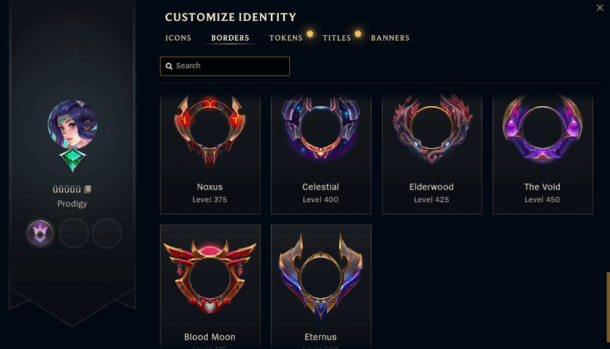
In League of Legends, level borders are just one part of the profile customization experience. They frame your profile icon, changing in design and color as you level up, serving as a subtle way to show off how long you’ve been playing. However, unlike ranked borders or other visuals, they don’t indicate your skill level, just the time you’ve put in.
On the flip side, ranked borders are awarded at the end of each competitive season and reflect your highest rank achieved. They show your competitive skills and are visible in loading screens, making them much more noticeable than level borders.
Then there are profile icons, summoner banners, and loading screen flairs, these often tie into events, achievements, or purchases, allowing for a more personal touch. Skins and chromas, while not part of your profile page, also help you stand out visually during gameplay.
So, what’s the main difference? Level borders change automatically over time, needing no extra effort other than playing the game. Ranked borders and special banners are based on achievements, while icons and flairs are simply collectible. Together, they create your unique visual identity in League, giving other players a glimpse of your experience and accomplishments.
What Are Some Common Misconceptions About Level Borders?
A lot of players seem to get confused about what level borders in League of Legends really mean. One of the biggest myths out there is that these borders reflect a player’s skill level. The truth is, they’re only linked to your account level, which shows how much time you’ve put into the game, not how skilled you are.
For instance, a Level 400 player can actually be less skilled than a Level 50 player who focuses on ranked matches. Another common misconception is that having a higher border gives you in-game perks, like extra stats or better matchmaking, this is totally untrue. Borders are just for show and don’t affect gameplay at all.
Some players also think that level borders are related to ranked borders, but they’re actually two different things: ranked borders reflect your performance in a season, while level borders track your overall account growth.
There’s even a myth that you can “lose” a border if you take a break from playing, but once you earn a border, it’s yours for good.
Lastly, some people believe that XP gains are random, but they actually follow specific rules based on how long the match lasts.
In addition to borders, the league of legends mmr system also plays a big role in how players are matched and progress through ranked games.
Are Level Borders Worth Grinding For In League Of Legends?
Level borders in League of Legends are definitely worth the grind if you love collecting those cosmetic milestones and want to show off your commitment. While they don’t change how you play, they serve as a subtle badge of honor, reflecting the time you’ve poured into the game.
For many players, hitting a rare high-tier border like the Level 500 Eternus frame can feel like a rewarding long-term achievement. That said, if your main focus is on competitive play, these borders won’t help you climb the ranks or improve your skills. Ultimately, they’re all about personal satisfaction and a bit of bragging rights, so it’s only worth the effort if you appreciate visual progression and recognition.
Conclusion
While level borders in League of Legends might not change how you play, they definitely add some flair to your profile and show your journey on the Rift.


Download Minecraft PE 1.21.131 APK for Android
Minecraft Bedrock 1.21.131 is a focused hotfix update — improved Spear combat, two important bug fixes, and better overall stability on Android. No new content, but a noticeably smoother experience.
Spear Knockback Improvement
The window during which a charged Spear attack can apply knockback has been extended. This makes combat feel more reliable — the attack now connects as expected without requiring pinpoint timing, especially useful when fighting multiple mobs at once.
Spear Animation Alignment
Charge attack animations now accurately sync with the Spear’s three gameplay phases: Engaged, Tired, and Disengaged. What you see on screen now matches what the game engine is actually doing — making combat more readable and reducing guesswork in fights.
Performance & Stability
Frame drops on mid-range Android hardware have been reduced. Memory handling improvements prevent sudden freezes during long play sessions. World loading and chunk generation are more reliable, reducing terrain “pop-in” when exploring or moving quickly.
Multiplayer Improvements
Backend updates improve session stability when players join or leave. Fewer disconnects and smoother synchronisation across Bedrock servers. Marketplace content and add-ons also load more consistently during multiplayer sessions.
Adventuring Time Achievement Fixed — The achievement no longer unlocks early. It now correctly requires visiting at least 17 biomes on PC, matching the intended design.
Marketplace Escape Key Fixed — Pressing Escape after using the Marketplace search now reliably returns players to the previous menu instead of getting stuck in a loop.
Add-on World Loading Fixed — A bug that triggered a “Block” error when loading or creating worlds with multiple add-ons installed has been resolved.
Download the APK
Tap one of the Download buttons above. Choose the Standard (no music) version if storage is limited, or the Full version for the complete experience. The ARM64 build is recommended for modern phones.
Enable “Install Unknown Apps”
Go to Settings → Security (or Privacy) → Install unknown apps. Enable the permission for your browser or file manager. Android requires this for any APK installed outside Google Play.
Open the APK File
Open your Downloads folder, find the Minecraft 1.21.131 APK, and tap it to launch the system installer. Follow the on-screen prompts.
Install Over Existing Version
In most cases you can install 1.21.131 directly over your existing Minecraft without losing any worlds or progress. If you see a signature conflict error, uninstall first — but back up your worlds beforehand.
Launch and Sign In
Open Minecraft, sign in with your Microsoft/Xbox Live account, and your existing worlds will load normally. Online multiplayer, Realms, and Marketplace content all work as before.
Download Minecraft PE 1.20 APK for Android
Get the full Minecraft Bedrock 1.20 (Trails and Tales) APK for Android. Supports Xbox Live sign-in. Multiple versions available — stable releases and preview builds.
Download the APK File
Tap the Download button above for the version you want. The APK file will save to your device’s Downloads folder.
Enable “Install Unknown Apps”
Go to Settings → Security or Privacy → Install unknown apps. Enable it for your browser or file manager. Android requires this for any APK installed outside of Google Play.
Open the Downloaded File
Open your Downloads folder (or tap the notification), find the Minecraft APK, and tap it to start the installer.
Confirm Installation
Tap Install and wait for the process to complete. If you see a “signature conflict” error, uninstall your existing Minecraft version first, then retry.
Launch and Sign In with Xbox Live
Open Minecraft, sign in with your Microsoft/Xbox Live account to access multiplayer, Realms, and cross-platform features.
-
 Guides7 years ago
6 Proven Ways to Get more Instagram Likes on your Business Account
-
Mainstream12 years ago
BioWare: Mass Effect 4 to Benefit From Dropping Last-Gen, Will Not Share Template With Dragon Age: Inquisition
-
 Mainstream8 years ago
How to Buy Property & Safe Houses in GTA 5 (Grand Theft Auto 5)
-

 Guides2 years ago
Free Fire vs PUBG: Comparing Graphics, Gameplay, and More
-

 Guides2 years ago
50+ Free Fire ID and Passwords Login List (Giveaway) 2025
-
 Casual3 years ago
8 Ways to Fix Over-Extrusion and Under-Extrusion in 3D Printing
-

 Other2 years ago
Ajjubhai UID: Free Fire Details & Earnings
-

 Features2 years ago
Exploring Valorant eSports Stats: Unveiling the Metrics Behind Competitive Excellence