
Guides
Gaming Strategies and Tactics: How to Use Them in eSports Betting

Understanding gaming strategies and tactics can drastically impact your wagering. It helps you understand the game more, increasing your win rate and income. Today’s guide will help you better understand those gaming tactics and where to learn them. We’ll even share with you several examples of them for different eSports. So prepare yourself for helpful reading, and let’s jump in!
What are the Gaming Strategies and Tactics
What causes eSport games to have a competitive factor? Complex gameplay. Players can make thousands of decisions within a match and react to situations uniquely. Thanks to such freedom in decision-making, players can create tactics and strategies.
Tactics and strategies are specific playing patterns aimed at reaching a certain goal. Or in simple words, it is a playstyle that helps players achieve something (depending on the game).
In fact, all competitive players have tactics and strategies in their backpacks. And they use them constantly to outplay opponents and get on top of them. The next paragraph will teach how you can use that.
How Knowing Gaming Strategies and Tactics Help You in Betting
A comprehensive analysis has always been a foundation for s successful bet. It helps you foresee upcoming matches and know which outcomes are more probable. Knowing gaming strategies and tactics contributes to your analysis quality.
How exactly? Let’s imagine the following situation. There is an upcoming match between team A and team B. Team A is known for its striking assaults; they easily finish off competitors bad at defensive plays. While Team B is the opposite: their defense is at the top.
Knowing this, you understand that Team A will have difficulty bringing their game plan to life. But we can’t say that about Team B. They’ll counter opponents, dictate how the game is played, and probably win here.
That was the most basic and cutout representation of how knowing tactics and strategies works. However, modern games’ tactics and strategies are far more elaborate. We’ll soon discuss them. But first, let’s see where you may learn strategies and tactics.
How to learn gaming strategies and tactics
Learning gaming strategies and tactics can be a tricky thing. Especially if you are unfamiliar with the game, you bet on. Therefore it’s the first thing to work on. Once you’ve got it covered, implement some of these practical tips.
Play the Game Yourself
By playing the game, you’ll naturally get better at it. And at some point, you’ll start understanding strategies and tactics yourself. Hence you’ll know how they work in practice.
Watch Guides
YouTube is full of enthusiasts making content about their favorite competitive games. And the chance you can find a video about some playing strategies and tactics is high. If you do, take your time to learn it.
It would be even better if the video explained a tactic or strategy a pro team/player uses. So you can instantly capitalize on your fresh knowledge. But to do it, you’ll need a good bookie for eSports betting with high odds and a lot of markets to bet on. Check this list to pick one. There you’ll find industry-leading websites with their benefits in front. Finding a proper eSports platform will be very quick and easy.
Spectate Competitive Games
Of all sources, competitive games are the best for learning gaming strategies and tactics. It’s because they let you see them in practice, seeing which teams use them.
You can do it by watching live competitive streams. Or search the net for replays. But pay attention to the replays’ upload dates. Examine the most recent matches as they give relevant information.
Examples of Gaming Tactics and Strategies
If you weren’t familiar with gaming tactics and strategies before, you might still get them vaguely. There is a simple solution for you. Check out the following strategies and tactics for top eSports games.
Dota 2: Fast Push
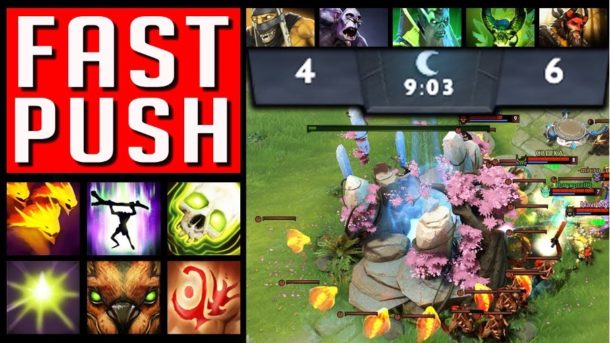
Dota 2 is all about getting stronger and turning it into an objective advantage or even a win. The fast push tactic suggests a team getting strong in the early game, faster than opponents. Players achieve it by playing strong early characters: Nature’s Prophet, Undying, Void Spirit, etc.
League of Legends: Split Pushing
Players don’t necessarily have to fight to win. Conversely, they can split and strive for the objectives: towers, inhibitors, and map bosses. That’s what the split pushing strategy suggests.
Such tactics are tough to play around. So many teams fail to counter split pushers and get behind in the game.
Apex Legends: Defensive Playing
Apex Legends has plenty of characters with unique abilities. Combining them helps you achieve a map goal. For instance, picking Horizon, Caustic, and Rampart allows setting up an unwavering defense.
Horizon will block the enemy’s grenades and slow them when they come close. Caustic will throw a couple of barrels, so opponents will have difficulty engaging. While Rampart places shields to shoot the enemies off. If this trio will reside in a proper building, they would be very hard to eliminate.


Download Minecraft PE 1.21.131 APK for Android
Minecraft Bedrock 1.21.131 is a focused hotfix update — improved Spear combat, two important bug fixes, and better overall stability on Android. No new content, but a noticeably smoother experience.
Spear Knockback Improvement
The window during which a charged Spear attack can apply knockback has been extended. This makes combat feel more reliable — the attack now connects as expected without requiring pinpoint timing, especially useful when fighting multiple mobs at once.
Spear Animation Alignment
Charge attack animations now accurately sync with the Spear’s three gameplay phases: Engaged, Tired, and Disengaged. What you see on screen now matches what the game engine is actually doing — making combat more readable and reducing guesswork in fights.
Performance & Stability
Frame drops on mid-range Android hardware have been reduced. Memory handling improvements prevent sudden freezes during long play sessions. World loading and chunk generation are more reliable, reducing terrain “pop-in” when exploring or moving quickly.
Multiplayer Improvements
Backend updates improve session stability when players join or leave. Fewer disconnects and smoother synchronisation across Bedrock servers. Marketplace content and add-ons also load more consistently during multiplayer sessions.
Adventuring Time Achievement Fixed — The achievement no longer unlocks early. It now correctly requires visiting at least 17 biomes on PC, matching the intended design.
Marketplace Escape Key Fixed — Pressing Escape after using the Marketplace search now reliably returns players to the previous menu instead of getting stuck in a loop.
Add-on World Loading Fixed — A bug that triggered a “Block” error when loading or creating worlds with multiple add-ons installed has been resolved.
Download the APK
Tap one of the Download buttons above. Choose the Standard (no music) version if storage is limited, or the Full version for the complete experience. The ARM64 build is recommended for modern phones.
Enable “Install Unknown Apps”
Go to Settings → Security (or Privacy) → Install unknown apps. Enable the permission for your browser or file manager. Android requires this for any APK installed outside Google Play.
Open the APK File
Open your Downloads folder, find the Minecraft 1.21.131 APK, and tap it to launch the system installer. Follow the on-screen prompts.
Install Over Existing Version
In most cases you can install 1.21.131 directly over your existing Minecraft without losing any worlds or progress. If you see a signature conflict error, uninstall first — but back up your worlds beforehand.
Launch and Sign In
Open Minecraft, sign in with your Microsoft/Xbox Live account, and your existing worlds will load normally. Online multiplayer, Realms, and Marketplace content all work as before.
Download Minecraft PE 1.20 APK for Android
Get the full Minecraft Bedrock 1.20 (Trails and Tales) APK for Android. Supports Xbox Live sign-in. Multiple versions available — stable releases and preview builds.
Download the APK File
Tap the Download button above for the version you want. The APK file will save to your device’s Downloads folder.
Enable “Install Unknown Apps”
Go to Settings → Security or Privacy → Install unknown apps. Enable it for your browser or file manager. Android requires this for any APK installed outside of Google Play.
Open the Downloaded File
Open your Downloads folder (or tap the notification), find the Minecraft APK, and tap it to start the installer.
Confirm Installation
Tap Install and wait for the process to complete. If you see a “signature conflict” error, uninstall your existing Minecraft version first, then retry.
Launch and Sign In with Xbox Live
Open Minecraft, sign in with your Microsoft/Xbox Live account to access multiplayer, Realms, and cross-platform features.
-
 Guides7 years ago
6 Proven Ways to Get more Instagram Likes on your Business Account
-
Mainstream12 years ago
BioWare: Mass Effect 4 to Benefit From Dropping Last-Gen, Will Not Share Template With Dragon Age: Inquisition
-
 Mainstream8 years ago
How to Buy Property & Safe Houses in GTA 5 (Grand Theft Auto 5)
-

 Guides2 years ago
Free Fire vs PUBG: Comparing Graphics, Gameplay, and More
-

 Guides2 years ago
50+ Free Fire ID and Passwords Login List (Giveaway) 2025
-
 Casual3 years ago
8 Ways to Fix Over-Extrusion and Under-Extrusion in 3D Printing
-

 Other2 years ago
Ajjubhai UID: Free Fire Details & Earnings
-

 Features2 years ago
Exploring Valorant eSports Stats: Unveiling the Metrics Behind Competitive Excellence