
Guides
13 Best Minecraft Survival House Ideas

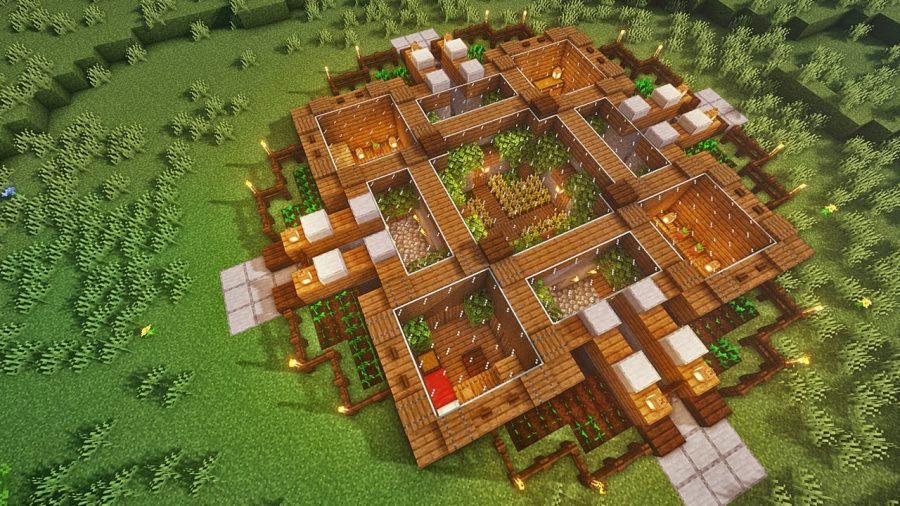
As Minecraft becomes popular more and more people want to play it and enjoy the thrill that comes along with this game. One of the common ways to enjoy this game is in survival mode. Survival mode brings all the fun to the game. It teaches you how to manage the level of hunger, how to avoid dying because of explosions of creepers. All this adds up to the fun and makes you wonder about a Minecraft survival house. It is not one of the popular things to do but it surely is lots of fun.
We have collated a list of the best Minecraft survival house ideas for you that you can try out. It is not just fun but also gives a fun twist to survival mode. Survival House Minecraft is quite a necessity once you start playing the game. It holds great importance as you face the challenges of survival mode. It will keep you safe from the evils of survival mode, there is no way to be safe without the best Minecraft survival house.
Other than that, it is fun to create a survival house. It is an opportunity to experiment with your creativity and you can test your imagination. Many people play Minecraft only for the fact that there is no limit to creation. You can create anything and everything as per your liking and imagination. If you are a newbie, creating bolder structures can be challenging.
To build anything, you need to have a clear picture in your mind about what you want to build. Likewise, it helps if you know what you want your survival house to look like. There are plenty of ideas for a survival house but to make your job a tiny bit easy, we have created a list of the 20 best Minecraft survival house ideas that will inspire you to build your own unique Survival House. Some of these ideas include easy Survival house Minecraft, simple Minecraft Survival house, small Minecraft survival house, and many more.
Here are the Best Minecraft Survival House Ideas
XL Survival Base
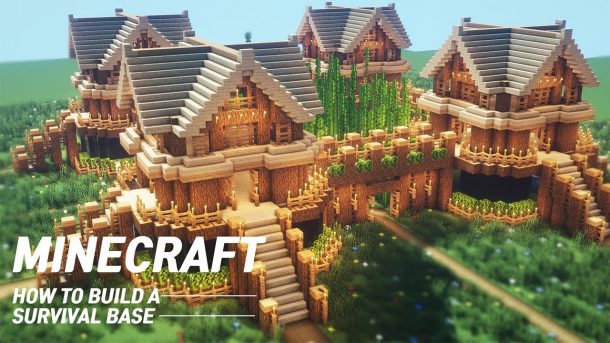
If you are looking for a big Minecraft survival house, this one’s for you. Zaypixel conjured up this XL base created out of woodblocks. It has a nice setup with a roof made of glass blocks and multiple levels. It looks spacious and elegant. You can even plant crops in the house. There are multiple farming options that you can explore that include growing Nether warts as well. It adds a fun element to your gameplay. Farming options allow you to have sufficient food for your survival and all the adventures in the new house.
Checkout 10 Best Minecraft Garden Ideas
Survival Mansion
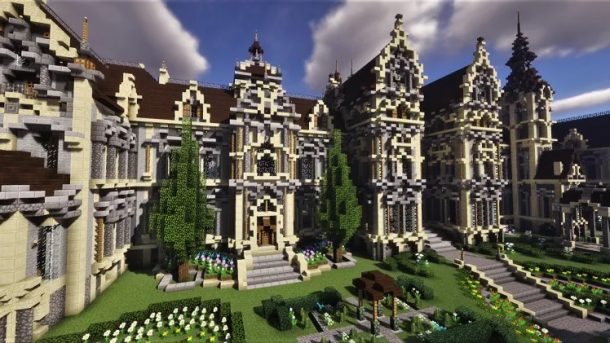
Follie in his video tutorial has created this survival house for everybody who enjoys luxury and easy availability of everything you need. This is one of the best Minecraft survival houses one can have. If you want to build it in a day you will require stone and stacks of wood. It involves various details and multiple structural challenges that make it all the more to create.
Ravine House
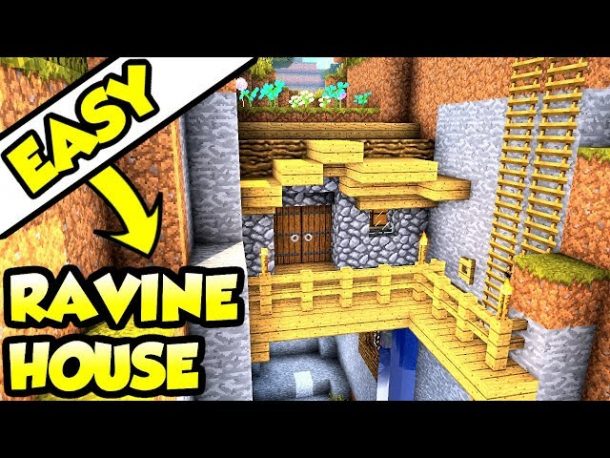
If you like unique houses, you can take inspiration from this house. A video created by NeoCubest suggests lots of details but don’t worry it is worth trying. It has Ravine as the base for the design. The outer frame of the base uses Cobblestone along with blocks of wood to embellish the interiors of the base. You can add your own creativity and add space for storage and add space for more furniture. This is a fun and unique house for anyone who loves to explore their creativity.
Checkout 10 of The Best Minecraft Treehouse Ideas
Spruce House
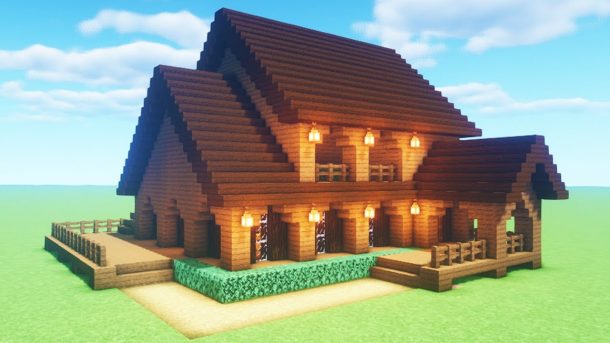
This easy survival house Minecraft is fun and aesthetic, it uses a rich color of dark brown. This simple Minecraft survival house is created by Zaypixel and entails Spruce blocks for the base. This can become an easy task if you find a wooden mountain or taiga biome for settling in. Building a survival home is a nice way to show your talents as a creator.
Two-Player Survival House
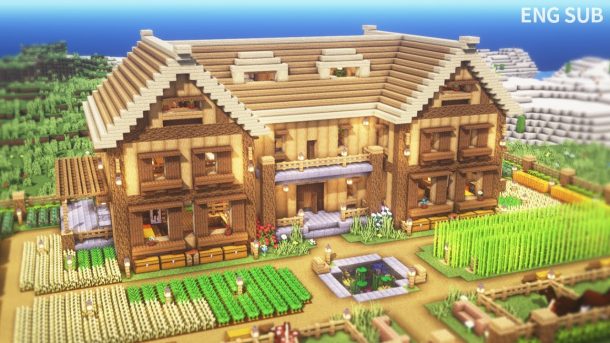
Wouldn’t it be fun if you could start a fun adventure with a friend? A two-player house is great as gameplay. You can collect resources to create this base that will be shared with a friend. A layout that is good is essential to build this simple survival Minecraft house. In the center of the main entrances that are two, you can have a Nether portal like the one shown in Heyimrobby’s video tutorial. You can also add an Enchanting table in the center along with some additional storage. The access to the bed can be direct because of this placement.
Checkout Best Minecraft Base Ideas
Survival Fortress
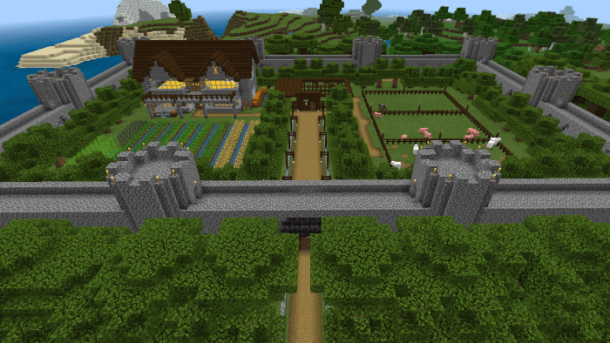
The fortress is a great challenge if you are up for it. It is not only challenging but fun. This can also be a Survival Minecraft mountain house as Fortresses are usually on a mountain. It requires a flat surface to build this structure and with a tower, in the center, it will look magnificent. This tower can function as a bedroom space as well. With a courtyard insight, it can be utilized for many reasons like a farm, keeping animals, Nether portal or to store belongings essential for you. Be sure to add a source of light to avoid any hostile mobs that can invade that space.
Underwater Base
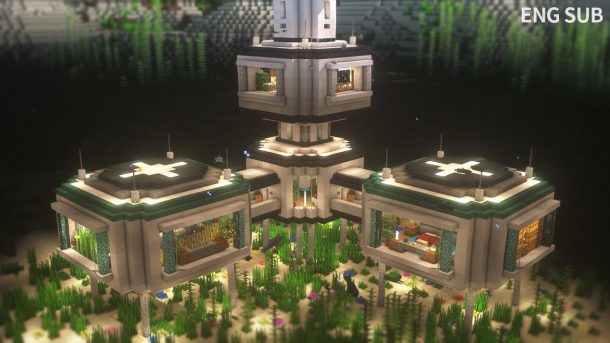
Who thought there could be an Underwater base, this Minecraft survival house is truly unique and amazing. This hideout is underwater! A video tutorial by Zaypixel shows how to create this underwater survival house Minecraft. It is aesthetic and a perfect place to be safe. It is built underwater. To view the beautiful aquatic mobs swimming around there is also a glass roof. A water-breathing potion is required to create this house or place a conduit that can keep you from drowning. This is a cute Minecraft survival house that you should take inspiration from and create one for yourself.
Checkout 11 of The Best Minecraft Bridge Designs & Ideas
Piglin House
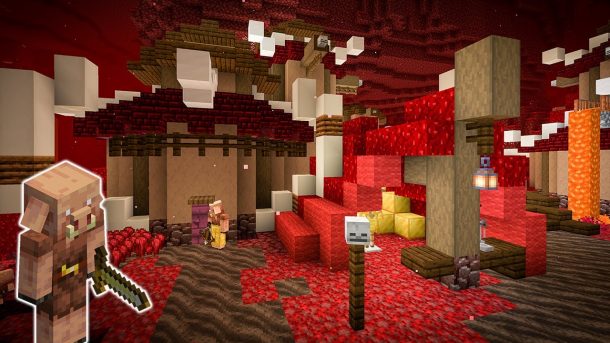
Do you think Nether is a good place to set up a place? Even though it is not a usual choice, there is no limitation in Minecraft. You should explore this idea if you think it cannot be done. It is daunting to know that in the Nether beds will explode each time to attempt to sleep in it. This Piglin house offers refuge while you explore the barren lands. You can be more creative and make a Piglin shape like in the video tutorial by ChimneySwift11 and fill up all the essentials in the interiors. A fun part about this design is the use of Respawn Anchor instead of a bed. The design naturally blends with the environment as all the resources are found in the Nether itself and it solely relies on that.
Ocean House
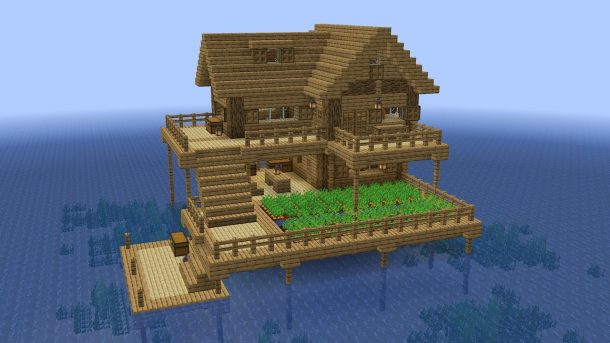
This Minecraft survival house will be exciting for many players. Creating an Ocean house brings fun as well as challenges. You might have to stay underwater for a long time or you might be bothered by drowned zombies. You can build this beautiful house on the water surface if you follow the suggestions by Random Steve Guy. This allows you to focus on the foundation and the house design that is traditional. You can try your luck and create this Minecraft survival house in one go.
Checkout 10 Best Cottagecore Minecraft House Ideas
Tower Survival House
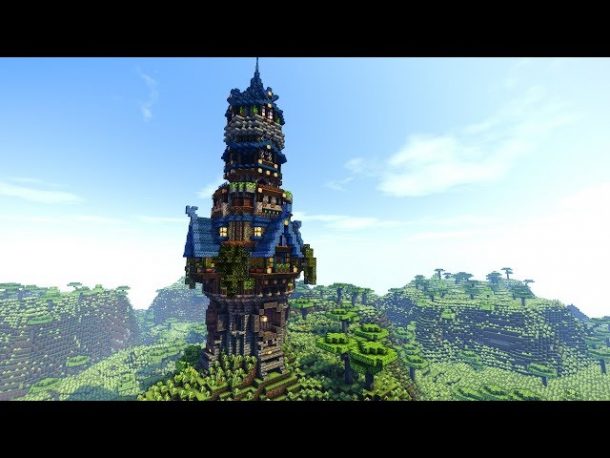
You should always know the surroundings to learn about any mobs that are hostile in Survival mode. It is best to know about it if you wander outside in the dark or want to explore caves. This Survival house design allows a 360-degree view of the surroundings as shown by itsMarloe. It also has all the essentials that fit well into a tall tower. Building this tower from the base up will require proper scaffolding. This is important especially if you don’t yet have the diamond armor that protects you from constant falls. You can also plant crops around the tower to have all the bare essentials ready for you.
Desert House
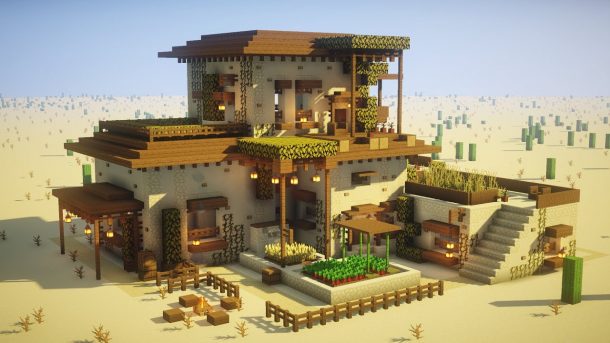
It is unusual that any player would like to build a Desert house in the desert biome but there will always be some who will say, why not? It is a unique idea and fun Minecraft survival house even though the desert biome is a place that is desolated, trees can’t be planted above the blocks of sand and under the sunlight, no husk can burn. However, Julious shows us in a video tutorial how much potential this desert biome has for a Minecraft survival house. Sandstone is used to create this house that has a lot of space to store your things and stay there safely at night.
Checkout 10 Best Minecraft Village Ideas That You Can Try
Stone House
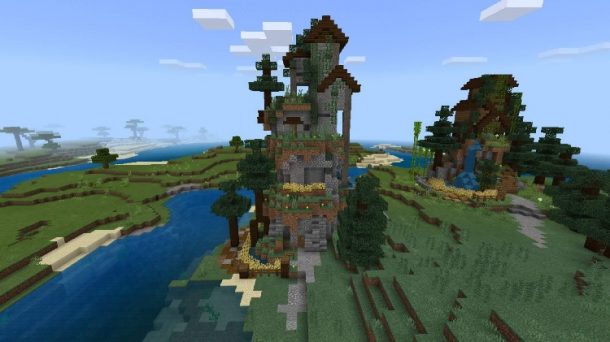
If you love a big Minecraft survival house, this house idea by TheMythicalSausage can be a good place to take the idea from. It is large and spacious. It uses Stone, wood, and cobblestone primarily to create the structure of the house. There is also a tower that is connected to the main building that looks lovely and functions as a storage place as well. The video tutorial is enjoyable and can be easily followed. It is also lovely to a smoking chimney that is created out of particles from the campfire.
Underground Base
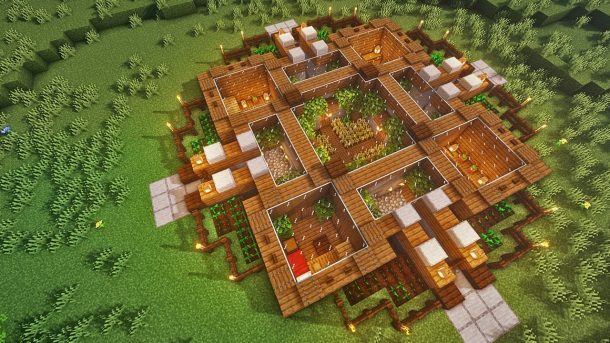
It is true that many players love to build houses with scenic views around and cultivable land around their house but why not build an underground Minecraft house that is safe and looks aesthetic too? This underground house is like a fun task, digging a big hole in the ground and creating something out of it is always enjoyable. Spudettis shows us how to create this elegant and spacious house. It can protect you from mobs that are hostile. This house also has a glass ceiling that allows you to admire the night sky and its beauty. Get the shovels out and start the adventure underground.
Checkout 15 of The Best Minecraft Barn Ideas
Conclusion
These were the 20 best Minecraft survival house ideas that are fun and challenging. You can experiment with these ideas and create your own versions of them. It is going to make gameplay more fun and enjoyable for you. You can play along with friends and create better houses and stay safe in the survival world. All these unique ideas require an eye for detail and creativity.





Download Minecraft PE 1.21.131 APK for Android
Minecraft Bedrock 1.21.131 is a focused hotfix update — improved Spear combat, two important bug fixes, and better overall stability on Android. No new content, but a noticeably smoother experience.
Spear Knockback Improvement
The window during which a charged Spear attack can apply knockback has been extended. This makes combat feel more reliable — the attack now connects as expected without requiring pinpoint timing, especially useful when fighting multiple mobs at once.
Spear Animation Alignment
Charge attack animations now accurately sync with the Spear’s three gameplay phases: Engaged, Tired, and Disengaged. What you see on screen now matches what the game engine is actually doing — making combat more readable and reducing guesswork in fights.
Performance & Stability
Frame drops on mid-range Android hardware have been reduced. Memory handling improvements prevent sudden freezes during long play sessions. World loading and chunk generation are more reliable, reducing terrain “pop-in” when exploring or moving quickly.
Multiplayer Improvements
Backend updates improve session stability when players join or leave. Fewer disconnects and smoother synchronisation across Bedrock servers. Marketplace content and add-ons also load more consistently during multiplayer sessions.
Adventuring Time Achievement Fixed — The achievement no longer unlocks early. It now correctly requires visiting at least 17 biomes on PC, matching the intended design.
Marketplace Escape Key Fixed — Pressing Escape after using the Marketplace search now reliably returns players to the previous menu instead of getting stuck in a loop.
Add-on World Loading Fixed — A bug that triggered a “Block” error when loading or creating worlds with multiple add-ons installed has been resolved.
Download the APK
Tap one of the Download buttons above. Choose the Standard (no music) version if storage is limited, or the Full version for the complete experience. The ARM64 build is recommended for modern phones.
Enable “Install Unknown Apps”
Go to Settings → Security (or Privacy) → Install unknown apps. Enable the permission for your browser or file manager. Android requires this for any APK installed outside Google Play.
Open the APK File
Open your Downloads folder, find the Minecraft 1.21.131 APK, and tap it to launch the system installer. Follow the on-screen prompts.
Install Over Existing Version
In most cases you can install 1.21.131 directly over your existing Minecraft without losing any worlds or progress. If you see a signature conflict error, uninstall first — but back up your worlds beforehand.
Launch and Sign In
Open Minecraft, sign in with your Microsoft/Xbox Live account, and your existing worlds will load normally. Online multiplayer, Realms, and Marketplace content all work as before.
Download Minecraft PE 1.20 APK for Android
Get the full Minecraft Bedrock 1.20 (Trails and Tales) APK for Android. Supports Xbox Live sign-in. Multiple versions available — stable releases and preview builds.
Download the APK File
Tap the Download button above for the version you want. The APK file will save to your device’s Downloads folder.
Enable “Install Unknown Apps”
Go to Settings → Security or Privacy → Install unknown apps. Enable it for your browser or file manager. Android requires this for any APK installed outside of Google Play.
Open the Downloaded File
Open your Downloads folder (or tap the notification), find the Minecraft APK, and tap it to start the installer.
Confirm Installation
Tap Install and wait for the process to complete. If you see a “signature conflict” error, uninstall your existing Minecraft version first, then retry.
Launch and Sign In with Xbox Live
Open Minecraft, sign in with your Microsoft/Xbox Live account to access multiplayer, Realms, and cross-platform features.
-
 Guides7 years ago
6 Proven Ways to Get more Instagram Likes on your Business Account
-
Mainstream12 years ago
BioWare: Mass Effect 4 to Benefit From Dropping Last-Gen, Will Not Share Template With Dragon Age: Inquisition
-
 Mainstream8 years ago
How to Buy Property & Safe Houses in GTA 5 (Grand Theft Auto 5)
-

 Guides2 years ago
Free Fire vs PUBG: Comparing Graphics, Gameplay, and More
-

 Guides2 years ago
50+ Free Fire ID and Passwords Login List (Giveaway) 2025
-
 Casual3 years ago
8 Ways to Fix Over-Extrusion and Under-Extrusion in 3D Printing
-

 Other3 years ago
Ajjubhai UID: Free Fire Details & Earnings
-

 Features2 years ago
Exploring Valorant eSports Stats: Unveiling the Metrics Behind Competitive Excellence