
Guides
Epic War 3 Tips and Tricks

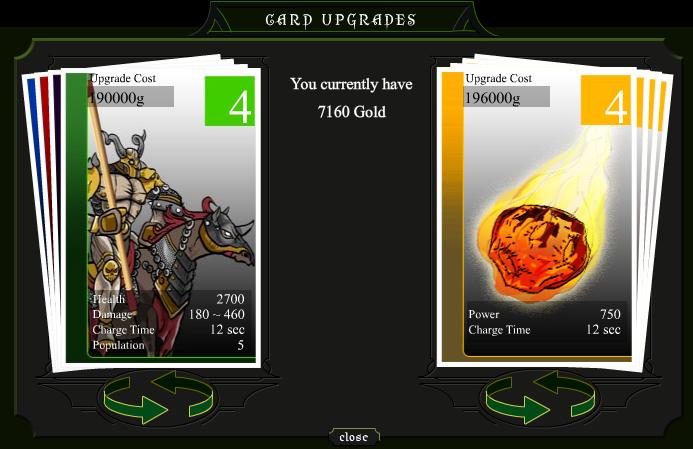 Today’s free flash game of the day award went to Epic War 3, an amazing mix of role playing elements, collectible card game and tactics. The game is incredibly challenging, so I have decided to create a small tips and tricks feature to help those who keep getting their arse kicked in the game. I am aware that many other tactics could be applied in Epic War 3, this is just my way of playing – and I did win after a long time. Check out the Epic War 3 tips and tricks below:
1. I suggest you start the game with Rembrant the Bloody, since he has a really nice and powerful starting deck.
2. It would be wise to eliminate players one by one. Start with the one to the right, then continue to the left.
3. Remember to always upgrade your cards! It would be good to have a strategy, since prices will get very high. I would recommend upgrading the green creatures first, since they are fast and only take a few seconds to be generated. Improving the meteor next is your priority, then continue to upgrade the green creatures alongside the archers. Once you have them to level 3, they should posses enough power until the later stages of the game.
4. Always protect your archers! Keep them way behind the melee forces and make sure they’re always protected. They are your most powerful weapon!
5. Use the skill cards as soon as possible. Try aiming at the enemies that wait outside the castle – in Epic War 3, the AI tends to stack up the most powerful forces there, but if you hit them, they will charge. If you don’t, you’re lost.
6. It would be best if you played all the battles yourself, the computer might lose some for you.
7. The most dangerous, in my opinion, enemy troops, are the purple spell casters (those who send waves of fire at you). They usually keep their distance, and you can only kill them with the skill cards. Make sure you do so as soon as they appear, otherwise they might cost you the battle. I have also noticed that sometimes they tend to remain hidden if your forces are already charging the enemy castle, so it would be wise to retreat a bit (archers first!) then return once they are killed. Once my entire fight was lost because I didn’t do so!
8. Save often, preferably after each fight. In the later stages of the game, it will be very time consuming to end a battle.
9. Do not charge as soon as the battle starts! Wait for some seconds to get your first basic troops (goblins and zombies) and send then close to the end of the first screen. Use the skill cards until you have more troops, arrange them accordingly (archers in the back, hero in between to hit and run, melee in front) and charge as fast as possible. After the AI sends its first wave, it will last a while until they will come back again. Until then, you will have taken at least half of the castle’s health and you will be able to hit them hard with the skill cards.
10. Make sure to always click on the units and order them where to go. If one unit dies, it will not come to battle or “remember” its last placement. Instead, it will stay in front of the castle. But you will always need them at the other end, so keep clicking and ordering them to move where they should be.
11. Be patient. If it somehow happens for you to lose a battle, it’s not the end of the world. You still get some experience and money, and keep going!
Now, if you are interested, I’m showing you my deck halfway through the game. It is a really, really powerful deck and I have lost no battles with it!
Unit cards used: Goblin Soldiers (Maximum level), Centaur Archer (level 4), Zombies (maximum level), Magic Cannon (level 3), Phantom Armor (level 3) and Black Knight (level 4).
Skill Cards Used: Comet Shot (level 4), Rain of arrows (level 3), Meteor strike (level 2).






Download Minecraft PE 1.21.131 APK for Android
Minecraft Bedrock 1.21.131 is a focused hotfix update — improved Spear combat, two important bug fixes, and better overall stability on Android. No new content, but a noticeably smoother experience.
Spear Knockback Improvement
The window during which a charged Spear attack can apply knockback has been extended. This makes combat feel more reliable — the attack now connects as expected without requiring pinpoint timing, especially useful when fighting multiple mobs at once.
Spear Animation Alignment
Charge attack animations now accurately sync with the Spear’s three gameplay phases: Engaged, Tired, and Disengaged. What you see on screen now matches what the game engine is actually doing — making combat more readable and reducing guesswork in fights.
Performance & Stability
Frame drops on mid-range Android hardware have been reduced. Memory handling improvements prevent sudden freezes during long play sessions. World loading and chunk generation are more reliable, reducing terrain “pop-in” when exploring or moving quickly.
Multiplayer Improvements
Backend updates improve session stability when players join or leave. Fewer disconnects and smoother synchronisation across Bedrock servers. Marketplace content and add-ons also load more consistently during multiplayer sessions.
Adventuring Time Achievement Fixed — The achievement no longer unlocks early. It now correctly requires visiting at least 17 biomes on PC, matching the intended design.
Marketplace Escape Key Fixed — Pressing Escape after using the Marketplace search now reliably returns players to the previous menu instead of getting stuck in a loop.
Add-on World Loading Fixed — A bug that triggered a “Block” error when loading or creating worlds with multiple add-ons installed has been resolved.
Download the APK
Tap one of the Download buttons above. Choose the Standard (no music) version if storage is limited, or the Full version for the complete experience. The ARM64 build is recommended for modern phones.
Enable “Install Unknown Apps”
Go to Settings → Security (or Privacy) → Install unknown apps. Enable the permission for your browser or file manager. Android requires this for any APK installed outside Google Play.
Open the APK File
Open your Downloads folder, find the Minecraft 1.21.131 APK, and tap it to launch the system installer. Follow the on-screen prompts.
Install Over Existing Version
In most cases you can install 1.21.131 directly over your existing Minecraft without losing any worlds or progress. If you see a signature conflict error, uninstall first — but back up your worlds beforehand.
Launch and Sign In
Open Minecraft, sign in with your Microsoft/Xbox Live account, and your existing worlds will load normally. Online multiplayer, Realms, and Marketplace content all work as before.
Download Minecraft PE 1.20 APK for Android
Get the full Minecraft Bedrock 1.20 (Trails and Tales) APK for Android. Supports Xbox Live sign-in. Multiple versions available — stable releases and preview builds.
Download the APK File
Tap the Download button above for the version you want. The APK file will save to your device’s Downloads folder.
Enable “Install Unknown Apps”
Go to Settings → Security or Privacy → Install unknown apps. Enable it for your browser or file manager. Android requires this for any APK installed outside of Google Play.
Open the Downloaded File
Open your Downloads folder (or tap the notification), find the Minecraft APK, and tap it to start the installer.
Confirm Installation
Tap Install and wait for the process to complete. If you see a “signature conflict” error, uninstall your existing Minecraft version first, then retry.
Launch and Sign In with Xbox Live
Open Minecraft, sign in with your Microsoft/Xbox Live account to access multiplayer, Realms, and cross-platform features.
-
 Guides6 years ago
6 Proven Ways to Get more Instagram Likes on your Business Account
-
Mainstream12 years ago
BioWare: Mass Effect 4 to Benefit From Dropping Last-Gen, Will Not Share Template With Dragon Age: Inquisition
-
 Mainstream8 years ago
How to Buy Property & Safe Houses in GTA 5 (Grand Theft Auto 5)
-

 Guides2 years ago
Free Fire vs PUBG: Comparing Graphics, Gameplay, and More
-

 Guides2 years ago
50+ Free Fire ID and Passwords Login List (Giveaway) 2025
-
 Casual3 years ago
8 Ways to Fix Over-Extrusion and Under-Extrusion in 3D Printing
-

 Other2 years ago
Ajjubhai UID: Free Fire Details & Earnings
-

 Features2 years ago
Exploring Valorant eSports Stats: Unveiling the Metrics Behind Competitive Excellence
Bart
June 28, 2009 at 2:54 am
what is “the invinvible achiement” card that you can get but i cant find it on the equip screen
EW3 Player
June 29, 2009 at 1:04 am
It’s funny because I selected Rembrant too, I liked the nice blend of soldiers he had. Also, how do you get more cards? And I have the same ones as you…
Units: Goblin (5), Centaur Archer (5), Zombie (5), Magic Cannon (5), Phantom (5), Knight (5)
Skills: Comet (4), Arrows (3), Meteor (4)
I’ve only used auto once and it was on defense and I won. Also, I only need 2 more castles to have control of the whole land. And I’m on Turn 12.
ei
June 29, 2009 at 1:10 am
to get all the cards you need to beat the game with all characters and beat the cave levels
fawaz
June 30, 2009 at 2:38 am
invinceibility is otherwise called atehnas protection
bob
June 30, 2009 at 10:35 pm
i stradegy I use is send dragon riders out mabee one of those purple ones while your remaining creatures grow your dragon riders are tearing them apart
asdf
July 14, 2009 at 10:17 pm
invinciblity u get from that dark blue guy at medium level. best army is probably
Tanks: Dragon Riders and Yeti
Ranged: Mermaid, Succubi (purple guys), centaurs and cannons all at level 5
u can beat cave of trials up to level 4 with this combination
skill cards: Phoenix, rain of arrows, heal, meteor (u can add more)
u can also use a hobbit spam army :D
u just put in the people with highest population and u can demolish a castle in 10 seconds :O
i beat the game on the second time with a hobbit army
reegz
August 22, 2009 at 11:28 am
how do u get rain of arrows?
Minimee
September 23, 2009 at 10:20 am
i beat the first 4 cave of trials with these cards. Units: Dragon Riders, yeti, black knights, witches, magic cannons and succubes. Skills: Pheonix strike, anethes protection, the healing one, zeus wrath, double damage and rain of arrows. i just kept sendin units forward. do cave of trial 5 first as u get the zeus wrath card from completing it. for that i used mermaids, witches, centuer achers, cannons, black knights and succubes, for spells use pheonix strike and other area spells like lightning. also use rain of arrows.
conzable
January 24, 2010 at 5:35 am
ok i have to tell you zombies arent good and neither are goblins try to eliminate them from your deck once you get far enough. here is my team: tuarus maxed, centaur archers maxed, black knight maxed, frost giant maxed, magic cannons maxed, and phantom armors maxed. a also like like succubus, witches and mermaids.
lightning and ice do massive damage when upgraded and can kill units instantaniously, so use thouse when they call the war horn to kill that entire wave. also you can use the athenas protection and hercules strength when by the castle to help[ destroy it.
Regodocu
January 30, 2010 at 8:39 pm
Ses são ruim heim? Não ganharam cave nivel 5!! Eu em 1 dia terminei o jogo kkkkkkkk
somebody
February 19, 2010 at 12:39 pm
guys, if you need a good deck then I recommend mine (I beat all caves of trial with this): all ranged units max out level (5) and yeti (5) and earth dragon (5) with spells: fire ball, thunder, arrow rain, hercules strength and the ice thingy all max out level
somebody
February 20, 2010 at 5:06 am
sorry, I meant fire titan, not earth dragon and I recommend the green guy as a hero because he has the most mana at the highest level. For cave 4, watch for the 3 or 4 titans so back up your own titan with something like hercules strength cause fire titan lands the most hits then you should win. For cave 5, watchout for the invincible grunt cause it one it kills you, just stun it the whole time andyou shuold win.
snax
March 4, 2010 at 5:46 am
By far, my best deck. (Titan-free)
Unit:
1)Fire Succubus (max)
2)Goblin Soldier (max) or you could use the Bomber (max)
3)Dragon Rider (max)
4)Frost Giant (Lvl 3 but max for peak performance)
5)Magic Cannon (max)
6)Mermaid (max)
Skill:
1)Healing Wave(Lvl 4 but max for peak performance)
2)Comet Shoot(max) BEAST!!!
3)Hercule’s Strength (Lvl 4 but max for peak performance)
Guide:
Once you have all these, next things you should try to equip is the Phoenix Strike and Freeze Trap skills if you have enough mana. But to start the level, simply keep sending bombers(if you’re using them) one after another until you build up enough troops. If you’re using goblins, send Dragon Rider’s instead. Keep using the Comet Shoot until you build up around 20-25 goblins. By then, you should have enough of every troop. Use the Comet Shoot again and hit the Hero on the opponent’s side and he will charge. Your Dragon Riders will take him out with ease. When the hero is down, send all your troops forward and commence battle with the castle. Listen for the horn, that’ll initiate another wave coming from the enemy. Shoot the Comet right in front of the castle where they spawn once you hear it. If you have, use the Freeze Trap as well. If you are getting backed up, use the Phoenix Strike and he will wipe the screen clean (again, if you are using it) then continue to charge. Continue this and the rest of the game is cake. Goblins are really good in numbers, they hit 180-200 average. With around 30 of them, do the math. That can wipe out the hero. The only thing bad about them is that they are really weak health wise. With the Hercule’s Strength, they are really strong and I tend to use them a lot. Happy gaming!
dracomaster
March 9, 2010 at 2:40 am
how do i get the black night? it seems impossible, sorry i’m a beginner
dark wizard 25
July 19, 2010 at 10:01 pm
batle loads of the enimies to get the black night because i practised and eventually you will get it hopefully just like i did good luck
alex01230
March 15, 2010 at 4:04 am
Get rembrant the bloody.equipt the cards.Then,get in a battle.Wait for a couple of seconds.Go to the skill card you equipted.Target it on the leader on the other side.He will charge after you without his guards (the guards stay at the castle on the other side).Your army will attck him,then he will die.Charge forward and attck the other side.You win
Marwan
April 3, 2010 at 9:00 am
Guys cheatengine get all upgrades easy lol.
Also win game to do newgameplus.
Lol also if u use cheat engine get all titans
and put them all three in with any others
wait for them to spawn and byebye badguys
note: don’t do this for easy castles, waste
of time. Thereya go if u listen to this u will
win lol don’t worry cheat engine is safe and
often updated…I am gonna make a site soon.
Check it.
dark wizard 25
July 19, 2010 at 9:56 pm
deck of cards
witches (maximum)
black nights (maximum)
gobilins (maximum)
zombies (maximum)
centur archures (maximum)
magic cannon (maximum)
bomber (maximum)
tarius warrior (maximum)
black night (maximum)
dwarf enginer (maximum)
skill cards
healing wave (maximum)
hercule’s strength (maximum)
lightning bolt (maximum)
groups of the enimies in the cave of the trails wait until the enimies are there because you can have more monsters to battle enimies on the game
dark wizard 25
July 20, 2010 at 8:45 pm
my new deck
gobilin soldier lv5
bomber lv5
dragon rider lv5
taraus warrior lv5
fire succubus lv4
dwarf enginer lv5
witch lv5
centaur archer lv5
black knight lv5
magic cannon lv5
skill cards
healing wave lv5
comet shoot lv5
phoenix strike lv4
hercule’s strength lv5
lightning bolt lv5
how do you get the rest of the skill cards and the monster one’s because i have almost finished second game level
dark wizard 25
July 20, 2010 at 8:54 pm
hey guys just playing on epicwar 3 just versing the yellow only two to go then i have completed another game mode do you know any cheats if you could tell me because i am desperate for more cards
dark star 100
August 1, 2010 at 1:28 pm
almost got all the cards on epicwar 3 going to play on epicwar 4
ice king
August 1, 2010 at 1:31 pm
how do you get all the cards and complete the cave of trial 3 4 and 5
xXH455YXx
July 21, 2011 at 9:30 pm
how do you build more units?