
iOS Games
Subway Exits New York Walkthrough (Level 1 – Level 16)

After completing the first 11 levels of Subway Exits for iPhone in Washington, it’s time to move forward and try the New York challenge which brings a new set of challenges which are extremely inventive and manage to get our total attention, but are also difficult, meaning that a walkthrough is more than welcome. And that we have today: Subway Exits New York walkthrough!
So check out the Subway Exits walkthrough below for the New York walkthrough (the first 16 levels) and we can only hope that future updates will make this great game match its potential again!
Subway Exits New York Level 1 Walkthrough
There’s a Play word on the train – tap it to open the door and proceed.
Subway Exits New York Level 2 Walkthrough
Press the red button under the traffic lights and keep it pressed until the doors open.
Subway Exits New York Level 3 Walkthrough
Tilt the phone to the right so that the train arrives in station. Hold the door in the spotlight until a green button appears, and when it does, quickly tap it to proceed to the next level.
Subway Exits New York Level 4 Walkthrough
Tap the animals in the following order (as indicated by the graph): Bull, Bull, Bear, Bull, Bea, Bull, Bear, Bear
Subway Exits New York Level 5 Walkthrough
– Open first door by tapping it
– Open second door by tilting your phone to the left to open the left part, then right to open the right part.
– Open third door by tapping and holding it until it opens.
– Open fourth door by shaking the phone until a pass falls, then use it on the door.
Subway Exits New York Level 6 Walkthrough
Press the Chinese symbol to the left. Many symbols will fall, you need to tap the one that looks like the symbol you have already pressed. A stick will fall – pick it up and use it on the right symbol.
Subway Exits New York Level 7 Walkthrough
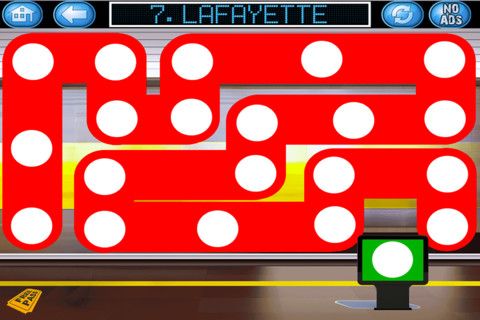
Tap and hold your finger on the white dots, then move in the maze without slipping out of it (you start on the left side and end at the green sign).
Subway Exits New York Level 8 Walkthrough
You have to make the diamond tips point as the number one on the price tags indicates. Please have in mind that they need to match the color (e.g. first diamond points at 5 o’clock because the 1 on the green price tag is there; second diamond points at the top, 12 o’clock, because the 1 on the blue tag is up and so on)
Subway Exits New York Level 9 Walkthrough
You need to follow the direction indicated by the arrows and swipe on the screen as they indicate. You can now move the pillar to the right and reveal a switch – tap it and do the whole thing again to see what circles colors to select (left is blue, top is yellow, right is red, bottom is green).
Subway Exits New York Level 10 Walkthrough
This is a simple memory game in which you have to match the cards in pairs. You tap cards to reveal them and match them.
Subway Exits New York Level 11 Walkthrough
Make the switches/signs/whatevers in the middle point in the following directions: top left one points right, top right one points down, bottom left one points up and bottom right one points left.
Subway Exits New York Level 12 Walkthrough
Tap the Emergency Toolbox in the lower left corner and take the tools, then tap the three broken panels. Notice that there are some wires that are destroyed: you have to tap them and hold them all at the same time, and while you keep them pressed, touch the call button under the traffic lights.
Subway Exits New York Level 13 Walkthrough
You have to combine the colors from the left side with colors from the right side using the same order. So combine at the top left yellow with red (get orange), middle top: blue and yellow (get green) and so on.
Subway Exits New York Level 14 Walkthrough
Move the pillar to the left to reveal one more light. Quickly tap the lights from right to left – the goal being to have all the lights on at the same time. When this happens, the train will come.
Subway Exits New York Level 15 Walkthrough
From left to right, you should have the following number of bars on each column: 3 bars, 6 bars, 1 bar, 4 bars, 2 bars, 5 bars. Touch the speaker to play the tune and the train will come.
Subway Exits New York Level 16 Walkthrough
Drag down the three items you can see in the upper part of the screen to reveal some items. Turn the item to the left into clouds and rain, turn the right one into sun and the middle one into rainbow (with colors Red, Orange, Yellow, Green, Blue, Violet)
And this is it! The 16 Levels or Subway Exits New York are complete, as well as this walkthrough. Hopefully, more levels will be released soon and they will be just as challenging and fun as these ones are.



Since most Canadians prefer playing casino games on their smartphone, online casinos have optimized their sites to ensure you have a seamless gaming experience. Moreover, some sites now have dedicated apps for Android and iOS. These apps are optimized to ensure the graphics and visuals remain unchanged regardless of the screen size. In this article, we will discuss some of the casino games you can play on your iPhone either via the iOS app or using a mobile web browser such as Safari.
How to Choose an iPhone Casino
While most casino sites today are optimized for mobile devices, not all iPhone casinos provide the same level of service, game variety, or reliability. To ensure a positive experience, Canadians should keep several key factors in mind when selecting a mobile casino.
Licensing is the first and most important consideration. Make sure the platform is legally registered with a recognized authority, such as the Kahnawake Gambling Commission or iGaming Ontario. These regulators enforce standards that protect players and ensure games are fair.
The selection of games is another critical factor. A strong mobile casino should feature a broad mix of options, including online slots, live dealer tables, and specialty games. Games developed by trusted providers like NetEnt, Microgaming, or Playtech usually come with better visuals, faster gameplay, and a more trustworthy reputation.
Bonuses often come in handy, especially if you are looking to boost your account. However, some offers have strict terms and conditions. Look for casinos that provide generous bonuses with transparent and reasonable wagering terms. Regular offers like reload bonuses, free spins, and loyalty rewards also enhance the gaming experience.
Reliable customer service is essential, especially when it comes to resolving technical issues or questions about withdrawals. The best iPhone casinos offer 24/7 customer support through live chat or email, ensuring assistance is always within reach.
Best Casino Games for iPhone in 2025
iPhone users in Canada have access to a wide selection of high-quality real-money games. These games are optimized to work seamlessly on iOS, delivering responsive touch controls, HD visuals, and fast loading times.
Online slots are among the most popular game categories available to iPhone users. With thousands of themes to choose from, players can go on mythical adventures, visit ancient civilizations, or enjoy modern action-packed storylines. Game types range from simple three-reel machines to feature-rich five-reel titles with dynamic paylines, multipliers, and bonus rounds. Many also come with high Return to Player (RTP) rates and the chance to win progressive jackpots.
Many Canadians also take advantage of free slots offered by mobile casinos. These demo versions allow you to try out games without spending real money. The gameplay, bonus rounds, and features are the same as in the full versions, making them ideal if you want to learn the rules or simply want to play for fun with no risk. Free slots are a great way to try new titles before deciding to wager real funds.
Roulette is another favorite among Canadian players. Whether you’re spinning the wheel on an RNG-based game or interacting with a live dealer, iPhone apps provide a realistic casino experience. RNG versions rely on certified algorithms to ensure fairness, while live dealer games allow real-time interaction with professional croupiers. Popular options include European Roulette, Premium French Roulette, and Immersive Roulette.
Blackjack also ranks high on the list of top iPhone casino games. The goal in this game is to get a hand value closer to 21 than the dealer without going over. Mobile blackjack titles often feature polished interfaces and variations that adjust rules and odds slightly. Multi-Hand Blackjack and Atlantic City Blackjack are well-suited for both beginners and seasoned card players.
Baccarat is another excellent choice for iPhone users who enjoy card-based games with simple rules. It involves predicting whether the banker’s hand or the player’s hand will be closest to a total of nine, or if the round will result in a tie. Both live dealer and virtual baccarat games are available in Canadian iPhone casinos, often with flexible betting ranges to accommodate all player types.
Poker enthusiasts are not left out. Many iPhone casinos feature a solid lineup of video poker titles, such as Jacks or Better and Deuces Wild. These games mix strategy and speed, offering single-hand and multi-hand options along with bonus features.
How to Choose an iPhone Casino
To find the best iPhone casinos, it is advised to test several sites to ensure they meet your preferences. Start with a background and security assessment. Verify the casino’s licensing credentials, partnerships with software providers, and the use of SSL encryption for data protection. This ensures the platform is safe for real money play and secure when handling sensitive information.
Next, test the deposit process. This will help you understand how fast and smooth the transaction is. Additionally, check the available payment methods, including cards, e-wallets, and crypto, as this will give you flexibility to select the most convenient option.
After you’ve deposited, explore the casino’s game library. The best iPhone casinos offer a range of games, including popular slots, table games, and live casino games. Also, test the compatibility of these games on your iPhone to confirm that all games load properly and perform without lag or glitches.
Customer service is another key aspect to consider. You can contact the support team through available channels to check response times and overall helpfulness. This step is critical, especially if you run into issues with payments or gameplay.

Horse racing is a globally spread sport with billions of fans worldwide. The thrills of the races and the excitement of the betting make horse racing quite popular among adrenaline rush seekers.
However, unlike other sports like football or basketball that you can actually try in your backyard, becoming a racehorse rider is out of reach for most people. But all hope for our fellow race lovers is not lost and the gaming world comes to the rescue.
We are talking about horse racing simulation games where you can pick or breed your own horse, participate in online racing tournaments, earn prestige, take care of your horse, and much more.
Horse racing video games are perfect when it comes to getting the bigger picture of the sport and familiarizing yourself with other aspects apart from racing, like stable management, breeding, and finance management.
On top of that, horse racing video games can help you understand how the sport works, which may help you with the next bet you make on TwinSpires.
Fortunately, there are plenty of horse racing games for iOS, and in today’s article, we will highlight some of the best that you should try.
Rival Stars Horse Racing
This is a game made by a legendary horse race video game developer called PikPok and it is without a doubt one of the best horse racing games available for iOS right now.
The graphics look incredible for a mobile game. They are quite realistic, and the horse movement and the design of the tracks also give you the feel that you are participating in a real-world race.
Rival Stars Horse Racing has quite a fast pace, where you can complete some quests and upgrade your stable, but the focus is on the races, as it should be.
When we talk about the racing part of the game, every racetrack that you unlock offers something new. You get to race at different lengths and surfaces. But let’s focus on the important part, race mechanics.
You can steer the horse, brake, and activate their sprint ability. The horse’s performance is based on multiple factors such as ground consistency, position, race length, previous races, and much more.
Rival Stars Horse Racing also has a quite good breeding, training, and managing system. On top of that, there are many different horse coat colors and breeds. Unlike other games like Zelda where you can get a gold horse, Rival Stars Horse Racing focuses on realism. All of the horses have natural coat colors and traits.
You get to collect or breed horses, transform foals to feed, and upgrade facilities to unlock more options to progress.
The only thing that is missing from the game is the audience on the races since the race courses feel a bit empty with nobody around.
Horse Racing Manager 2024
This is a game that has a rather different approach than Rival Stars Horse Racing. It is focused more on the managing part of horse racing rather than on the actual gameplay and racing. You are in control of your business operation and your goal is to succeed in the world of horse racing and earn money.
You don’t have an impact on the races, and you cannot control your horse. The races are simulated, and the outcome depends on your horse’s stats and abilities.
That’s why horse training, and breeding a champion horse play a really important role in the game.
The best thing about Horse Racing Manager 2024 is the ability to race online. There are live PVP races that occur every 5 minutes and everyone can participate in them.
This is the perfect game if you want to learn what’s happening behind the curtains of horse racing as a sport. You are in control of your breeding rights that you can sell, as well as the age and career path of your horse.
It is an interesting game, especially for those who are not afraid of data and analysis.
iHorse Racing
This is a similar game to Rival Stars Horse Racing but with worse graphics, and fewer options. This game has multiple features like horse training, stable management, horse auction, race entries, CLU-jockey hiring system, and world jockey ranking, and you can connect your Facebook profile to invite friends.
To be honest, the graphics and gameplay of the game are fun and engaging, but I’d still go for Rival Stars Horse Racing, especially if you like a more realistic horse racing game.
Pocket Stables
Let’s drop down all the realism and focus on some retro 2D gameplay. For all retro game lovers who have a passion for horse racing, Pocket Stables is just the perfect game. At first glance, this game might look simple, but it actually has many features that make it even more fun.
For starters, you can build training facilities where you can increase your horse’s stats. Additionally, not all horses are the same and your goal should be to find a horse with the right balance of speed, stamina, and intensity.
As you win races, you’ll receive prizes, that can be used to upgrade your stable and give you better ways to breed a faster horse.
It’s fun, casual, and quite cute. Plus, you get to build your horse racing community and hire people that will take care of your stable.

It’s crazy to think mobile games started with super basic stuff like Snake on old-school Nokia phones. Now, thanks to touchscreens and motion sensors, playing games on our phones feels more immersive than ever. Whether it’s swiping to cast spells, tilting to steer race cars, or just furiously tapping buttons, mobile gaming has come a long way from static keypads of the past.
How It Was
In the beginning, little keypads were the only controls we had to work with. Remember playing Brick Breaker on their BlackBerry, anyone? Then, the accelerometer changed everything. Suddenly, we could just tilt our phones to do all kinds of things like aim angry birds, balance stacks of blocks, even steer cars in racing games. Way better than pressing little arrows!
Of course, as screens got more advanced, mobile games exploded into all kinds of genres, from puzzles to 3D adventures. Multitouch displays, in particular, are what really enabled natural feeling gesture controls.
Swiping Changes the Game

These days, swiping is easily one of the most common ways we interact with mobile games. You’ll find it everywhere, from temples you raid in endless runners like Temple Run to baseball diamonds when batting in MLB Tap Sports Baseball. Swiping not only feels super intuitive but also adds velocity and immediacy, perfect for fast-paced games.
Even slower-paced games use swipes for all kinds of game mechanics, like directing troops across battlefields in strategy games such as Clash of Clans. No matter the genre, swiping works because it feels so smooth, direct, and responsive. Not to mention, it’s just plain fun!
Tapping into Gameplay
Tapping will always be one of the best ways we can interact with phones. After all, it’s how we click links, type messages, and snap pics. For gaming, taps are perfect for delivering pinpoint precision. There’s nothing quite as satisfying as nailing a perfect note streak in games like Piano Tiles by tapping right on the beat.
You’ll also find that tapping makes snappy navigation through menus and UI thanks to its accuracy and responsiveness. Most games use taps for activating fundamental stuff like making your character jump, shoot, or interact with objects in the game world. It’s just so reliable!
Hypercasual games, in particular, thrive on simple yet addictive tap mechanics around sorting colors, popping bubbles, merging objects, and the like. When gameplay boils down to pure interactivity, nothing beats good old-fashioned screen tapping.
Getting Physical with Motion Controls
Phones now pack all kinds of motion sensors that track positioning and tilt along multiple axes. It allows for a myriad of gesture controls that add physicality and mimic real actions. For example, you can cast a line by flicking your phone while fishing in Ridiculous Fishing. Steering vehicles in racing games feels super tactile by tilting your phone to control direction. Even party games get in on the action with shaking or wiggling gestures detecting your phone’s movements.
Anything that gets us moving beyond just staring at the screen helps create moments of skill-based mastery. You feel much more engaged pulling off tricky shots in pool games by adjusting just the right angle or keeping teetering structures from collapsing with careful tilting. That sense of physical feedback goes a long way toward gameplay immersion.
Voice, AR, and Beyond
With phone cameras, mics, and sensors improving by the generation, we’re beginning to see radical new control schemes. Augmented reality transforms the world around you into a game environment like we’ve seen with monumental successes like Pokémon GO. Calling plays or audibling routes by literally yelling at your phone has also created hilarious moments playing Madden NFL Mobile. Heck, the camera can even scan objects to import them into games. The possibilities seem endless as technology progresses!
But with all these advancements, the most crucial thing developers can do is make sure their games remain accessible through difficulty settings, customizable controls, and assist modes. That way, anyone can tailor things to their personal playstyle and limitations. Gaming needs to be fun and inclusive for everybody, after all!
With new mobile games flooding app stores every single day, it feels risky trying out some random new title. That’s where special apps like Cash Giraffe come in handy. They actually give you money just for testing out new mobile games with no strings attached!
Where Are We Headed?
It’s anyone’s guess where things go next. Controllers are becoming more common to make mobile gaming feel console quality. Tools like Apple Pencil and Bluetooth styluses could let us draw playfields or game elements. New sensors might even track eye movements for hands-free control. The future is filled with possibilities!
For now, though, as long as developers keep innovating with intuitive tap, tilt, and swipe gestures, mobile games should have no problem staying fun and immersive. Just try not to smash your phone in celebration next time you pull off an epic comeback!
-
 Guides6 years ago
6 Proven Ways to Get more Instagram Likes on your Business Account
-
Mainstream12 years ago
BioWare: Mass Effect 4 to Benefit From Dropping Last-Gen, Will Not Share Template With Dragon Age: Inquisition
-
 Mainstream8 years ago
How to Buy Property & Safe Houses in GTA 5 (Grand Theft Auto 5)
-

 Guides2 years ago
Free Fire vs PUBG: Comparing Graphics, Gameplay, and More
-

 Guides2 years ago
50+ Free Fire ID and Passwords Login List (Giveaway) 2025
-
 Casual3 years ago
8 Ways to Fix Over-Extrusion and Under-Extrusion in 3D Printing
-

 Other2 years ago
Ajjubhai UID: Free Fire Details & Earnings
-

 Features2 years ago
Exploring Valorant eSports Stats: Unveiling the Metrics Behind Competitive Excellence