
Guides
How to Show Hidden Objects in Sims 4 [Cheat Code]

Are you an avid Sims 4 player? If yes, chances are you want to make the most of the gameplay. Having access to all the available and hidden items makes all the difference in the kind of gaming experience that you have.
This is where the “Debug cheat” comes into play. Not only does it show you all the hidden objects in Sims 4, but it also gives you direct access to them. A few items in Sims 4 aren’t available for immediate purchase. Implementing the debug cheat allows you to navigate that restriction.
In this comprehensive guide, we will take you through the details of the debug cheat and how to use it to show hidden objects in Sims 4.
Also Read – Simoleon Overload? Here’s How To Get Rid of Money In Sims 4!
What Is Debug/Hidden Items in Sims 4?
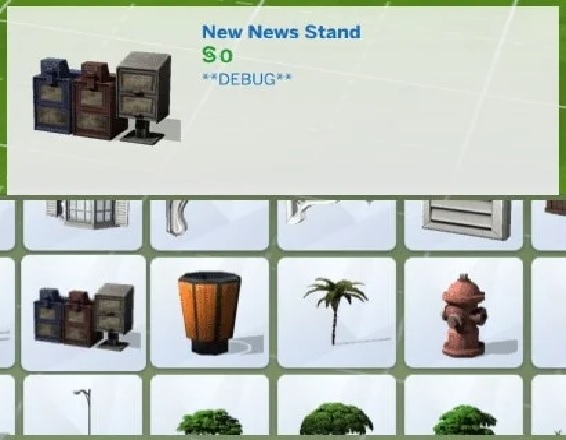
Before we familiarize you with the cheat, let us break down the basics first. What are the debug or hidden items in Sims 4?
Debug/hidden items in Sims 4 are objects not usually available to players in build/buy mode. These items can be used for various purposes, such as testing new features, creating custom content, or adding more variety to your game.
The only way to access these hidden items is by enabling the cheats first. This is mandatory, and something we’d 100% recommend you prioritize. Enabling cheats in Sims 4 is simple. You must press Ctrl+Shift+C on your keyboard to open the cheats console and then enter relevant codes to get started.
Some of the most common debug/hidden items in Sims 4 include:
- Mail merge machine
- Object spawner
- Debug versions of doors, windows, furniture
- Trees, rocks, and plants
- Grim Reaper’s scythe
- Scientist’s lab equipment
- Custom content created by other Sims 4 players, etc.
In hindsight, these items might not seem very important, but they are helpful in the most unexpected situations.
Also Read – 21 Best Sims 4 Kids cc [Ultimate Kids CC Collection]
How do I Uncover Hidden Objects in Sims 4 on PC?
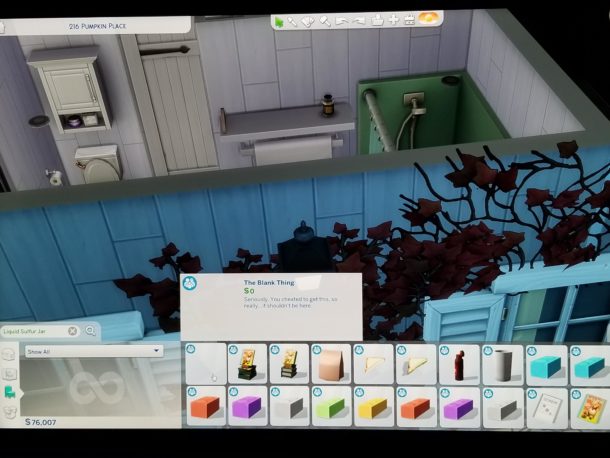
One quick reminder is that you need to enable cheats to be able to implement the Debug cheat that we have been talking about until now.
Following are the steps for that:
- Press Ctrl + Shift + C to open the cheating console.
- In the pop-up window, type “testingcheats true” and press Enter.
- Once done, a message says that the game enables the cheats. So, if you want to test different cheats, now is the time to make it happen.
Following enabling the cheats in the console, follow the steps to show the hidden objects:
- In the cheat console, type bb.showhiddenobjects and press Enter.
- Next, enter the second code, “bb.showliveeditobjects” and press Enter again.
- Once done, exit the cheats menu, and you should be able to access the hidden objects you couldn’t before.
But the work doesn’t stop there. Once you have uncovered the hidden objects using the cheat, how do you see them or keep track of them? For that, you’d have to follow the steps mentioned:
- Navigate to the build/buy men.
- Search for “Debug.”
The items that are debug or hidden will be marked as debug. There will be a variety of catalog items that you can access, too.
Note: If you are using a different gaming console than your PC, the steps to enable the cheats will be other than what we mentioned. For Mac, press Command (⌘) and Shift, then press c. For PS4, press down all the four shoulder buttons simultaneously. For Xbox, press down all four shoulder buttons at once.
Also Read – Top 20 Sims 4 CC Clothes Packs in 2023 [Download]
How to Unlock Hidden Items in Sims 4 on Mac?
We briefly mentioned that enabling cheats on a Mac differs from enabling cheats on a PC. However, the essential preface is the same.
You must enable the cheating console first and enter the relevant code to unlock the hidden items. Following are the steps to follow:
- To enable the cheating console on Mac, press Command (⌘) and Shift, then press C.
- Once the cheating console is enabled, type the code “bb.showhiddenobjects.”
This will unlock all the hidden items in Sims 4 on your Mac without hassle. You can then check out the debug menu and see the hidden objects.
Also Read – Most Epic Sims 4 Shaders For Ardent Gamers Out There
How to Unlock Hidden Items in Sims 4 on PS4 and Xbox One?
When it comes to unlocking the hidden items in your gaming console like PS4 and Xbox One, the steps are the same.
Start by enabling the cheating console. For PS4, press down all the four shoulder buttons simultaneously. For Xbox, press down all four shoulder buttons at once.
- Once done, type “bb.showhiddenobjects” to uncover the hidden objects.
- You can also type “bb.ignoregameplayunlocksentitlement” to unlock the building-based items if that’s something you have been looking to unveil.
And that’s it. You can now sort out some of the hidden items and objects in Sims 4 that you couldn’t before.
Also Read – Sims 4 Death Cheats 2022: Cheats to Kill Your Sim
How to Navigate through the Debug Menu in Sims 4?
Now that you know how to uncover the hidden items in Sims 4, navigating through the debug menu is the next challenging part. It’s complicated, but only if you make it difficult.
The debug menu consists of a catalog of all the hidden items you otherwise didn’t know. So, scrolling and sifting through them can be a challenge. In that case, we’d recommend you look up the Debug menu, and from there, you can go ahead and search for specific items you think you need.
If the item is available and unlocked, it will appear in the menu, and you can access it without restrictions.
Also Read – How To Use The Sims 4 CAS Full Edit Mode Cheat
What are Some Other Cheats in Sims 4 Similar to the Debug Cheat?
The Debug cheat is undoubtedly one of the most popular cheats players use in Sims 4. If there are similar cheats like this one, the answer is yes.
Following are a few we’d like to highlight:
Live Edit
This one mimics the debug cheat in more ways than one. But think of it as an elevated version of the standard debug cheat. Even with the debug cheat, you can access non-purchasable items and world objects that aren’t unlocked.
You need to use the code “bb.showliveeditobjects” to access it.
Locked objects
Another similar cheat, like the debug cheat we’d have to highlight, is the locked objects cheat. Certain items and activities in Sims 4 are locked until you reach certain milestones. However, you might need early access to them to make the gameplay smoother. This is where this cheat comes into play.
You must use the code “bb.ignoregameplayunlocksentitlement” to access this cheat.
Also Read – Top 10 Sims 4 Woohoo Mods
Conclusion
The debug cheat in Sims 4 is one of the most popular codes that you can think of. It is interactive and unlocks items that streamline your gameplay and make achieving many levels in the game a walk in the park. If you have been curious about how to use this cheat, we hope this article gives you a good look into it.






Download Minecraft PE 1.21.131 APK for Android
Minecraft Bedrock 1.21.131 is a focused hotfix update — improved Spear combat, two important bug fixes, and better overall stability on Android. No new content, but a noticeably smoother experience.
Spear Knockback Improvement
The window during which a charged Spear attack can apply knockback has been extended. This makes combat feel more reliable — the attack now connects as expected without requiring pinpoint timing, especially useful when fighting multiple mobs at once.
Spear Animation Alignment
Charge attack animations now accurately sync with the Spear’s three gameplay phases: Engaged, Tired, and Disengaged. What you see on screen now matches what the game engine is actually doing — making combat more readable and reducing guesswork in fights.
Performance & Stability
Frame drops on mid-range Android hardware have been reduced. Memory handling improvements prevent sudden freezes during long play sessions. World loading and chunk generation are more reliable, reducing terrain “pop-in” when exploring or moving quickly.
Multiplayer Improvements
Backend updates improve session stability when players join or leave. Fewer disconnects and smoother synchronisation across Bedrock servers. Marketplace content and add-ons also load more consistently during multiplayer sessions.
Adventuring Time Achievement Fixed — The achievement no longer unlocks early. It now correctly requires visiting at least 17 biomes on PC, matching the intended design.
Marketplace Escape Key Fixed — Pressing Escape after using the Marketplace search now reliably returns players to the previous menu instead of getting stuck in a loop.
Add-on World Loading Fixed — A bug that triggered a “Block” error when loading or creating worlds with multiple add-ons installed has been resolved.
Download the APK
Tap one of the Download buttons above. Choose the Standard (no music) version if storage is limited, or the Full version for the complete experience. The ARM64 build is recommended for modern phones.
Enable “Install Unknown Apps”
Go to Settings → Security (or Privacy) → Install unknown apps. Enable the permission for your browser or file manager. Android requires this for any APK installed outside Google Play.
Open the APK File
Open your Downloads folder, find the Minecraft 1.21.131 APK, and tap it to launch the system installer. Follow the on-screen prompts.
Install Over Existing Version
In most cases you can install 1.21.131 directly over your existing Minecraft without losing any worlds or progress. If you see a signature conflict error, uninstall first — but back up your worlds beforehand.
Launch and Sign In
Open Minecraft, sign in with your Microsoft/Xbox Live account, and your existing worlds will load normally. Online multiplayer, Realms, and Marketplace content all work as before.
Download Minecraft PE 1.20 APK for Android
Get the full Minecraft Bedrock 1.20 (Trails and Tales) APK for Android. Supports Xbox Live sign-in. Multiple versions available — stable releases and preview builds.
Download the APK File
Tap the Download button above for the version you want. The APK file will save to your device’s Downloads folder.
Enable “Install Unknown Apps”
Go to Settings → Security or Privacy → Install unknown apps. Enable it for your browser or file manager. Android requires this for any APK installed outside of Google Play.
Open the Downloaded File
Open your Downloads folder (or tap the notification), find the Minecraft APK, and tap it to start the installer.
Confirm Installation
Tap Install and wait for the process to complete. If you see a “signature conflict” error, uninstall your existing Minecraft version first, then retry.
Launch and Sign In with Xbox Live
Open Minecraft, sign in with your Microsoft/Xbox Live account to access multiplayer, Realms, and cross-platform features.
-
 Guides7 years ago
6 Proven Ways to Get more Instagram Likes on your Business Account
-
Mainstream12 years ago
BioWare: Mass Effect 4 to Benefit From Dropping Last-Gen, Will Not Share Template With Dragon Age: Inquisition
-
 Mainstream8 years ago
How to Buy Property & Safe Houses in GTA 5 (Grand Theft Auto 5)
-

 Guides2 years ago
Free Fire vs PUBG: Comparing Graphics, Gameplay, and More
-

 Guides2 years ago
50+ Free Fire ID and Passwords Login List (Giveaway) 2025
-
 Casual3 years ago
8 Ways to Fix Over-Extrusion and Under-Extrusion in 3D Printing
-

 Other2 years ago
Ajjubhai UID: Free Fire Details & Earnings
-

 Features2 years ago
Exploring Valorant eSports Stats: Unveiling the Metrics Behind Competitive Excellence