
Guides
Remember Me Cheats

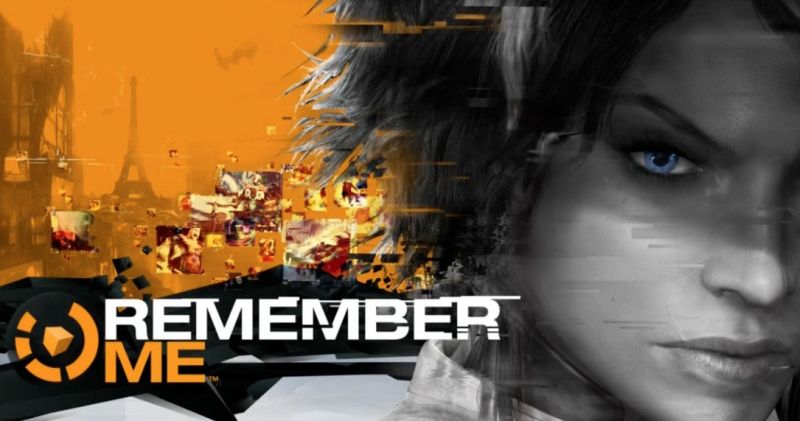
Remember Me, on of the most anticipated games of this year, has been launched today and we’re here on day one to share with you all the Remember Me cheats that we can find in order to help you have an easier life in the game. So read on our Remember Me cheats article in order to see if there are any cheats that you can use!
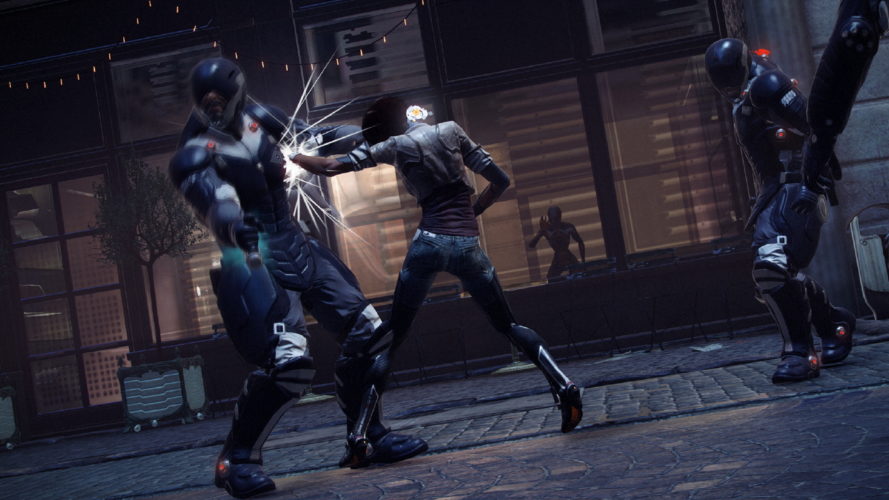
Remember Me features exploration, platforming, stealth, and melee combat. The game introduces the mechanic of ‘memory remixing’: entering and rearranging a target’s memories to manipulate them. Players accomplish this by replaying a memory and modifying details to change the target’s recollection of the outcome. Another key mechanic of gameplay is stealing memories from specific targets and using points called Remembranes to replay the memory in real-time: this is often needed to proceed through the game or avoid hazards otherwise hidden from the player. When the player is low on health, the screen will glitch until a sufficient amount of health is regained. (Wikipedia)
Remember Me Achievements
Script Kiddie (10 points): Finish the game in Script Kiddie Mode.
Errorist Agent (20 points): Finish the game in Errorist Agent Mode.
MemHunter Elite (50 points): Finish the game in Memory Hunter Mode.
I know kung fu (20 points): Equip 17 Pressens at least once in your Combos.
Float like a butterfly (20 points): Beat Kid X-Mas in under 5 minutes without dying.
You missed me (20 points): Dodge a Skinner’s charge five times in a row.
The wheat and the chaff (20 points): Beat Madame without hitting any of her clones.
Leader of the pack (20 points): Beat a Mourner without beating its supporting sidekicks.
Out of the friend Zorn (20 points): Beat a Zorn in under 120 seconds.
The fallen (20 points): Make 50 Leapers fall off walls.
It’s all in the details (30 points): Find all Mnesist memories.
I do like spam! (20 points): Finish 15 Enforcers off with the Spammer.
Machines do it better (20 points): Use the Sensen RIP to make robots knock 20 human enemies out.
Fury lover (30 points): Reach x14 with the Sensen Fury.
Fuzzy logic (40 points): Hit 5 enemies at once with a Logic Bomb while they are stunned by the Sensen DOS.
The shield is down! (20 points): Destroy 20 Heavy Enforcer shields.
Fiat lux! (20 points): Beat 15 Stranglers without using the Sensen DOS.
You focus (20 points): Find all Focus Boosts.
Gotta patch them all! (20 points): Find all SAT Patches.
Pest control (30 points): Find all Scaramechs.
Droning by numbers (30 points): Get hit 5 times by a drone during a playthrough, on any given difficulty.
God is a DJ (40 points): Find and activate all interactions in all memory remixes.
Unbelievable truth (20 points): Reach all memory bugs in all memory remixes.
Mix’em all (20 points): Land 10 Combos that combine the four different Pressen types.
Queen of the hill (20 points): Survive the entire Leaking Brain assault (episode 3) without using Power or Regen Pressens.
Can’t touch this (20 points): Defeat 5 Elite Enforcers without using Combos or Spammer attacks.
Dropping L-Bombs (20 points): Trigger two Logic Bombs in less than 15 seconds.
8-hit wonder (20 points): Perform 40 8-hit Combos.
Serve the servant (20 points): Beat 20 robot enemies.
400 (50 points): Beat 400 enemies.
Lord of the ring (20 points): Beat 15 enemies by making them fall off a platform.
Remember Me Secret Achievements
Dead man’s chest (10 points): Finish episode 0.
Forged alliance (10 points): Finish episode 1.
Christmas is over (10 points): Finish episode 2.
Jail break-in (10 points): Finish episode 3.
Murder incorporated (10 points): Finish episode 4.
Are you my mummy? (10 points): Finish episode 5.
Mind craft (10 points): Finish episode 6.
Towering inferno (10 points): Finish episode 7.
Rust in Peace (20 points): Destroy the Zorn that chased you in the prologue.
Final overload (20 points): Destroy H3O.
Medical malpractice (10 points): Remix Olga.
Crime of passion (20 points): Remix Forlan.
Birthday crash (20 points): Remix Scylla.
Biter bit (20 points): Remix Charles.
You talkin’ to me? (20 points): In the Olga memory remix: have David awaken and talk to Olga.
Trigger unhappy (10 points): In the Forlan memory remix: have Forlan get the gun, argue with Alexia but not kill her.
Happy birthday (10 points): In the Scylla memory remix: have Scylla and Nilin avoid the accident and get on their way home.
Power off (10 points): In the final memory remix: have Jax short-circuit, but keep everybody safe.
Open mind (10 points): Perform your first memory steal on Bad Request.
UPDATE: We have extra content to help you with Remeber Me cheats:
– How to beat Zorn in under 2 minutes
– All the Remember Me Collectible Locations
Stay tuned as we’ll update this article with more cheats as soon as we have them. If you have any cheats of your own or strategy tips, please share them with us in the comment section below!






Download Minecraft PE 1.21.131 APK for Android
Minecraft Bedrock 1.21.131 is a focused hotfix update — improved Spear combat, two important bug fixes, and better overall stability on Android. No new content, but a noticeably smoother experience.
Spear Knockback Improvement
The window during which a charged Spear attack can apply knockback has been extended. This makes combat feel more reliable — the attack now connects as expected without requiring pinpoint timing, especially useful when fighting multiple mobs at once.
Spear Animation Alignment
Charge attack animations now accurately sync with the Spear’s three gameplay phases: Engaged, Tired, and Disengaged. What you see on screen now matches what the game engine is actually doing — making combat more readable and reducing guesswork in fights.
Performance & Stability
Frame drops on mid-range Android hardware have been reduced. Memory handling improvements prevent sudden freezes during long play sessions. World loading and chunk generation are more reliable, reducing terrain “pop-in” when exploring or moving quickly.
Multiplayer Improvements
Backend updates improve session stability when players join or leave. Fewer disconnects and smoother synchronisation across Bedrock servers. Marketplace content and add-ons also load more consistently during multiplayer sessions.
Adventuring Time Achievement Fixed — The achievement no longer unlocks early. It now correctly requires visiting at least 17 biomes on PC, matching the intended design.
Marketplace Escape Key Fixed — Pressing Escape after using the Marketplace search now reliably returns players to the previous menu instead of getting stuck in a loop.
Add-on World Loading Fixed — A bug that triggered a “Block” error when loading or creating worlds with multiple add-ons installed has been resolved.
Download the APK
Tap one of the Download buttons above. Choose the Standard (no music) version if storage is limited, or the Full version for the complete experience. The ARM64 build is recommended for modern phones.
Enable “Install Unknown Apps”
Go to Settings → Security (or Privacy) → Install unknown apps. Enable the permission for your browser or file manager. Android requires this for any APK installed outside Google Play.
Open the APK File
Open your Downloads folder, find the Minecraft 1.21.131 APK, and tap it to launch the system installer. Follow the on-screen prompts.
Install Over Existing Version
In most cases you can install 1.21.131 directly over your existing Minecraft without losing any worlds or progress. If you see a signature conflict error, uninstall first — but back up your worlds beforehand.
Launch and Sign In
Open Minecraft, sign in with your Microsoft/Xbox Live account, and your existing worlds will load normally. Online multiplayer, Realms, and Marketplace content all work as before.
Download Minecraft PE 1.20 APK for Android
Get the full Minecraft Bedrock 1.20 (Trails and Tales) APK for Android. Supports Xbox Live sign-in. Multiple versions available — stable releases and preview builds.
Download the APK File
Tap the Download button above for the version you want. The APK file will save to your device’s Downloads folder.
Enable “Install Unknown Apps”
Go to Settings → Security or Privacy → Install unknown apps. Enable it for your browser or file manager. Android requires this for any APK installed outside of Google Play.
Open the Downloaded File
Open your Downloads folder (or tap the notification), find the Minecraft APK, and tap it to start the installer.
Confirm Installation
Tap Install and wait for the process to complete. If you see a “signature conflict” error, uninstall your existing Minecraft version first, then retry.
Launch and Sign In with Xbox Live
Open Minecraft, sign in with your Microsoft/Xbox Live account to access multiplayer, Realms, and cross-platform features.
-
 Guides7 years ago
6 Proven Ways to Get more Instagram Likes on your Business Account
-
Mainstream12 years ago
BioWare: Mass Effect 4 to Benefit From Dropping Last-Gen, Will Not Share Template With Dragon Age: Inquisition
-
 Mainstream8 years ago
How to Buy Property & Safe Houses in GTA 5 (Grand Theft Auto 5)
-

 Guides2 years ago
Free Fire vs PUBG: Comparing Graphics, Gameplay, and More
-

 Guides2 years ago
50+ Free Fire ID and Passwords Login List (Giveaway) 2025
-
 Casual3 years ago
8 Ways to Fix Over-Extrusion and Under-Extrusion in 3D Printing
-

 Other3 years ago
Ajjubhai UID: Free Fire Details & Earnings
-

 Features2 years ago
Exploring Valorant eSports Stats: Unveiling the Metrics Behind Competitive Excellence