
Guides
MotorStorm: Pacific Rift – PS3 Cheats

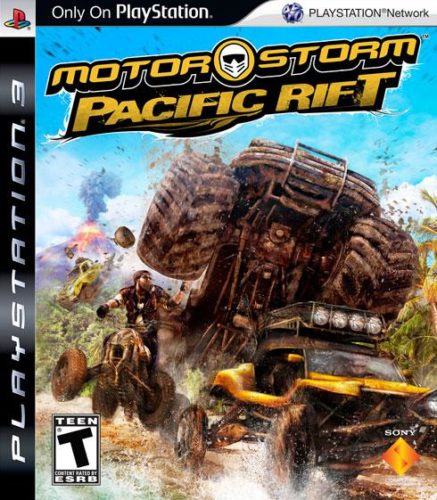 MotorStorm: Pacific Rift is the latest racing title in the MotorStorm series, released as a PlayStation 3 exclusive. The game was developed by Evolution Studios and published by Sony. It was released on 28 October 2008. Below you can find full collections of unlockables and Trophies for MotorStorm: Pacific Rift.
Unlockables:
Vehicles
Earn the trophy to unlock the vehicle:
– Atlas Arizona big rig: Earn the “Last Man Standing” trophy.
– Atlas Earthquake monster truck: Earn the “Over Acheiver” trophy.
– Lunar-Tec SpaceFrame II buggy: Earn the “Stunt Man” trophy.
– Mirage Bastille mudplugger and Monarch Backpacker big rig: Earn the “Champion” trophy.
– Mojave Globetrotter mudplugger: Earn the “Speed-Demon” trophy.
– Molotov Elbrus ATV: Earn the “Ghost Rider” trophy.
– Monarch Deerstalker ATV: Earn the “Legend” trophy.
– Monarch Mk 1 rally car: Earn the “Ranked Streak” trophy.
– Monarch Sparrowhawk bike: Earn the “FriendShip” trophy.
– Ozutsu Daimyo racing truck: Earn the “Speeder” trophy.
– Ozutsu Ronin rally car: Earn the “Competitor” trophy.
– Springbok Namibia racing truck: Earn the “Wreckless” trophy.
– The Nord Viking big rig: Earn the “Hero” trophy.
– Voodoo Thunder Lizard monster truck: Earn the “Racefan” trophy.
– Wombat Beachmaster buggy: Earn the “Casual” trophy.
– Wombat Mudslide ATV: Earn the “Runner Up” trophy.
– Wombat Typhoon buggy: Earn the “Hire Me” trophy.
Speed events
Finish within the top three places and be under the time limit for a zone.
Eliminator events
Finish within the top three places and be under the wreck limit for a zone.
Trophies:
The Money Shot (Bronze): Boost Explode over the finish line to win 10 races.
Track Master (Bronze): Win 5 races on each track.
Just Getting Started (Bronze): Race for a total of one hour.
Time Sink (Bronze): Race for a total of 10 hours.
Stuntman (Bronze): Successfully land a jump of 185m or more.
Race Fan (Bronze): Take part in 250 races.
Tourist (Bronze): Travel a total of 500km.
Hazardous (Bronze): Wreck your vehicle 250 times.
Friendship (Bronze): Complete a Split-Screen race with 4 players.
Ghost Rider (Bronze): Beat 48 developer’s ghosts on Time Attack.
Tumbler (Bronze): Perform an impressive Barrel Roll.
Bully (Bronze): Successfully punch or ram 100 vehicles.
Lightweight (Bronze): Win 50 races using a lightweight vehicle.
Mediumweight (Bronze): Win 50 races using a mediumweight vehicle.
Heavyweight (Bronze): Win 50 races using a heavyweight vehicle.
Pugilist (Bronze): Punch 5 competitors in a single race and go on to win gold.
Close Call (Bronze): Win a race by a margin of less than 0.1s.
Survivor (Bronze): In Eliminator escape from last place 10 times with only 3 seconds to go.
Freestyle (Bronze): Create and win 10 free-play races.
Spoilt For Choice (Bronze): Reach rank 3 in the Festival to unlock all 8 vehicle classes.
Bike (Bronze): Win 5 Festival races using a Bike.
ATV (Bronze): Win 5 Festival races using an ATV.
Buggy (Bronze): Win 5 Festival races using a Buggy.
Rally Car (Bronze): Win 5 Festival races using a Rally Car.
Racing Truck (Bronze): Win 5 Festival races using a Racing Truck.
Mud Plugger (Bronze): Win 5 Festival races using a Mud Plugger.
Big Rig (Bronze): Win 5 Festival races using a Big Rig.
Monster Truck (Bronze): Win 5 Festival races using a Monster Truck.
Necessary Roughness (Bronze): Knock down 10 dismounted drivers.
Tortoise (Bronze): Win a race without using boost.
Speeder (Bronze): Unlock all 16 Speed events.
Wreck-Less (Bronze): Unlock all 16 Eliminator events.
Last Man Standing (Bronze): Win all 16 Eliminator events.
Beginner (Bronze): Complete a ranked Online race with 12 players.
Competitor (Bronze): Complete 50 Online ranked races.
Casual (Bronze): Complete 50 online casual races.
Immortal (Bronze): Win an Online ranked race without wrecking.
Beginner’s Luck (Bronze): Come 1st in an Online ranked race.
Rookie (Bronze): Reach Online rank 2 (Rookie).
Veteran (Bronze): Reach Online rank 3 (Veteran).
Hire Me (Silver): Beat the developer’s best ghost times on every track with every vehicle.
Speed Demon (Silver): Win all 16 Speed events.
Can’t Touch This (Silver): Win any Rank 8 race without being wrecked.
Runner Up (Silver): Win 96 Silver Medals.
Ranked Streak (Silver): Win 3 Online ranked races in a row.
Hero (Silver): Reach Online rank 4 (Hero).
Winner (Gold): Win 250 races.
Champion (Gold): Win 96 Gold medals.
Legend (Gold): Reach Online rank 5 (Legend).
Over Achiever (Platinum): Unlock all the other 49 Trophies


Download Minecraft PE 1.21.131 APK for Android
Minecraft Bedrock 1.21.131 is a focused hotfix update — improved Spear combat, two important bug fixes, and better overall stability on Android. No new content, but a noticeably smoother experience.
Spear Knockback Improvement
The window during which a charged Spear attack can apply knockback has been extended. This makes combat feel more reliable — the attack now connects as expected without requiring pinpoint timing, especially useful when fighting multiple mobs at once.
Spear Animation Alignment
Charge attack animations now accurately sync with the Spear’s three gameplay phases: Engaged, Tired, and Disengaged. What you see on screen now matches what the game engine is actually doing — making combat more readable and reducing guesswork in fights.
Performance & Stability
Frame drops on mid-range Android hardware have been reduced. Memory handling improvements prevent sudden freezes during long play sessions. World loading and chunk generation are more reliable, reducing terrain “pop-in” when exploring or moving quickly.
Multiplayer Improvements
Backend updates improve session stability when players join or leave. Fewer disconnects and smoother synchronisation across Bedrock servers. Marketplace content and add-ons also load more consistently during multiplayer sessions.
Adventuring Time Achievement Fixed — The achievement no longer unlocks early. It now correctly requires visiting at least 17 biomes on PC, matching the intended design.
Marketplace Escape Key Fixed — Pressing Escape after using the Marketplace search now reliably returns players to the previous menu instead of getting stuck in a loop.
Add-on World Loading Fixed — A bug that triggered a “Block” error when loading or creating worlds with multiple add-ons installed has been resolved.
Download the APK
Tap one of the Download buttons above. Choose the Standard (no music) version if storage is limited, or the Full version for the complete experience. The ARM64 build is recommended for modern phones.
Enable “Install Unknown Apps”
Go to Settings → Security (or Privacy) → Install unknown apps. Enable the permission for your browser or file manager. Android requires this for any APK installed outside Google Play.
Open the APK File
Open your Downloads folder, find the Minecraft 1.21.131 APK, and tap it to launch the system installer. Follow the on-screen prompts.
Install Over Existing Version
In most cases you can install 1.21.131 directly over your existing Minecraft without losing any worlds or progress. If you see a signature conflict error, uninstall first — but back up your worlds beforehand.
Launch and Sign In
Open Minecraft, sign in with your Microsoft/Xbox Live account, and your existing worlds will load normally. Online multiplayer, Realms, and Marketplace content all work as before.
Download Minecraft PE 1.20 APK for Android
Get the full Minecraft Bedrock 1.20 (Trails and Tales) APK for Android. Supports Xbox Live sign-in. Multiple versions available — stable releases and preview builds.
Download the APK File
Tap the Download button above for the version you want. The APK file will save to your device’s Downloads folder.
Enable “Install Unknown Apps”
Go to Settings → Security or Privacy → Install unknown apps. Enable it for your browser or file manager. Android requires this for any APK installed outside of Google Play.
Open the Downloaded File
Open your Downloads folder (or tap the notification), find the Minecraft APK, and tap it to start the installer.
Confirm Installation
Tap Install and wait for the process to complete. If you see a “signature conflict” error, uninstall your existing Minecraft version first, then retry.
Launch and Sign In with Xbox Live
Open Minecraft, sign in with your Microsoft/Xbox Live account to access multiplayer, Realms, and cross-platform features.
-
 Guides6 years ago
6 Proven Ways to Get more Instagram Likes on your Business Account
-
Mainstream12 years ago
BioWare: Mass Effect 4 to Benefit From Dropping Last-Gen, Will Not Share Template With Dragon Age: Inquisition
-
 Mainstream8 years ago
How to Buy Property & Safe Houses in GTA 5 (Grand Theft Auto 5)
-

 Guides2 years ago
Free Fire vs PUBG: Comparing Graphics, Gameplay, and More
-

 Guides2 years ago
50+ Free Fire ID and Passwords Login List (Giveaway) 2025
-
 Casual3 years ago
8 Ways to Fix Over-Extrusion and Under-Extrusion in 3D Printing
-

 Other2 years ago
Ajjubhai UID: Free Fire Details & Earnings
-

 Features2 years ago
Exploring Valorant eSports Stats: Unveiling the Metrics Behind Competitive Excellence