
Guides
14 Best Minecraft Temple Design Ideas For 2022

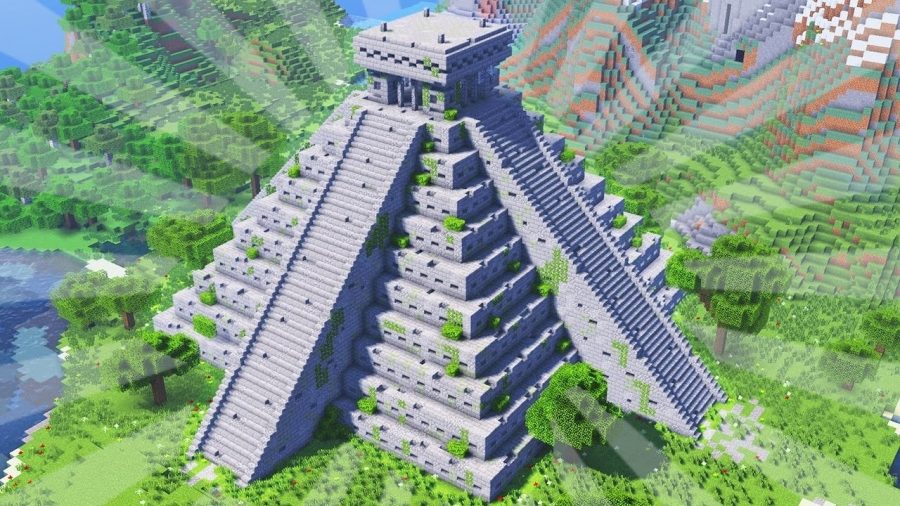
There is something about Minecraft that makes it a favorite for so many people around the world and across all age groups. The feeling of putting together blocks and creating a unique build is beyond satisfying. If you weren’t already excited about creating your unique builds, we give you some of the best Minecraft Temple design ideas for 2022 that you can try out. These Minecraft temple designs will make your gameplay even more exciting than usual.
While you play in the Survival mode and plan a build there, you need to keep an eye on the mobs that can be hostile and other dangers that the environment throws at you. Building a Minecraft temple is a good idea if you are running out of ideas. To make things easier for you we have created a list of the 14 best Minecraft temple design ideas for 2022 that you can explore and build with a touch of your unique personality.
Over the years many Minecraft players have built their unique Minecraft designs with a lot of love and effort. It is amazing to see how one can build such magnificent structures with blocks that may otherwise seem impossible to use as blocks for construction. With these Minecraft temple designs, you will be able to choose from the best designs and build a temple on your own. Some of the Minecraft temple designs are difficult to build in Survival mode if you haven’t paid a visit to the Nether. With a little practice, everything is easy and buildable. You just have to be mindful of what you are building and the design idea at hand.
From desert temple to jungle temple we have a lot of options for you to choose from that are fun to build. Use these Minecraft temple designs and construct a magnificent temple that inspires you.
Here Are The Best Minecraft Temple Designs & Ideas 2022
Japanese Temple
DiddiHD brings us this Asian temple that is traditional and looks divine. This Minecraft temple design is distinct and charming all at once. DiddiHD’s tutorial for this Japanese temple is easy to follow and primarily uses Oak planks and steep stone stairs. For the foundation of this temple, you will require a minimum area of 17×17 blocks where the foundation will sit.
There is a unique feature about the tutorial that it has an enchanting table that is made with a Redstone contraption. You can add any kind of furniture as you like to make the interiors look nice. There is a second part to this video tutorial that has more details about the first and second floors of the temple.
Greek Temple
This Greek temple design by Lytezcraft is a version of the colossal Greek temple. It needs 31×43 blocks. To build the outer structure you will need over 1000 Red Nether slabs and over 2000 Quartz blocks.
The ideal placement for this huge structure is atop a hill, this will help it stand out and you can build structures around it. The temple has a white smoothness and Soul Sands blue fire, this combination looks amazing and makes the style of construction pop out.
Related : 20 Best Minecraft Building Ideas
Asian Temple
You can build an Asian temple for fun gameplay that is inspired by Japanese architecture. You will need Smooth Quartz blocks of 19×19 to make the foundation and stairs of this Asian temple. You can also play around with other blocks like white concrete or blonde blocks. The foundation has a height of 2 blocks. It has many stairs and has a combination of red and green colors that comes from Red Nether brick walls and Red concrete along with a green roof built with dark prismarine. Watch Pinks tutorial to know how to build this roof that may seem a little difficult.
Desert Temple
Looking for a new way to build a wonderful structure? A1MOSTADDICTED has taken a simple desert temple and given it a twist by making it a bit more complex and the addition of new blocks that adds variety to the build. You will need to gather Orange Terracotta, Acacia Wood, and Sandstone. This Minecraft temple design includes a top floor, gardens, and water sources, this gives you space to build a Nether portal, you can place one or more crafting stations, or for decoration, you can also add a Beacon.
Many Minecraft players use Campfires to create a smoky effect that will build lovely scenery.
Small Temple
If you do not like big structures, you can build this small temple from the Dark Kingdom that religious people use. It is a small and nice temple to use. It looks like a small statue with a lasting fire. If you want to bring light and peace to the kingdom you can build this small temple by TheHumanNuggets.
The primary materials required to build this temple are Stone bricks and Blue stained clay. You can use different blocks like gold or colored wool. It is an easy temple to build.
Related : 10 Best Minecraft Garden Ideas
Jungle Temple
This Jungle temple needs patience and a lot of collaboration. This is perfect if you want a base that you can share with a friend with whom you started a new world in the Survival mode. Watch the tutorial made by daxer123_build to learn this jungle temple that has enough room for two. There are all essentials present inside the temple for Survival mode; these include crafting stations, storage, a Nether portal, and an enchanting table.
Underwater Ancient Temple
Spudettis brings us this underwater ancient temple that may need you to put in some effort thanks to the underwater limitations. Many Minecraft players use ocean monuments and abandoned places to build a base for themselves. Spudettis also does the same and builds this underwater ancient temple. The use of smooth Sandstone is evident along with Sea Lanterns and decoration with aquatic stuff.
If you are planning to create this in Survival mode, there are many ways to avoid drowning like wearing a helmet that has a Respiration enchantment or you can also use a water breathing potion.
Castle Temple
Greg Builds teaches us how to make this Castle temple that has a foundation of 43×43 blocks and a height of 22 blocks. The temple also has a maze to keep the intruders away. You can hide your valuables like diamonds and others in the storage room that is in one of the corners of the pyramid.
Aztec Temple
Aztecs are popular for their complex society and knowledge. Like them, you can also take inspiration and keep your Beacon and conceal it as a jungle temple. This tutorial is by Crafting Table and requires an area of 15×15 to lay the Beacon underground. You can easily mine through the layers of stone for your next project. You can customize this design idea as per your choice.
Related – 11 Best Minecraft Dock Ideas
Modern Water Temple
Julious creates a Modern water temple using Quartz blocks to make the outer structure and a serene waterfall at the sides. There is enough place on the inside for all the Survival essentials and to start you require only a 19×19 block area. The decoration on the outside is kept minimal to keep the focus on the beautiful waterfalls but the interior is colorful and bright.
Ender Temple
Have you found the End Portal? Maybe this Temple design idea by TSMC will interest you to make this Ender temple. It is a pleasant and fast build as it doesn’t need a lot of blocks. If you want, you can use Terracotta as a replacement for Wool. The most important element is the Eye, so make it look great.
Mayan Temple
Mesoamerican culture of Mayas is always appreciated and has a wonderful architecture that is iconic and the pyramids they built could make for a Minecraft temple. Minecraft Ninja brings us a tutorial to build this Mayan temple. You require only blocks that are found in the Overworld to construct a survival base.
Be it any biome this temple will fit right in and has everything you require for your Survival adventures in Minecraft.
Related – 10 Best Minecraft Fountain Design Ideas
Quartz Temple
Allesa_De brings us this Quartz temple primarily built with Quartz. Use this to decorate the Nether Portal along with Oak leaves and to bring out the ancient, mysterious vibes use lanterns.
Maya Temple
To make this Maya Temple by N11cK you need to build four huge staircases that go up to something similar to a pyramid but have a platform at the top. The staircase also needs a railing so you do not fall by accident. The flat top is where you will build another structure like a viewing deck that has holes in the corner.
Related – 13 Best Minecraft Survival House Ideas
FAQs
How To Build A Japanese Temple?
You can build a Japanese temple using Oak planks and steep stone stairs like the tutorial presented by DiddiHD.
How to Build a Castle Temple?
You will require a foundation area of 43×43 to build a Castle temple. It also has a maze inside the temple, you can refer to the Greg Builds tutorial to build this castle temple.
How To Build a Maya Temple in Minecraft?
You will have to build huge staircases for this temple, use N11cK’s tutorial as a guide to building a temple on your own.
Conclusion
These were the 14 best Minecraft temple design ideas for 2022 that you can explore and create on your own. Some are more difficult than others but absolutely worth it. We hope these temple designs inspire you to build a temple of your own with creativity and imagination.






Download Minecraft PE 1.21.131 APK for Android
Minecraft Bedrock 1.21.131 is a focused hotfix update — improved Spear combat, two important bug fixes, and better overall stability on Android. No new content, but a noticeably smoother experience.
Spear Knockback Improvement
The window during which a charged Spear attack can apply knockback has been extended. This makes combat feel more reliable — the attack now connects as expected without requiring pinpoint timing, especially useful when fighting multiple mobs at once.
Spear Animation Alignment
Charge attack animations now accurately sync with the Spear’s three gameplay phases: Engaged, Tired, and Disengaged. What you see on screen now matches what the game engine is actually doing — making combat more readable and reducing guesswork in fights.
Performance & Stability
Frame drops on mid-range Android hardware have been reduced. Memory handling improvements prevent sudden freezes during long play sessions. World loading and chunk generation are more reliable, reducing terrain “pop-in” when exploring or moving quickly.
Multiplayer Improvements
Backend updates improve session stability when players join or leave. Fewer disconnects and smoother synchronisation across Bedrock servers. Marketplace content and add-ons also load more consistently during multiplayer sessions.
Adventuring Time Achievement Fixed — The achievement no longer unlocks early. It now correctly requires visiting at least 17 biomes on PC, matching the intended design.
Marketplace Escape Key Fixed — Pressing Escape after using the Marketplace search now reliably returns players to the previous menu instead of getting stuck in a loop.
Add-on World Loading Fixed — A bug that triggered a “Block” error when loading or creating worlds with multiple add-ons installed has been resolved.
Download the APK
Tap one of the Download buttons above. Choose the Standard (no music) version if storage is limited, or the Full version for the complete experience. The ARM64 build is recommended for modern phones.
Enable “Install Unknown Apps”
Go to Settings → Security (or Privacy) → Install unknown apps. Enable the permission for your browser or file manager. Android requires this for any APK installed outside Google Play.
Open the APK File
Open your Downloads folder, find the Minecraft 1.21.131 APK, and tap it to launch the system installer. Follow the on-screen prompts.
Install Over Existing Version
In most cases you can install 1.21.131 directly over your existing Minecraft without losing any worlds or progress. If you see a signature conflict error, uninstall first — but back up your worlds beforehand.
Launch and Sign In
Open Minecraft, sign in with your Microsoft/Xbox Live account, and your existing worlds will load normally. Online multiplayer, Realms, and Marketplace content all work as before.
Download Minecraft PE 1.20 APK for Android
Get the full Minecraft Bedrock 1.20 (Trails and Tales) APK for Android. Supports Xbox Live sign-in. Multiple versions available — stable releases and preview builds.
Download the APK File
Tap the Download button above for the version you want. The APK file will save to your device’s Downloads folder.
Enable “Install Unknown Apps”
Go to Settings → Security or Privacy → Install unknown apps. Enable it for your browser or file manager. Android requires this for any APK installed outside of Google Play.
Open the Downloaded File
Open your Downloads folder (or tap the notification), find the Minecraft APK, and tap it to start the installer.
Confirm Installation
Tap Install and wait for the process to complete. If you see a “signature conflict” error, uninstall your existing Minecraft version first, then retry.
Launch and Sign In with Xbox Live
Open Minecraft, sign in with your Microsoft/Xbox Live account to access multiplayer, Realms, and cross-platform features.
-
 Guides7 years ago
6 Proven Ways to Get more Instagram Likes on your Business Account
-
Mainstream12 years ago
BioWare: Mass Effect 4 to Benefit From Dropping Last-Gen, Will Not Share Template With Dragon Age: Inquisition
-
 Mainstream8 years ago
How to Buy Property & Safe Houses in GTA 5 (Grand Theft Auto 5)
-

 Guides2 years ago
Free Fire vs PUBG: Comparing Graphics, Gameplay, and More
-

 Guides2 years ago
50+ Free Fire ID and Passwords Login List (Giveaway) 2025
-
 Casual3 years ago
8 Ways to Fix Over-Extrusion and Under-Extrusion in 3D Printing
-

 Other2 years ago
Ajjubhai UID: Free Fire Details & Earnings
-

 Features2 years ago
Exploring Valorant eSports Stats: Unveiling the Metrics Behind Competitive Excellence