
Guides
Incredible Hulk, The – PS3

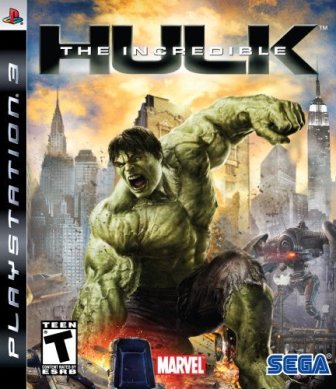 The Incredible Hulk is a single player action game developed by Edge of Reality and published by Sega. The game was released on June 5 2008. The game features 16 playable characters and a lot of secrets. Below you will find a full collection of unlockables and hints for The Incredible Hulk for PS3.
Unlockables:
Classic Hulk (Savage Hulk)
Collect five comic book covers.
Grey Hulk
Smash 10,000 objects.
Maestro
Destroy a building in each neighborhood.
Ironclad
Defeat the U-Foes, trick a U-Foe into KOing his teammate, and defeat Abomination.
Abomination
Defeat Abomination.
Professor Hulk (Smart Hulk)
Complete all jump challenges.
Hints:
Locations of the hidden comic books:
1. Face Of The Monster: At the Latverian Embassy.
2. Bruce And Goliath: At Stark Tower.
3. The Flop-tastic Four: On the Baxter Building.
4. Sonic Assault: Two blocks west of One World Plaza, two blocks north of the Reuters Building. It is located where the two intersect on a ledge mid-building.
5. Bye Bye Bi-Beast: At the southern tip of the island near the docks in a pass thru the building.
6. Talbot The Madman: At the Daily Bugle.
7. Just a Hop Skip And A Jump: On the domed roof of the World Financial Center.
8. Blonsky… Broken…: Go to the Latverian embassy, then move towards Central Park. When you get to the last building before Central Park, turn south. It is on top of tallest building with the dome top.
9. Turrett Syndrome: In the Central Park subway terminal.
10. Fired From The Sky: On the rooftop of Nelson and Murdock, Attorneys At Law.
11. The Lesser Of Two Evils: On top of a fountain near the Flatiron Building.
12. Enclave’s Ultimate Weapon: On the Belvedere Castle in Central Park near the lake.
13. This Is Only a Test…: Start at the top right corner of Central Park and go up one square. You should be on a big square building on the map. Go right one building and you will see it in the upper left of the lower roof of that building.
14. Betty’s Peril: On the top of the Flat Iron Building.
15. Abomination Domination: At the Marvel Comics Office front door.
Additionally, completing the following missions will unlock extra comic books:
1. Face Of The Monster: He must Not Escape
2. Bruce And Goliath: The Enclave and Rick Jones
3. The Flop-tastic Four: A Friend Who can Help
4. Sonic Assault: Just Take him down
5. Bye Bye Bi-Beast: A Mass Mind COntrol Device
6. Talbot The Madman: This Guy’s Bad News
7. Just A Hop, Skip And A Jump: Destruction in a Single Bound
8. Blonsky… Broken…: Our Old Research Data
9. Turret Syndrome: The Problem is the Hulk part 2
10. Fire From The Sky: PISTH part 3
11. The Lesser Of Two Evils: The lesser of two evils part 2
12. Enclave’s Ultimate Weapon: LOTE part 3
13. This Is Only A Test…: We can use their tech part 2
14. Betty’s Peril: It’s time to end this part 2
15. Abomination Domination: We’ve got the antidote.
Locations of the Jump Challenges:
1. World Financial Center
2. Behind the Woolworth Building
3. 20 Exchange Place
4. Third building south of The Flat Iron Building
5. Beside the Empire State Building (fall into it)
6. Madison Square Garden
7. U.S. Trust Building
8. The building north of the Reuters Building. It has a star-shaped top. The jump ring is horizontal; you must look up to find it.
9. South of Time Square, near Jump Challenge #8, slightly further south between a skyscraper and a smaller building, down low.
10. Swiss Bank Tower
11. Citigroup Center
12. Carnegie Hall
13. Time Warner Center
14. Southeast of the Empire State University Subway
15. North central area of Central Park





Download Minecraft PE 1.21.131 APK for Android
Minecraft Bedrock 1.21.131 is a focused hotfix update — improved Spear combat, two important bug fixes, and better overall stability on Android. No new content, but a noticeably smoother experience.
Spear Knockback Improvement
The window during which a charged Spear attack can apply knockback has been extended. This makes combat feel more reliable — the attack now connects as expected without requiring pinpoint timing, especially useful when fighting multiple mobs at once.
Spear Animation Alignment
Charge attack animations now accurately sync with the Spear’s three gameplay phases: Engaged, Tired, and Disengaged. What you see on screen now matches what the game engine is actually doing — making combat more readable and reducing guesswork in fights.
Performance & Stability
Frame drops on mid-range Android hardware have been reduced. Memory handling improvements prevent sudden freezes during long play sessions. World loading and chunk generation are more reliable, reducing terrain “pop-in” when exploring or moving quickly.
Multiplayer Improvements
Backend updates improve session stability when players join or leave. Fewer disconnects and smoother synchronisation across Bedrock servers. Marketplace content and add-ons also load more consistently during multiplayer sessions.
Adventuring Time Achievement Fixed — The achievement no longer unlocks early. It now correctly requires visiting at least 17 biomes on PC, matching the intended design.
Marketplace Escape Key Fixed — Pressing Escape after using the Marketplace search now reliably returns players to the previous menu instead of getting stuck in a loop.
Add-on World Loading Fixed — A bug that triggered a “Block” error when loading or creating worlds with multiple add-ons installed has been resolved.
Download the APK
Tap one of the Download buttons above. Choose the Standard (no music) version if storage is limited, or the Full version for the complete experience. The ARM64 build is recommended for modern phones.
Enable “Install Unknown Apps”
Go to Settings → Security (or Privacy) → Install unknown apps. Enable the permission for your browser or file manager. Android requires this for any APK installed outside Google Play.
Open the APK File
Open your Downloads folder, find the Minecraft 1.21.131 APK, and tap it to launch the system installer. Follow the on-screen prompts.
Install Over Existing Version
In most cases you can install 1.21.131 directly over your existing Minecraft without losing any worlds or progress. If you see a signature conflict error, uninstall first — but back up your worlds beforehand.
Launch and Sign In
Open Minecraft, sign in with your Microsoft/Xbox Live account, and your existing worlds will load normally. Online multiplayer, Realms, and Marketplace content all work as before.
Download Minecraft PE 1.20 APK for Android
Get the full Minecraft Bedrock 1.20 (Trails and Tales) APK for Android. Supports Xbox Live sign-in. Multiple versions available — stable releases and preview builds.
Download the APK File
Tap the Download button above for the version you want. The APK file will save to your device’s Downloads folder.
Enable “Install Unknown Apps”
Go to Settings → Security or Privacy → Install unknown apps. Enable it for your browser or file manager. Android requires this for any APK installed outside of Google Play.
Open the Downloaded File
Open your Downloads folder (or tap the notification), find the Minecraft APK, and tap it to start the installer.
Confirm Installation
Tap Install and wait for the process to complete. If you see a “signature conflict” error, uninstall your existing Minecraft version first, then retry.
Launch and Sign In with Xbox Live
Open Minecraft, sign in with your Microsoft/Xbox Live account to access multiplayer, Realms, and cross-platform features.
-
 Guides7 years ago
6 Proven Ways to Get more Instagram Likes on your Business Account
-
Mainstream12 years ago
BioWare: Mass Effect 4 to Benefit From Dropping Last-Gen, Will Not Share Template With Dragon Age: Inquisition
-
 Mainstream8 years ago
How to Buy Property & Safe Houses in GTA 5 (Grand Theft Auto 5)
-

 Guides2 years ago
Free Fire vs PUBG: Comparing Graphics, Gameplay, and More
-

 Guides2 years ago
50+ Free Fire ID and Passwords Login List (Giveaway) 2025
-
 Casual3 years ago
8 Ways to Fix Over-Extrusion and Under-Extrusion in 3D Printing
-

 Other3 years ago
Ajjubhai UID: Free Fire Details & Earnings
-

 Features2 years ago
Exploring Valorant eSports Stats: Unveiling the Metrics Behind Competitive Excellence