
Guides
Lego Indiana Jones: The Original Adventures – PS3 Cheats

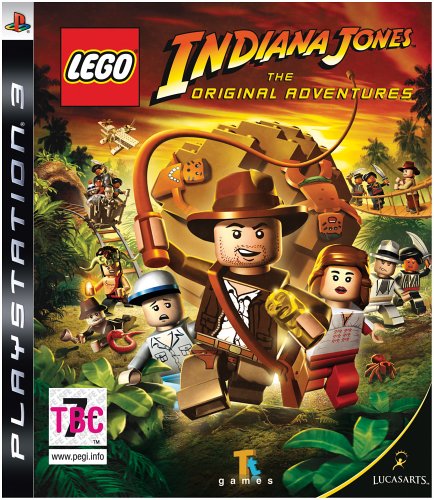 Lego Indiana Jones: The Original Adventures is an action-adventure video game based on the first three movies in the Lego Indiana Jones series. It was developed by Traveller’s Tales and published by LucasArts. The game was released on June 3, 2008. Below you will find a full collection of cheat codes and unlockables for Lego Indiana Jones for PlayStation 3.
Cheats:
Characters
Enter one of the following codes on the blackboard in the Math classroom at Barnett College to unlock the corresponding character for purchase.
Barranca – 04EM94
Belloq (desert) – CHN3YU
Belloq (jungle) – TDR197
Belloq (priest) – VEO29L
Boxer – 8246RB
British officer – VJ5TI9
British troop – DJ5I2W
British troop commander – B73EUA
Captain Katanga – VJ3TT3
Chatterlal – ENW936
Chucin – 3NK48T
Colonel Dietrich – 2K9RKS
Colonel Vogel – 8EAL4H
Dancing girl – C7EJ21
Desert digger – 12N68W
Desert enemy officer – 2MK45O
Desert masked bandit – N48SF0
Desert monkey man – 3RF6YJ
Desert soldier – 4NSU7Q
Desert swordsman – 1MK4RT
Donovan – 3NFTU8
Dr. Schneider (desert) – JSNRT9
Dr. Schneider (officer) – VMJ5US
Enemy Bazookaman – S93Y5R
Enemy bazookaman – MK83R7
Enemy butler – VJ48W3
Enemy communications officer – 1MF94R
Enemy guard – VJ7R51
Enemy guard (Nepal) – YR47WM
Enemy officer – 572E61
Enemy pilot – B84ELP
Fedora – V75YSP
First mate – 0GIN24
Grail knight – NE6THI
Hovitos tribesman – H0V1SS
Indiana Jones (officer) – VJ85OS
Indiana Jones disguised – 4J8S4M
Jungle guide – 24PF34
Kaokan – WMO46L
Kazim (desert) – 3M29TJ
Kazim (Venice) – NRH23J
Laoche – 2NK479
Maharaja – NFK5N2
Major Toht – 13NS01
Mola Ram – FJUR31
Pankot assassin – 2NKT72
Pankot guard – VN28RH
Punjabi dignitary – KD48TN
Punjabi village elder – 4682E1
Sherpa brawler – VJ37WJ
Sherpa gunner – ND762W
Slave child – 0E3ENW
Thuggee – VM683E
Thuggee Chatterlal – CNH4RY
Thuggee priest – T2R3F9
Thuggee slavedriver – VBS7GW
Willie DJ – VK93R7
Willie pajamas – MEN4IP
Wuhan – 3NSLT8
Extra options
Enter one of the following codes on the blackboard in the Math classroom at Barnett College to unlock the corresponding option at the “Extras” menu.
Invincibility – B83EA1
Secret Characters – 3X44AA
Fertilizer – B1GW1F
Disguises – 4ID1N6
Silhouettes – 3HE85H
Beep Beep – VNF59Q
Ice Rink – 33GM7J
Fast Fix – FJ59WS
Super Slap – 0P1TA5
Treasure x2 – VM4TS9
Fast Dig – 378RS6
Fast Build – V83SLO
Artifact Detector – VIKED7
Treasure x4 – VLWEN3
Poo Treasure – WWQ1SA
Super Scream – VN3R7S
Character Treasure – VIES2R
Treasure x6 – V84RYS
Regenerate Hearts – MDLP69
Parcel Detector – VUT673
Disarm Enemies – VKRNS9
Treasure x8 – A72E1M
Treasure Magnet – H86LA2
Treasure x10 – VI3PS8
Unlockables:
Secret levels
Collect all the artifacts in a movie to unlock the corresponding secret level
Raiders Of The Lost Ark: Young Indy level
Temple Of Doom: Ancient City
The Last Crusade: Warehouse level
Raining Lego studs
Get a 100% completion to have Lego studs rain inside the college.



Download Minecraft PE 1.21.131 APK for Android
Minecraft Bedrock 1.21.131 is a focused hotfix update — improved Spear combat, two important bug fixes, and better overall stability on Android. No new content, but a noticeably smoother experience.
Spear Knockback Improvement
The window during which a charged Spear attack can apply knockback has been extended. This makes combat feel more reliable — the attack now connects as expected without requiring pinpoint timing, especially useful when fighting multiple mobs at once.
Spear Animation Alignment
Charge attack animations now accurately sync with the Spear’s three gameplay phases: Engaged, Tired, and Disengaged. What you see on screen now matches what the game engine is actually doing — making combat more readable and reducing guesswork in fights.
Performance & Stability
Frame drops on mid-range Android hardware have been reduced. Memory handling improvements prevent sudden freezes during long play sessions. World loading and chunk generation are more reliable, reducing terrain “pop-in” when exploring or moving quickly.
Multiplayer Improvements
Backend updates improve session stability when players join or leave. Fewer disconnects and smoother synchronisation across Bedrock servers. Marketplace content and add-ons also load more consistently during multiplayer sessions.
Adventuring Time Achievement Fixed — The achievement no longer unlocks early. It now correctly requires visiting at least 17 biomes on PC, matching the intended design.
Marketplace Escape Key Fixed — Pressing Escape after using the Marketplace search now reliably returns players to the previous menu instead of getting stuck in a loop.
Add-on World Loading Fixed — A bug that triggered a “Block” error when loading or creating worlds with multiple add-ons installed has been resolved.
Download the APK
Tap one of the Download buttons above. Choose the Standard (no music) version if storage is limited, or the Full version for the complete experience. The ARM64 build is recommended for modern phones.
Enable “Install Unknown Apps”
Go to Settings → Security (or Privacy) → Install unknown apps. Enable the permission for your browser or file manager. Android requires this for any APK installed outside Google Play.
Open the APK File
Open your Downloads folder, find the Minecraft 1.21.131 APK, and tap it to launch the system installer. Follow the on-screen prompts.
Install Over Existing Version
In most cases you can install 1.21.131 directly over your existing Minecraft without losing any worlds or progress. If you see a signature conflict error, uninstall first — but back up your worlds beforehand.
Launch and Sign In
Open Minecraft, sign in with your Microsoft/Xbox Live account, and your existing worlds will load normally. Online multiplayer, Realms, and Marketplace content all work as before.
Download Minecraft PE 1.20 APK for Android
Get the full Minecraft Bedrock 1.20 (Trails and Tales) APK for Android. Supports Xbox Live sign-in. Multiple versions available — stable releases and preview builds.
Download the APK File
Tap the Download button above for the version you want. The APK file will save to your device’s Downloads folder.
Enable “Install Unknown Apps”
Go to Settings → Security or Privacy → Install unknown apps. Enable it for your browser or file manager. Android requires this for any APK installed outside of Google Play.
Open the Downloaded File
Open your Downloads folder (or tap the notification), find the Minecraft APK, and tap it to start the installer.
Confirm Installation
Tap Install and wait for the process to complete. If you see a “signature conflict” error, uninstall your existing Minecraft version first, then retry.
Launch and Sign In with Xbox Live
Open Minecraft, sign in with your Microsoft/Xbox Live account to access multiplayer, Realms, and cross-platform features.
-
 Guides7 years ago
6 Proven Ways to Get more Instagram Likes on your Business Account
-
Mainstream12 years ago
BioWare: Mass Effect 4 to Benefit From Dropping Last-Gen, Will Not Share Template With Dragon Age: Inquisition
-
 Mainstream8 years ago
How to Buy Property & Safe Houses in GTA 5 (Grand Theft Auto 5)
-

 Guides2 years ago
Free Fire vs PUBG: Comparing Graphics, Gameplay, and More
-

 Guides2 years ago
50+ Free Fire ID and Passwords Login List (Giveaway) 2025
-
 Casual3 years ago
8 Ways to Fix Over-Extrusion and Under-Extrusion in 3D Printing
-

 Other3 years ago
Ajjubhai UID: Free Fire Details & Earnings
-

 Features2 years ago
Exploring Valorant eSports Stats: Unveiling the Metrics Behind Competitive Excellence