
Guides
Eye Of Judgment, The – PS3

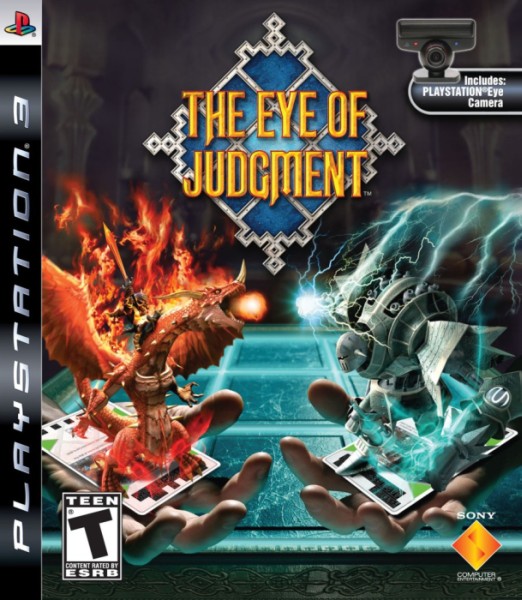 The Eye of Judgment is a turn based collectible card game developed by SCE Japan and published by Sony. Three “sets” of games will be released in a series and the third release will be followed, by the end of 2008, by a complete disc. The original game was released on October 24, 2007. Below you will find a complete list of unlockables and trophies for The Eye Of Judgment.
Unlockables:
Goal mode and sub-modes
Complete all decks in a game against the CPU under the Normal difficulty level, using the “Official Layout” option. The goal mode will be unlocked after the Arbiter deck is completed. Six new goals under each theme deck playing against the CPU will appear. To unlock a new card in Goal mode, complete the following task, with the same setting:
Fire Crusader: Win without using spell cards.
Water Barrage: Win without destroying any enemy creatures.
Earth Emperor: Win without opponent controlling a single field.
Wood Swarm: Win within ten rounds.
Biolith Scourge: Win with five Biolith squares occupied.
Arbiter: Win by having five creatures of the same element on board.
Trophies:
Gatemaster : For braving the gateway to battle (Victory vs. starter deck).
Mourning Ascetic : For training in the rites of the flame (Victory vs. Set 1 theme deck, Fire Crusader).
Okunadan Monk : For suppressing the aquatic mutiny (Victory vs. Set 1 theme deck, Water Barrage).
Swordsman of East Reach : For gaining the recognition of your earthen comrades (Victory vs. Set 1 theme deck, Earth Emperor).
Til Vorg Riders : For those who have joined the liberation army of wood (Victory vs. Set 1 theme deck, Wood Swarm).
Biolith Castle Gatekeeper : For proving oneself to the Bioliths (Victory vs. Set 1 theme deck, Biolith Scourge).
Black Goat Prison Guard : For capturing the unscrupulous followers of the flame (Victory vs. Set 2 theme deck, Fire King’s Rage).
Venoan Mercenary : For passing the initiation of the water clan (Victory vs. Set 2 theme deck, Water Conquest).
Undead Battalion : For suppression of the earthen dead (Victory vs. Set 2 theme deck, Earth Atonement).
Green Bandits : For being admitted into the band of wood thieves (Victory vs. Set 2 theme deck, Wood Unleashed).
Biolith Castle Archive Curator : For reaching complete and true understanding of the Bioliths (Victory vs. Set 2 theme deck, Biolith Godmaker).
Theraclave Gatekeeper : For being admitted into the army of flame (Victory vs. Set 3 theme deck, Fire Havoc).
Tritonan Palace Guard : For being admitted into the army of water (Victory vs. Set 3 theme deck, Water of Death).
Blade Guild at Visvar Vaas : For being admitted into the circle of earthen knights (Victory vs. Set 3 theme deck, Earth Desolation).
Alchemist’s Lab Worker : For being recommended to the wood research facility (Victory vs. Set 3 theme deck, Wood Mayhem).
Biolith Godmaker : For those who might become a Biolith godmaker (Victory vs. Set 3 theme deck, Biolith Revenge).
Yaksha Ninja : For victory over the federation army (Victory vs. Set 1 theme deck, Arbiter).
Parmetic Inquisitor : For meting punishment to the Parmetic heretics (Victory vs. Set 2 theme deck, Parmetic Wrath).
Sacred Darkness Academy Attendee : For gaining entrance to the academy (Victory vs. Set 3 theme deck, Eye of Judgment).
Mourning Reverend Father : For fending the trespassers off with your bare hands (Completion of Set 1 Challenge 1).
Okunadan Father : For the inspiration required to end a battle swiftly (Completion of Set 1 Challenge 2).
Liberator of East Reach : For conquering every outpost of your enemy (Completion of Set 1 Challenge 3).
Forest Chief : For ambushing the enemy with relentless forces (Completion of Set 1 Challenge 4).
Battle Master : For gaining ground on the great expanse (Completion of Set 1 Challenge 5).
Ninja Patriarch : For inspiring steadfast unity in battle (Completion of Set 1 Challenge 6).
Black Goat Prison Warden : For suppressing the riots with an iron will (Completion of Set 2 Challenge 1).
Venoan Don : For utilizing intelligence to confuse enemy forces (Completion of Set 2 Challenge 2).
Undead General : An award for complete and total dominance (Completion of Set 2 Challenge 3).
Green King : For claiming all for one’s own in the blink of an eye (Completion of Set 2 Challenge 4).
Unsinkable Biolith Armada : For abolishing the Prime Elements (Completion of Set 2 Challenge 5).
Parmetic Prior : For punishing heretics near and far (Completion of Set 2 Challenge 6).
Chief of Dhees’ Army of 1000 : For pushing your foes back with a deific physical prowess (Completion of Set 3 Challenge 1).
Tritonan Admiral : For achieving victory without needless spilling of blood (Completion of Set 3 Challenge 2).
Ten Tyrants : For utter annihilation of your blasphemous foes (Completion of Set 3 Challenge 3).
Lord of the Forest : For victory achieved before war could be declared (Completion of Set 3 Challenge 4).
Condemned Biolith : For striking fear into the hearts of the heartless Bioliths (Completion of Set 3 Challenge 5).
Master Summoner : In recognition of your rank as a master summoner (Completion of Set 3 Challenge 6).
Divine Warrior of Juno : In recognition of those truly experienced in battle (victory in countless duels).
Divine Summoner : In recognition of your rank as a true master summoner (Acquisition of all trophies).






Download Minecraft PE 1.21.131 APK for Android
Minecraft Bedrock 1.21.131 is a focused hotfix update — improved Spear combat, two important bug fixes, and better overall stability on Android. No new content, but a noticeably smoother experience.
Spear Knockback Improvement
The window during which a charged Spear attack can apply knockback has been extended. This makes combat feel more reliable — the attack now connects as expected without requiring pinpoint timing, especially useful when fighting multiple mobs at once.
Spear Animation Alignment
Charge attack animations now accurately sync with the Spear’s three gameplay phases: Engaged, Tired, and Disengaged. What you see on screen now matches what the game engine is actually doing — making combat more readable and reducing guesswork in fights.
Performance & Stability
Frame drops on mid-range Android hardware have been reduced. Memory handling improvements prevent sudden freezes during long play sessions. World loading and chunk generation are more reliable, reducing terrain “pop-in” when exploring or moving quickly.
Multiplayer Improvements
Backend updates improve session stability when players join or leave. Fewer disconnects and smoother synchronisation across Bedrock servers. Marketplace content and add-ons also load more consistently during multiplayer sessions.
Adventuring Time Achievement Fixed — The achievement no longer unlocks early. It now correctly requires visiting at least 17 biomes on PC, matching the intended design.
Marketplace Escape Key Fixed — Pressing Escape after using the Marketplace search now reliably returns players to the previous menu instead of getting stuck in a loop.
Add-on World Loading Fixed — A bug that triggered a “Block” error when loading or creating worlds with multiple add-ons installed has been resolved.
Download the APK
Tap one of the Download buttons above. Choose the Standard (no music) version if storage is limited, or the Full version for the complete experience. The ARM64 build is recommended for modern phones.
Enable “Install Unknown Apps”
Go to Settings → Security (or Privacy) → Install unknown apps. Enable the permission for your browser or file manager. Android requires this for any APK installed outside Google Play.
Open the APK File
Open your Downloads folder, find the Minecraft 1.21.131 APK, and tap it to launch the system installer. Follow the on-screen prompts.
Install Over Existing Version
In most cases you can install 1.21.131 directly over your existing Minecraft without losing any worlds or progress. If you see a signature conflict error, uninstall first — but back up your worlds beforehand.
Launch and Sign In
Open Minecraft, sign in with your Microsoft/Xbox Live account, and your existing worlds will load normally. Online multiplayer, Realms, and Marketplace content all work as before.
Download Minecraft PE 1.20 APK for Android
Get the full Minecraft Bedrock 1.20 (Trails and Tales) APK for Android. Supports Xbox Live sign-in. Multiple versions available — stable releases and preview builds.
Download the APK File
Tap the Download button above for the version you want. The APK file will save to your device’s Downloads folder.
Enable “Install Unknown Apps”
Go to Settings → Security or Privacy → Install unknown apps. Enable it for your browser or file manager. Android requires this for any APK installed outside of Google Play.
Open the Downloaded File
Open your Downloads folder (or tap the notification), find the Minecraft APK, and tap it to start the installer.
Confirm Installation
Tap Install and wait for the process to complete. If you see a “signature conflict” error, uninstall your existing Minecraft version first, then retry.
Launch and Sign In with Xbox Live
Open Minecraft, sign in with your Microsoft/Xbox Live account to access multiplayer, Realms, and cross-platform features.
-
 Guides7 years ago
6 Proven Ways to Get more Instagram Likes on your Business Account
-
Mainstream12 years ago
BioWare: Mass Effect 4 to Benefit From Dropping Last-Gen, Will Not Share Template With Dragon Age: Inquisition
-
 Mainstream8 years ago
How to Buy Property & Safe Houses in GTA 5 (Grand Theft Auto 5)
-

 Guides2 years ago
Free Fire vs PUBG: Comparing Graphics, Gameplay, and More
-

 Guides2 years ago
50+ Free Fire ID and Passwords Login List (Giveaway) 2025
-
 Casual3 years ago
8 Ways to Fix Over-Extrusion and Under-Extrusion in 3D Printing
-

 Other2 years ago
Ajjubhai UID: Free Fire Details & Earnings
-

 Features2 years ago
Exploring Valorant eSports Stats: Unveiling the Metrics Behind Competitive Excellence