
Guides
11 Best Minecraft Dock Ideas

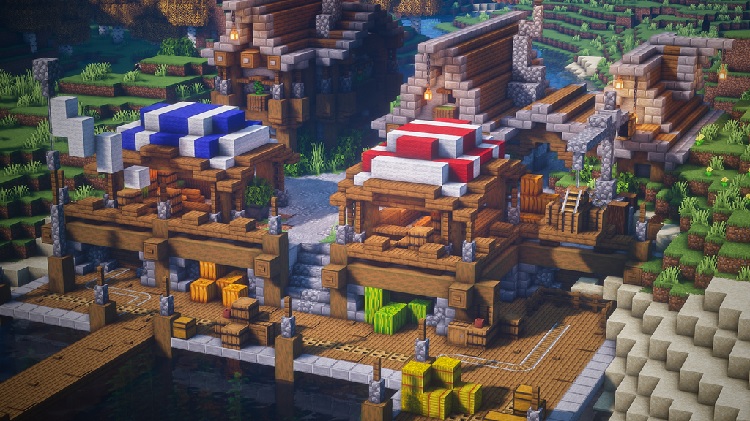
Minecraft is a game based on creativity. If it is in your imagination, you can surely build it in Minecraft. Even though it can be tough to build complex structures in Minecraft yet it is worth it. One such structure is the dock in Minecraft. A dock is an essential build in Minecraft for the reason that it will take you to your boat and let you ride it on water. If you are looking for Minecraft dock ideas, here are some ideas for you to take inspiration from.
Minecraft is not all a particular age group but for all. Sometimes we all need to build, destroy or create in order to relax and calm down. The world of Minecraft allows you to do all this and more. While exploring the magnificent world of Minecraft, you will come across many oceans and lakes that are great for fishing. And for fishing, you need a lovely dock. This is a hint to build yourself a lovely dock.
To make life easier for you, we have curated the 11 best Minecraft dock ideas for you that include Minecraft docks design, Minecraft boat dock, Minecraft fishing dock, Minecraft boating dock, Minecraft small dock, and a lot more.
Before we go ahead and see all the cool dock ideas Minecraft allows us to create, let us see what materials are required to build docks in Minecraft.
Building A Dock: Materials Needed
Have you been wanting to own a water vehicle like a ship, boat, or something similar? You will require a Minecraft dockyard to park your vehicle. This will allow you to easily visit any water area in your surrounding.
Here is what you will need to build a dock in Minecraft.
- Sheets of wood
- Ax
- Redstones
- Water
- Plants
- Dispenser
- Glass
- Wooden pillars
- Boat
The quantity of material will be different for each type of water body depending on its depth.
Now that we have the material required to build a dock, let us look at the various Minecraft dock ideas.
Here are the Best Minecraft Dock Ideas
Medieval Dock
Building this medieval dock can get a little tricky but don’t worry we are here for you. Begin with the outline of the platform. Add five smooth stone slabs along with one stripped spruce log. Add more posts to it and smooth stone slabs (6) in between them. Repeat the process to build a dock as big and long as you like.
The tricky part is placing the trapdoor of oak at the oceanside area and filling it with spruce slabs. Next, add a spruce fence and cobblestone wall to give it a medieval look. Make stairs of cobblestone at the entrance.
Simple Fishing Docks
Here is a cool Minecraft fishing dock design that you will enjoy if you like simple projects. Start by building seven pillars and keep a gap in between, now fill the floors. Add a boat rack design. Now add a fishing area. Build four pillars and connect them to make a platform. Build a tiny house atop the platform and add trapdoors with some effort.
Related – 20 Best Minecraft Building Ideas
Minimalistic Dock
One of the many Minecraft dock ideas is this minimalistic dock. Select a beautiful spot for your dream dock. Build pillars (you can use oak lawns) keep the width of two blocks and the length of three blocks between each post. The spaces between can be filled with oak sheets. Build the dock however long you want. Extra support can be added on the log post with barrels.
Coastal Dock
If you wish to you can make use of a spruce fence post for this dock design. Keep the width of two blocks and the length of three blocks. You can be creative and build your own oak logs or spruce slabs. To fill in the gaps add wooden blocks. Between posts, you can add a spruce gate for additional support.
Related – 7 Best Cool Minecraft Staircase Ideas
Harbor
Begin by making two blocks, now add Redstones underneath it. Next, make a frame of wood. Create an outline with a spruce fence, keep the dispenser in the middle and put hoppers. Around the frame, add a wall that is square. You can also add cactus to this dock design. Add desired finishing touches to complete your beautiful Minecraft dock.
Smart Dock
The smart dock is a great dock idea as everything today is smart like smartphones and refrigerators. You can easily build a smart dock with this Minecraft dock idea. Begin by building a long post and then create an outline using slabs of dark oak. Extend this out by 7 blocks. Use source slaps and a spruce fence gate to create a fence on the outline.
For some support, place a beam on the seabed. To fill food, you can use spruce slaps. Add a trap door if you may and you can have as many as you want.
Related – 13 Best Minecraft Survival House Ideas
Fishing Pier
To make this fishing pier, start by setting up a platform. After this add trapdoors and a campfire. If you wish to add some more details by the side, you can use a spruce log and a dark oak log. Add pillars that extend to the seabed for added support. Add fences on both sides of the pillars. Finishing touches can be added with lanterns and long logs that are long enough. Now you can enjoy fishing on the pier built by you.
Redstone Dock
Whatever you can think of, you can create in Minecraft. This is the beauty of this game. Redstone dock is quite easy to build and makes your gameplay more fun. Be it, anybody, building Redstone dock is easy for everyone. Though everybody might not have your unique imagination and creativity.
To build a Redstone dock, you should have a fair understanding of how Redstone wiring works without which your dock won’t be functional. Even though Redstone docks are easy, the circuit of Redstone is complex and maybe a bit of a task at first. With a little practice, nothing seems difficult. Experiment with this dock idea to learn what more you can do with it.
Check out this video tutorial by Skippy 6 Gaming to learn how to get started with this idea.
Related – 17 Best Easy Minecraft Castle Ideas
Boat Dispenser
This is the easiest idea among the rest mentioned above. Even though it is the easiest to build, it is fully equipped to keep your collection of swords and boats safe. This boat dispenser is a fun challenge for any Minecraft player because you get to dispense boats after all!
Not just boats but you can use it to dispense anything like animals, mobs, items or even you! The dispenser can store anything like eggs, fire charges, splash portions, or even snowballs. The possibilities when it comes to the dispenser are limitless. Check out the dispenser by Newbie Dave as it has a unique auto-collection system and is different from the rest.
KevSham’s Stunning Dock
This dock designed by KevSham is top-notch and one of the best dock design ideas there is. You can build this besides a lake. This design idea uses quite a lot of logs as compared to the previous ideas. The use of extra logs is for beam support.
If you are not a fan of dark oak wood you can switch to jungle wood. No matter what wood you use, the structure will stand out because of its individuality. The process to build this structure is simple. For people who are just starting out building docks, this one is a great start for you.
Related – Best Minecraft Base Ideas
Minecraft House with Dock
You can build a Minecraft house with a dock that you can use for fishing or parking your boats. This would require a water body next to your Minecraft house or a house that is built on water. You can use oak logs and dark oak wood to build this dock that extends from your Minecraft house. Make a layout and build a structure on it using stone bricks, oak logs, brick stairs, and iron bars. You can make the structure, five bricks tall and the dock as long as you want it to be.
Conclusion
Try out these 11 best Minecraft dock ideas for your next challenge and have exciting gameplay. If it is in your imagination, it can be created in Minecraft. Use your imagination and creativity to build a Minecraft dock for yourself that is unique yet functional. Use these ideas to draw inspiration from and build a fun dock.





Download Minecraft PE 1.21.131 APK for Android
Minecraft Bedrock 1.21.131 is a focused hotfix update — improved Spear combat, two important bug fixes, and better overall stability on Android. No new content, but a noticeably smoother experience.
Spear Knockback Improvement
The window during which a charged Spear attack can apply knockback has been extended. This makes combat feel more reliable — the attack now connects as expected without requiring pinpoint timing, especially useful when fighting multiple mobs at once.
Spear Animation Alignment
Charge attack animations now accurately sync with the Spear’s three gameplay phases: Engaged, Tired, and Disengaged. What you see on screen now matches what the game engine is actually doing — making combat more readable and reducing guesswork in fights.
Performance & Stability
Frame drops on mid-range Android hardware have been reduced. Memory handling improvements prevent sudden freezes during long play sessions. World loading and chunk generation are more reliable, reducing terrain “pop-in” when exploring or moving quickly.
Multiplayer Improvements
Backend updates improve session stability when players join or leave. Fewer disconnects and smoother synchronisation across Bedrock servers. Marketplace content and add-ons also load more consistently during multiplayer sessions.
Adventuring Time Achievement Fixed — The achievement no longer unlocks early. It now correctly requires visiting at least 17 biomes on PC, matching the intended design.
Marketplace Escape Key Fixed — Pressing Escape after using the Marketplace search now reliably returns players to the previous menu instead of getting stuck in a loop.
Add-on World Loading Fixed — A bug that triggered a “Block” error when loading or creating worlds with multiple add-ons installed has been resolved.
Download the APK
Tap one of the Download buttons above. Choose the Standard (no music) version if storage is limited, or the Full version for the complete experience. The ARM64 build is recommended for modern phones.
Enable “Install Unknown Apps”
Go to Settings → Security (or Privacy) → Install unknown apps. Enable the permission for your browser or file manager. Android requires this for any APK installed outside Google Play.
Open the APK File
Open your Downloads folder, find the Minecraft 1.21.131 APK, and tap it to launch the system installer. Follow the on-screen prompts.
Install Over Existing Version
In most cases you can install 1.21.131 directly over your existing Minecraft without losing any worlds or progress. If you see a signature conflict error, uninstall first — but back up your worlds beforehand.
Launch and Sign In
Open Minecraft, sign in with your Microsoft/Xbox Live account, and your existing worlds will load normally. Online multiplayer, Realms, and Marketplace content all work as before.
Download Minecraft PE 1.20 APK for Android
Get the full Minecraft Bedrock 1.20 (Trails and Tales) APK for Android. Supports Xbox Live sign-in. Multiple versions available — stable releases and preview builds.
Download the APK File
Tap the Download button above for the version you want. The APK file will save to your device’s Downloads folder.
Enable “Install Unknown Apps”
Go to Settings → Security or Privacy → Install unknown apps. Enable it for your browser or file manager. Android requires this for any APK installed outside of Google Play.
Open the Downloaded File
Open your Downloads folder (or tap the notification), find the Minecraft APK, and tap it to start the installer.
Confirm Installation
Tap Install and wait for the process to complete. If you see a “signature conflict” error, uninstall your existing Minecraft version first, then retry.
Launch and Sign In with Xbox Live
Open Minecraft, sign in with your Microsoft/Xbox Live account to access multiplayer, Realms, and cross-platform features.
-
 Guides7 years ago
6 Proven Ways to Get more Instagram Likes on your Business Account
-
Mainstream12 years ago
BioWare: Mass Effect 4 to Benefit From Dropping Last-Gen, Will Not Share Template With Dragon Age: Inquisition
-
 Mainstream8 years ago
How to Buy Property & Safe Houses in GTA 5 (Grand Theft Auto 5)
-

 Guides2 years ago
Free Fire vs PUBG: Comparing Graphics, Gameplay, and More
-

 Guides2 years ago
50+ Free Fire ID and Passwords Login List (Giveaway) 2025
-
 Casual3 years ago
8 Ways to Fix Over-Extrusion and Under-Extrusion in 3D Printing
-

 Other2 years ago
Ajjubhai UID: Free Fire Details & Earnings
-

 Features2 years ago
Exploring Valorant eSports Stats: Unveiling the Metrics Behind Competitive Excellence