
Guides
Linger In Shadows – PS3 Cheats

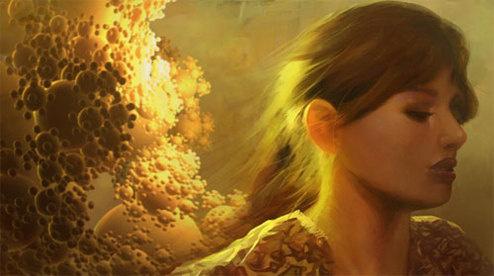 Linger In Shadows is an interactive game created exclusively for the PlayStation 3 that got mixed reviews from critics. It was created by Polish developers Plastic and published by Sony. It was released on October 9, 2008. Below you will find cheat codes, Trophies and unlockables for Linger In Shadows.
Cheats:
Bonus options
Hold L3 + R3 at the main menu to display the “Credits” and “Hidden Part” hidden options.
Unlockables:
Bonus options
Successfully complete the game with all trophies earned in one session to unlock the “Credits” and “Hidden Part” hidden menu options.
Trophies:
Sigil Of Time (Bronze): Freeze and manipulate time in order to force your way through rips in reality. Use it wisely, for it is a power that can overcome great challenges when seeking the light… or chaos.
Sigil Of Motion (Silver): Make the world tremble and the heavens shatter from within the shadows. The power to manipulate your environment has been unveiled and will prove essential in your struggles with nature.
Sigil Of Chaos (Silver): Chaos inhabits every fiber of the universe. Unleashing this power has obliterated the obstacles before you and will release you into nature.
Sigil Of Nature (Silver): The force of nature has brought odd life to an even more unusual environment. Remember what you have learned here and it may be useful to you in the future.
Sigil Of Creation (Silver): Eyes are the black holes of creatures, vast depths of darkness, but at the center you will find that creation exists everywhere, even when it is nowhere. All that is left is to unleash the light from within the shadow.
Sigil Of Light (Silver): It is foretold that revealing all 6 sigils will bring about light, and thus the sigils have been uncovered and light has been wrought from the shadow. Use all you have gained and search outside your vision for secrets within the world.
Greetings To Fairlight (Bronze): Fairlight is an old group with a lot of members from all over Europe. They’ve managed to be on top for the past 20 years. Their fresh demo selection has won many different awards for the hi-end machines and also for old-school ones including scene.org award in 4kb, 64kb and demo category.
Greetings To Sunflower (Silver): Sunflower is an old group that brought new trends to the demoscene in the beginning of accelerated era. Their demos seem to not suffer from time. This is due to their abstract style and very sophisticated music. The group was formed from very experienced sceners and project “Sunflower” survived for only two years (1999-2001). We all hope that they will make a massive comeback.
Greetings To Still (Silver): Still is a relatively new group formed by ex-members of Bauknecht, lkcc and “Haujobb”. Their first productions were released in 2007 but have already received interest and critical acclaim within the demoscene.
Greetings To Farbrausch (Silver): Farbrausch is a demogroup famous for using procedural techniques for creating textures, scenes, and animations in their productions. “Werkzeug” which is their demotool, successfully started a new era of tools, separating coders from artists, thus speeding up production process. Together with “Werkzeug” came V2, a high-quality software synthesizer that was already adopted by other groups respecting its values. Farbrausch is mostly known for “Candytron”, “The produkkt”, “The Popular Demo” and recently released “Debris”.
Greetings To The Black Lotus (Silver): The Black Lotus is an old Amiga group with a very distinctive, monumental style, influencing other groups including Plastic. They’ve managed to beat 2 Ghz computers with a classic 66 Mhz Amiga and a demo called “Starstruck”.
Greetings To Conspiracy (Silver): Conspiracy is a Hungarian group that specializes in creating 64-kilobyte intros. As the first group in demoscene history, they’ve managed to show their real-time production “Chaos Theory” together with other offline, pre-processed animations at SIGGRAPH 2007. This intro has also received a scene.org award.
Greetings To RGBA (none): RGBA is a Spanish group known mostly for their 64-kilobyte and their recent 4-kilobyte productions. They are also well known for breaking the mold in 4-kilobyte graphics. Plastic is especially dedicated to sending their greetings to RGBA for their remake of “195/95” demo.
Greetings To MFX (none): Mfx demos are known for their distinctive, mostly experimental style, focusing on building a specific dark atmosphere. Even if they prefer the form over content, their demos often visualize a concept or short story. Mfx members can be found also in different groups like Kewlers or Synesthetics. Mfx has been awarded with many awards including the scene.org award for Most Original Concept in a Demo called “The Ballet Dancer”.
Greetings To Andromeda Software Development (none): Andromeda Software Development is a demogroup with an extremely distinctive style. Their demos featured dynamic coherent flows of abstract visual elements subtly blending into each other in various and unexpected ways. They have won many demoscene awards including Best Demo of the Year 2007 for “Lifeforce” and Best Demo of 2005 for “Planet Risk”.
Greetings To Madwizards (none): Madwizards is an old group originating out of Poland best known for their accelerated Amiga productions. They’ve managed to invent their own abstract style while mixing real-time effects together with still post-processed photography. In their most recent production “Senzala”, they went back to the roots developing on classic Amiga.




Download Minecraft PE 1.21.131 APK for Android
Minecraft Bedrock 1.21.131 is a focused hotfix update — improved Spear combat, two important bug fixes, and better overall stability on Android. No new content, but a noticeably smoother experience.
Spear Knockback Improvement
The window during which a charged Spear attack can apply knockback has been extended. This makes combat feel more reliable — the attack now connects as expected without requiring pinpoint timing, especially useful when fighting multiple mobs at once.
Spear Animation Alignment
Charge attack animations now accurately sync with the Spear’s three gameplay phases: Engaged, Tired, and Disengaged. What you see on screen now matches what the game engine is actually doing — making combat more readable and reducing guesswork in fights.
Performance & Stability
Frame drops on mid-range Android hardware have been reduced. Memory handling improvements prevent sudden freezes during long play sessions. World loading and chunk generation are more reliable, reducing terrain “pop-in” when exploring or moving quickly.
Multiplayer Improvements
Backend updates improve session stability when players join or leave. Fewer disconnects and smoother synchronisation across Bedrock servers. Marketplace content and add-ons also load more consistently during multiplayer sessions.
Adventuring Time Achievement Fixed — The achievement no longer unlocks early. It now correctly requires visiting at least 17 biomes on PC, matching the intended design.
Marketplace Escape Key Fixed — Pressing Escape after using the Marketplace search now reliably returns players to the previous menu instead of getting stuck in a loop.
Add-on World Loading Fixed — A bug that triggered a “Block” error when loading or creating worlds with multiple add-ons installed has been resolved.
Download the APK
Tap one of the Download buttons above. Choose the Standard (no music) version if storage is limited, or the Full version for the complete experience. The ARM64 build is recommended for modern phones.
Enable “Install Unknown Apps”
Go to Settings → Security (or Privacy) → Install unknown apps. Enable the permission for your browser or file manager. Android requires this for any APK installed outside Google Play.
Open the APK File
Open your Downloads folder, find the Minecraft 1.21.131 APK, and tap it to launch the system installer. Follow the on-screen prompts.
Install Over Existing Version
In most cases you can install 1.21.131 directly over your existing Minecraft without losing any worlds or progress. If you see a signature conflict error, uninstall first — but back up your worlds beforehand.
Launch and Sign In
Open Minecraft, sign in with your Microsoft/Xbox Live account, and your existing worlds will load normally. Online multiplayer, Realms, and Marketplace content all work as before.
Download Minecraft PE 1.20 APK for Android
Get the full Minecraft Bedrock 1.20 (Trails and Tales) APK for Android. Supports Xbox Live sign-in. Multiple versions available — stable releases and preview builds.
Download the APK File
Tap the Download button above for the version you want. The APK file will save to your device’s Downloads folder.
Enable “Install Unknown Apps”
Go to Settings → Security or Privacy → Install unknown apps. Enable it for your browser or file manager. Android requires this for any APK installed outside of Google Play.
Open the Downloaded File
Open your Downloads folder (or tap the notification), find the Minecraft APK, and tap it to start the installer.
Confirm Installation
Tap Install and wait for the process to complete. If you see a “signature conflict” error, uninstall your existing Minecraft version first, then retry.
Launch and Sign In with Xbox Live
Open Minecraft, sign in with your Microsoft/Xbox Live account to access multiplayer, Realms, and cross-platform features.
-
 Guides7 years ago
6 Proven Ways to Get more Instagram Likes on your Business Account
-
Mainstream12 years ago
BioWare: Mass Effect 4 to Benefit From Dropping Last-Gen, Will Not Share Template With Dragon Age: Inquisition
-
 Mainstream8 years ago
How to Buy Property & Safe Houses in GTA 5 (Grand Theft Auto 5)
-

 Guides2 years ago
Free Fire vs PUBG: Comparing Graphics, Gameplay, and More
-

 Guides2 years ago
50+ Free Fire ID and Passwords Login List (Giveaway) 2025
-
 Casual3 years ago
8 Ways to Fix Over-Extrusion and Under-Extrusion in 3D Printing
-

 Other2 years ago
Ajjubhai UID: Free Fire Details & Earnings
-

 Features2 years ago
Exploring Valorant eSports Stats: Unveiling the Metrics Behind Competitive Excellence