
Guides
NCAA Football 09 – PS3 Cheats

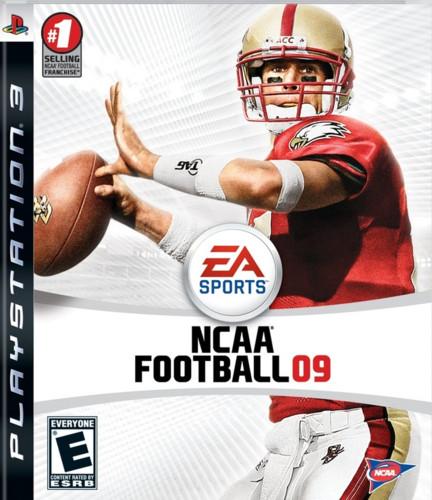 NCAA Football 09 is a college football simulation game featuring Matt Ryan as the cover athlete. The game was developed by EA’s Tiburon studio and published by Electronic Arts. The game was released on July 15, 2008 in North America only. Bellow you will find a full collection of cheat codes for NCAA Football 09, the PlayStation 3 version.
Cheats:
All-Time teams
Select “My Shrine” at the starting menu. Access the pennant collection screen and type any of the following codes for the indicated team (team name in bold):
Alabama – Roll Tide
Arkansas – Woopigsooie
Auburn – War Eagle
Baylor – Sic Em
Clemson – Death Valley
Colorado – Glory
Florida – Great to be
Florida State – Uprising
Georgia – Hunker Down
Illinois – Oskee Wow
Iowa – On Iowa
Kansas State – Victory
LSU – Geaux Tigers
Miami – Raising Cane
Michigan – Go Blue
Mississippi State – Hail State
Missouri – Mizzou Rah
Nebraska – Go Big Red
North Carolina – Rah Rah
Notre Dame – Golden Domer
Ohio State – Killer Nuts
Oklahoma – Boomer
Oklahoma State – Go Pokes
Oregon – Quack Attack
Penn State – We Are
Pittsburgh – Lets Go Pitt
Purdue – Boiler Up
Syracuse – Orange Crush
Tennessee – Big Orange
Texas A&M – Gig Em
Texas Longhorns – Hook Em
Texas Tech – Fight
UCLA – Mighty
USC – Fight On
Virginia – Wahoos
Virginia Tech – Tech Triumph
Washington – Bow Down
Wisconsin – U Rah Rah
Mascot teams
Select “My Shrine” at the starting menu. Access the pennant collection screen and type any of the following codes for the indicated mascot
Arizona – Bear Down
Georgia Tech – Ramblinwreck
Iowa State – Red And Gold
Kansas – Rock Chalk
Kentucky – On On UK
Michigan State – Go Green
Minnesota – Rah Rah Rah
North Carolina State – Go Pack
Northwestern – Go Cats
Ole Miss – Hotty Totty
South Carolina – Go Carolina
Wake Forest – Go Deacs Go
Washington Sate – All Hail
West Virginia – Hail WV
Pennants
2004 All-Americans – Fumble
Extra Credit – Touchdown
First and 5 – Undefeated
First and 15 (#200) – Thanks
Super Dive – Upset
QB can throw passes beyond the line of scrimmage – Tiburon
Opponent fumbles when he tries to juke – Champs
Ref spots ball short for your opponent – For
Very narrow upright on opponent’s field goal attempts – 08
Opponent’s QB throws passes high and wobbly – Elite 11
QB almost impossible to sack – Offense
Doubles opponent’s penalty yardage for one game – NCAA
Five downs to make a first down – Impact
Get points when player is injured – Heisman
Unlimited timeouts for one game – Football
Kicker has greater distance for one game – Gridiron
Team’s pass rush improved for one game – Turnover
Player’s catching ability improved for one game – In the zone
Increase wind in your direction on field goal attempts – Sideline
Increase DB’s chance of jamming a receiver at the line – Defense
Increase opponent’s chance of dropping a pass – Registering
Increase opponent’s chance of injury for one game – Blitz
Increase opponent’s fatigue for one game – Game time
Increase opponent’s fumbles for one game – With EA
Increase player’s ability to break tackles for one game – Break Free
Increase player’s chance of intercepting a pass – Hand Picked
Increase QB’s passing accuracy for one game – No Sweat
Increase receiver’s chance of burning coverage deep – Light Speed
Prevent QB from throwing interceptions or fumbling – EA Sports






Download Minecraft PE 1.21.131 APK for Android
Minecraft Bedrock 1.21.131 is a focused hotfix update — improved Spear combat, two important bug fixes, and better overall stability on Android. No new content, but a noticeably smoother experience.
Spear Knockback Improvement
The window during which a charged Spear attack can apply knockback has been extended. This makes combat feel more reliable — the attack now connects as expected without requiring pinpoint timing, especially useful when fighting multiple mobs at once.
Spear Animation Alignment
Charge attack animations now accurately sync with the Spear’s three gameplay phases: Engaged, Tired, and Disengaged. What you see on screen now matches what the game engine is actually doing — making combat more readable and reducing guesswork in fights.
Performance & Stability
Frame drops on mid-range Android hardware have been reduced. Memory handling improvements prevent sudden freezes during long play sessions. World loading and chunk generation are more reliable, reducing terrain “pop-in” when exploring or moving quickly.
Multiplayer Improvements
Backend updates improve session stability when players join or leave. Fewer disconnects and smoother synchronisation across Bedrock servers. Marketplace content and add-ons also load more consistently during multiplayer sessions.
Adventuring Time Achievement Fixed — The achievement no longer unlocks early. It now correctly requires visiting at least 17 biomes on PC, matching the intended design.
Marketplace Escape Key Fixed — Pressing Escape after using the Marketplace search now reliably returns players to the previous menu instead of getting stuck in a loop.
Add-on World Loading Fixed — A bug that triggered a “Block” error when loading or creating worlds with multiple add-ons installed has been resolved.
Download the APK
Tap one of the Download buttons above. Choose the Standard (no music) version if storage is limited, or the Full version for the complete experience. The ARM64 build is recommended for modern phones.
Enable “Install Unknown Apps”
Go to Settings → Security (or Privacy) → Install unknown apps. Enable the permission for your browser or file manager. Android requires this for any APK installed outside Google Play.
Open the APK File
Open your Downloads folder, find the Minecraft 1.21.131 APK, and tap it to launch the system installer. Follow the on-screen prompts.
Install Over Existing Version
In most cases you can install 1.21.131 directly over your existing Minecraft without losing any worlds or progress. If you see a signature conflict error, uninstall first — but back up your worlds beforehand.
Launch and Sign In
Open Minecraft, sign in with your Microsoft/Xbox Live account, and your existing worlds will load normally. Online multiplayer, Realms, and Marketplace content all work as before.
Download Minecraft PE 1.20 APK for Android
Get the full Minecraft Bedrock 1.20 (Trails and Tales) APK for Android. Supports Xbox Live sign-in. Multiple versions available — stable releases and preview builds.
Download the APK File
Tap the Download button above for the version you want. The APK file will save to your device’s Downloads folder.
Enable “Install Unknown Apps”
Go to Settings → Security or Privacy → Install unknown apps. Enable it for your browser or file manager. Android requires this for any APK installed outside of Google Play.
Open the Downloaded File
Open your Downloads folder (or tap the notification), find the Minecraft APK, and tap it to start the installer.
Confirm Installation
Tap Install and wait for the process to complete. If you see a “signature conflict” error, uninstall your existing Minecraft version first, then retry.
Launch and Sign In with Xbox Live
Open Minecraft, sign in with your Microsoft/Xbox Live account to access multiplayer, Realms, and cross-platform features.
-
 Guides7 years ago
6 Proven Ways to Get more Instagram Likes on your Business Account
-
Mainstream12 years ago
BioWare: Mass Effect 4 to Benefit From Dropping Last-Gen, Will Not Share Template With Dragon Age: Inquisition
-
 Mainstream8 years ago
How to Buy Property & Safe Houses in GTA 5 (Grand Theft Auto 5)
-

 Guides2 years ago
Free Fire vs PUBG: Comparing Graphics, Gameplay, and More
-

 Guides2 years ago
50+ Free Fire ID and Passwords Login List (Giveaway) 2025
-
 Casual3 years ago
8 Ways to Fix Over-Extrusion and Under-Extrusion in 3D Printing
-

 Other2 years ago
Ajjubhai UID: Free Fire Details & Earnings
-

 Features2 years ago
Exploring Valorant eSports Stats: Unveiling the Metrics Behind Competitive Excellence
john
May 13, 2009 at 1:48 am
i can’t find where to put the codes
John
August 9, 2009 at 2:51 pm
I cannot find my shrine. I see view shrine, but not the pennant collection. Where is the pennant collection?
johnathen
September 18, 2010 at 8:59 pm
very true where do you go then? does anyone know?