
Guides
9 Best Minecraft Furniture Ideas

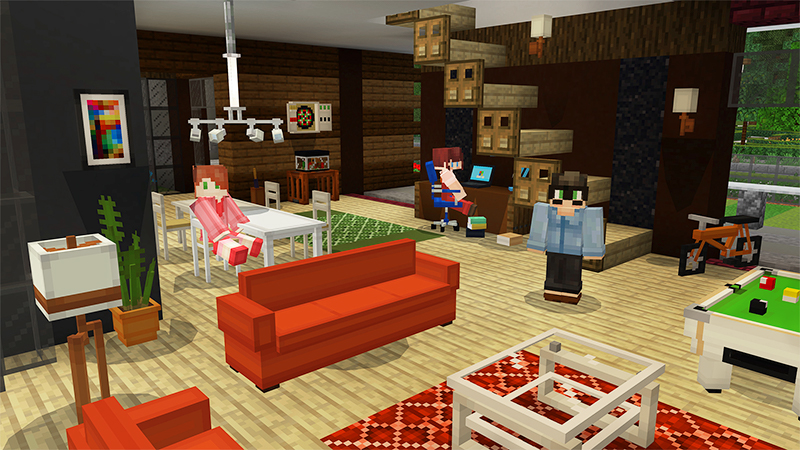
Adding tiny decorations and furnishing to projects in Minecraft may make them stand out. A lot of the time, gamers focus on the outside and overlook the inner.
Houses come alive with interior design. There is no particular object or block for furniture in Minecraft. However, players may combine different blocks and things to create gorgeous tables. This post will show you some of the most fantastic Minecraft furniture ideas.
Here Are The Best Minecraft Furniture Ideas
Hanging Couch
A hanging couch is ideal for use in a yard or on a balcony. This hanging couch may be attached to a tree or placed inside a treehouse. Chains and trap doors are required to create a hanging sofa.
Make two vertical chains that are separated by one block. Place chains until they reach a height of one block above the ground. Encircle the chains with trap doors.
A Cozy Library Chair and Desk
The construction above won’t take long to duplicate if you want a beautiful chair and table fixture.
Here is the material required:
1 Smooth Quartz Block
1 White Carpet
5 Trapdoors (Your Choice)
1 End Rod
1 of Any Building Block
That’s all there is to it. You could think that only a couple of bookshelves are required to complete the building’s aesthetic. On the other hand, the background is self-explanatory and ridiculously simple to construct, so you can do whatever you want with it.
The End Rod is, without a doubt, the most contentious aspect of this work. Being blindingly gleaming and all that jazz.
A construct like this can function as a waypoint to assist you in finding your way back home if you have an external 2nd-floor library. It serves as a Minecraft light source and a place to relax.
A Hot Spring / Jacuzzi
For making a Jacuzzi, you will need these below-mentioned ingredients:
12 Quartz Stairs
4 Soul Sand
16 Spruce Trapdoors
Bucket of Water
4 Smooth Quartz Stone
Make a square-shaped space using the Quartz Stairs as the inner barrier and the Spruce Trapdoors as the outside barrier. Dig two holes down on both sides of the area in the center.
After that, use Smooth Quartz Stone to polish the dirt on the sides of the ground and make it seem clean.
Then, using the four pieces of Soul Sand, fill up the bottom layer. You’re done after you’ve spilled the pail of water inside your tub!
As soon as you apply that finishing touch, you’ll notice bubbles fizzing out of the hot tub. One of the most fantastic Minecraft furniture designs gets a nasty touch!
Sofa Set
In Minecraft, the Sofa Set is a must-have piece of living room furniture. Players may construct a simple sofa set using wooden steps and signage. As seen in the illustration, add stairwells. Create a hand rest for the sofa by placing signs on both sides of the stairs.
In Minecraft, players may make pillows using the banner below the stairwell. These little embellishments give furniture uniqueness.
Ceiling Lights
This is a low-cost, high-impact ceiling light. It’s straightforward to construct and doesn’t take much time after you have all of the necessary supplies.
There are just three sorts of materials required. Here’s what you’ll need for one of the best Minecraft furniture ideas:
End Rod
Glass Panes
Sea Lantern
Prop an End Rod looking downwards if you can reach the ceiling from the ground, then place the Sea Lantern right below it.
Bench
A bench is simple to construct and may be used for practically any occasion. While it may be used indoors, it shines when used in outdoor spaces such as parks or outdoor patios.
Trapdoor and Smooth Quartz Slab are the sole materials required to construct it. You may, of course, pick and select whatever slab you choose.
To construct it, start by placing a supporting construction block on the left and right sides of the three slabs. This is done so that your Quartz Slab can float.
Add three construction bricks on top of each Quartz Slab after that’s done, and you get yourself a beautiful bench.
Bunk Bed
This construct may require some refinement, but the best part is that all of the components you’ll need are readily available.
Here’s the thing that you will need to get started on one of the most extraordinary Minecraft furniture ideas:
Ladder
Bed
Wooden Stairs
Plank of Wood
Wooden Slabs
Those materials are presumably already in your possession. And if you don’t, simply go outdoors, and cut down some trees.
Canopy Bed
While a bunk bed appears valuable and attractive, you may prefer the traditional double-style king bed.
With simply two beds next to each other, you may come up with many cool build ideas, one of which is this canopy bed.
You need to surround your bed with hardwood components, much like the bunk bed. Wooden Slabs, Wooden Blocks, and Wooden Fences are examples of this. Wooden Planks should be used to fill the bed’s corner edges.
This will also serve as a support for your Fences in the future. Place Wooden Slabs on the remaining foundation layer surrounding the bed. Increase the size of the wooden fences by two.
Then, using Wooden Slabs, make a rectangle shape on top, leaving a hole in the center. You may instead use a Double Chest instead of a Wooden Slab if that’s more your style.
Working Chair
The majority of furniture in Minecraft is unusable and serves as decoration. However, chairs are an exception. Minecarts may be used to make available seats. Place a stair similar to the sofa and add signage on both sides.
Incorporate a stairwell inside the minecart. Make sure the minecart is parked on a block of soul sand. A Redstone block can be used to push the stair within. After moving the stair, players can sit in the chair by right-clicking on it.
The above furniture can be placed in these below categories:
For Bedroom: You can use the canopy or bunk bed in your bedroom. It can look great once you are done with the furnishing, and you can add some fantastic decorations to your structure, such as a Painting, to put the finishing touches on it.
For Kitchen & Dining Room: The sofa set and hanging couch add a creative touch to your Dining room, and you can even use them for various purposes.
For Library: You can add the Ceiling Lights as it will detract from reality because the light is beaming directly on you while you read sitting on that Cozy Library chair. What table stand, on the other hand, emits a brilliant light?
Frequently Asked Questions (FAQs)
How do you make furniture in Minecraft?
Improvisation is the key to designing furniture in Minecraft. Creative use of objects will go a far way when making pieces for your house, business, or bat cave. As you’ll see, the procedure is both straightforward and enjoyable. We’ll be making items that resemble furniture for the most part, which means you’ll be able to create almost unlimited versions of your ideas.
What is the best furniture pack in Minecraft?
The goal of Minecraft Furniture Mod is to add functional and useful furniture and decorations to the game. You’ll discover furniture for every area in your house, including the kitchen, bedroom, dining room, patio, and more! The mod is currently adding over eighty distinct blocks, and fresh versions are being released on a regular basis.
Conclusion
Furniture may play a significant part in the stunning effect of the décor, as you can see from these design ideas. So, which of these Minecraft furniture designs do you prefer?





Download Minecraft PE 1.21.131 APK for Android
Minecraft Bedrock 1.21.131 is a focused hotfix update — improved Spear combat, two important bug fixes, and better overall stability on Android. No new content, but a noticeably smoother experience.
Spear Knockback Improvement
The window during which a charged Spear attack can apply knockback has been extended. This makes combat feel more reliable — the attack now connects as expected without requiring pinpoint timing, especially useful when fighting multiple mobs at once.
Spear Animation Alignment
Charge attack animations now accurately sync with the Spear’s three gameplay phases: Engaged, Tired, and Disengaged. What you see on screen now matches what the game engine is actually doing — making combat more readable and reducing guesswork in fights.
Performance & Stability
Frame drops on mid-range Android hardware have been reduced. Memory handling improvements prevent sudden freezes during long play sessions. World loading and chunk generation are more reliable, reducing terrain “pop-in” when exploring or moving quickly.
Multiplayer Improvements
Backend updates improve session stability when players join or leave. Fewer disconnects and smoother synchronisation across Bedrock servers. Marketplace content and add-ons also load more consistently during multiplayer sessions.
Adventuring Time Achievement Fixed — The achievement no longer unlocks early. It now correctly requires visiting at least 17 biomes on PC, matching the intended design.
Marketplace Escape Key Fixed — Pressing Escape after using the Marketplace search now reliably returns players to the previous menu instead of getting stuck in a loop.
Add-on World Loading Fixed — A bug that triggered a “Block” error when loading or creating worlds with multiple add-ons installed has been resolved.
Download the APK
Tap one of the Download buttons above. Choose the Standard (no music) version if storage is limited, or the Full version for the complete experience. The ARM64 build is recommended for modern phones.
Enable “Install Unknown Apps”
Go to Settings → Security (or Privacy) → Install unknown apps. Enable the permission for your browser or file manager. Android requires this for any APK installed outside Google Play.
Open the APK File
Open your Downloads folder, find the Minecraft 1.21.131 APK, and tap it to launch the system installer. Follow the on-screen prompts.
Install Over Existing Version
In most cases you can install 1.21.131 directly over your existing Minecraft without losing any worlds or progress. If you see a signature conflict error, uninstall first — but back up your worlds beforehand.
Launch and Sign In
Open Minecraft, sign in with your Microsoft/Xbox Live account, and your existing worlds will load normally. Online multiplayer, Realms, and Marketplace content all work as before.
Download Minecraft PE 1.20 APK for Android
Get the full Minecraft Bedrock 1.20 (Trails and Tales) APK for Android. Supports Xbox Live sign-in. Multiple versions available — stable releases and preview builds.
Download the APK File
Tap the Download button above for the version you want. The APK file will save to your device’s Downloads folder.
Enable “Install Unknown Apps”
Go to Settings → Security or Privacy → Install unknown apps. Enable it for your browser or file manager. Android requires this for any APK installed outside of Google Play.
Open the Downloaded File
Open your Downloads folder (or tap the notification), find the Minecraft APK, and tap it to start the installer.
Confirm Installation
Tap Install and wait for the process to complete. If you see a “signature conflict” error, uninstall your existing Minecraft version first, then retry.
Launch and Sign In with Xbox Live
Open Minecraft, sign in with your Microsoft/Xbox Live account to access multiplayer, Realms, and cross-platform features.
-
 Guides6 years ago
6 Proven Ways to Get more Instagram Likes on your Business Account
-
Mainstream12 years ago
BioWare: Mass Effect 4 to Benefit From Dropping Last-Gen, Will Not Share Template With Dragon Age: Inquisition
-
 Mainstream8 years ago
How to Buy Property & Safe Houses in GTA 5 (Grand Theft Auto 5)
-

 Guides2 years ago
Free Fire vs PUBG: Comparing Graphics, Gameplay, and More
-

 Guides2 years ago
50+ Free Fire ID and Passwords Login List (Giveaway) 2025
-
 Casual3 years ago
8 Ways to Fix Over-Extrusion and Under-Extrusion in 3D Printing
-

 Other2 years ago
Ajjubhai UID: Free Fire Details & Earnings
-

 Features2 years ago
Exploring Valorant eSports Stats: Unveiling the Metrics Behind Competitive Excellence