
Guides
How To Make Money In The Gaming Industry With Blog


Gaming has become the fastest-growing form of entertainment in the world. The pandemic has only warmed up the gaming industry, now the market attracts record investments, and developers compete more actively for the free time of a paying audience. Thanks to the millions of players around the world, online games have become a source of huge profits and opened up a lot of opportunities to earn money. In this article, we will consider how to turn a hobby into an income and analyze what methods of monetization are currently relevant.
How to promote a game channel?
Now, YouTube is one of the most powerful tools for promoting a personal brand. The platform allows you to create a community of loyal users, build trusting and long-term relationships with them that can be constantly monetized.
Developing a blog is constant and energy-consuming work that requires diligence, self-discipline, and time. That’s why it’s important to approach it seriously if you want to achieve high financial results.
Before you make any marketing moves, it is important to identify the main topic on which you will create videos. Some bloggers bet on rating games or new products that could also become popular in the future. It is worth studying the target audience for a more personalized approach to the development of content strategy, as well as the drafting of advertising messages for each of the segments.
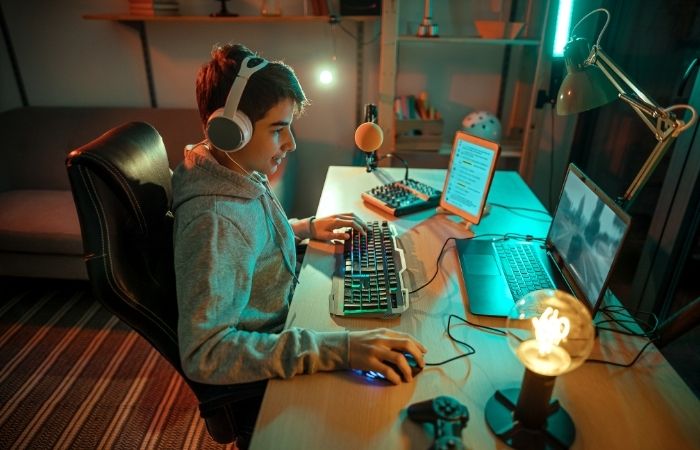
The first step is to properly design the channel. This allows you from the first seconds to hold the attention of a new audience, engage and immerse people in the depth of your content. To stand out among your competitors, create a unique style, a bright memorable channel header, your logo, and write the description. Take care of the quality of the content and buy professional equipment: video camera, tripod, microphone, lighting, etc.
The necessary stage of promotion is to increase the level of popularity and involvement. At the start, it is effective to buy YouTube subscribers, views, comments, etc. This marketing move will allow you to quickly raise your videos’ rankings in search engines and recommendations. What’s more, high stats on your channel create the trigger for social proof. When people see that the credibility of the brand is confirmed by the majority, they perceive it as authoritative, the content as interesting, and the channel begins to scale organically.
Every year YouTube becomes more saturated with content and personal brands, and to get out of the shadow of competitors it is important to constantly invest in its promotion: set up ads, buy real YouTube subscribers, do collaborations with bloggers, mutual PR, cross-promotion through other platforms, etc. A steady influx of new audiences will ensure a constant channel’s growth by converting users into subscribers, customers, or advertisers.
How to profit from a personal brand?
Once you have built up a huge social capital, you have the opportunity to make money.
You can earn with Google AdSense, through ads that are embedded in videos on an automatic basis. In this case, the video blogger is focused only on creating content.
You can make direct contracts with advertisers or cooperate with game developers. In this case, it is important to hold negotiations, agree on a script and know how to work with the audience. You can offer collaboration yourself and write to game projects that you are interested in, that are quite popular, and now acquire advertising. Accordingly, you will get sponsors for your videos, and they will get a great source of traffic. In some cases, they will be able to help you with creatives, materials, and video shooting, provide you with early access so that you can broadcast updates in the game, the appearance of new characters, before anyone else.
An effective way to monetize your channel is through affiliate programs. You can recommend definite games or in-game products, add affiliate links to the description and receive a commission on sales or installations.
It is recommended to combine tools and develop several income sources at once for stable growth of profit.
To sum up, in modern times the gaming industry is mainstream. Every year, it involves more people and allows them to take part in its enormous financial flows. So, the best time to start moving in this direction is now.



Download Minecraft PE 1.21.131 APK for Android
Minecraft Bedrock 1.21.131 is a focused hotfix update — improved Spear combat, two important bug fixes, and better overall stability on Android. No new content, but a noticeably smoother experience.
Spear Knockback Improvement
The window during which a charged Spear attack can apply knockback has been extended. This makes combat feel more reliable — the attack now connects as expected without requiring pinpoint timing, especially useful when fighting multiple mobs at once.
Spear Animation Alignment
Charge attack animations now accurately sync with the Spear’s three gameplay phases: Engaged, Tired, and Disengaged. What you see on screen now matches what the game engine is actually doing — making combat more readable and reducing guesswork in fights.
Performance & Stability
Frame drops on mid-range Android hardware have been reduced. Memory handling improvements prevent sudden freezes during long play sessions. World loading and chunk generation are more reliable, reducing terrain “pop-in” when exploring or moving quickly.
Multiplayer Improvements
Backend updates improve session stability when players join or leave. Fewer disconnects and smoother synchronisation across Bedrock servers. Marketplace content and add-ons also load more consistently during multiplayer sessions.
Adventuring Time Achievement Fixed — The achievement no longer unlocks early. It now correctly requires visiting at least 17 biomes on PC, matching the intended design.
Marketplace Escape Key Fixed — Pressing Escape after using the Marketplace search now reliably returns players to the previous menu instead of getting stuck in a loop.
Add-on World Loading Fixed — A bug that triggered a “Block” error when loading or creating worlds with multiple add-ons installed has been resolved.
Download the APK
Tap one of the Download buttons above. Choose the Standard (no music) version if storage is limited, or the Full version for the complete experience. The ARM64 build is recommended for modern phones.
Enable “Install Unknown Apps”
Go to Settings → Security (or Privacy) → Install unknown apps. Enable the permission for your browser or file manager. Android requires this for any APK installed outside Google Play.
Open the APK File
Open your Downloads folder, find the Minecraft 1.21.131 APK, and tap it to launch the system installer. Follow the on-screen prompts.
Install Over Existing Version
In most cases you can install 1.21.131 directly over your existing Minecraft without losing any worlds or progress. If you see a signature conflict error, uninstall first — but back up your worlds beforehand.
Launch and Sign In
Open Minecraft, sign in with your Microsoft/Xbox Live account, and your existing worlds will load normally. Online multiplayer, Realms, and Marketplace content all work as before.
Download Minecraft PE 1.20 APK for Android
Get the full Minecraft Bedrock 1.20 (Trails and Tales) APK for Android. Supports Xbox Live sign-in. Multiple versions available — stable releases and preview builds.
Download the APK File
Tap the Download button above for the version you want. The APK file will save to your device’s Downloads folder.
Enable “Install Unknown Apps”
Go to Settings → Security or Privacy → Install unknown apps. Enable it for your browser or file manager. Android requires this for any APK installed outside of Google Play.
Open the Downloaded File
Open your Downloads folder (or tap the notification), find the Minecraft APK, and tap it to start the installer.
Confirm Installation
Tap Install and wait for the process to complete. If you see a “signature conflict” error, uninstall your existing Minecraft version first, then retry.
Launch and Sign In with Xbox Live
Open Minecraft, sign in with your Microsoft/Xbox Live account to access multiplayer, Realms, and cross-platform features.
-
 Guides6 years ago
6 Proven Ways to Get more Instagram Likes on your Business Account
-
Mainstream12 years ago
BioWare: Mass Effect 4 to Benefit From Dropping Last-Gen, Will Not Share Template With Dragon Age: Inquisition
-
 Mainstream8 years ago
How to Buy Property & Safe Houses in GTA 5 (Grand Theft Auto 5)
-

 Guides2 years ago
Free Fire vs PUBG: Comparing Graphics, Gameplay, and More
-

 Guides2 years ago
50+ Free Fire ID and Passwords Login List (Giveaway) 2025
-
 Casual3 years ago
8 Ways to Fix Over-Extrusion and Under-Extrusion in 3D Printing
-

 Other2 years ago
Ajjubhai UID: Free Fire Details & Earnings
-

 Features2 years ago
Exploring Valorant eSports Stats: Unveiling the Metrics Behind Competitive Excellence