
Tech
Best Gaming Keyboards: 2014 Edition

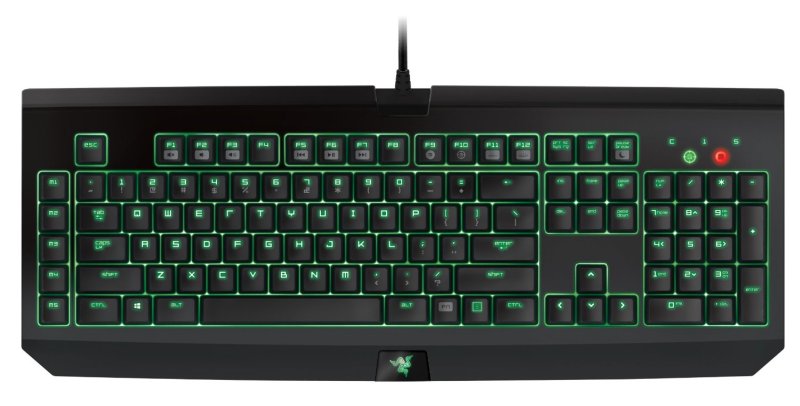
Ever since we started covering the tech niche here at Unigamesity, I wanted to write an article about the best gaming keyboards. The idea is that usually you don’t have to purchase a keyboard too often and choosing the right one is the key to victory here. I personally still run with a PS/2 keyboard and I am completely satisfied with it, but when the time will come for me to finally upgrade later this year, I will surely choose one of the gaming keyboards that we have listed below.
What features should you look for in a gaming keyboard? Durability would be first on my list as we, the gamers, tend to get angry sometimes and the keyboard is the easiest to punch. Then, we’d have all the technical requirements, ergonomic shape and enough buttons to make gaming a breeze. So here are the best gaming keyboards to try out in 2014:
SteelSeries Merc Stealth
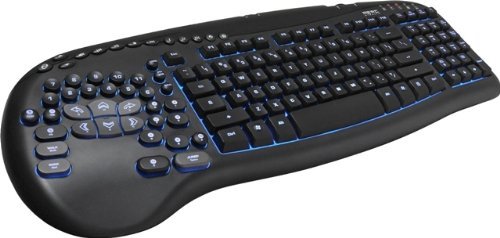
One of my all time favorite keyboards, I love looking at it and considering it a keyboard that came from another planet. With over 125 pre-defined key mapping layouts, it’s not all about a ton of buttons: it’s also tilted at 11 degrees, which is the natural wrist position, which further means that your wrist won’t start to ache after hours of gaming. Add to that three color illumination options (blue, purple and red), rubberized keys and anti ghosting capability that supports up to 7 simultaneous keystrokes, and you can already say that you’ve read all you had to read on this list and stop searching for a gaming keyboard. Really. Check it out here, currently running at a 31% discount.
Sharkoon Skiller
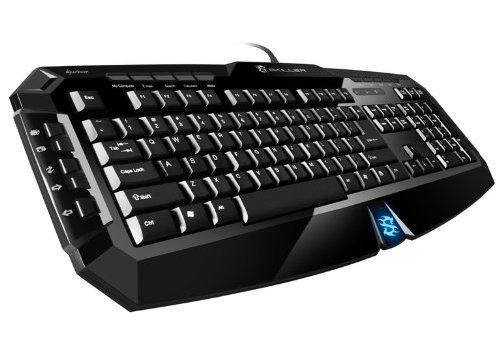
Bulky and hardcore – that’s how I would describe this durable gaming keyboard. It features 8 swapable rubberized gaming keys so you can always customize the ones you really need to press with the biggest precision and also has 20 extra multimedia keys because… it can! This is an extremely durable keyboard too, a perfect fit for any angry gamer – it’s keys are tested and promised to last for 10 million key presses, so that’s a lot of killing you can do in your favorite games. It’s strongest point? It’s extremely cheap, currently running at just $17.99 on Amazon. So if you’re low on funds, this one’s a no brainer!
Logitech G710+
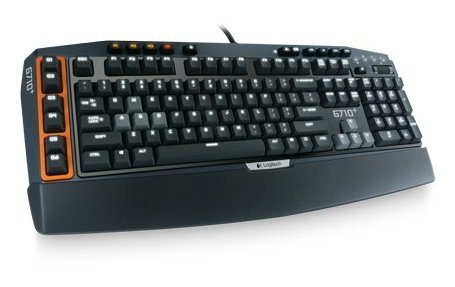
Logitech has a great offer when it comes to gaming keyboards, including the G110 and the popular G550s, but my personal choice goes to the G710+ since it’s current gen and does a great job overall. The keys are extremely quiet (there’s no clicking sound with the G710+) and Logitech promises faster response than that of the rubber-domed keys. Background lightning on three levels, plus the option to adjust the brightness of the arrow keys and WASD independently for flawless gaming at any level of light. Anti ghosting capability, customizable function keys… Logitech really did a great job with this gaming keyboard and you can check it out here.
Corsair Vengeance K95
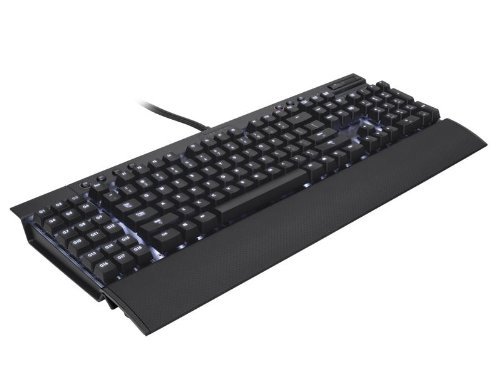
If you’re a MMO gamer, you need nothing BUT this gaming keyboard! You can set 18 macros on this mechanical keyboard and make sure that your constant key strokes won’t harm it in any way. A nice but pretty useless, in my opinion, feature is that you can save gaming profiles on the keyboard itself rather than on the PC – useful if you plan to take your keyboard away and play at a friend’s house. Apart from that, it has key-by-key customizable backlighting and a brushed aluminum chassis for a sleek look. It’s not very cheap, but it’s perfect for all MMO gamers out there – check it out here on Amazon.
Razer BlackWidow Ultimate
The Ultimate edition of the Razer BlackWidow is here and proves to be a top pick for 2014. It features fully programmable keys + 5 additional gaming keys with on-the-fly macro recording, individually backlit keys and extremely durable: each key is designed to withstand 60 million key strokes. Nice! Add to that a really nice design and you get a really good gaming keyboard overall. Check out the deals for it by clicking here.
Razer DeathStalker

The #1, best selling gaming keyboard on Amazon, and it still has a 4.5 rating after over 200 reviews – these are details that really matter when choosing your gaming keyboard. Add to that the fact that it’s pretty cheap at just $67.17 (with a discount of 16% at the moment of writing) and you have a really sweet deal. A nice feature of this gaming keyboard is the slim key mechanics which reduce the time required for pressing a key – so if it’s milliseconds you want to win in your games, this is they keyboard for you. It also has other great features, like anti ghosting for up to 10 keys and the nice green backlight of the Razer brand. Check it out on Amazon to find out more about it.
Logitech G13 Gameboard
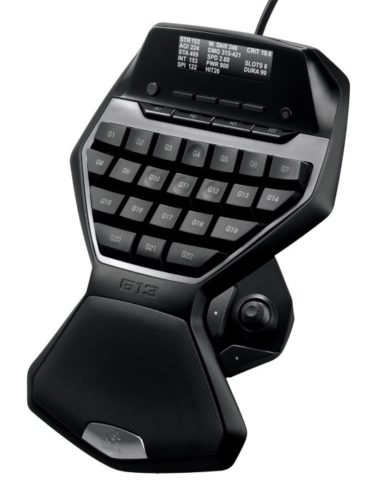
And here’s a bonus entry for those willing to bring the future to their homes now. The gameboard also cares a lot about your hand’s comfort and does a pretty good job providing everything you need on the small board. It has an on-board memory that remembers up to 5 profiles, 25 programmable keys and a game panel that lets you see game stats, system info, and communications from fellow players. The bonus you should always invest in if you have the funds available! Check it out here – currently running at a 22% discount!
And these would be our top gaming keyboard picks for you to try out in 2014. Which is the one you’ll pick? Let us know by commenting below!


Network reliability is a critical factor for businesses that rely on continuous connectivity to operate efficiently and effectively. The implementation of advanced solutions such as Cradlepoint R980 can significantly enhance network reliability by providing robust features designed to meet the demands of modern technological environments. This article explores how Cradlepoint R980 can improve network stability, examines its key features, and discusses strategies to maximize performance across various industries.
Enhancing Network Reliability with Cradlepoint R980

The Cradlepoint R980 plays a pivotal role in ensuring network reliability by leveraging cutting-edge technologies such as Edge Computing and Kubernetes Orchestration. Edge Computing processes data closer to the source, reducing latency and enhancing real-time data processing capabilities. This is particularly beneficial for industries where timely data access is crucial, such as healthcare and finance. Furthermore, Kubernetes Orchestration helps in managing containerized applications across multiple environments, ensuring seamless network operations even during peak traffic.
Beyond these technologies, the Cradlepoint R980 integrates a Load Balancer to distribute network traffic efficiently, preventing bottlenecks and ensuring optimal performance. This is crucial in maintaining the reliability of services, especially for businesses with high traffic demands. By optimizing traffic flow, the device minimizes downtime and improves service delivery.
Incorporating the Zero Trust Security Model into the Cradlepoint R980 ensures that all network activities are continuously verified, thereby enhancing security and reliability. This model is essential for businesses that prioritize data integrity and protection against unauthorized access, which is a common concern in technology-driven sectors.
Key Features of Cradlepoint R980 for Network Stability
The Cradlepoint R980 boasts several features that contribute to network stability. One prominent feature is its API Gateway, which facilitates the integration of different software systems and enables seamless communication between various applications. This integration is vital for businesses employing Microservices Architecture, as it allows for flexible and scalable system designs.
An additional feature is the built-in Content Delivery Network (CDN), which optimizes the delivery of digital content to end-users by caching data at strategic locations. This reduces load times and enhances user experience, making it an indispensable tool for organizations that rely on rapid content delivery.
WebAssembly support within the Cradlepoint R980 enhances the performance of web applications, enabling faster execution of complex tasks and improving overall application efficiency. This feature is particularly beneficial for businesses that require high-performance computing resources to operate their web applications seamlessly.
Real-World Applications of Cradlepoint R980 in Various Industries
In the healthcare industry, the Cradlepoint R980 ensures reliable connectivity for remote patient monitoring systems, enabling real-time data transmission critical for patient care. This reliability is achieved through the device’s advanced features like Edge Computing and Load Balancer, which optimize data flow and reduce latency.
Retail businesses benefit from the Cradlepoint R980 by utilizing its GraphQL Query Language capabilities to efficiently manage inventory systems and customer data integration, offering a streamlined approach to data management and enhancing operational efficiency.
For financial services, the Cradlepoint R980 provides a robust solution for secure transactions and data integrity through its Zero Trust Security Model, ensuring that sensitive data is protected from breaches and unauthorized access. This is vital in maintaining customer trust and regulatory compliance.
Strategies for Maximizing Network Performance with Cradlepoint R980
To maximize the performance of the Cradlepoint R980, businesses can employ several strategies. Utilizing DevOps Pipeline frameworks allows for continuous integration and deployment, ensuring that network configurations and updates are efficiently managed and implemented. This approach reduces downtime and enhances system reliability.
Regular Penetration Testing ensures that the network is secure against potential vulnerabilities, maintaining the integrity and reliability of the network infrastructure. This testing is crucial for identifying weaknesses and implementing necessary security measures.
Integrating UX/UI Prototyping Tools helps businesses optimize user interfaces and improve user experience, which is essential for maintaining user satisfaction and engagement. A/B Testing Frameworks can further refine these designs by comparing various interface options and selecting the most effective one based on user feedback.
Conclusion

Implementing Cradlepoint R980 is a strategic decision for businesses aiming to enhance network reliability and stability. Its advanced features, such as Edge Computing and Kubernetes Orchestration, provide robust solutions for diverse industry needs. By optimizing performance and ensuring security, the Cradlepoint R980 empowers organizations to maintain seamless operations and deliver exceptional service. For businesses committed to leveraging technology for growth, the Cradlepoint R980 offers a reliable and comprehensive solution.

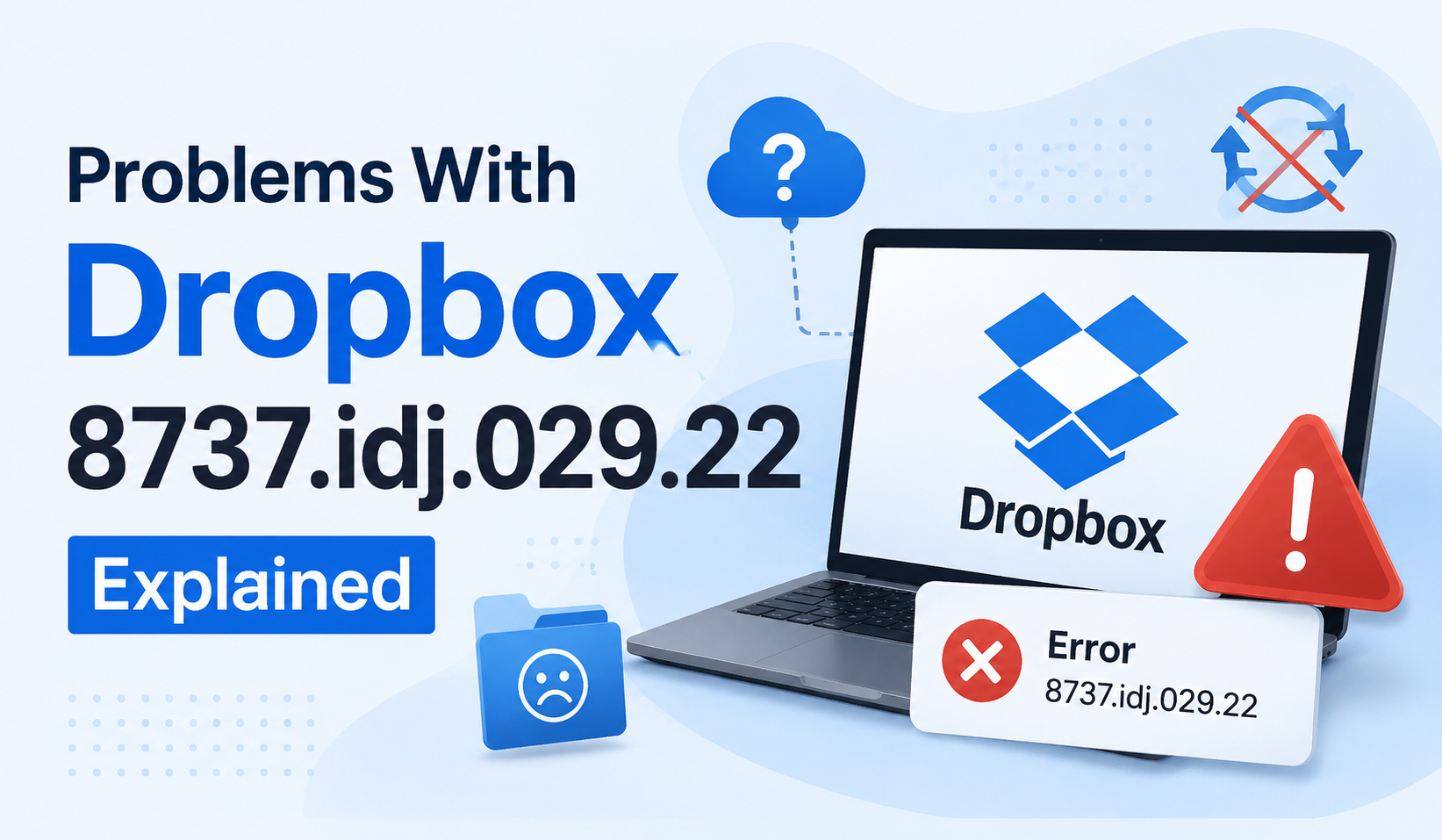
People think using a cloud storage system will solve their problems and make life easier. When an error message appears during a routine task on their cloud storage client, instead of a simple message like “we’re experiencing connection issues”, they get freaked out. They read the error code (let’s say, “dropbox 8737.idj.029.22”) and imagine the worst. When then things don’t work as expected—files won’t sync anymore, a file is stuck in uploading, or their client can’t connect—they might jump to the worst conclusion: their files have been compromised in some way.
Yes, this is a fixable bug.
Although Dropbox have never officially detailed the exact code ‘8737.idj.029.22’, many users have been able to pinpoint the issue to file syncing problems, corrupted cache files, interrupted networks, conflicts with Dropbox apps, or incomplete Dropbox updates.
Stuck with a “The file is too big” error? Don’t worry – we’ve put together this quick guide to explain what’s gone wrong, why it’s happened, and, most importantly, how you can fix the problem without losing your file.
What Is Dropbox Error 8737.idj.029.22?
The error known as “problems with Dropbox 8737.idj.029.22” is generally considered a sync-related system error inside the Dropbox desktop app. In simple terms, Dropbox is unable to complete a background process successfully.
This can affect:
- File syncing
- Uploading large files
- Downloading shared folders
- App startup
- Cloud connection refresh
- Cross-device updates
Many users notice the issue after:
- A Dropbox update
- Changing antivirus settings
- Internet instability
- Simultaneous file editing on multiple devices
- System permission changes
The important thing to remember is this:
Your cloud files are usually safe.
The error mainly affects the local Dropbox application and syncing behavior, not the files stored on Dropbox servers.
If you’re facing access restrictions with services like Dropbox, similar workarounds used in guides such as How to Access Unblocked Games WTF at School, Work or Anywhere can sometimes help bypass network limitations.
Common Signs of Problems With Dropbox 8737.idj.029.22
Not every user sees the exact same symptoms. However, these are the most common warning signs associated with the error:
Files Stuck on Syncing
Dropbox may endlessly display “Syncing…” without actually uploading or downloading anything.
Missing File Updates
Changes made on one device do not appear on another device.
Duplicate or Conflicted Files
Dropbox may create duplicate files labeled as “conflicted copy.”
Dropbox App Freezing
Some users report the desktop app becoming unresponsive after startup.
Extremely Slow Upload Speeds
Large file transfers may fail midway through the process.
High CPU Usage
Dropbox may suddenly consume excessive system resources while trying to sync corrupted data.
What Causes Dropbox 8737.idj.029.22?
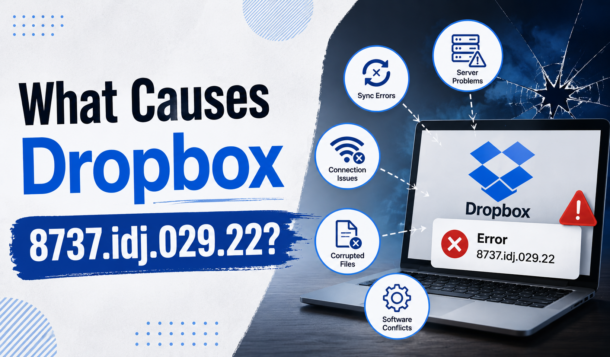
There is no single confirmed cause. Instead, several technical issues can trigger the error.
1. Corrupted Dropbox Cache
Dropbox stores temporary sync information in local cache folders. Over time, corrupted cache files can interfere with normal syncing operations.
2. Internet Connection Problems
A weak or unstable connection can interrupt Dropbox while it uploads or downloads files.
Even brief connection drops may trigger the error during large transfers.
3. Outdated Dropbox Application
Older versions of Dropbox may become incompatible with current server protocols.
This is especially common after major Dropbox updates.
4. Antivirus or Firewall Interference
Security software sometimes blocks Dropbox background processes by mistake.
VPNs and aggressive antivirus programs are frequent culprits.
5. Permission Issues
Dropbox needs read-and-write access to synced folders.
If operating system permissions change after updates, Dropbox may fail to access files properly.
6. Sync Conflicts
Editing the same file on multiple devices at the same time can confuse Dropbox’s syncing engine and create conflicts.
If you’re also organizing gaming files or team collaborations, you might find inspiration in this guide on Top Squad Name Ideas in MLBB – Ranked and Ready to Inspire, which helps streamline identity and structure for competitive play.
How to Fix Problems With Dropbox 8737.idj.029.22
Now let’s get into the fixes that actually work.
Fix 1: Restart Dropbox Properly
Sometimes the issue is temporary.
A full restart clears stuck background processes and refreshes the sync engine.
On Windows:
- Right-click the Dropbox icon in the taskbar.
- Select Quit Dropbox.
- Open Task Manager.
- End remaining Dropbox processes.
- Restart Dropbox.
On Mac:
- Click the Dropbox icon.
- Select Quit.
- Open Activity Monitor.
- Force close Dropbox processes.
- Relaunch the app.
Fix 2: Check Your Internet Connection
Dropbox relies heavily on connection stability.
Try these quick checks:
- Restart your router
- Switch from Wi-Fi to Ethernet
- Disable VPN temporarily
- Test internet speed
- Move closer to your router
- Avoid public networks during large uploads
Many users solve the issue simply by stabilizing their connection.
Fix 3: Clear Dropbox Cache
This is one of the most effective fixes.
Steps:
- Quit Dropbox completely.
- Open your Dropbox folder.
- Locate .dropbox.cache
- Delete files inside the cache folder.
- Restart Dropbox.
Do not worry — clearing cache does not delete your cloud files.
Fix 4: Update Dropbox
Running outdated software often creates compatibility issues.
To update:
- Open Dropbox.
- Go to settings/profile.
- Check for updates.
- Install the newest version.
You can also download the latest installer directly from Dropbox’s official website.
Fix 5: Disable Antivirus Temporarily
Security tools may mistakenly block Dropbox syncing.
Temporarily disable:
- Antivirus
- Firewall
- VPN software
If Dropbox starts working normally afterward, add Dropbox to your software whitelist or exclusions list.
Fix 6: Resolve File Conflicts
If multiple people edit the same file simultaneously, Dropbox may fail to sync correctly.
To fix this:
- Rename duplicate files
- Remove conflicted copies
- Keep one master version
- Avoid editing the same file from multiple devices simultaneously
Shared team folders are especially vulnerable to sync conflicts.
Interestingly, much like how users look for quick fixes or hidden insights in issues like Dropbox 8737.idj.029.22, gamers often search for updated Chainsaw Man Devil’s Heart Codes to unlock in-game advantages without unnecessary friction.
Fix 7: Reinstall Dropbox
If nothing else works, reinstalling the application can repair broken installation files.
Before reinstalling:
- Ensure your files are synced online
- Back up important local files
Then:
- Uninstall Dropbox
- Restart your computer
- Download the latest version
- Install and sign back in
In most cases, Dropbox automatically reconnects your cloud files afterward.
Is Dropbox 8737.idj.029.22 a Scam?
This is where things get important.
Several tech experts warn that fake “Dropbox error” popups are sometimes used in scam attempts. Legitimate Dropbox errors normally appear only inside the official Dropbox app or Dropbox website.
Be cautious if:
- A browser popup displays the error
- A random website asks you to call support
- You receive suspicious emails mentioning the code
- A message demands payment or remote access
If the error appears outside official Dropbox software, treat it carefully and run a malware scan immediately.
How to Prevent Dropbox Errors in the Future
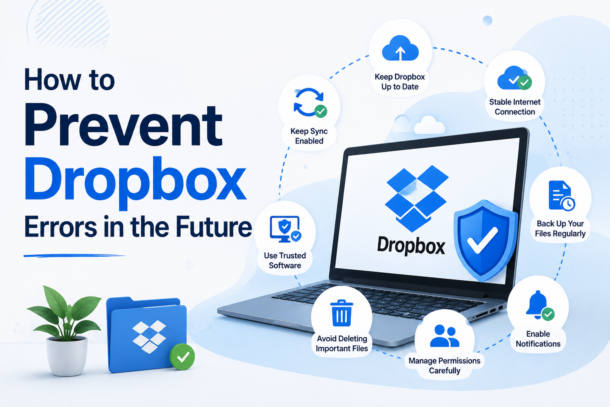
Once you fix the issue, these habits can help prevent it from returning:
- Keep Dropbox updated
- Maintain stable internet during uploads
- Clear cache occasionally
- Avoid simultaneous file editing
- Exclude Dropbox from antivirus scanning
- Use proper file naming conventions
- Restart Dropbox after major system updates
Small maintenance habits make a huge difference over time.
Much like how choosing the right setup early on matters—as seen in Fallout 4 Best Starting Stats: Optimal SPECIAL Setups For Early-Game Builds—getting your Dropbox configuration right from the start can prevent many of these issues from surfacing later.
Final Thoughts
So you have gotten “problems with Dropbox 8737.idj.029.22”? and can’t sync your latest files any more? Fear not for your files, as this is quite a common problem and rarely is associated with any data loss. Typical reasons for such problems are cached data, connection problems, outdated dropbox clients or permission problems.
For most issues with Dropbox we recommend a simple drop and drag of the dropdown menu to reset Dropbox, a delete of the cache and settings file, an update of the Dropbox application, or an uninstall and reinstall of the Dropbox application. But don’t worry! Most importantly, your cloud files are typically safe and accessible from the Dropbox website until we get you sorted out.

Virtual reality (VR) is rapidly emerging as a transformative tool in the field of rehabilitation, offering immersive, interactive, and safe environments that enhance motor learning, cognitive function, and pain management. By creating a controlled virtual space, VR enables patients to engage in repetitive, task-specific training, which is particularly beneficial for stroke survivors and individuals with neurological conditions. This innovative approach not only promotes neuroplasticity but also significantly improves mobility, balance, and engagement, allowing patients to practice daily life skills in a supportive environment.
Key Applications of VR in Rehabilitation
Physical and Motor Rehabilitation
One of the primary roles of VR in rehabilitation is its application in physical and motor rehabilitation. Research has shown that VR can improve gait speed, balance, and posture, making it particularly useful for patients recovering from strokes, Parkinson’s disease, and musculoskeletal injuries. The technology facilitates repetitive training, which is essential for enhancing neuroplasticity and functional recovery. According to a study by the National Institutes of Health (NIH), patients engaging in VR-based rehabilitation have demonstrated improvements that persist for up to 12 weeks post-therapy. This highlights the long-term benefits of integrating VR into rehabilitation programmes.
Cognitive Rehabilitation
VR is also proving effective in cognitive rehabilitation, particularly for patients with Mild Cognitive Impairment (MCI). Through simulated daily living tasks, VR enhances cognitive functions such as attention, memory, and executive function. This immersive experience allows patients to practice decision-making and problem-solving in a risk-free environment, fostering cognitive resilience and independence.
Pain Management and Psychological Health
The immersive nature of VR serves as a powerful distraction tool for pain management, particularly for patients suffering from conditions like phantom limb pain. By engaging patients in a captivating virtual environment, VR can help reduce anxiety, depression, and feelings of isolation. This is especially important for individuals undergoing rehabilitation, as mental health significantly impacts recovery outcomes.
Enhanced Engagement and Motivation
Traditional rehabilitation exercises can often become monotonous, leading to decreased patient motivation and adherence to therapy. VR transforms these repetitive tasks into engaging games, making the rehabilitation process more enjoyable. This increase in motivation encourages patients to participate actively in their recovery, ultimately leading to better outcomes.
Safe and Customisable Environments
One of the significant advantages of VR is its ability to provide a safe space for practice. Patients can engage in rehabilitation exercises without the risk of falling or injury, which is particularly beneficial for those with mobility issues. Additionally, therapists can customise the difficulty level of tasks to suit individual patient needs, ensuring a tailored approach to rehabilitation.
Telemedicine and Remote Care
As healthcare increasingly shifts towards remote solutions, VR has the potential to facilitate telemedicine and remote rehabilitation. This is particularly valuable for patients with limited mobility or those living in geographically isolated areas. By enabling therapeutic interventions to be delivered remotely, VR can make rehabilitation more accessible and convenient for a broader range of patients.
Addressing Mobility Issues
While VR holds great promise for rehabilitation, it is essential to address the specific challenges faced by individuals recovering from substance abuse, such as ketamine addiction or alcohol abuse. Substance abuse can lead to significant mobility issues, as chronic use may result in neurological impairments, muscle weakness, and coordination problems. For instance, individuals recovering from alcohol abuse may experience difficulties in balance and motor skills, which can hinder their rehabilitation efforts.
Incorporating VR into the rehabilitation process for these individuals can provide a unique advantage. The immersive nature of VR allows patients to engage in physical activities that may otherwise be challenging due to their condition. By creating scenarios that simulate real-life situations, VR can help patients practice essential motor skills and regain confidence in their physical abilities. Furthermore, the engaging aspect of VR can motivate individuals to participate in their recovery actively, reducing the risk of relapse and encouraging a healthier lifestyle.
Challenges and Future Outlook
Despite its many benefits, the implementation of VR in rehabilitation is not without challenges. Technical limitations, such as high costs and the requirement for substantial data bandwidth, can hinder widespread adoption. Additionally, some patients may experience discomfort or dizziness when using VR, which necessitates further research and development to enhance user experience.
Moreover, there is a need for improved motion tracking for fine motor tasks and rigorous clinical validation of VR applications in rehabilitation. As researchers continue to explore the potential of VR, it is crucial to address these challenges to ensure that this innovative technology can be effectively integrated into rehabilitation programmes.
In conclusion, virtual reality is rapidly changing the landscape of rehabilitation, offering a powerful, engaging, and effective tool that complements traditional therapy methods. By enhancing motor learning, cognitive function, and pain management, VR has the potential to significantly improve recovery outcomes for patients. As the technology continues to evolve, it is essential to embrace its capabilities and address the challenges it presents, paving the way for a more effective and accessible rehabilitation experience for all.
-
 Guides6 years ago
6 Proven Ways to Get more Instagram Likes on your Business Account
-
Mainstream12 years ago
BioWare: Mass Effect 4 to Benefit From Dropping Last-Gen, Will Not Share Template With Dragon Age: Inquisition
-
 Mainstream8 years ago
How to Buy Property & Safe Houses in GTA 5 (Grand Theft Auto 5)
-

 Guides2 years ago
Free Fire vs PUBG: Comparing Graphics, Gameplay, and More
-

 Guides2 years ago
50+ Free Fire ID and Passwords Login List (Giveaway) 2025
-
 Casual3 years ago
8 Ways to Fix Over-Extrusion and Under-Extrusion in 3D Printing
-

 Other2 years ago
Ajjubhai UID: Free Fire Details & Earnings
-

 Features2 years ago
Exploring Valorant eSports Stats: Unveiling the Metrics Behind Competitive Excellence