
Guides
How to Increase Loyalty in Bannerlord: Mount & Blade 2

In Mount and Blade 2: Bannerlord, Town loyalty and security is the most important part of the game. The Player needs to take care of the town as well as security in order to keep the people happy. All Town stats such as Loyalty, Food Stocks, or Security to be sustained if you need your town to be profitable. If people are unhappy then the people in the town start to leave.
The Fief attributes are correlated to each other. If food or security is low then loyalty won’t be increased. Equally town loyalty also suffers from ‘drifting’. The culture of a country is a crucial aspect of loyalty. Loyalty penalties won’t affect when you are part of the culture and control of the town. Penalties apply when you conquer a town with another culture. One needs to stabilize the drift, if it exceeds over 50 then loyalty will gradually reduce and if you go below, loyalty will increase.
Since there are many more things to learn in Mount and Blade 2:Bannerlord here is a guide to help you make an in depth analysis of the stats and know how it works.
What is loyalty in Bannerlord?
Loyalty in Bannerlord means it is the extent at which the people of a fief accept you as their conqueror.
How Town (Fief) Loyalty Works in Bannerlord
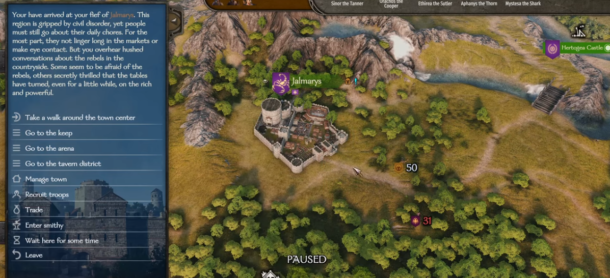
In Bannerlord, loyalty is interrelated with six different status values of your settlement. The attributes of loyalty in Bannerlord include – food, security, governor and conqueror’s culture. Higher these values then you will receive more taxes and less likely rebellions will occur. In case both your loyalty and taxes are high, then building speed and training of militias will increase. The loyalty drops off in case of low security, as the latter will defend your city in case of attack. Income decreases, supplies become scarce, trade slows down and inhabitants fear security and will have an impact on loyalty.
When loyalty is higher than 75, the ruler of the town will receive a bonus for the amount of taxes received. Devs added a mechanism that loyalty will fluctuate between -5 and +5. Maximum you can lose is -5 when Loyalty is 100, and +5 when it is 0.
Your town will be happy in your world conquest if your loyalty and taxes are high. If not, it leads to problems. But, somehow the game tries to save you with the Drifts.
Also Read: Is Golf With Your Friends Cross-Platform?
Town Loyalty Debuffs and How to Fix Them
In Bannerlord, loyalty is badly affected by many things. The debuffs expected for your newly conquered fiefdom are:
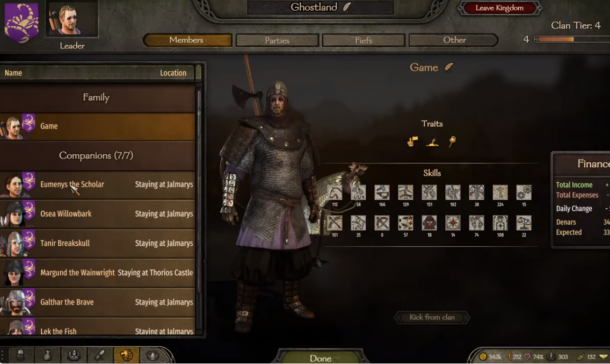
Different Owner Culture: -3 Loyalty
Different owner culture debuffs will be with you forever throughout the game. If your character is Lucon, the town and castle conquered outside the Lucon will have -3 loyalty defect.
Different Governor Culture: -1 Loyalty
While selecting the governor for a fief, make sure the partner associated has the same culture as the town. Else there is a -1 loyalty in case of a different culture governor.
Starving Populace: -1 Loyalty
The “Starving” negative modifier comes from low to zero food. To overcome this, try to build food specific production buildings and increase your food stocks. Start selling a lot of food into the settlement..
Issues: -0.5 Loyalty
The issues can be a solution if the city lies in completing quests for notable characters. At least one significant NPC in the fiefdom offers a quest to the player, a debuff of -0.1 will not give up.
The extent of this debuff depends on both the severity of the quest and the importance of the individual assigning it. For instance, if a prominent citizen of the town assigns a crucial quest, the modifier could reach up to -0.5 per day, regardless of the number of NPCs offering quests, the modifier will not surpass -0.5.
If failed to address these debuffs or counteract them with Loyalty buffs, risk of losing control of the town or castle to rebellion is crucial by the rulers.
Also Read: Jump Throw Bind in CSGO [The Complete Guide]
Rebellions in Bannerlord
When Town Loyalty falls below 25, likely are the chances of emerging possibility of rebellion. If it further drops below 15, the likelihood of rebellion in the city significantly increases.
Rebellions occur only when the player is absent in the town and when the militia outnumber the garrison. To prevent potential rebellions from emerging, bolstering the garrison with enough troops is advisable.
Upon the emergence of a rebellion, the player becomes conscious enough that he immediately forfeits control of the town and engages in the battle to reclaim it.
Also Read: Top 15 Apps like GamePigeon for Android, Iphone and PC
How to Increase Town Loyalty in Bannerlord
There are several ways to increase the town loyalty in Mount and Blade: Bannerlord
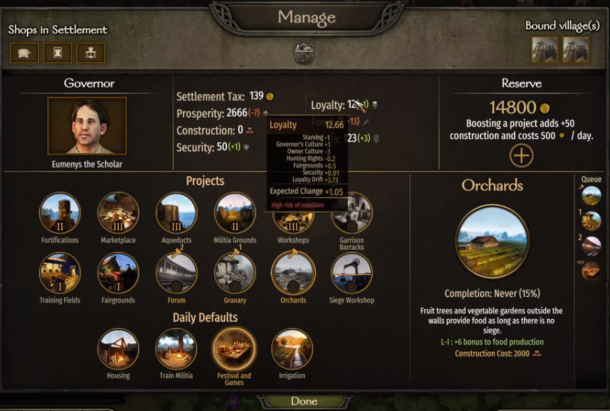
- Build and upgrade Fairgrounds (+1.5)
Enhancing the Fairgrounds is key for the militant to keep afflicted with numerous negative debuffs. Progressively building and upgrading this structure enables the player to gain a daily Loyalty boost of +1.5 at level 3.
- Appoint a same-culture governor with loyalty bonus perks (+5)
Appointing a governor from the same culture grants a daily buff of +1 as previously stated. Additionally, certain character perks offer the opportunity to increase Loyalty by 1 per day. Some of the characters are
- Heroic Leader (Leadership Skill)
- Healthy Citizens (Athletics Skill
- Discipline (Bow Skill
- Physician of People (Medicine Skill)
- Increase Security (+1)
In Town loyalty achieving a Security level of 100 enables players to earn up to 1 daily point. Lords can boost Security by maintaining a sizable garrison in the city and completing quests throughout the fiefdom.
In order to maintain the security as high, it’s crucial to address issues within the town and surrounding villages (resulting in a Security decrease of -1 to -2) and eliminate any bandit hideouts (-2 Security).
Furthermore, Security is liable to the risky Drift as discussed earlier, although in this case when Security is at 100, it can only decrease by a maximum of -3.33.
- Choose the Festivals and Games Daily Default (+3% of Prosperity)
The Festivals and Games Daily Default offers town lords a Loyalty boost equivalent to 3% of Constructions.This feature proves advantageous for those who have effectively increased Prosperity. In any case, it’s critical to take note that this buff is incapable while developing new structures, so caution is advised when utilizing it.
- Get the Support of Notable Characters (+0.5 per NPC)
Building relationships and garnering the moving of powerful characters in Bannerlord can swiftly enhance Town Loyalty. Players can get a Dependability increase in +0.5 for each supporting person, with next to no greatest cutoff.
However, a downside to securing support from key NPCs is its randomness. Regardless of whether a player keeps serious areas of strength with a striking individual, there’s as yet an opportunity they might decide to help another person.
- Kingdom Policies (+5.5)
The last technique to bring Town Loyalty in Mount and Blade: Bannerlord involves Kingdom Policies. For players who rule over their own kingdom, this process is clear. However, for those people who do not, acquiring desired policies will require an exhausting impact.
Learn More About How to Get MC Command Center Mod: Sims 4
That is all you really need to be familiar with Town loyalty in Mount and Blade 2: Bannerlord!


Download Minecraft PE 1.21.131 APK for Android
Minecraft Bedrock 1.21.131 is a focused hotfix update — improved Spear combat, two important bug fixes, and better overall stability on Android. No new content, but a noticeably smoother experience.
Spear Knockback Improvement
The window during which a charged Spear attack can apply knockback has been extended. This makes combat feel more reliable — the attack now connects as expected without requiring pinpoint timing, especially useful when fighting multiple mobs at once.
Spear Animation Alignment
Charge attack animations now accurately sync with the Spear’s three gameplay phases: Engaged, Tired, and Disengaged. What you see on screen now matches what the game engine is actually doing — making combat more readable and reducing guesswork in fights.
Performance & Stability
Frame drops on mid-range Android hardware have been reduced. Memory handling improvements prevent sudden freezes during long play sessions. World loading and chunk generation are more reliable, reducing terrain “pop-in” when exploring or moving quickly.
Multiplayer Improvements
Backend updates improve session stability when players join or leave. Fewer disconnects and smoother synchronisation across Bedrock servers. Marketplace content and add-ons also load more consistently during multiplayer sessions.
Adventuring Time Achievement Fixed — The achievement no longer unlocks early. It now correctly requires visiting at least 17 biomes on PC, matching the intended design.
Marketplace Escape Key Fixed — Pressing Escape after using the Marketplace search now reliably returns players to the previous menu instead of getting stuck in a loop.
Add-on World Loading Fixed — A bug that triggered a “Block” error when loading or creating worlds with multiple add-ons installed has been resolved.
Download the APK
Tap one of the Download buttons above. Choose the Standard (no music) version if storage is limited, or the Full version for the complete experience. The ARM64 build is recommended for modern phones.
Enable “Install Unknown Apps”
Go to Settings → Security (or Privacy) → Install unknown apps. Enable the permission for your browser or file manager. Android requires this for any APK installed outside Google Play.
Open the APK File
Open your Downloads folder, find the Minecraft 1.21.131 APK, and tap it to launch the system installer. Follow the on-screen prompts.
Install Over Existing Version
In most cases you can install 1.21.131 directly over your existing Minecraft without losing any worlds or progress. If you see a signature conflict error, uninstall first — but back up your worlds beforehand.
Launch and Sign In
Open Minecraft, sign in with your Microsoft/Xbox Live account, and your existing worlds will load normally. Online multiplayer, Realms, and Marketplace content all work as before.
Download Minecraft PE 1.20 APK for Android
Get the full Minecraft Bedrock 1.20 (Trails and Tales) APK for Android. Supports Xbox Live sign-in. Multiple versions available — stable releases and preview builds.
Download the APK File
Tap the Download button above for the version you want. The APK file will save to your device’s Downloads folder.
Enable “Install Unknown Apps”
Go to Settings → Security or Privacy → Install unknown apps. Enable it for your browser or file manager. Android requires this for any APK installed outside of Google Play.
Open the Downloaded File
Open your Downloads folder (or tap the notification), find the Minecraft APK, and tap it to start the installer.
Confirm Installation
Tap Install and wait for the process to complete. If you see a “signature conflict” error, uninstall your existing Minecraft version first, then retry.
Launch and Sign In with Xbox Live
Open Minecraft, sign in with your Microsoft/Xbox Live account to access multiplayer, Realms, and cross-platform features.
-
 Guides7 years ago
6 Proven Ways to Get more Instagram Likes on your Business Account
-
Mainstream12 years ago
BioWare: Mass Effect 4 to Benefit From Dropping Last-Gen, Will Not Share Template With Dragon Age: Inquisition
-
 Mainstream8 years ago
How to Buy Property & Safe Houses in GTA 5 (Grand Theft Auto 5)
-

 Guides2 years ago
Free Fire vs PUBG: Comparing Graphics, Gameplay, and More
-

 Guides2 years ago
50+ Free Fire ID and Passwords Login List (Giveaway) 2025
-
 Casual3 years ago
8 Ways to Fix Over-Extrusion and Under-Extrusion in 3D Printing
-

 Other3 years ago
Ajjubhai UID: Free Fire Details & Earnings
-

 Features2 years ago
Exploring Valorant eSports Stats: Unveiling the Metrics Behind Competitive Excellence