
Guides
12 Best Minecraft Kitchen Ideas

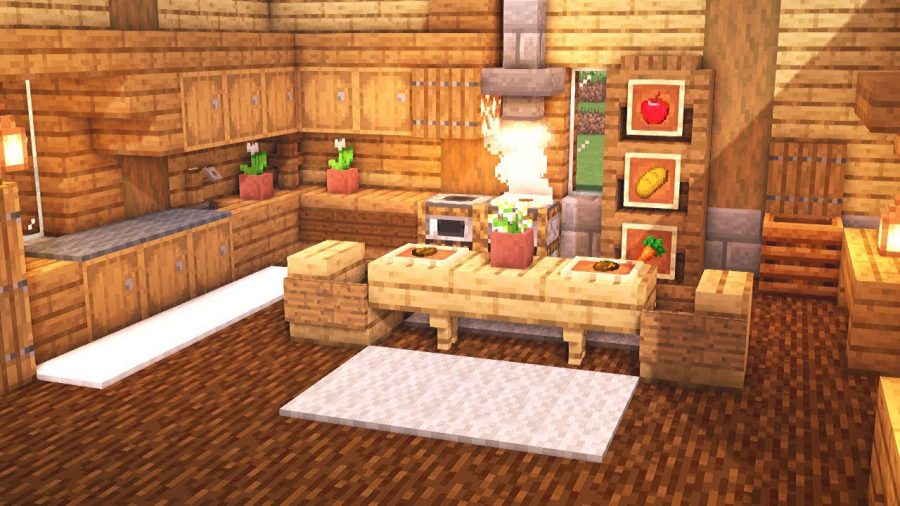
When it comes to Minecraft, the players are often skeptical about the different buildings, islands, and bases to even care about the varying kitchen ideas. Typically, that is the last thing that swirls around in the player’s mind.
However, if you are one of those misfits looking for the best Minecraft kitchen ideas, we have your back. There are quite a few amazing and fun kitchen interior ideas that can spruce up the interiors of your castle or home.
Even when you are spending your time building large castles, your character will get hungry eventually. Investing in a well-equipped and designed kitchen in your base camp can make a lot of difference, provided that you do them the right way.
This article will explore some of the best kitchen ideas in Minecraft that you can consider implementing.
Here are the Best Minecraft Kitchen Ideas
While we are at it, we have looked through and sorted out the top Kitchen ideas that we think will come in handy for your game. Let us take a look at each one of them.
1. Blendingi’s Modern Kitchen
If you are particular about the design and layout of the kitchen and don’t want something too flashy, Blendingi’s Modern Kitchen is your calling. This one features a minimal, chic, and classy look with a premium aesthetic that fits everyone’s liking. The kitchen is very spaced out and not crammed if that is something you appreciate. There are basic furniture pieces with a beige and white theme all around. Also, you get access to some of your standard furniture items, including a dining table, chairs, sink, refrigerator, rug, etc.
2. MCram’s Modern Kitchen
Another modern kitchen layout worth considering is MCram’s Modern Kitchen. Unlike the previous one with lighter and beige themes, this one has black and gray undertones. The flooring in this kitchen is to die for and will run for the actual kitchens you have in real life. The countertop adds a pretty stark appearance to the overall layout of the kitchen as well. You do have cabinets for storage, which always comes in handy. Also, the ventilation system in this one is pretty impressive too.
3. 6tenstudio’s Modern Kitchen
If you are a fan of extravagance, the 6tenstudio’s Modern Kitchen is your option. This screams privilege and wealth. However, this kitchen is quite overcrowded and filled with items you normally wouldn’t need. The kitchen has a woody texture and layout with a stone fridge and furniture pieces made out of logs. So, it adds a modern yet very rustic vibe to the kitchen. The process of creating this kitchen isn’t as complicated as you’d think, which makes this a lot more accessible.
4. MCram’s Simple Kitchen
MCram doesn’t fail to offer variety and options to their viewers. So, if you don’t enjoy luxurious and potent themed kitchen ideas, you will appreciate the simplicity of MCram’s Simple Kitchen. This one is everything you need for a modern-day, minimalistic kitchen look with wooden floorboards, hanging lamps, and modern utility and appliances. You have access to all the basic amenities, which is reason enough for making the kitchen layout. This is one of the best Minecraft small kitchen ideas.
5. Kitchen Interior
While we are on the equation of best kitchen ideas Minecraft, focusing on the Kitchen interior is crucial. You will find a detailed tutorial by JINTUBE explaining the installation and set-up process, in case you are worried about the same. The layout of this kitchen décor has a blend of modern architecture with the aesthetic blend. You will appreciate this one if you enjoy stylish interiors with elegant overhead lamp pieces. This is hands down one of the cool kitchen ideas in Minecraft.
6. Medieval Kitchen
Just because everyone indulges in a modern kitchen interior idea doesn’t mean you have to follow suit. You can look into the medieval settings instead. These kinds of fantasy-themed kitchen décor ideas are pretty fun, not to mention that they are quite easier to build as well. You have the layout filled and designed with cobblestone, patches, renaissance paintings and lacks some of the basic modern amenities. But that is where the beauty lies. MCram manages to nail the bullet in this one too.
7. Royal Dining Table
While we are discussing Medieval kitchens, we will make a complete 180 and look into the Royal dining table. This is everything you’d dream of a King and Queen would feast on. Eagle McCraft highlights many stunning design elements to this one, making it one of the best kitchen ideas for Minecraft. It does lack some of your basic amenities but does have a range of dining tables, chairs and your basic spread on the table. It lacks a dedicated area for the kitchen. This is perfect for the players who don’t want to get into further complexity of things.
8. Survival Kitchen
Sometimes, when you are in Minecraft’s survival mode, the last thing you want is a lavish and luxury spread kitchen layout. This is where the Survival kitchen comes into play. It includes your basic amenities, not to mention that they include elements like the chairs, table, basic countertop, and kitchen utilities to get you through the rough patch on the game’s survival level.
9. Simple and Modern Kitchen
A popular option by 6tenstudio, the simple and modern kitchen is a personification of minimalism with aesthetics. This is an amazing option if you don’t enjoy bright and vivid colors and want to keep things neutral. Also, the checkered flooring adds a pretty great vibe to the overall look of the place. As for the inclusions in the kitchen, it is equipped with all the basic kitchen amenities, including the countertop, cabinets, sink, table, chairs, and the appliances that complete the kitchen. This is hands down the best Minecraft kitchen idea you can implement.
10. Checkered Kitchen
A lot like the previous one, the Chickened Kitchen is a rendition by ManDooMiN. It has a very neutral and basic color and background with all the kitchen amenities that you’d need. Besides that, this is one of the few kitchen spaces with a large window on the side that allows easy passing of the sunlight. There are a lot of shelves, which double as a storage unit for your weapons.
11. Minecraft Kitchen Vanilla
Looking for a simple and minimalistic kitchen idea under the Vanilla mode? The Minecraft kitchen vanilla is a pretty new concept. It features a basic layout, which you will find around in the smaller kitchen ideas. The color palette and concept of this kitchen are quite subdued too. It has minimal amenities and inclusions, making this a perfect option for people who don’t want crowded spaces. The available cabinetry is quite less.
12. Nerdak’s Simple Kitchen
Last on the list is Nerdak’s Simple Kitchen, which is hands down the most unusual kitchen layout on Minecraft. This is a small kitchen idea, especially because it is located in one corner and includes miniature items. There is a medieval touch and look to it with many light fixtures and a modern kitchen. This isn’t for the players who are looking for luxury design ideas. It is small and subtle instead.
Conclusion
We hope this article suffices all your queries if you are on the hunt for the best Minecraft kitchen ideas. Remember that all the tips and ideas we shared come with tutorials, so you won’t have to scrounge through the methods to achieve them. Also, you can take inspiration from these options and then curate a completely new kitchen idea that aligns best with your interest. Sometimes, all you have to do is turn on your innovative switch.





Download Minecraft PE 1.21.131 APK for Android
Minecraft Bedrock 1.21.131 is a focused hotfix update — improved Spear combat, two important bug fixes, and better overall stability on Android. No new content, but a noticeably smoother experience.
Spear Knockback Improvement
The window during which a charged Spear attack can apply knockback has been extended. This makes combat feel more reliable — the attack now connects as expected without requiring pinpoint timing, especially useful when fighting multiple mobs at once.
Spear Animation Alignment
Charge attack animations now accurately sync with the Spear’s three gameplay phases: Engaged, Tired, and Disengaged. What you see on screen now matches what the game engine is actually doing — making combat more readable and reducing guesswork in fights.
Performance & Stability
Frame drops on mid-range Android hardware have been reduced. Memory handling improvements prevent sudden freezes during long play sessions. World loading and chunk generation are more reliable, reducing terrain “pop-in” when exploring or moving quickly.
Multiplayer Improvements
Backend updates improve session stability when players join or leave. Fewer disconnects and smoother synchronisation across Bedrock servers. Marketplace content and add-ons also load more consistently during multiplayer sessions.
Adventuring Time Achievement Fixed — The achievement no longer unlocks early. It now correctly requires visiting at least 17 biomes on PC, matching the intended design.
Marketplace Escape Key Fixed — Pressing Escape after using the Marketplace search now reliably returns players to the previous menu instead of getting stuck in a loop.
Add-on World Loading Fixed — A bug that triggered a “Block” error when loading or creating worlds with multiple add-ons installed has been resolved.
Download the APK
Tap one of the Download buttons above. Choose the Standard (no music) version if storage is limited, or the Full version for the complete experience. The ARM64 build is recommended for modern phones.
Enable “Install Unknown Apps”
Go to Settings → Security (or Privacy) → Install unknown apps. Enable the permission for your browser or file manager. Android requires this for any APK installed outside Google Play.
Open the APK File
Open your Downloads folder, find the Minecraft 1.21.131 APK, and tap it to launch the system installer. Follow the on-screen prompts.
Install Over Existing Version
In most cases you can install 1.21.131 directly over your existing Minecraft without losing any worlds or progress. If you see a signature conflict error, uninstall first — but back up your worlds beforehand.
Launch and Sign In
Open Minecraft, sign in with your Microsoft/Xbox Live account, and your existing worlds will load normally. Online multiplayer, Realms, and Marketplace content all work as before.
Download Minecraft PE 1.20 APK for Android
Get the full Minecraft Bedrock 1.20 (Trails and Tales) APK for Android. Supports Xbox Live sign-in. Multiple versions available — stable releases and preview builds.
Download the APK File
Tap the Download button above for the version you want. The APK file will save to your device’s Downloads folder.
Enable “Install Unknown Apps”
Go to Settings → Security or Privacy → Install unknown apps. Enable it for your browser or file manager. Android requires this for any APK installed outside of Google Play.
Open the Downloaded File
Open your Downloads folder (or tap the notification), find the Minecraft APK, and tap it to start the installer.
Confirm Installation
Tap Install and wait for the process to complete. If you see a “signature conflict” error, uninstall your existing Minecraft version first, then retry.
Launch and Sign In with Xbox Live
Open Minecraft, sign in with your Microsoft/Xbox Live account to access multiplayer, Realms, and cross-platform features.
-
 Guides7 years ago
6 Proven Ways to Get more Instagram Likes on your Business Account
-
Mainstream12 years ago
BioWare: Mass Effect 4 to Benefit From Dropping Last-Gen, Will Not Share Template With Dragon Age: Inquisition
-
 Mainstream8 years ago
How to Buy Property & Safe Houses in GTA 5 (Grand Theft Auto 5)
-

 Guides2 years ago
Free Fire vs PUBG: Comparing Graphics, Gameplay, and More
-

 Guides2 years ago
50+ Free Fire ID and Passwords Login List (Giveaway) 2025
-
 Casual3 years ago
8 Ways to Fix Over-Extrusion and Under-Extrusion in 3D Printing
-

 Other3 years ago
Ajjubhai UID: Free Fire Details & Earnings
-

 Features2 years ago
Exploring Valorant eSports Stats: Unveiling the Metrics Behind Competitive Excellence