
Guides
9 Best Minecraft Library Design & Ideas

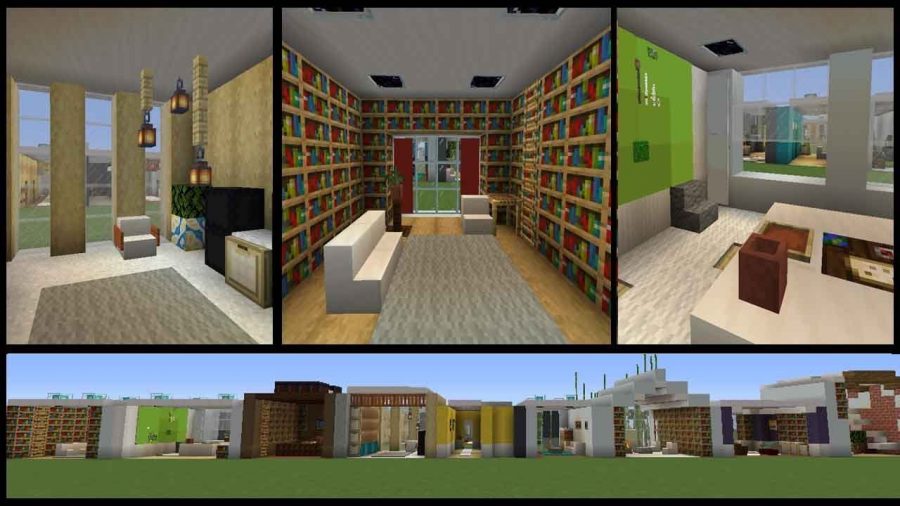
In Minecraft, there are so many different things to build, and a library is a fantastic addition to any home or town. Overall size, hallways, the number of floors, basements, and enchantment spaces are all essential factors to consider while choosing a library.
Before you begin, you should understand what you want to develop to save time. Also, you need to decide if you wish to have a standalone library or a library that is simply an extension of your storage room or house.
In this article, you will find various Minecraft library designs and ideas to make an aesthetically pleasing library.
Wooden Library
This library has two storeys and is primarily made of wood. Take note of the bridges and the tree arrangement in the center. The application of glowstone on the tops of fences creates a warm lighting environment. There are benches for people to “learn” on below and leaf hedges and glowstone hanging from the ceiling.
Fancy Minecraft Library
A more significant corridor is incorporated in this design, with branches out to the sides carrying bookcases. People may “grab their books” on the sides and then return to the lovely central space to read them. Each nook might be used for a distinct purpose; for example, one branch could be used for enchanting, while another could be used for potion brewing.
Glowstone lamps and numerous storeys with balconies add to that pleasant and comfortable feeling.
Small Minecraft Library
A little library within the hobbit hole might give it a realistic appearance, similar to the ones seen in the movies. Players may create a library room with bookshelves and a study table. They can also take advantage of the bookshelves by placing an enchanted table near them.
Related – 20 Best Minecraft Building Ideas
Library With Large Exterior
This illustrates a vast structure that may be used to create a Minecraft library. With its columns and stairs at the front, its design resembles many old government buildings, virtually approaching the Roman Pantheon or the New York Stock Exchange.
Tall Ceilings and Bookcases
Making a massive ceiling with rows of bookshelves that do not reach that ceiling is a fantastic library design concept. This provides the sense of a vast structure and is similar to the method used by most supermarket shops. Consider a grocery shop where you can see the entire store from the inside, but the aisles do not always extend to the roof.
Village Library Design
Villages have a large number of dwellings, resulting in a large number of living spaces. The village library usually has many villagers so that players will have plenty of room. Depending on their demands, they may need to expand the structure in the future, but it’s large enough to serve as a starting point.
In addition to cobblestone, the town library’s construction is made of oak logs, planks, and other wooden components.
Related – 15 Creative Minecraft Interior Design Ideas
Underground Cozy Library
The glowstone lighting, rows of bookcases, usage of wooden paneling, and columns are all present in this Minecraft library, which was created underground. The library appears to have just one story. However, a space above ground might be a residential room. The usage of stairwells enhances this beautiful library design’s comfortable ambiance as seats and leaves as hedges.
High School Library Design
A more “real-life” Minecraft library looks like one you’d find in a high school (or even a public library). This style is defined by the green carpet, white ceiling and support columns, boxy fluorescent lighting, and glass columns. Notice how there are no medieval components like wood, stone, or fires.
Modern Library With Great Interior
This is an example of a more modern library that you would come to in a major city. Classic contemporary components are used in the design, such as white tones, much glass, boxy designs, etc. It also has numerous stories, some of which have glass walls on the whole wall.
Related : 7 Best Cool Minecraft Staircase Ideas
FAQs
What should I put in my Minecraft library?
Most Minecraft libraries will feature at least some of the following major design elements:
- Darker wood tones are used, as well as bookshelf blocks.
- Glowstone is frequently disguised as a lamp by using fences and signage.
- Indoor plants that use leaves as hedges or even complete trees as centerpieces are popular.
- Atriums and corridors at the center.
- Wooden stairwells are used to create benches and desks for “studying.”
- Glass and white tones will be used extensively in modern libraries.
- Indoors, there are many storeys with balconies and pathways.
How do you make a simple Minecraft library?
Making a library in Minecraft is a straightforward task. It would help if you had wood, cobblestone, and a few other raw materials, and you’re good to go.
Here’s a simple Minecraft Library design. You may watch the tutorial on YouTube here:
Conclusion
We hope that the above library designs inspired you to make a uniquely creative library design for yourself, and you can add various other things to make it look more appealing.
Image source – https://www.youtube.com/watch?v=y4MNOTEaThA





Download Minecraft PE 1.21.131 APK for Android
Minecraft Bedrock 1.21.131 is a focused hotfix update — improved Spear combat, two important bug fixes, and better overall stability on Android. No new content, but a noticeably smoother experience.
Spear Knockback Improvement
The window during which a charged Spear attack can apply knockback has been extended. This makes combat feel more reliable — the attack now connects as expected without requiring pinpoint timing, especially useful when fighting multiple mobs at once.
Spear Animation Alignment
Charge attack animations now accurately sync with the Spear’s three gameplay phases: Engaged, Tired, and Disengaged. What you see on screen now matches what the game engine is actually doing — making combat more readable and reducing guesswork in fights.
Performance & Stability
Frame drops on mid-range Android hardware have been reduced. Memory handling improvements prevent sudden freezes during long play sessions. World loading and chunk generation are more reliable, reducing terrain “pop-in” when exploring or moving quickly.
Multiplayer Improvements
Backend updates improve session stability when players join or leave. Fewer disconnects and smoother synchronisation across Bedrock servers. Marketplace content and add-ons also load more consistently during multiplayer sessions.
Adventuring Time Achievement Fixed — The achievement no longer unlocks early. It now correctly requires visiting at least 17 biomes on PC, matching the intended design.
Marketplace Escape Key Fixed — Pressing Escape after using the Marketplace search now reliably returns players to the previous menu instead of getting stuck in a loop.
Add-on World Loading Fixed — A bug that triggered a “Block” error when loading or creating worlds with multiple add-ons installed has been resolved.
Download the APK
Tap one of the Download buttons above. Choose the Standard (no music) version if storage is limited, or the Full version for the complete experience. The ARM64 build is recommended for modern phones.
Enable “Install Unknown Apps”
Go to Settings → Security (or Privacy) → Install unknown apps. Enable the permission for your browser or file manager. Android requires this for any APK installed outside Google Play.
Open the APK File
Open your Downloads folder, find the Minecraft 1.21.131 APK, and tap it to launch the system installer. Follow the on-screen prompts.
Install Over Existing Version
In most cases you can install 1.21.131 directly over your existing Minecraft without losing any worlds or progress. If you see a signature conflict error, uninstall first — but back up your worlds beforehand.
Launch and Sign In
Open Minecraft, sign in with your Microsoft/Xbox Live account, and your existing worlds will load normally. Online multiplayer, Realms, and Marketplace content all work as before.
Download Minecraft PE 1.20 APK for Android
Get the full Minecraft Bedrock 1.20 (Trails and Tales) APK for Android. Supports Xbox Live sign-in. Multiple versions available — stable releases and preview builds.
Download the APK File
Tap the Download button above for the version you want. The APK file will save to your device’s Downloads folder.
Enable “Install Unknown Apps”
Go to Settings → Security or Privacy → Install unknown apps. Enable it for your browser or file manager. Android requires this for any APK installed outside of Google Play.
Open the Downloaded File
Open your Downloads folder (or tap the notification), find the Minecraft APK, and tap it to start the installer.
Confirm Installation
Tap Install and wait for the process to complete. If you see a “signature conflict” error, uninstall your existing Minecraft version first, then retry.
Launch and Sign In with Xbox Live
Open Minecraft, sign in with your Microsoft/Xbox Live account to access multiplayer, Realms, and cross-platform features.
-
 Guides6 years ago
6 Proven Ways to Get more Instagram Likes on your Business Account
-
Mainstream12 years ago
BioWare: Mass Effect 4 to Benefit From Dropping Last-Gen, Will Not Share Template With Dragon Age: Inquisition
-
 Mainstream8 years ago
How to Buy Property & Safe Houses in GTA 5 (Grand Theft Auto 5)
-

 Guides2 years ago
Free Fire vs PUBG: Comparing Graphics, Gameplay, and More
-

 Guides2 years ago
50+ Free Fire ID and Passwords Login List (Giveaway) 2025
-
 Casual3 years ago
8 Ways to Fix Over-Extrusion and Under-Extrusion in 3D Printing
-

 Other2 years ago
Ajjubhai UID: Free Fire Details & Earnings
-

 Features2 years ago
Exploring Valorant eSports Stats: Unveiling the Metrics Behind Competitive Excellence