
Browser Games
How Social Network Gaming Can Improve Your Friendships?


In today’s world, it is not unusual for people to have more friends online than offline. Thanks to social media, people can connect in seconds with others from all over the world. Without social media, some people would be isolated in their homes without a means of communication. Fortunately, you have already discovered the wonderful benefits of virtual friends. Maybe you believe your virtual friendships could use a pick-me-up. Or, you have made room in your virtual world for more friends. Whatever the case may be, social network gaming may be the solution. What is social network gaming? How does social network gaming work? Find the answers to these questions and much more in the content provided below.
What Is Social Network Gaming?
Social network gaming is virtual gaming, but instead of gaming platforms, the games are played via social media, such as Facebook. Social network gaming has grown in popularity at an unusually fast pace since it became available in 2011. The first Facebook-to-mobile game was deemed “Star Arcade.” The Finnish developers were not surprised by the social media response its game received.
Add A Reward & Punishment
Finally, you should mix things up by adding a reward for the winner and a punishment for the loser. One of the best ways to do this is by using a picker wheel. You can add numerous rewards and punishments to the wheel. After a gaming session, the winner will spin and get a reward. As for the loser, they’ll receive a punishment. The possibilities are endless. The loser can be forced to lose a turn next time or clean your room for a week. As for the winner, they can get an extra turn or have their laundry washed for a week. Be sure to work with your friend to find suitable rewards and punishments.
With the help of the wheel spinner, players can choose from a list of rewards and punishments.
Strong Bond
To develop a strong bond with your friend, you need to find a fun activity that you can enjoy together. If you’re looking for something that matches your needs, you should try playing games online. You can use the picker wheel to pick a reward for the winner and a punishment for the loser. Doing so will add a new level of excitement to the equation. Once you’ve found a few games that you can play together, you’ll love it and your friend will too. You’ll enjoy playing together and getting to know each other.
Before you know it, your relationship will blossom. Don’t forget to use a picker wheel because it can take the gaming experience to a new level.
Summary
It is a good idea to game alongside your friends and family members. Doing so can help you build a deep relationship with the individual in question. In addition to this, you’ll share a hobby with that individual. You’ll have a great time while getting to know them. Just remember that you need to find suitable games because some aren’t great for multiplayer situations. You’ll also want to find something that works well for you and your partner.

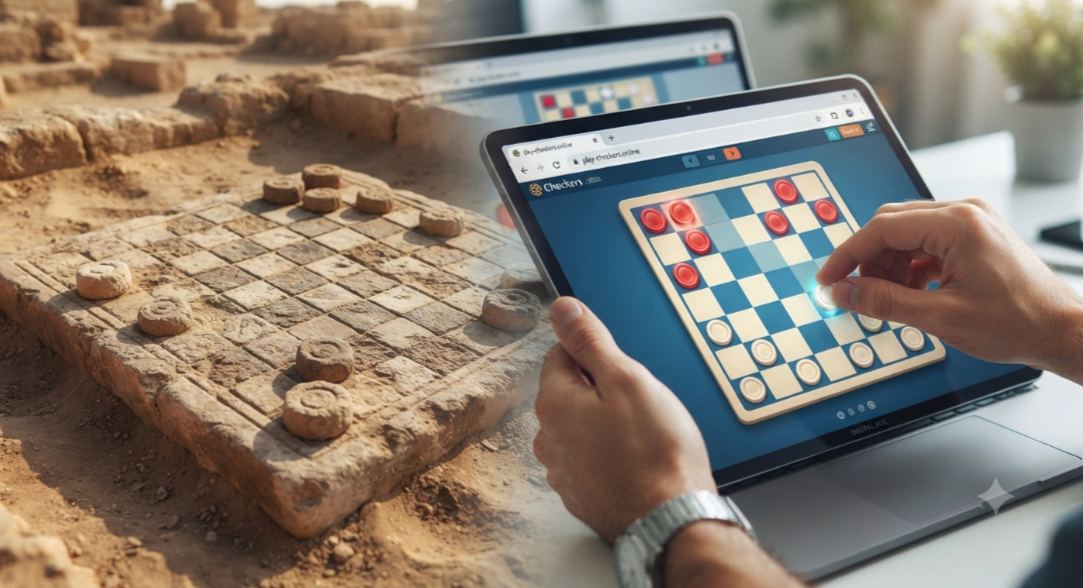
Today’s online checkers players may not know the rich history of the game’s evolution from its ancient past to the computer. Do you ever wonder how your favorite games came into being? No hobby has bridged ancient history with current technology better than Checkers can. The game of Checkers is called “Drafts” in most parts of the world, and over time the checkers rules and setup changed a bit.
From carved stones in ancient ruins to fast-paced matches when you play checkers online, the history of Checkers is an amazing story of human culture, math, and digital invention.
The Ancient Origin of Checkers: Where Did It Start?
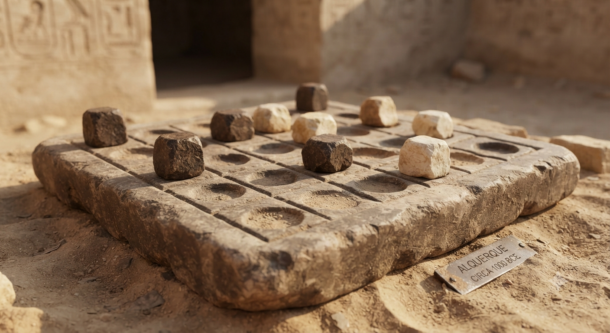
Long before modern boards existed, humans loved playing games that involved jumping over and capturing pieces. The early history of checkers points to ancient ancestors like Alquerque, a board game played in the Middle East more than 3,000 years ago. Similar grid games have even been found inside ancient Egyptian tombs.
Although the rules were not the same back then, the concept remained the same: moving your piece from one square to another, jumping your opponent’s piece, and winning by clearing the board. But the checkers strategy evolved over time. This game was engraved on temple floors and stones. It spread through trade throughout the world, paving the way for the game we now know.
The Evolution of Checkers: Moving to the 64-Square Board
The game was revolutionized during the Medieval period and the Renaissance era in Europe. Players incorporated the jumping moves of previous games into the 64-square board usually used for playing chess.
This brilliant combination introduced diagonal moves and the idea that, if you can, you must jump over your opponent’s piece. As a result of all these revolutionary changes, the game turned from entertainment into a real strategic game.
Kings and queens played on boards made of precious stones, while common people used wooden pieces in village squares. Over hundreds of years, the history of checkers unfolded, and every era enjoyed its own modified variation.
Checkers in the Computer Age: When AI Learned to Play
When computers first arrived in the middle of the twentieth century, scientists used Checkers to test early artificial intelligence. In 1952, Arthur Samuel, a computer scientist, created the first of several computer programs that could learn on its own how to play checkers on the IBM computer. The program became such a good player that it started beating its maker, which was a remarkable achievement in computer science. But it turned out years later, namely in 2007, that checkers had been solved mathematically.
The famous computer program Chinook showed that in case two players played the perfect move every time, the game would inevitably end in a draw. Nevertheless, you can be sure that this has not affected people’s enthusiasm about the game. Right after that, the software revolution of the 1990s made Checkers available on personal computers in people’s homes.
Play Checkers Online: The Shift to Web Browsers

The creation of the internet completely changed how we play classic games. In the early days of web gaming, players had to download heavy software files or install special plugins just to play a simple board game online.
Nowadays, one can enjoy playing the games on the Internet instantly with the help of contemporary web technologies. No downloading, updating, or installing is needed before starting the game. You just have to push a button, and your game starts. It is very easy now to play the game of Checkers on the Internet, whether on the bus or from home.
Why Checkers Is Still Popular Today
The longevity of Checkers is attributed to its simplicity yet complex nature. One can get the basics of playing the game within a few minutes, but a lifetime is required to be a professional at Checkers strategy. The way Checkers has managed to transcend from being played on stones to being played on browsers clearly indicates that an excellent game is timeless. Regardless of whether one is going against a computer algorithm or another person online, a perfect checkers strategy that becomes important in the final stage of the game.
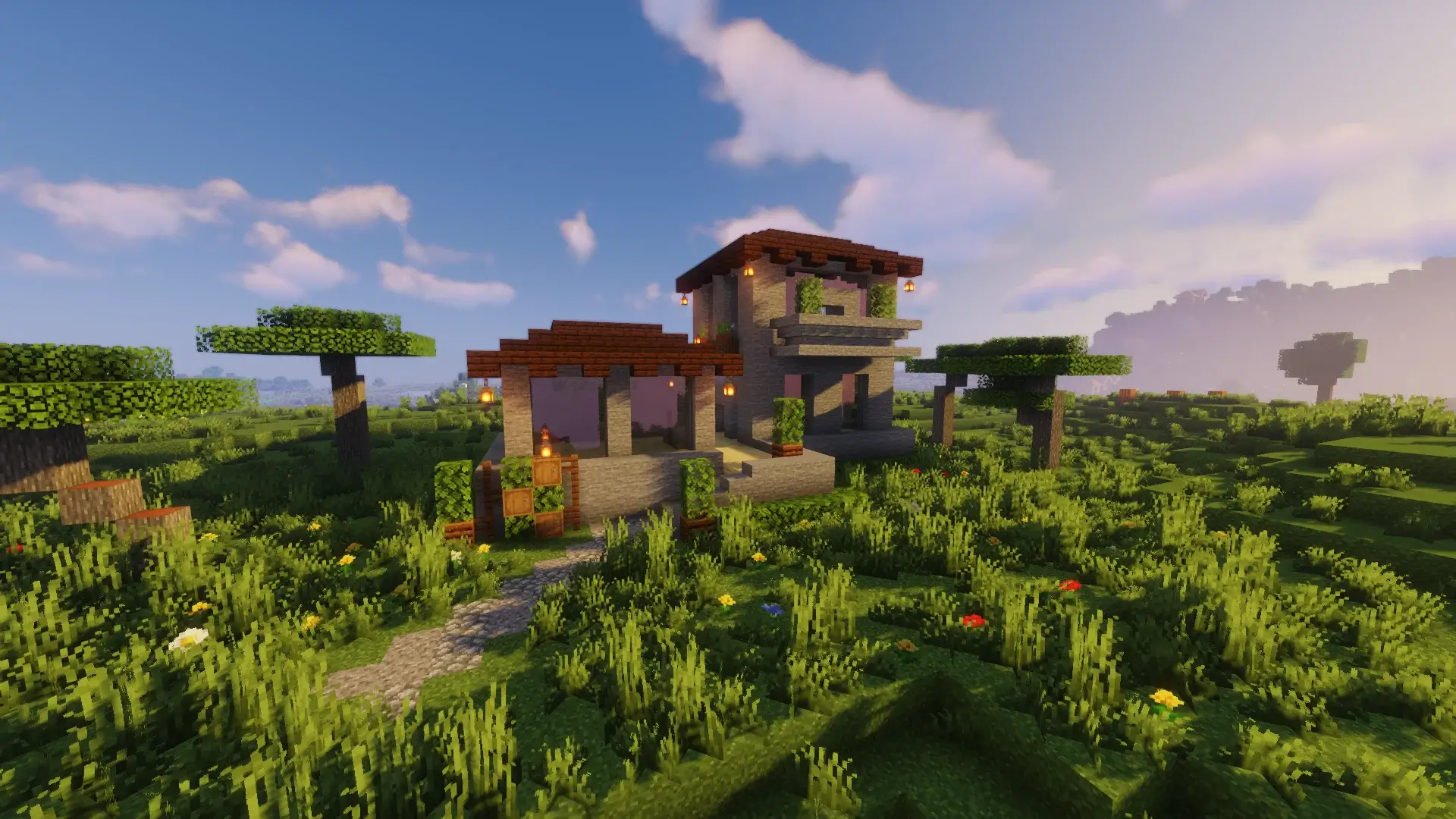
Brick is one of those timeless, classic building materials in Minecraft. The beautiful red texture and its ability to fit in with various other blocks like wood, stone, and various others make it the go-to for any player who wants to build a durable yet stylish home that is sure to last for any survival world, whether that’s an upgrade from a simple starter hut, a bigger family home or something more ornate, a brick house can work wonders for your Minecraft experience! A brick house can blend into a variety of architectural designs as well, including medieval and modern buildings.
Ultimately, it depends on the available resources you have in your survival world and also on the biome you wish to live in.
Brick houses vary from simple to complex and this tutorial guide will teach you how to build a stunning brick house in Minecraft!
1. Classic Brick Farmhouse
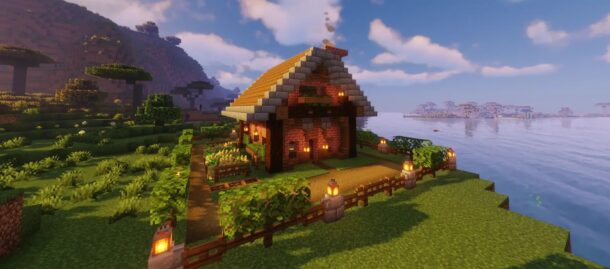
The brick farmhouse is one of the most convenient house designs in the game. This simple and classic house idea uses spruce wood as accent walls, providing it with a cozy and welcoming look. You will have more than enough space in this two-story design to accommodate bedrooms, storage rooms, crafting rooms, and enchanted zones.
You will want to make sure you provide extra space outside the farmhouse, to help plant fields, make fences for animals and so forth!
The design offers two stories and large windows on both sides of the house that allow the natural light into the structure making it feel open and breezy. To add an interesting look, you could always implement a slightly sloped roof design. The farmhouse is a highly recommended style for people looking to live in a cozy and comfortable home throughout the survival journey, especially in the plains and forest biomes, where it would blend in nicely with the environment!
2. Spanish-Inspired Brick Villa
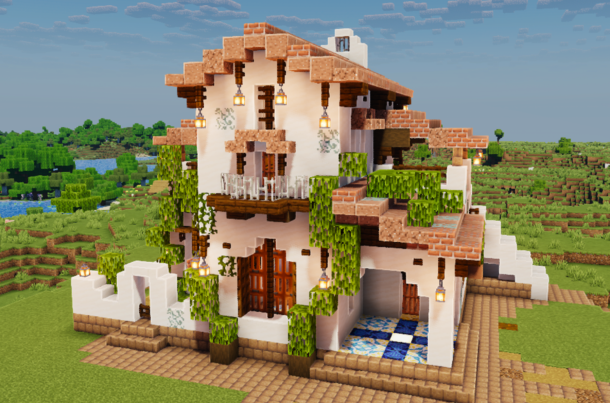
This decorative brick house design is something a bit special and unique! Using brick for most of the construction, but also adding in a little bit of spruce wood and granite to compliment the house, you’ll end up with a colorful villa. Spanish homes look very beautiful, so they make a great Minecraft build!
Having a couple of stories with this house is crucial to allow enough space to live inside, from sleeping and cooking to storage and crafting!
In addition to that, make sure to try to use extra balcony windows and window frames to make the exterior of your Spanish brick house stand out! If the plains are not where you plan to settle in, try the Spanish brick villa in the savannas and warm biomes – it fits in perfectly and gives you more aesthetic choices in terms of decorations.
3. Modern Brick House
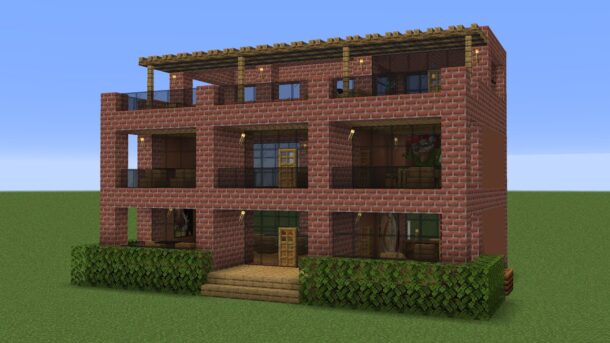
There aren’t that many brick houses in a modern design style. Most Minecraft builds featuring brick usually have a traditional look, but you could make a contemporary modern house with this material! Combine clean lines, well-organized interior spaces, polished blocks and large glass windows to create a sleek house.
Flat, tiered, or simple roofs would add to the minimalist appearance of your house.
Providing plenty of space is important in modern design, especially for storage and workstations to improve the efficiency of the house. Consider adding small decorative plants or landscape features around your modern house to complement the exterior! The modern brick house may be complicated to build, but it’s definitely worth the effort! It is a beautiful addition to your city build and fits in nicely with other modern designs.
For even more creative building possibilities, you can explore Minecraft Mods That Will Take Your Experience to the Next Level and discover new ways to customize your builds.
4. Compact Brick Starter House
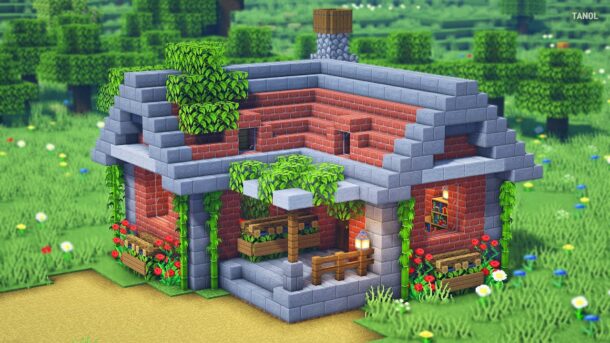
One of the most recommended brick houses in the game for those of you who are just beginning their adventure is a small, compact house. The construction materials needed for this small structure are fairly minimal, making it the ideal house to begin with in Minecraft. In this house, you can fit a bed, furnace, crafting table, and storage chest, which is everything you would require in the early stages of the game.
Making a few Stone brick accents on the windows and doorways can help add more character to the build without overcomplicating things.
Making a small, fenced area for planting crops around your compact house can go a long way toward helping you stay fed throughout the game! There’s really not much this little house can’t do! This little house will work in any biome you choose to build in.
5. Medieval Brick Cottage
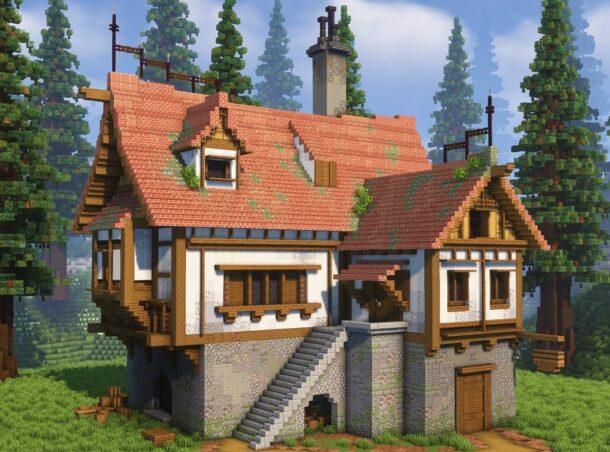
If you enjoy building and exploring historical and fantasy-themed buildings in Minecraft, then a Medieval brick cottage is the perfect choice! Combine brick and spruce wood together to craft a rustic house that fits right next to castles, other old structures, and stone paths. Although this house style is more compact than other options, it’s fully equipped for the challenges of survival gameplay and provides a welcoming, old-fashioned charm.
Features such as wooden beams, steeply sloped roofs, and arched windows will help capture the essence of a traditional medieval dwelling.
The interior can be equipped with fireplaces, cozy wooden furnishings, and ambient lighting. Building your medieval brick cottage near a river, forest, or any existing village structures will enhance the rustic and medieval atmosphere!
6. Two-Story Family Brick House
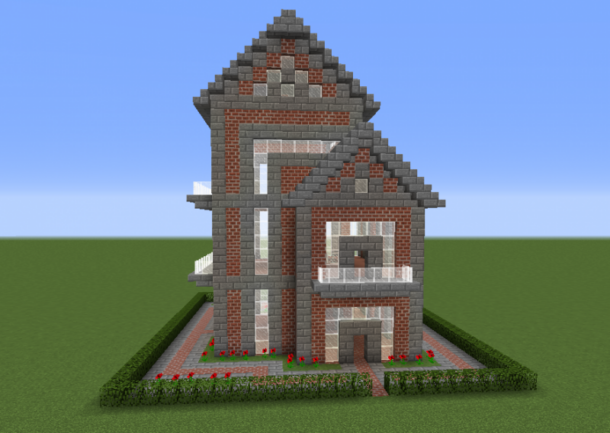
With plenty of space, you can furnish and design bedrooms, additional storage areas, charming nooks, and even your very own workshop! Spruce wood beams combined with a stone accent layer balance the strong red of the brick, giving it a classic and stable look. Large windows flood the inside with natural light, while a covered porch invites visitors to your front door. This type of structure is perfectly suited for long-term survival worlds, where it can be easily expanded to accommodate storage and a vast collection of gear and resources. You could even expand this house, connecting it to nearby animal pens and farms and paths, as your world progresses!
A Minecraft brick house can also be a great backdrop for gaming sessions, especially when exploring titles through an Unblocked Poki Games: Complete Access Guide.
7. Minecraft Brick Farm House design
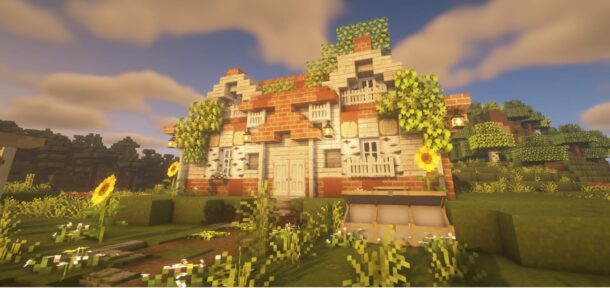
One of the most convenient Minecraft builds would be combining your house with the farm to grow all sorts of food items. Combining a Brick House design with Farm would not only increase convenience but will make the property look great. Bricks on the walls and fences on the boundaries of farm sections look classic as well as provide adequate protection for the crops or animals.
A walkway path from the house connecting it to wheat, potato, carrot, and other crop fields will improve convenience while collecting.
This makes the house the most efficient for the player to stay on the plains and meadows for living in their world!
8. Cool Decorative Brick House with Stone design Minecraft
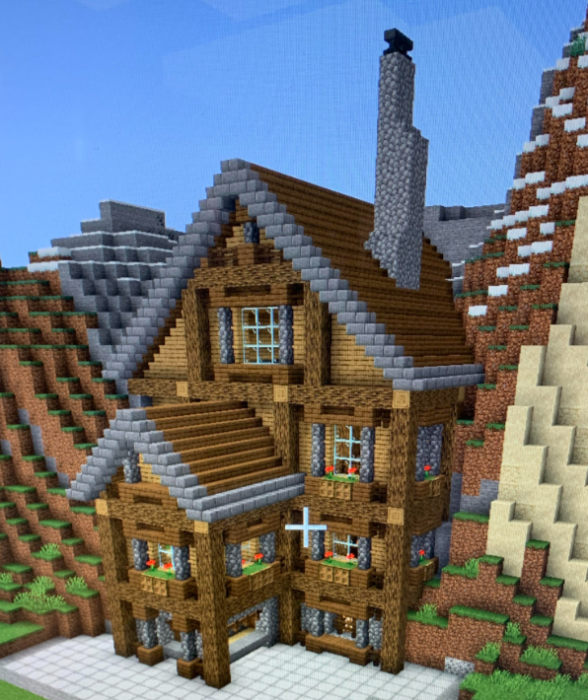
Adding some of these stone accent elements would provide depth to your brick house and ensure that it doesn’t feel monotonous. Including these elements on walls and around windows and on the roof will provide your house with amazing textured depth. Stone brick stairs, slabs, and walls will enhance the overall design.
These designs complement the structure well without feeling overwhelming to look at and can also complement well-placed wooden beams which would help to break up the plain brick areas of the house.
For medium-sized homes, this style offers great balance without being over the top.
9. Minecraft Small Brick Cabin Survival design
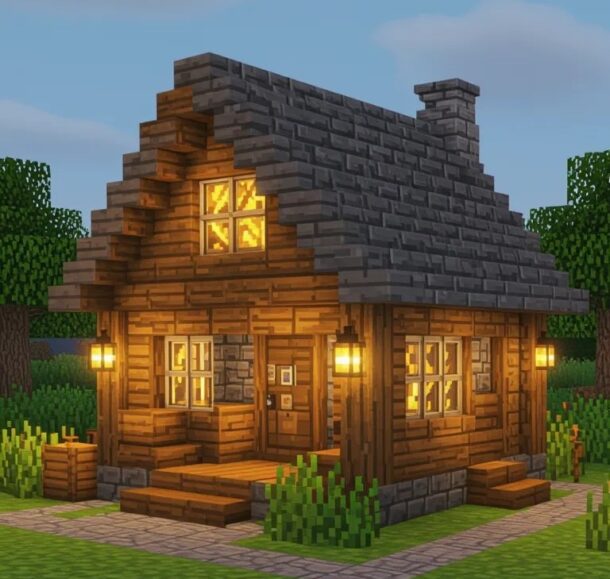
If your plan for a survival house does not include much room then a Brick Cabin would be best. It would make a perfect choice to survive all odds and will also not consume much resources. With basic stations and storage options, this would keep your house as efficient as you may require it to be. Furthermore, since it’s compact it would not take a lot of time for you to complete it while you spend time exploring,mining, and farming. The wooden roof and stone path make a cozy house that works well at the edges of forests and along riverbanks or in the base of hills!
For a quick break between builds, Unblocked Games G+: Play Free Online Games Anywhere offers an easy way to enjoy a variety of games online.
10. Elegant Minecraft Brick Estate design
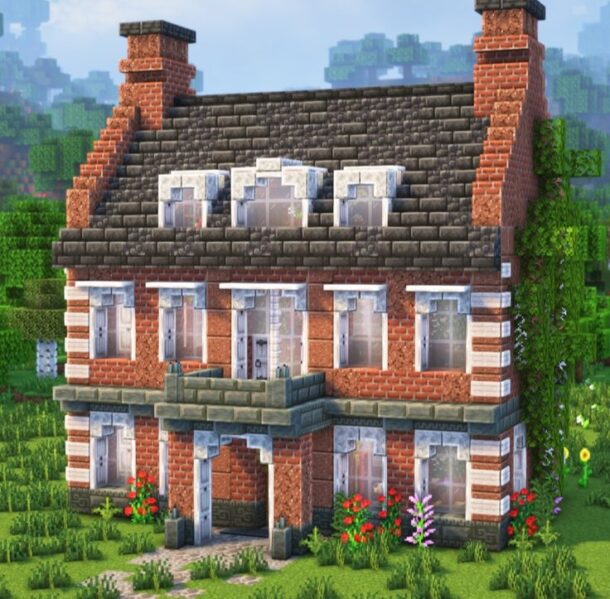
For players who are looking to invest their time and resources, building an extravagant Estate is an outstanding design. Bricks form the basic structure, with accentuating features made out of carefully designed wood elements and stone decorations which help the entire build pop. With huge windows letting in plenty of light. The addition of landscaping, garden areas and courtyards create a sophisticated environment. This is definitely not a small build, but the finished result is truly stunning and an excellent statement piece!
Conclusion
Minecraft brick homes are so popular not only because they look great and are very realistic, but also because they are sturdy and extremely versatile. This versatile material fits all sorts of styles, from cozy little cottages and sturdy farmhouses to sprawling modern estates and elegant Medieval fortresses. By combining bricks with wood, stone, and plants, you can ensure that no two brick builds look exactly alike. Because brick fits in a vast array of Minecraft locations, you’re sure to find that the perfect brick house for you exists, whether it is a tiny starter home or a massive manor you plan to build a base around!
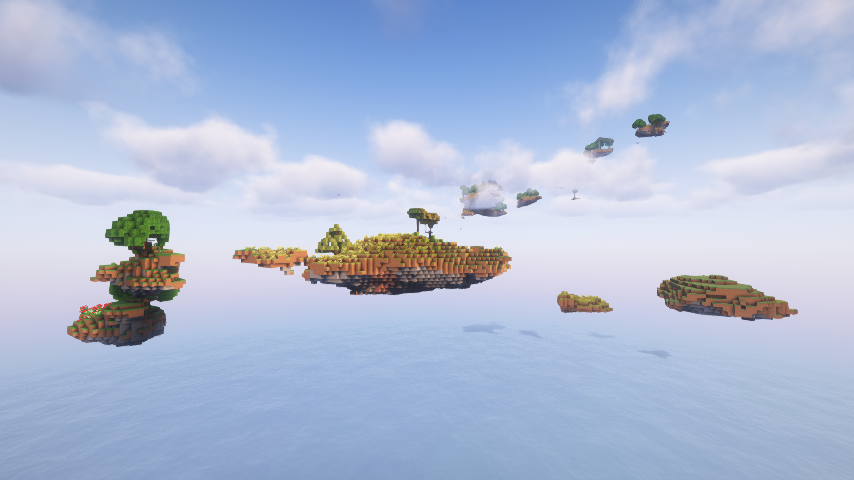
Minecraft has retained its status as one of the world’s most popular games for over a decade for a good reason. The game offers a diverse range of activities from construction and adventure to survival and creation of truly remarkable structures. However, the fun does not last forever, and the need emerges to do things differently.
That is where the game’s modding community comes into play. It has existed for as long as the game has been around, and the results of their collective efforts are nothing short of amazing. Some of the modifications add new features and content to the game, while others focus on improving the existing ones.
The article below will present the best Minecraft mods to include in one’s modpack.
Why Use Minecraft Mods?
It is possible to change nearly any aspect of Minecraft using a mod. While some only add variety, like new bosses, items, and structures, others completely alter game mechanics. Instead of playing the same basic survival game every time, try to install several modifications and play a completely different world.
No matter what type of gameplay loop you want to experience, there is a modification that would allow you to do that.
1. Create
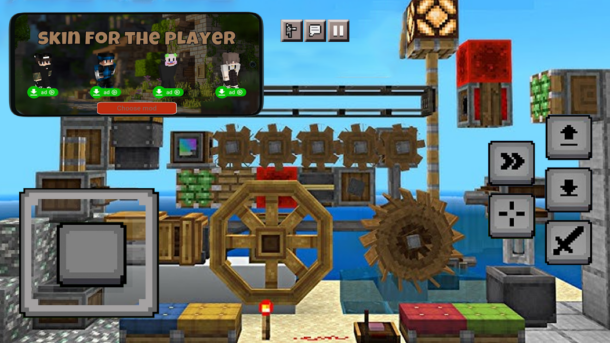
First on the list of the best Minecraft mods is Create. It features a wide variety of different machines that can be constructed with the use of gears, belts, and crankshafts. Unlike many other tech-mods, Create does not require the use of electricity. Players may use water-wheels, windmills, and other such devices to power their machines. Most notably, nearly all machinery has impressive animations, which greatly enhances the immersion and appeal of the mod.
Reasons to Like It:
- Awesome array of different machines
- Amazing animations
- Unique mechanical feel
- Easy to use and learn
2. Biomes O’ Plenty

Do you get bored exploring the same biomes every time you start a new world? If so, give Biomes O’Plenty a try. This modification adds dozens of new biospheres, each featuring its own unique set of trees, plants, materials, and structures. Apart from making your journeys more interesting, it also makes building much easier due to the sheer variety of blocks and decorations that can be found in the Biomes O’Plenty worlds.
Reasons to Like It:
- More than 80 new biomes to explore
- Hundreds of new plants, trees, and blocks
- Unique building supplies
- More variety than the original game
For those who enjoy discovering new ways to play beyond Minecraft, Unblocked Poki Games: Complete Access Guide offers another collection of browser-based gaming options worth exploring.
3. The Twilight Forest
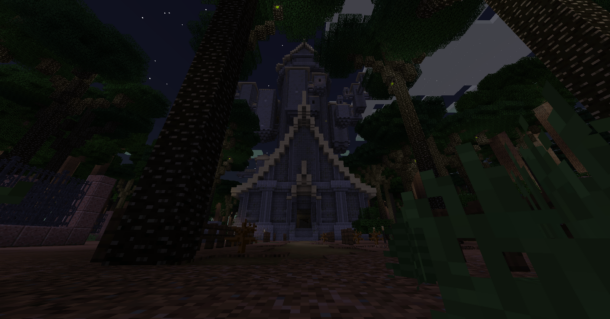
Twilight Forest is a popular adventure mod that adds an entirely new dimension to the game. Instead of making minor changes to the existing Minecraft content, it introduces players to a completely new world full of tall trees, rare resources, ancient dungeons, and challenging bosses. In Twilight Forest , the sense of progression is truly outstanding, as every boss you defeat rewards you with powerful loot and access to new areas.
Reasons to Like It:
- Unique dimension with tons of new content
- Challenging bosses and dungeons
- Great sense of progression
- Rewards players for their efforts
4. BetterEnd
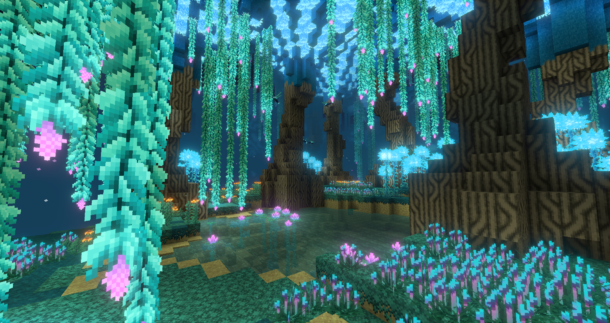
The End is one of the saddest biomes in the game. After killing the Ender Dragon, most players won’t go there again because there is nothing to do there. With the help of BetterEnd , that will all change. BetterEnd brings many more things to the End such as forests, plants, berries, enemies, and buildings. This mod will give players an opportunity to admire the beautiful environment of the End while fighting off enemies.
Reasons to Like It:
- Completely reworked and expanded biome
- More things to explore and do in The End
- Unique plants, creatures, and structures
- More challenging encounters
5. BetterNether
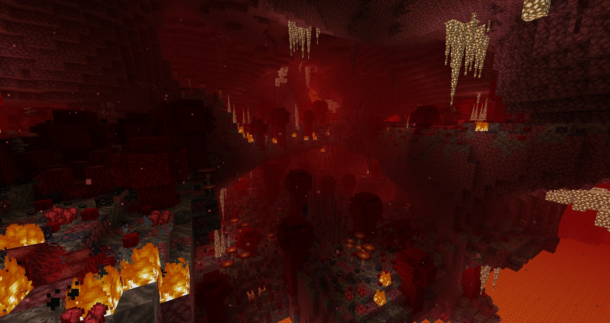
The Nether has seen a significant improvement with the release of the latest versions of Minecraft. Nevertheless, it still lacks diversity, interesting structures, and unique creatures. BetterNether addresses these issues by bringing more exciting content to the Nether. It features numerous new biomes, plants, animals, and monsters, making every journey through the Nether exciting and adventurous.
Reasons to Like It:
- Diverse array of new content
- New biomes, creatures, and structures
- More rewarding than the standard Nether
- Unique visuals and environment
6. Just Enough Items (JEI)
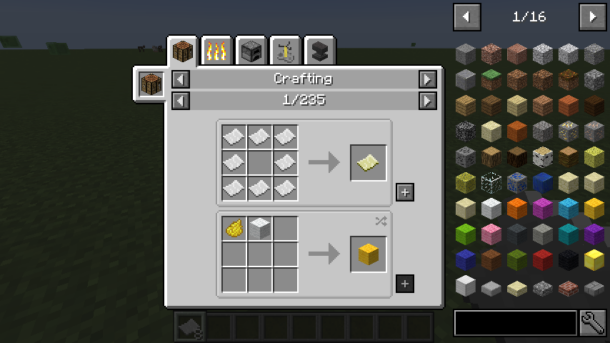
When playing Minecraft , you often find yourself clueless about how to craft certain items. Fortunately, this problem is solved with the Just Enough Items modification. JEI is probably one of the most necessary mods in any Minecraft modpack, as it is incredibly useful and does not impact game performance in the slightest. With JEI , you will always know exactly what you need to craft the items you want.
Reasons to Like It:
- Tells you what you need to craft any item
- Lets you browse all possible items’ uses
- Super easy to use
- Does not impact game performance
If you enjoy exploring new ways to play beyond Minecraft, Unblocked Games G+: Play Free Online Games Anywhere offers plenty of browser-based options to keep the gaming experience fresh.
7. Alex’s Mobs
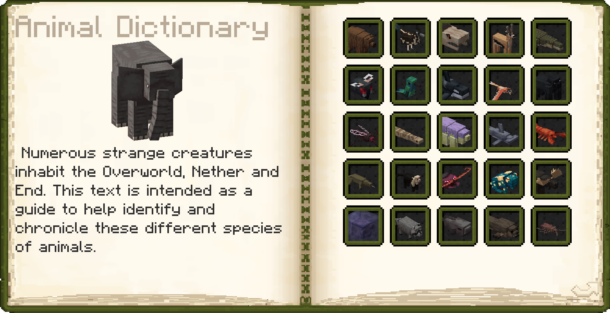
Minecraft ‘s animal interaction is one of the most underrated aspects of the game. It is super satisfying to watch different creatures roam around in their habitats. Alex’s Mobs is a great game because it adds so much variety to the animal theme. There are dozens of different animals you can encounter and each has their own unique mechanics and behaviors. You can even have fun by trying to let them follow you around and see what they do. You can see rare animals like the elephant, the hummingbird, the crocodile, or even the bear!
Reasons to Like It:
- More than 80 new animals to discover
- Amazing variety and diversity
- Creatures act realistically and naturally
- Cool rewards and unique interactions
8. Sodium
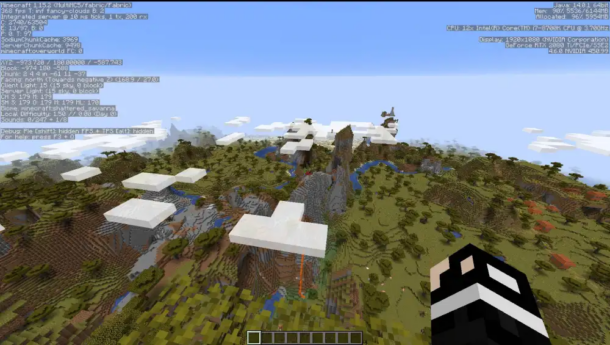
The majority of the modifications featured in this article add cool content and improve game mechanics, but Sodium does something a bit different. It is one of the most popular performance mods for the Fabric platform, as it significantly increases the game’s frame rate and overall performance. Sodium achieves this by optimizing how blocks are rendered in-game; thus, it does not impact the actual game mechanics in any way. If your PC struggles to keep a decent FPS when running Minecraft with shaders, this mod is a must-have.
Reasons to Like It:
- Increases FPS and overall performance
- Makes rendering look better
- Does not affect game mechanics
- Great mod for people with low-end PCs
9. Farmer’s Delight
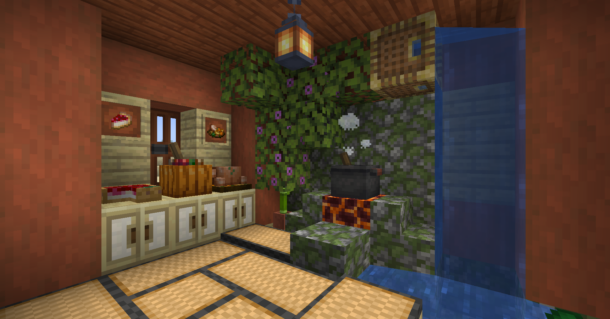
Cooking in the original Minecraft is super underwhelming, as players only have a handful of food options to choose from. Farmer’s Delight changes everything by introducing players to a whole new world of agriculture, food, and cooking. Not only does it provide more variety in terms of ingredients, but it also adds new cooking-related mechanics that are more rewarding and satisfying than the ones found in the original game.
Reasons to Like It:
- Amazing variety of new food, blocks, and mechanics
- Farming is more enjoyable than ever before
- Building new structures is super fun
- Unique and diverse cooking system
10. Waystones
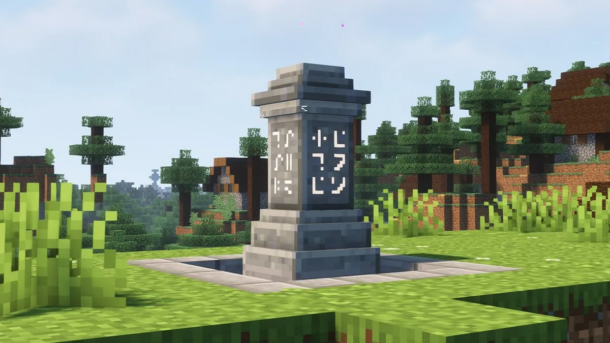
Minecraft exploration can become super tedious when you have to travel long distances between different points of interest. Luckily, there is a mod called Waystones that solves this issue once and for all. With the use of special waypoints scattered across the world, players can conveniently teleport between all discovered locations. This drastically reduces travel times in-between missions, but at the same time, it still preserves the challenge and appeal of survival gameplay.
Reasons to Like It:
- Lets you teleport across long distances
- Makes exploration much more enjoyable
- Super convenient and useful
- Great for servers and large-scale worlds
If you enjoy exploring classic gaming experiences alongside Minecraft, these Top 10 Neo Geo Games are also worth checking out for their timeless gameplay and arcade appeal.
Final Thoughts
Minecraft has always been about boundless creativity and sandboxy exploration, so it’s no surprise that the modding community has taken the game to new levels. There are countless modifications changing everything from graphics and performance to entirely new adventures in the sandbox game. This is what the modding scene in Minecraft has to offer. With all of these cool changes, the best Minecraft mods truly show how deep and customizable the game really is.
Whether you are returning to the game after a long break or simply trying to find some inspiration for your next world, the modifications mentioned above are definitely worth checking out.
-
 Guides7 years ago
6 Proven Ways to Get more Instagram Likes on your Business Account
-
Mainstream12 years ago
BioWare: Mass Effect 4 to Benefit From Dropping Last-Gen, Will Not Share Template With Dragon Age: Inquisition
-
 Mainstream8 years ago
How to Buy Property & Safe Houses in GTA 5 (Grand Theft Auto 5)
-

 Guides2 years ago
Free Fire vs PUBG: Comparing Graphics, Gameplay, and More
-

 Guides2 years ago
50+ Free Fire ID and Passwords Login List (Giveaway) 2025
-
 Casual3 years ago
8 Ways to Fix Over-Extrusion and Under-Extrusion in 3D Printing
-

 Other2 years ago
Ajjubhai UID: Free Fire Details & Earnings
-

 Features2 years ago
Exploring Valorant eSports Stats: Unveiling the Metrics Behind Competitive Excellence