
Guides
Logitech M510 vs M705: Which to Choose?

When it comes to choosing the right mouse for your regular PC or laptop work, the options are plenty, and the decision is equally tricky. There are so many things to consider before looking for products, such as what kind of mouse you are looking for: wired or wireless, for gaming or office work, the grip you want, dexterity, etc. Moreover, other important parameters like ergonomic design, clutter-free experience, budget, durability, and brand value all come into consideration before making the purchase. But happens when all the boxes are ticked, and you have two options to choose from: Logitech M510 vs. M705? Making a decision becomes tough now, and we are here to help you through it!
Check out the product specification, pros, cons, verdicts, and more below.
Logitech M510
In brief:
The M510 wireless mouse has a contoured, well-crafted design for a comfortable grip. It has great battery life and is equipped with buttons for added navigation and multitasking. These buttons can be programmed according to our choice and can be used for various purposes while working. Moreover, it has a unique smart sleep mode and advanced optical navigation for seamless use on pretty much any type of surface.
Let us look at this product in some more detail.
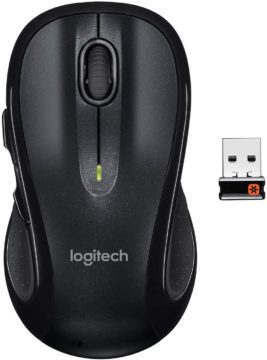
Product Specifications:
- Shape and design: The ergonomic design and comfortable grip ensure that both the right and left-hand users can use it with ease. The sleekness and clutter-free way also make it portable and easy to incorporate in your daily office or work use.
- Product dimension: 4.72 x 2.56 x 1.61 inches.
- Weight: 4.55 ounces.
- Controls: Apart from the conventional controls, this mouse also lets you customize the button functions to your choice, and all you need to do is download the free Logitech software.
- Connectivity: The mouse uses an advanced 2.4 GHz wireless technology. Moreover, the USB connection provides unifying support to other Logitech devices that you might be using, e.g., keyboard.
- Durability: With 2 AA batteries for power, this battery can run for two years.
- Compatible systems: Windows 10, Windows 8, Windows 7, Chrome OS, Mac OS X 10.6 Snow Leopard, Mac OS X 10.5 Leopard, Mac OS X 10.4 Tiger, Mac OS X 10.7 Lion, Linux Kernel 2.6+.
- Programmable buttons: These let you perform multitasking functions like browsing, jumping through documents, or adjusting videos, swiftly.
- Easy and hassle-free: It has a straightforward Plug’n’Play connection, enabled by the USB connector. Just connect it to your USB drive, turn on the mouse, and be ready for operation.
- Warranty: 3 years.
- User review on Amazon: 4.5/5
- Price: $19.99
Takeaway:
Overall, the M510 is good quality, comfortable to use mouse, with an ergonomic design, accurate sensors, and long-lasting battery life.
Logitech M705
The M705 is slightly rounded in shape and has a broader palm grip. It comes equipped with three-year battery durability and has hyper-fast scrolling. It has enhanced optical tracking that allows seamless navigation on most surfaces. Let us dive into some more product-specific details.
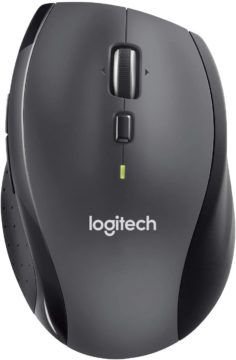
Product Features:
- Product dimensions: Height x Width x Depth- 4.29 in (109 mm) x 2.8 in (71 mm) x 1.65 in (42 mm).
- Weight: 4.76 oz (135 g).
- Battery power: This mouse uses much less power and has a battery life of up to 3 years. There is an indicator light that tells you when the battery is low.
- Scrolling speed: With the Hyper-fast scrolling feature, flipping through documents and pages becomes easier than ever, with the spin of a nearly frictionless metal scroll wheel.
- Design: The rounded design in a right-hand shape, gives you a comfortable grip and lets you have control on the side keys.
- Compatibility: Windows Vista, Windows 7, Windows 8, Windows 10, Mac OS X 10.4 or later, Chrome OS, Linux® kernel 2.6+. Chromebook compatible.
- Connectivity: Advanced 2.4 GHz wireless connectivity.
- Logitech unifying receiver: It can be used for other wireless device support by Logitech and makes it a hassle-free experience.
- Sensor: The laser grade sensor lets you use it on practically any surface with high accuracy.
- Warranty: 3 years
- User review on Amazon: 4.2/5
- Price: $28.99
Takeaway:
A good quality mouse, especially for those who prefer a larger rounded grip. It has a higher battery life, useful thumb button, and a frictionless scroll.
Comparisons
| No. | Points of Difference | Logitech M510 | Logitech M705 |
| 1. | Mouse Dimensions (height x width x depth): | 4.72 in (120 mm) x 2.56 in (65 mm) x 1.61 in (41 mm) | 4.29 in (109 mm) x 2.8 in (71 mm) x 1.65 in (42 mm) |
| 2. | Mouse Weight (including battery) | 4.55 oz (129 g) | 4.76 oz (135 g) |
| 3. | Shape | Sleek, contoured | Rounded |
| 4. | Receiver Dimensions (height x width x depth) | 0.57 in (14.4 mm) x 0.74 in (18.7 mm) x 0.24 in (6.1 mm) | 0.57 in (14.4 mm) x 0.74 in (18.7 mm) x 0.24 in (6.1 mm) |
| 5. | Sensor technology | High Precision Optical Tracking | Laser-grade tracking |
| 6. | Sensor Resolution | 1000 | 1000 |
| 7. | Design and Grip | The ergonomic design and comfortable grip ensure that both the right and left-hand users can use it with ease. The sleekness and clutter-free way also make it portable and easy to incorporate in your daily office or work use. | The rounded design in a right-hand shape, gives you a comfortable grip and lets you have control on the side keys. |
| 8. | Number of buttons | 7 | 7 |
| 9. | Tilt scroll function | Yes | Yes |
| 10. | Scroll Wheel | Yes | Yes (with Hyper-Fast Scrolling |
| 11. | Battery life | 24-month battery life | 36-month battery life |
| 12. | Wireless operating distance | Approximately 10m | Approximately 10m |
| 13. | Wireless technology | Advanced 2.4 GHz wireless connectivity (Unifying supported) | Advanced 2.4 GHz wireless connectivity (Unifying supported) |
| 14. | Interface | USB receiver | USB receiver |
| 15.. | System Compatibility | Windows 10, Windows 8, Windows 7, Chrome OS, Linux Kernel 2.6+ | Windows Vista, Windows 7, Windows 8, Windows 8.1, Mac OS X 10.5 or later |
| 16. | Warranty | 3-year Limited hardware warranty | 3-year Limited hardware warranty |
| 17. | Price | $19.99 | $28.99 |
| 18. | User review on Amazon | 4.5/5 | 4.2/5 |
List of Pros and Cons
|
Logitech M510 |
Pros | Cons |
| The ergonomic design fits nicely especially for smaller hands. | Broad hands may find it awkward for ring finger placement while using. | |
| On/off switch at the bottom. | Can’t change DPI much. | |
| Easy to connect | Middle mouse button is a bit hard. | |
| Programmable buttons | ||
| Long battery life | ||
| Both for left hand and right hand users. |
|
Logitech M705 |
Pros | Cons |
| Laser grade tracking. | Difficult for left handed people. | |
| Hyperfast scrolling speed and frictionless. | Battery plate not sturdy enough. | |
| Easy to connect. | A bit of tracking problem on shiny surfaces like glass. | |
| Sleep option present. | ||
| Larger than most portable mice available. Good for broader or longer palms. | ||
| Programmable buttons | ||
| Long battery life |
Verdict
Both these Logitech mice are suitable for your day to day use and have an overall good built. But do remember that M510 and M705 are not really for gaming and preferably ideal for standard mice work. Having cleared that, the two of them have a pretty similar specification and features. The main visible difference is the shape.
The M510 has a very sleek ergonomic design. Its edges are contoured to fit your hands snugly. Now, this, on the one hand, is preferable for people with smaller hands and grip.
However, if you have broader palms or accustomed to a fuller mouse grip, I think the M705 might be better for you. It has the traditional rounded design and gives more space to coordinate your finger placement according to comfort.
On the flip side, the M705 is optimum for right-hand users. In this regard, the M510 is ambidextrous in design and well-suited for both right and left-hand users. Now let us talk about sensors, both these models have laser grade, high-quality optical sensors.
The M510 works well on pretty much all surfaces, but M705 has some issues on extremely smooth surfaces like glass. Accuracy and battery durability are more or less the same for both, but M705 boasts a longer battery life at 36 months. The M705 also has a cool sleep mode feature not present in M510. The right choice for you, thus, depends on your preference, dexterity, and shape preference.
Go for the M510 if you want well-fit sleek mice under your palms, while M705 is better if small mice make it challenging to place your fingers and navigate properly.
Conclusion
M510 and M705 are both from the house of Logitech. So brand-wise, you don’t need to worry about choosing. Next, when it comes to the product features, compare them carefully. Especially the criteria like hand size, what kind of mice shape makes you comfortable for long hours of use, which hand you use, what type of surface you will be using it on, what kind of battery life you want.
When you have a clear idea about all these questions, I think making a decision will be more comfortable. Also, go through user reviews, and offers available, because that can make a lot of difference. Don’t forget to check the product number before ordering, many a time, you see one product but might end up ordering a different version of it with a lower review. Go through the description, research, and finally bring home the mouse you want!


Download Minecraft PE 1.21.131 APK for Android
Minecraft Bedrock 1.21.131 is a focused hotfix update — improved Spear combat, two important bug fixes, and better overall stability on Android. No new content, but a noticeably smoother experience.
Spear Knockback Improvement
The window during which a charged Spear attack can apply knockback has been extended. This makes combat feel more reliable — the attack now connects as expected without requiring pinpoint timing, especially useful when fighting multiple mobs at once.
Spear Animation Alignment
Charge attack animations now accurately sync with the Spear’s three gameplay phases: Engaged, Tired, and Disengaged. What you see on screen now matches what the game engine is actually doing — making combat more readable and reducing guesswork in fights.
Performance & Stability
Frame drops on mid-range Android hardware have been reduced. Memory handling improvements prevent sudden freezes during long play sessions. World loading and chunk generation are more reliable, reducing terrain “pop-in” when exploring or moving quickly.
Multiplayer Improvements
Backend updates improve session stability when players join or leave. Fewer disconnects and smoother synchronisation across Bedrock servers. Marketplace content and add-ons also load more consistently during multiplayer sessions.
Adventuring Time Achievement Fixed — The achievement no longer unlocks early. It now correctly requires visiting at least 17 biomes on PC, matching the intended design.
Marketplace Escape Key Fixed — Pressing Escape after using the Marketplace search now reliably returns players to the previous menu instead of getting stuck in a loop.
Add-on World Loading Fixed — A bug that triggered a “Block” error when loading or creating worlds with multiple add-ons installed has been resolved.
Download the APK
Tap one of the Download buttons above. Choose the Standard (no music) version if storage is limited, or the Full version for the complete experience. The ARM64 build is recommended for modern phones.
Enable “Install Unknown Apps”
Go to Settings → Security (or Privacy) → Install unknown apps. Enable the permission for your browser or file manager. Android requires this for any APK installed outside Google Play.
Open the APK File
Open your Downloads folder, find the Minecraft 1.21.131 APK, and tap it to launch the system installer. Follow the on-screen prompts.
Install Over Existing Version
In most cases you can install 1.21.131 directly over your existing Minecraft without losing any worlds or progress. If you see a signature conflict error, uninstall first — but back up your worlds beforehand.
Launch and Sign In
Open Minecraft, sign in with your Microsoft/Xbox Live account, and your existing worlds will load normally. Online multiplayer, Realms, and Marketplace content all work as before.
Download Minecraft PE 1.20 APK for Android
Get the full Minecraft Bedrock 1.20 (Trails and Tales) APK for Android. Supports Xbox Live sign-in. Multiple versions available — stable releases and preview builds.
Download the APK File
Tap the Download button above for the version you want. The APK file will save to your device’s Downloads folder.
Enable “Install Unknown Apps”
Go to Settings → Security or Privacy → Install unknown apps. Enable it for your browser or file manager. Android requires this for any APK installed outside of Google Play.
Open the Downloaded File
Open your Downloads folder (or tap the notification), find the Minecraft APK, and tap it to start the installer.
Confirm Installation
Tap Install and wait for the process to complete. If you see a “signature conflict” error, uninstall your existing Minecraft version first, then retry.
Launch and Sign In with Xbox Live
Open Minecraft, sign in with your Microsoft/Xbox Live account to access multiplayer, Realms, and cross-platform features.
-
 Guides7 years ago
6 Proven Ways to Get more Instagram Likes on your Business Account
-
Mainstream12 years ago
BioWare: Mass Effect 4 to Benefit From Dropping Last-Gen, Will Not Share Template With Dragon Age: Inquisition
-
 Mainstream8 years ago
How to Buy Property & Safe Houses in GTA 5 (Grand Theft Auto 5)
-

 Guides2 years ago
Free Fire vs PUBG: Comparing Graphics, Gameplay, and More
-

 Guides2 years ago
50+ Free Fire ID and Passwords Login List (Giveaway) 2025
-
 Casual3 years ago
8 Ways to Fix Over-Extrusion and Under-Extrusion in 3D Printing
-

 Other3 years ago
Ajjubhai UID: Free Fire Details & Earnings
-

 Features2 years ago
Exploring Valorant eSports Stats: Unveiling the Metrics Behind Competitive Excellence