
Guides
Best m13 Loadout COD Mobile: Best Attachments

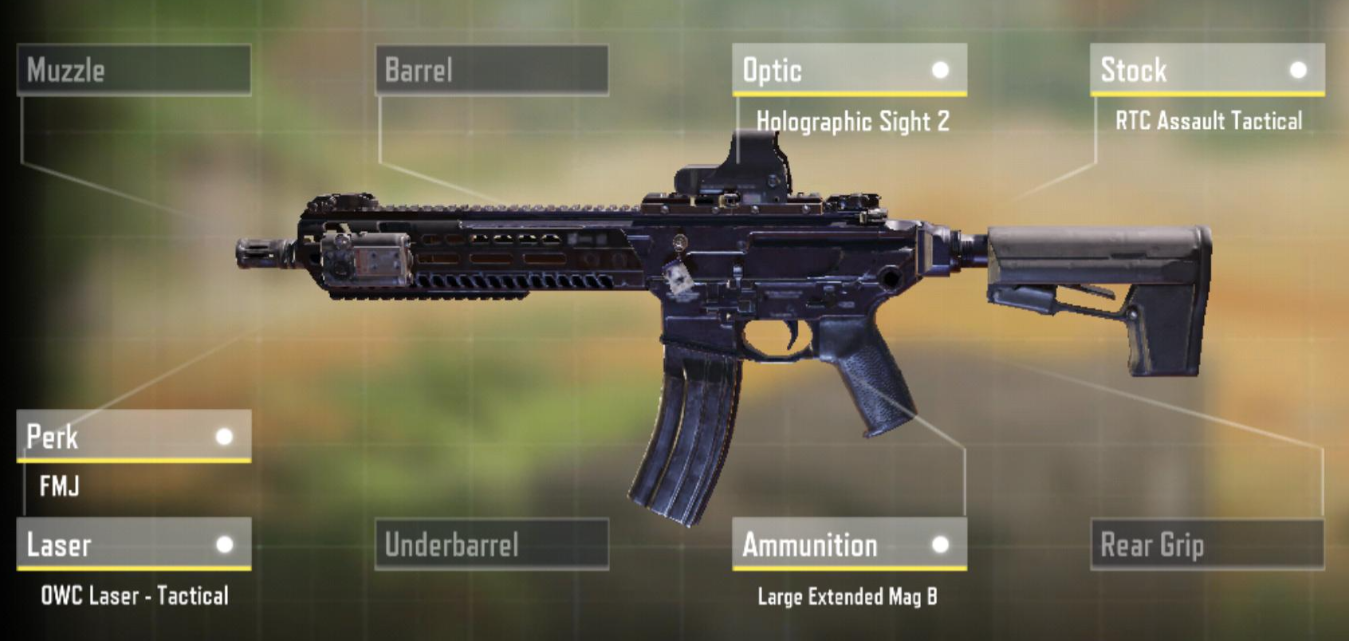
Selecting the appropriate loadout in Call of Duty Mobile’s hectic environment might mean the difference between success and failure. Of all the guns on the market, the M13 is one of the most effective and adaptable. This article will explore the M13’s nuances and the finest attachments to maximize its capabilities.
Understanding the M13
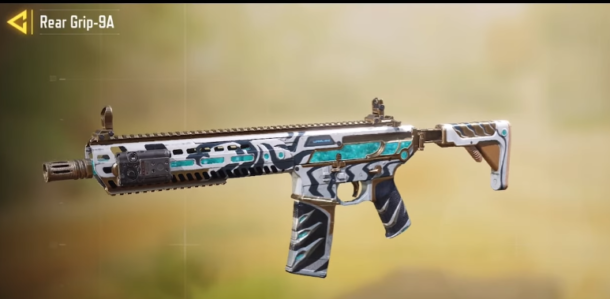
The M13 is a popular pick among Call of Duty Mobile players due to its excellent damage output, controllable recoil, and exceptional accuracy. Its adaptability is unparalleled, especially in medium-to-long-range engagements. Because of its ability to aim precisely, it’s perfect for gamers who value accuracy above power.
The weapon’s fast rate of fire guarantees quick takedowns, and its minimal recoil enables consistent aiming. Because of its versatility in combat, it may be used in various playstyles, including deliberate long-range confrontations and aggressive close-quarters fighting.
All things considered, the M13 is a monument to precision engineering and continues to be a standard option for load-outs that need accuracy and adaptability.
Also Read: Call of Duty: Tips for Mastering Warzone
Best Attachments for the M13
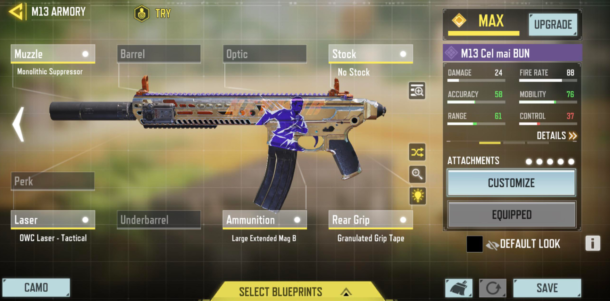
Muzzle: MIP Light Flash Guard
- Reduces both vertical and horizontal recoil, improving overall accuracy without compromising mobility.
Barrel: MIP Extended Light Barrel
- It increases bullet velocity and extends the weapon’s effective range, making it more lethal at longer distances.
Optic: Tactical Scope
- Provides a clear sight picture and magnification for precise targeting at medium to long ranges.
Underbarrel: Operator Foregrip
- Further reduces recoil, allowing for better control during sustained firefights.
Ammunition: Extended Mag A
- Increases magazine capacity, reducing the need for frequent reloads and ensuring you’re always ready for engagements.
Rear Grip: Granulated Grip Tape
- Improves weapon handling and ADS speed, giving you an edge in fast-paced combat situations.
Stock: No Stock
- It enhances mobility and ADS speed at the cost of some aiming stability, which is ideal for aggressive playstyles.
Perk: Sleight of Hand
- Speeds up reload times, keeping you in the fight and minimizing downtime.
Optimizing Performance
Attaching the aforementioned accessories, you can turn the M13 into a precise weapon that can rule the battlefield. It takes experience, strategy, and flexibility to perfect this loadout, though, rather than merely slapping on attachments.
Also Read: Why is Call of Duty: Modern Warfare so popular?
Tips For Success
- Aim for the Head: The M13 boasts low recoil, making it easier to land headshots. Aim for the head to maximize damage and dispatch enemies swiftly.
- Control Your Fire: While the M13 has a high rate of fire, it’s essential to maintain control and fire in short bursts, especially at longer ranges, to minimize recoil and conserve ammunition.
- Positioning is Key: Use the M13’s versatility to your advantage by positioning yourself in strategic locations that capitalize on its accuracy and range.
- Stay Mobile: With attachments like No Stock and Sleight of Hand, the M13 loadout excels in mobile combat. Keep moving to avoid becoming an easy target and catch your enemies off guard.
- Practice, Practice, Practice: Familiarize yourself with the weapon’s handling and recoil pattern through practice drills and real-game scenarios. Mastery comes with experience.
Also Read: Easiest Way to Earn COD: Mobile Coins and Credits
FAQs
The M13 stands out for its superb accuracy, controllable recoil, and consistent damage output, making it a flexible choice for various playstyles.
The M13 is a great weapon for medium-to-long-range conflicts, but it can also be effectively used in close-quarters fighting, especially with the correct attachments.
The MIP Extended Light Barrel for greater range, the Operator Foregrip for improved recoil control, and the MIP Light Flash Guard for less recoil are important accessories
Players may lessen the effects of recoil by practicing controlled bursts rather than continuous fire and utilizing accessories like the Operator Foregrip. Furthermore, minimizing the impacts of recoil can be achieved by maintaining good aim and posture.
Final Thoughts
The M13 may still be a very strong weapon when handled by proficient players. You may unleash this lethal firearm’s full potential by building your loadout with the greatest attachments and developing your abilities via strategy and practice. Take control of the battlefield and make the M13 your go-to weapon for supremacy.


Download Minecraft PE 1.21.131 APK for Android
Minecraft Bedrock 1.21.131 is a focused hotfix update — improved Spear combat, two important bug fixes, and better overall stability on Android. No new content, but a noticeably smoother experience.
Spear Knockback Improvement
The window during which a charged Spear attack can apply knockback has been extended. This makes combat feel more reliable — the attack now connects as expected without requiring pinpoint timing, especially useful when fighting multiple mobs at once.
Spear Animation Alignment
Charge attack animations now accurately sync with the Spear’s three gameplay phases: Engaged, Tired, and Disengaged. What you see on screen now matches what the game engine is actually doing — making combat more readable and reducing guesswork in fights.
Performance & Stability
Frame drops on mid-range Android hardware have been reduced. Memory handling improvements prevent sudden freezes during long play sessions. World loading and chunk generation are more reliable, reducing terrain “pop-in” when exploring or moving quickly.
Multiplayer Improvements
Backend updates improve session stability when players join or leave. Fewer disconnects and smoother synchronisation across Bedrock servers. Marketplace content and add-ons also load more consistently during multiplayer sessions.
Adventuring Time Achievement Fixed — The achievement no longer unlocks early. It now correctly requires visiting at least 17 biomes on PC, matching the intended design.
Marketplace Escape Key Fixed — Pressing Escape after using the Marketplace search now reliably returns players to the previous menu instead of getting stuck in a loop.
Add-on World Loading Fixed — A bug that triggered a “Block” error when loading or creating worlds with multiple add-ons installed has been resolved.
Download the APK
Tap one of the Download buttons above. Choose the Standard (no music) version if storage is limited, or the Full version for the complete experience. The ARM64 build is recommended for modern phones.
Enable “Install Unknown Apps”
Go to Settings → Security (or Privacy) → Install unknown apps. Enable the permission for your browser or file manager. Android requires this for any APK installed outside Google Play.
Open the APK File
Open your Downloads folder, find the Minecraft 1.21.131 APK, and tap it to launch the system installer. Follow the on-screen prompts.
Install Over Existing Version
In most cases you can install 1.21.131 directly over your existing Minecraft without losing any worlds or progress. If you see a signature conflict error, uninstall first — but back up your worlds beforehand.
Launch and Sign In
Open Minecraft, sign in with your Microsoft/Xbox Live account, and your existing worlds will load normally. Online multiplayer, Realms, and Marketplace content all work as before.
Download Minecraft PE 1.20 APK for Android
Get the full Minecraft Bedrock 1.20 (Trails and Tales) APK for Android. Supports Xbox Live sign-in. Multiple versions available — stable releases and preview builds.
Download the APK File
Tap the Download button above for the version you want. The APK file will save to your device’s Downloads folder.
Enable “Install Unknown Apps”
Go to Settings → Security or Privacy → Install unknown apps. Enable it for your browser or file manager. Android requires this for any APK installed outside of Google Play.
Open the Downloaded File
Open your Downloads folder (or tap the notification), find the Minecraft APK, and tap it to start the installer.
Confirm Installation
Tap Install and wait for the process to complete. If you see a “signature conflict” error, uninstall your existing Minecraft version first, then retry.
Launch and Sign In with Xbox Live
Open Minecraft, sign in with your Microsoft/Xbox Live account to access multiplayer, Realms, and cross-platform features.
-
 Guides7 years ago
6 Proven Ways to Get more Instagram Likes on your Business Account
-
Mainstream12 years ago
BioWare: Mass Effect 4 to Benefit From Dropping Last-Gen, Will Not Share Template With Dragon Age: Inquisition
-
 Mainstream8 years ago
How to Buy Property & Safe Houses in GTA 5 (Grand Theft Auto 5)
-

 Guides2 years ago
Free Fire vs PUBG: Comparing Graphics, Gameplay, and More
-

 Guides2 years ago
50+ Free Fire ID and Passwords Login List (Giveaway) 2025
-
 Casual3 years ago
8 Ways to Fix Over-Extrusion and Under-Extrusion in 3D Printing
-

 Other2 years ago
Ajjubhai UID: Free Fire Details & Earnings
-

 Features2 years ago
Exploring Valorant eSports Stats: Unveiling the Metrics Behind Competitive Excellence