
Guides
Barn Festival Slot Machine Review
People talking


- Barn Festival Slot Machine and its unique concept
- Slot machine, including rules, objectives, and strategies
- Why this slot machine is different from other games in terms of features and rewards
- Tips on how to maximize your winnings with the Barn Festival Slot Machine
- How to use bonus rounds and special symbols for higher payouts
- Most popular jackpots available at Barn Festival Slot Machines
- Review of customer experiences playing Barn Festival Slot Machines
Be aware that the United Nations Food and Agriculture Organisation has projected an alarming statistic – by 2050, we need to grow 70% more food than current levels in order to feed everyone. That includes tackling global hunger right now, plus providing enough sustenance for billions of additional people over the next few decades! Let’s hope humanity is up to this daunting task. Until then, check out Barn Festival from Pragmatic Play – a fun online slot game focused on agriculture themes!
Barn Festival Slot Machine and its unique concept
At Barn Festival, Pragmatic Play has masterfully combined elements from various games like a modern-day Dr. Frankenstein. Here you’ll experience similarities to Sweet Bonanza and Money Train 2 along with the goodness of an authentic farm economy!

Barn Festival might sound like it is inside a barn, but it’s actually outside. It is a fun 1xBet game with bright colors and happy music. When you play bonus rounds, the music gets louder and there are fireworks too!So, regardless of what’s in its barn or not – come join us for some rustic fun at the Barn Festival!
Pragmatic Play’s classic game has great visuals that look just like the popular game The Dog House Megaways.
Slot machine, including rules, objectives, and strategies
Barn Festival is a game by Pragmatic Play. You can bet from 20 cents to $100 per spin. You win when 8 or more matching symbols show up on the screen. The highest return you can get is 96.45%. This game is very difficult, with a 5 out of 5 rating for volatility!
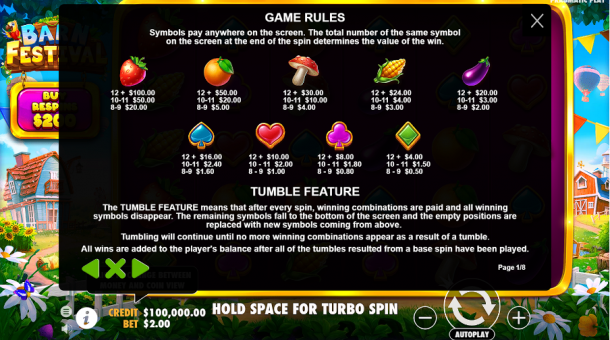
The Barn Festival paytable injects an exciting twist to classic slot iconography. When playing a game, if you see diamond, club, heart and spade symbols you can win up to 8 times your bet. If there are aubergines, corn mushrooms, oranges and strawberries you could win up to 50 times your bet.
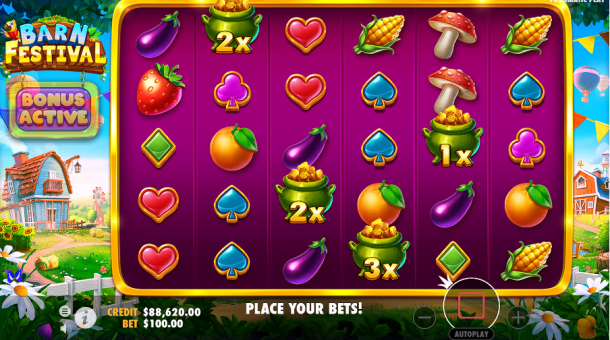
When you get a winning combination the tumble feature will remove it from view and new symbols will take its place until no more wins can be made.
Why this slot machine is different from other games in terms of features and rewards
At the Barn Festival, Money symbols are your gateway to unlocking incredible bonuses and rewards! Most money symbols come with random values of 1x – 500x total bet. Get enough of the right things and you can win more money. You might even get to play a special 1xbet https://in.1xbet.com/slots game called Barn Festival Money Respins!
Tips on how to maximize your winnings with the Barn Festival Slot Machine
If 3 money symbols show up during one spin, they will make your win bigger. Even if you don’t win at first, the symbols will keep spinning until you do win and then give you a bigger prize!
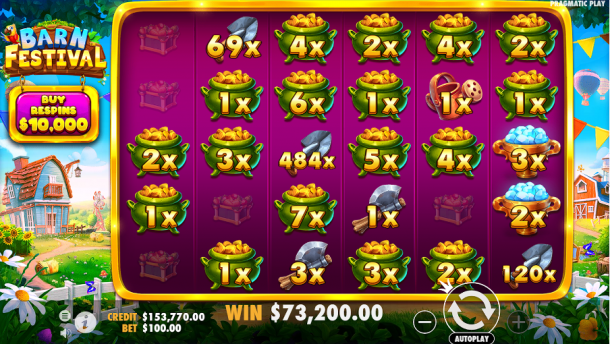
Unlock the Money Respin feature when you hit 4 or more money symbols! You’ll be taken to an exclusive four-by-five grid, with your initial triggering money symbols locked in place and three respins allotted. When new icons appear, those will be solidified as well while resetting the count of respins available. On top of monetary tokens, special symbols may also show up for even greater rewards!
How to use bonus rounds and special symbols for higher payouts
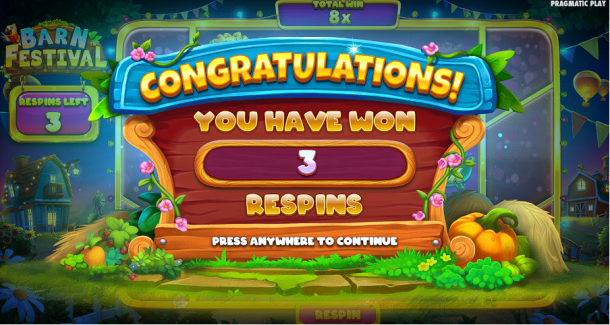
Add Value – enhance the cash symbols you see on screen by randomly increasing their worth, and watch as they transform into money signs!
- With Multiply, you can boost your earnings from 2 to 5 money symbols by up to fivefold! Just choose the multiplier of x2, x3,x4 or x5 and watch as it transforms into a lucrative money symbol.
- Gather up all the money symbols in your sight and collect their values!
- Unlock your grid by adding a reel to transform it into an icon of wealth.
- Persistent Add is an incredible tool that will add more value to all your money symbols, both on the current respin and any future ones.
- Persistent Multiply provides an exciting, suspense-building edge to your gaming experience. With it, you can multiply two to five money symbols by x2, x3, x4 or even up to x5 on the current and all future respins for maximum winning potential!
- With Persistent Collect, you can collect the value of every money symbol visible during your spin and all subsequent respins – a highly advantageous feature to help maximize your profits.
- Upon completion of the respins, a maximum win cap is imposed. If all positions have been filled, a whopping 500x your bet will be added to your total prize! Either way you look at it, this round presents an exciting opportunity to walk away with some impressive rewards.
It’s easier to buy the Respin feature than to wait for the money symbols to show up
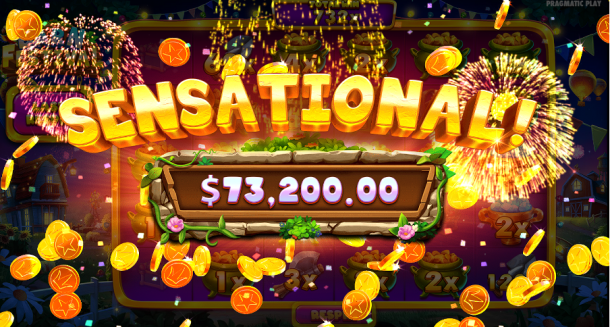
This incredible offer is available in select locations, which can be yours if you 1xbet pay 100x the bet.
Barn Festival from Pragmatic Play is a really good slot game
It has special symbols that make it different from other games. If you want to play a hold ‘n win style game, this one is colorful and fun. Give it a try!
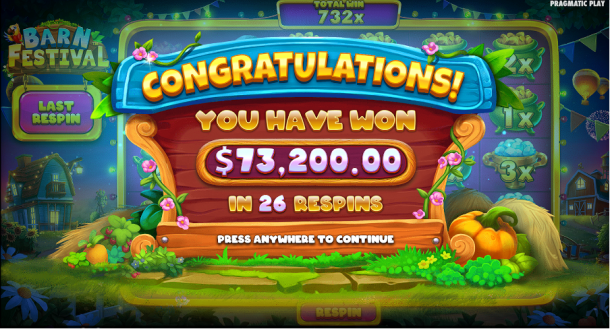
It’s reasonable to suggest that Barn Festival’s base game is even more exciting than Money Train 2. The scatter pay mechanism can cause you to lose, but it also gives you money multipliers that make it exciting. If you don’t win with the multiplier, it will carry over and be used on the next scatter hit. This is very generous! But MT2 has more power and excitement than the Barn Festival.
Most popular jackpots available at Barn Festival Slot Machines
Barn Festival is different from other games. It has bright colors and lots of corn. It’s not for people who like intense and dark games, but it is still fun. Pragmatic Play made it so that you can have a lot of fun playing this game.
The bonus rounds of Barn Festival Respins are as unpredictable as ever, though the persistent symbols still act as game changers that can bring about significant results. Even without these special symbols, decent outcomes can be achieved – and sometimes you might even get a dud round! In any case, there’s no denying that this aspect of the game remains an exciting one.
Review of customer experiences playing Barn Festival Slot Machines
Some people may worry that the game will end if you win 20,000 times your bet. But it is very unlikely to happen. You have a 1 in 3.2 million chance of reaching this maximum score. This means it is not easy to get that far. The company says how much you can win but it may not be true so don’t believe everything they say.
Seeking an alternative to traditional slot machines?
The Barn Festival is your game! With its endearing farmer-themed aesthetics, it packs a punch that will have you feeling like a runaway tractor in no time. All the features you need for unlimited fun are included, so come and experience this rustic yet thrilling take on classic hold ‘n win 1xbet gameplay today!

Download Minecraft PE 1.21.131 APK for Android
Minecraft Bedrock 1.21.131 is a focused hotfix update — improved Spear combat, two important bug fixes, and better overall stability on Android. No new content, but a noticeably smoother experience.
Spear Knockback Improvement
The window during which a charged Spear attack can apply knockback has been extended. This makes combat feel more reliable — the attack now connects as expected without requiring pinpoint timing, especially useful when fighting multiple mobs at once.
Spear Animation Alignment
Charge attack animations now accurately sync with the Spear’s three gameplay phases: Engaged, Tired, and Disengaged. What you see on screen now matches what the game engine is actually doing — making combat more readable and reducing guesswork in fights.
Performance & Stability
Frame drops on mid-range Android hardware have been reduced. Memory handling improvements prevent sudden freezes during long play sessions. World loading and chunk generation are more reliable, reducing terrain “pop-in” when exploring or moving quickly.
Multiplayer Improvements
Backend updates improve session stability when players join or leave. Fewer disconnects and smoother synchronisation across Bedrock servers. Marketplace content and add-ons also load more consistently during multiplayer sessions.
Adventuring Time Achievement Fixed — The achievement no longer unlocks early. It now correctly requires visiting at least 17 biomes on PC, matching the intended design.
Marketplace Escape Key Fixed — Pressing Escape after using the Marketplace search now reliably returns players to the previous menu instead of getting stuck in a loop.
Add-on World Loading Fixed — A bug that triggered a “Block” error when loading or creating worlds with multiple add-ons installed has been resolved.
Download the APK
Tap one of the Download buttons above. Choose the Standard (no music) version if storage is limited, or the Full version for the complete experience. The ARM64 build is recommended for modern phones.
Enable “Install Unknown Apps”
Go to Settings → Security (or Privacy) → Install unknown apps. Enable the permission for your browser or file manager. Android requires this for any APK installed outside Google Play.
Open the APK File
Open your Downloads folder, find the Minecraft 1.21.131 APK, and tap it to launch the system installer. Follow the on-screen prompts.
Install Over Existing Version
In most cases you can install 1.21.131 directly over your existing Minecraft without losing any worlds or progress. If you see a signature conflict error, uninstall first — but back up your worlds beforehand.
Launch and Sign In
Open Minecraft, sign in with your Microsoft/Xbox Live account, and your existing worlds will load normally. Online multiplayer, Realms, and Marketplace content all work as before.
Download Minecraft PE 1.20 APK for Android
Get the full Minecraft Bedrock 1.20 (Trails and Tales) APK for Android. Supports Xbox Live sign-in. Multiple versions available — stable releases and preview builds.
Download the APK File
Tap the Download button above for the version you want. The APK file will save to your device’s Downloads folder.
Enable “Install Unknown Apps”
Go to Settings → Security or Privacy → Install unknown apps. Enable it for your browser or file manager. Android requires this for any APK installed outside of Google Play.
Open the Downloaded File
Open your Downloads folder (or tap the notification), find the Minecraft APK, and tap it to start the installer.
Confirm Installation
Tap Install and wait for the process to complete. If you see a “signature conflict” error, uninstall your existing Minecraft version first, then retry.
Launch and Sign In with Xbox Live
Open Minecraft, sign in with your Microsoft/Xbox Live account to access multiplayer, Realms, and cross-platform features.
-
 Guides7 years ago
6 Proven Ways to Get more Instagram Likes on your Business Account
-
Mainstream12 years ago
BioWare: Mass Effect 4 to Benefit From Dropping Last-Gen, Will Not Share Template With Dragon Age: Inquisition
-
 Mainstream8 years ago
How to Buy Property & Safe Houses in GTA 5 (Grand Theft Auto 5)
-

 Guides2 years ago
Free Fire vs PUBG: Comparing Graphics, Gameplay, and More
-

 Guides2 years ago
50+ Free Fire ID and Passwords Login List (Giveaway) 2025
-
 Casual3 years ago
8 Ways to Fix Over-Extrusion and Under-Extrusion in 3D Printing
-

 Other3 years ago
Ajjubhai UID: Free Fire Details & Earnings
-

 Features2 years ago
Exploring Valorant eSports Stats: Unveiling the Metrics Behind Competitive Excellence