
Guides
Elden Ring: Best Armor for Samurai [2023]

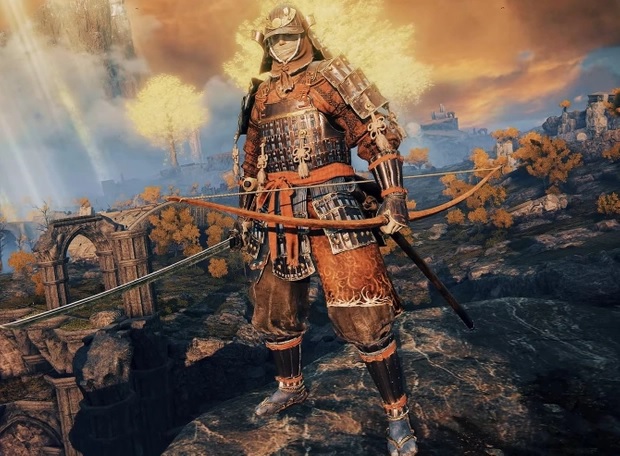
If you’re new to Elden Ring, there’s a good chance that you’re a little unsure about choosing a beginning class. Don’t worry; this is normal! Before you feel too intimidated by the game, we recommend starting with the Samurai class. This particular class is perfect for beginners, thanks to its versatility.
You get to do things like hit your enemies from far away with a bow and arrow, then use a katana when they get too close. Additionally, the Samurai class equips you with a fantastic set of armor at the beginning of the game.
However, there are several sets of armor to choose from. This is where we come in, with a list of recommendations to help you choose the best armor for the Samurai class in Elden Ring.
Let’s dive right in.
About Samurai Class in Elden Ring
The Samurai class in Elden Ring begins at level nine. It has several great attributes that we’ll examine in the next section of the article, and numerous other features.
One of the best things about the Samurai Class is that it has a reliable starting weapon, a flexible and useful longbow, and a katana. It’s important to note that when you start building the Samurai class, you must focus on Dexterity and Strength. This is because they will help in situations of combat. Additionally, you must focus on building Vigor to help sustain your character when faced with combat. In addition to Dexterity, Strength, and Vigor, Endurance is another important attribute in the Samurai class. It will help you when using bows and arrows.
As its name indicates, the attribute Vigor will help you survive getting hit in a combative situation for much longer!
A tip we’d like to share with you is that when you first start playing the game and building the Samurai class, selecting the Golden Seed and maintaining it as a keepsake would be best. It can help provide you with either 1 extra Mana Potion or 1 Healing.
It’s important to note that in this class, you will use arrows a lot in the gameplay. The arrows allow you to kill and defeat your enemies while also helping you save time and preserve your character’s strength.
Related – Elden Ring Weapon Tier List 2022
Attributes of the Samurai Class
The Samurai class has several notable attributes that are listed below:
- Level 9
- Arcane 8
- Endurance 13
- Strength 12
- Dexterity 15
- Mind 11
- Faith 8
- Intelligence 9
- Vigor 12
Best Samurai Armor in The Elden Ring Game
The best Samurai armor in the Elden Ring offers players various advantages, like protection, the ability to defeat enemies easily, and they are found in various locations that are scattered throughout the game. Choosing armor is a skill in itself because the armor that you select determines how your game is going to go.
For instance, there is armor designed specifically for endurance, so it won’t make sense to choose armor that will help you run fast! Therefore, when selecting armor, it’s important to be completely honest about how you plan to approach the game. For example, if your attribute of choice is intelligence, it doesn’t make any sense to choose armor built with endurance and strength in mind!
It’s also important to note that there isn’t a single specific type of armor that is better than its counterpart. The difference is that you must choose a type of armor that caters to your gameplay style and goals when playing Elden Ring.
In this section of the article, we’ll walk you through four types of Samurai armor, how resistant it is, and how much it negates damage. Let’s take a closer look.
White Reed Set
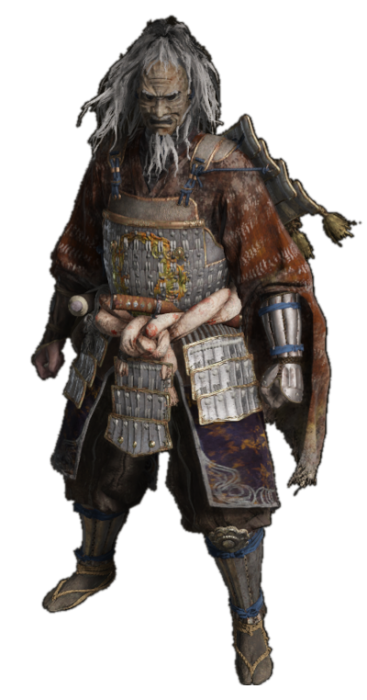
One of the most interesting features of this set of armor is that it consists of iron plates that are banded together. Since this set is popular and highly coveted, it’s safe to say that it isn’t the easiest set of armor to find! Please note that you will find it only later on in the game, so it’s a good idea to keep an eye out for it.
The White Reed set consists of four separate pieces of armor. These are the White Reed Gauntlets, the Okina Mask, the White Reed Greaves, and the White Reed Armor. You’ll be able to find the armor inside the Spirit Caller’s cave, which is located on the Mountaintop of the Giants. It’s important to note that to collect all four pieces of the armor set, you must first complete several quests. You will also need to obtain a stone sword key if you want to access the Spirit Caller’s cave, and to do so, you have to either buy the key from maiden husks or merchants in the game.
Additionally, to collect the Okina Mask, you must defeat the Bloody Finger Okina at the Mountaintop of the Giants.
The White Reed Armor has a damage negation of 22.7, and it also gives a wonderful immunity boost of 159. The damage negotiation stats for this suit of armor is as follows:
- Slash – 24.7
- Fire – 23.6
- Pierce – 19
- Lightning – 25.8
- Strike – 22.1
- Magic – 23.6
- Holy – 22.1
- Physical – 20.6
In addition to damage negation, every suit of armor also has a certain amount of resistance in various areas. The resistance for the White Reed armor is as follows:
- Focus – 130
- Weight – 19.8
- Robustness – 100
- Vitality – 120
- Poise – 16
- Immunity – 159
Ronin’s Set
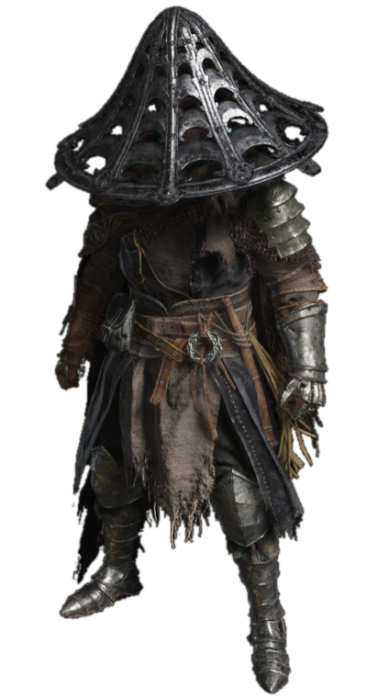
When it comes to suits of armor that you want to have on your side, Ronin’s set is definitely something you want in your arsenal. In terms of its weight, this suit is much lighter than the White Reed set. It comes with greaves, an iron Kasa, Ronin’s armor, and gauntlets.
Ronin’s set has an overall damage negation of about 25, which is broken down into the following stats:
- Fire – 26.8
- Holy – 25.6
- Strike – 23
- Slash – 24.7
- Pierce – 23
- Lightning – 28.3
- Magic – 25.6
- Physical – 23
In addition to damage negation, Ronin’s set has a good amount of resistance, broken down into the stats below:
- Focus – 132
- Vitality – 140
- Poise – 15
- Robustness – 125
- Immunity – 167
Land of Reed’s Set
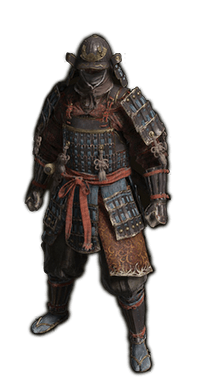
The next Samurai armor that we highly recommend is the Land of Reed’s set. When you start playing at this level of the game, this is the first suit of armor that you will wear. It is built with iron strips that are fastened together. One of the most interesting things about Elden Ring is the amount of attention its creators pay to detail. Since suits of armor often had strips of fur on them in medieval times, the Land of Reed’s set also has strips of fur on it. However, you can definitely customize your Land of Reed suit and remove the fur if you don’t like how it looks.
This suit’s average damage negation is 22.8, which is broken down into the stats below:
- Strike – 20.6
- Pierce – 20.6
- Holy – 23.6
- Magic – 22.1
- Lightning – 25.8
- Fire – 24.7
- Physical – 19
- Slash – 25.8
Along with damage negation, every suit has resistance. The resistance for this suit is broken down into the stats below:
- Poise – 120
- Immunity – 143
- Vitality – 120
- Focus – 130
- Robustness – 13
Briar Set
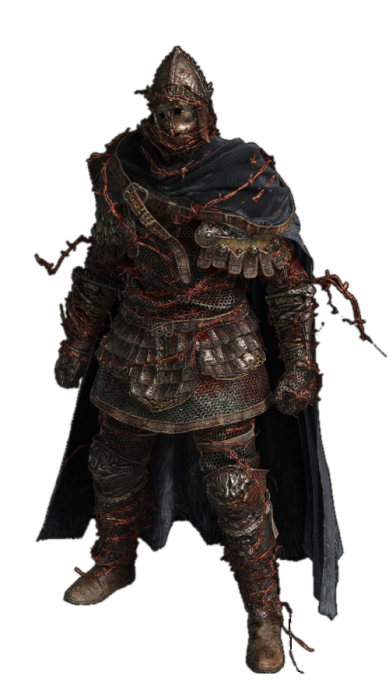
The final set of Samurai armor that we’re recommending is the Briar Set, and it’s safe to say that we’ve saved the best for last. While it is heavier than the other three sets of armor on our list, we can assure you that this set, in particular, is ideal to defeat your opponents in battle! You can buy it from the Finger Reader Enia in Roundtable Hold.
Its average damage negation is 25.5 and is broken down into the stats below:
- Strike – 23.2
- Physical – 25.6
- Slash – 25.3
- Holy – 24.4
- Lightning 24.1
- Fire – 24.4
- Pierce – 24.6
- Magic – 24.5
The resistance for this final suit of armor is as follows:
- Focus – 86
- Robustness – 140
- Poise – 27
- Vitality – 80
- Immunity – 113
Related – Elden Ring Confessor Build: A Beginner Guide
Conclusion
In this article, we walked you through a list of four of the best suits of Samurai armor in the Elden Ring video game! Each armor set has its advantages and disadvantages and strengths and weaknesses. As we mentioned in the second section of this article, it’s important that you know what your gameplay is going to look like when choosing armor. Each suit mentioned here suits a different style of gameplay, so we hope our descriptions helped you!
Image Credit – https://win.gg/

Download Minecraft PE 1.21.131 APK for Android
Minecraft Bedrock 1.21.131 is a focused hotfix update — improved Spear combat, two important bug fixes, and better overall stability on Android. No new content, but a noticeably smoother experience.
Spear Knockback Improvement
The window during which a charged Spear attack can apply knockback has been extended. This makes combat feel more reliable — the attack now connects as expected without requiring pinpoint timing, especially useful when fighting multiple mobs at once.
Spear Animation Alignment
Charge attack animations now accurately sync with the Spear’s three gameplay phases: Engaged, Tired, and Disengaged. What you see on screen now matches what the game engine is actually doing — making combat more readable and reducing guesswork in fights.
Performance & Stability
Frame drops on mid-range Android hardware have been reduced. Memory handling improvements prevent sudden freezes during long play sessions. World loading and chunk generation are more reliable, reducing terrain “pop-in” when exploring or moving quickly.
Multiplayer Improvements
Backend updates improve session stability when players join or leave. Fewer disconnects and smoother synchronisation across Bedrock servers. Marketplace content and add-ons also load more consistently during multiplayer sessions.
Adventuring Time Achievement Fixed — The achievement no longer unlocks early. It now correctly requires visiting at least 17 biomes on PC, matching the intended design.
Marketplace Escape Key Fixed — Pressing Escape after using the Marketplace search now reliably returns players to the previous menu instead of getting stuck in a loop.
Add-on World Loading Fixed — A bug that triggered a “Block” error when loading or creating worlds with multiple add-ons installed has been resolved.
Download the APK
Tap one of the Download buttons above. Choose the Standard (no music) version if storage is limited, or the Full version for the complete experience. The ARM64 build is recommended for modern phones.
Enable “Install Unknown Apps”
Go to Settings → Security (or Privacy) → Install unknown apps. Enable the permission for your browser or file manager. Android requires this for any APK installed outside Google Play.
Open the APK File
Open your Downloads folder, find the Minecraft 1.21.131 APK, and tap it to launch the system installer. Follow the on-screen prompts.
Install Over Existing Version
In most cases you can install 1.21.131 directly over your existing Minecraft without losing any worlds or progress. If you see a signature conflict error, uninstall first — but back up your worlds beforehand.
Launch and Sign In
Open Minecraft, sign in with your Microsoft/Xbox Live account, and your existing worlds will load normally. Online multiplayer, Realms, and Marketplace content all work as before.
Download Minecraft PE 1.20 APK for Android
Get the full Minecraft Bedrock 1.20 (Trails and Tales) APK for Android. Supports Xbox Live sign-in. Multiple versions available — stable releases and preview builds.
Download the APK File
Tap the Download button above for the version you want. The APK file will save to your device’s Downloads folder.
Enable “Install Unknown Apps”
Go to Settings → Security or Privacy → Install unknown apps. Enable it for your browser or file manager. Android requires this for any APK installed outside of Google Play.
Open the Downloaded File
Open your Downloads folder (or tap the notification), find the Minecraft APK, and tap it to start the installer.
Confirm Installation
Tap Install and wait for the process to complete. If you see a “signature conflict” error, uninstall your existing Minecraft version first, then retry.
Launch and Sign In with Xbox Live
Open Minecraft, sign in with your Microsoft/Xbox Live account to access multiplayer, Realms, and cross-platform features.
-
 Guides7 years ago
6 Proven Ways to Get more Instagram Likes on your Business Account
-
Mainstream12 years ago
BioWare: Mass Effect 4 to Benefit From Dropping Last-Gen, Will Not Share Template With Dragon Age: Inquisition
-
 Mainstream8 years ago
How to Buy Property & Safe Houses in GTA 5 (Grand Theft Auto 5)
-

 Guides2 years ago
Free Fire vs PUBG: Comparing Graphics, Gameplay, and More
-

 Guides2 years ago
50+ Free Fire ID and Passwords Login List (Giveaway) 2025
-
 Casual3 years ago
8 Ways to Fix Over-Extrusion and Under-Extrusion in 3D Printing
-

 Other2 years ago
Ajjubhai UID: Free Fire Details & Earnings
-

 Features2 years ago
Exploring Valorant eSports Stats: Unveiling the Metrics Behind Competitive Excellence