
Guides
Everything You Need To Know About Demon Slayer

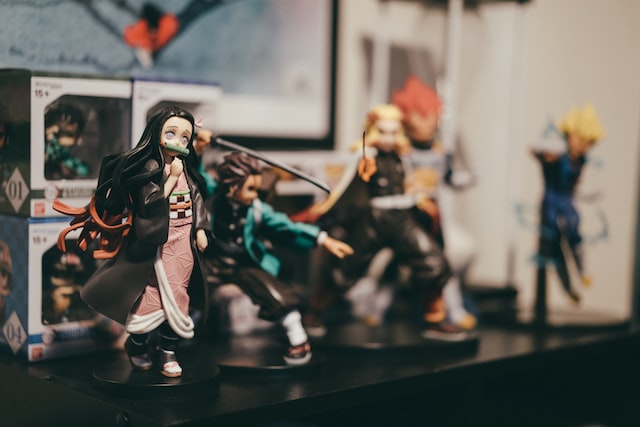
Are you an Anime fan? Then you must have been aware of what a demon slayer is. If you are starting just recently, don’t worry; we are here to help you.
In 2019, the anime world was ignited by the arrival of Demon Slayer. The Koyoharu Gotouge’s Demon Slayer: Kimetsu no Yaiba has stormed the world. This martial-arts-based story checked all the boxes for the typical shonen fan with its gorgeous animation, endearing characters, and exciting battle scenes. Among the most-watched anime shows is Demon Slayer, which is based on the same name manga.
After debuting in Weekly Shonen Jump in 2016, Demon Slayer became one of the most popular manga series of all time and sparked a similarly well-liked anime adaptation. If you don’t pay close attention to anime or manga or want to know more about the Demon slayer, here is everything you need to know. Whether you have first read about it or not, just jump on the bandwagon and get started with this top-hit manga series.
What Demon Slayer Is About?
Demon slayer katanas are a great discussion topic when it comes to killing a demon. Demon Slayer is a martial-arts-based story that revolves around young Tanijaro, who is somewhat a youngster and lives with his family in the cabin in the woods. This also makes Tanijaro Kamado the main character of the story.
One day Tanijaro decides to leave his mountaintop shelter to sell charcoals and returns only to find his entire family dead. Except for Nezuko, his sister has been changed into a demon.
After seeing his family dead, Young Tanijaro starts coaching to be a demon slayer to take revenge on the people who killed his family. He wants to eradicate the evil beings that have stolen so much from him. But to successfully execute his revenge, he must first defeat 12 powerful demons.
On the other hand, Nezuko, Tanijaro’s sister, has some human qualities despite the curse. Tanijaro set out on a mission to make her human once more rather than killing her. He does this by enlisting in the Demon Slayer Corps, a covert organization of skilled fighters who have been engaged in combat for centuries, using nichirin swords, a special handmade katana with sun power to kill the demons.
As stated earlier, to defeat multiple demons, including the Demon of Lord Muzan and his twelve most powerful Kizuki, Nezuko and Tanijaro partner up with different corps members and the prestigious Hashira during their travels. With this, the lower six and upper six are divided up. The lower 6 are more minor demons, as their names imply, but they are still powerful. But the real threats come from the upper 6, and before Tanijaro can defeat Muzan, the demon leader, they must all be defeated. Taijaro’s family died because of Muzan, who is ultimately his intended victim in this situation. It is, at its core, a shonen manga.
Who Plays The Lead Roles?
In Demon Slayer, there are four main characters. As mentioned earlier, the protagonist Tanijaro is a good-natured person with a keen sense of smell. He fights demons with his sister, Nezuko, using the martial art of water dancing. Nezuko somehow manages to escape the massacre of Tanjiro’s family, but as a result, she turns into a demon. Nezuko only emerges at night because demons can not emerge during the daytime because they would burn up like vampires. Also, she can no longer speak now as she is a demon.
We are introduced to Zenitsu and Inosuke, the other two main characters, later in the first season. Zenitsu is a coward who wants to kill demons to impress girls, but deep down, he has the spirit of a stoic warrior. Despite his fear, he can use flashes of lightning attacks which can be surprisingly powerful. Inosuke, on the contrary, is a complete jerk who lives in his own fantasy world. He attacks in a beastly manner and wears a boar’s head.
Who Was the Author of Demon Slayer?
Koyoharu Gotouge was the creator of Demon Slayer. His editor advised him to develop a narrative focused on more “easy to understand” themes after his prior series failed to catch on in Shonen Jump. Gotouge was told that after starting with the idea of a swordsman fighting demons, the narrative required more humor and an approachable lead character. Koyoharu Gotouge finally had the formula for Demon Slayer’s success with the help of these notes.
Where Can I Read the Manga of the Demon Slayer?
For the reading purpose, you can purchase the manga from Barnes and Noble, Amazon, Indigo, and various other stores. However, if you prefer, you can also read it for free online. The 205 chapters of the manga are gathered online for reading, though there are occasional ads to click through.
Moreover, if you want to enjoy uninterrupted reading, you can easily get it through apps like Viz Manga, Comixology, or Shonen Jump also, the content there is in a more organized format so it would be a fun ride. There are tonnes of option; it all depends on your preferences.
You can also get the entire series box set, which will cost around $235, from Amazon. If you are beginning your collection from scratch, this complete set is more affordable, given that a simple volume costs about $15. Viz Media’s Shonen Jump also offers a monthly subscription for just $1.99, giving you access to the entire manga library. With the added benefit of not needing to find shelf space for all 23 volumes of Demon Slayer, making it a convenient way to read the book.
Where Is It Available to Watch?
The anime’s first season had 26 episodes, premier back in April 2019. Moreover, the anime series also spawned the 2020 film Demon Slayer: Mugen Train. It ended up being one of the most lucrative films ever made. The movie broke numerous other records while grossing more than US$ 500 million globally.
Although the movie has been made available digitally, there is no need to be concerned if it is not in your area because it has been transformed into a separate anime arc. The Mugen Train movie is adapted into a seven-episode arc for the anime’s second season, ending with the Entertainment District Arc from the manga. Or you can easily watch it on Netflix.

Download Minecraft PE 1.21.131 APK for Android
Minecraft Bedrock 1.21.131 is a focused hotfix update — improved Spear combat, two important bug fixes, and better overall stability on Android. No new content, but a noticeably smoother experience.
Spear Knockback Improvement
The window during which a charged Spear attack can apply knockback has been extended. This makes combat feel more reliable — the attack now connects as expected without requiring pinpoint timing, especially useful when fighting multiple mobs at once.
Spear Animation Alignment
Charge attack animations now accurately sync with the Spear’s three gameplay phases: Engaged, Tired, and Disengaged. What you see on screen now matches what the game engine is actually doing — making combat more readable and reducing guesswork in fights.
Performance & Stability
Frame drops on mid-range Android hardware have been reduced. Memory handling improvements prevent sudden freezes during long play sessions. World loading and chunk generation are more reliable, reducing terrain “pop-in” when exploring or moving quickly.
Multiplayer Improvements
Backend updates improve session stability when players join or leave. Fewer disconnects and smoother synchronisation across Bedrock servers. Marketplace content and add-ons also load more consistently during multiplayer sessions.
Adventuring Time Achievement Fixed — The achievement no longer unlocks early. It now correctly requires visiting at least 17 biomes on PC, matching the intended design.
Marketplace Escape Key Fixed — Pressing Escape after using the Marketplace search now reliably returns players to the previous menu instead of getting stuck in a loop.
Add-on World Loading Fixed — A bug that triggered a “Block” error when loading or creating worlds with multiple add-ons installed has been resolved.
Download the APK
Tap one of the Download buttons above. Choose the Standard (no music) version if storage is limited, or the Full version for the complete experience. The ARM64 build is recommended for modern phones.
Enable “Install Unknown Apps”
Go to Settings → Security (or Privacy) → Install unknown apps. Enable the permission for your browser or file manager. Android requires this for any APK installed outside Google Play.
Open the APK File
Open your Downloads folder, find the Minecraft 1.21.131 APK, and tap it to launch the system installer. Follow the on-screen prompts.
Install Over Existing Version
In most cases you can install 1.21.131 directly over your existing Minecraft without losing any worlds or progress. If you see a signature conflict error, uninstall first — but back up your worlds beforehand.
Launch and Sign In
Open Minecraft, sign in with your Microsoft/Xbox Live account, and your existing worlds will load normally. Online multiplayer, Realms, and Marketplace content all work as before.
Download Minecraft PE 1.20 APK for Android
Get the full Minecraft Bedrock 1.20 (Trails and Tales) APK for Android. Supports Xbox Live sign-in. Multiple versions available — stable releases and preview builds.
Download the APK File
Tap the Download button above for the version you want. The APK file will save to your device’s Downloads folder.
Enable “Install Unknown Apps”
Go to Settings → Security or Privacy → Install unknown apps. Enable it for your browser or file manager. Android requires this for any APK installed outside of Google Play.
Open the Downloaded File
Open your Downloads folder (or tap the notification), find the Minecraft APK, and tap it to start the installer.
Confirm Installation
Tap Install and wait for the process to complete. If you see a “signature conflict” error, uninstall your existing Minecraft version first, then retry.
Launch and Sign In with Xbox Live
Open Minecraft, sign in with your Microsoft/Xbox Live account to access multiplayer, Realms, and cross-platform features.
-
 Guides7 years ago
6 Proven Ways to Get more Instagram Likes on your Business Account
-
Mainstream12 years ago
BioWare: Mass Effect 4 to Benefit From Dropping Last-Gen, Will Not Share Template With Dragon Age: Inquisition
-
 Mainstream8 years ago
How to Buy Property & Safe Houses in GTA 5 (Grand Theft Auto 5)
-

 Guides2 years ago
Free Fire vs PUBG: Comparing Graphics, Gameplay, and More
-

 Guides2 years ago
50+ Free Fire ID and Passwords Login List (Giveaway) 2025
-
 Casual3 years ago
8 Ways to Fix Over-Extrusion and Under-Extrusion in 3D Printing
-

 Other2 years ago
Ajjubhai UID: Free Fire Details & Earnings
-

 Features2 years ago
Exploring Valorant eSports Stats: Unveiling the Metrics Behind Competitive Excellence