
Guides
WorkinTool File Compressor Review

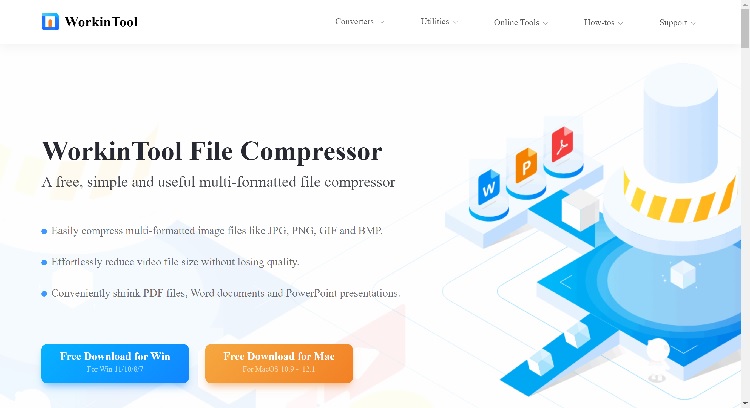
We are now processing all kinds of files in the workplace or at school each day. For most of us, file size is definitely one of our headaches. If the size of your Word document, PDF file or PowerPoint presentation is too large, you will find it difficult to send it via email. If your videos are too large, it will be hard for you to upload onto and share them on social media. Therefore, it is necessary to have a handy and free file compressor on your PC. Today, we will introduce you to a tool like this–WorkinTool File Compressor.
Overview
WorkinTool File Compressor belongs to WorkinTool software family. Just like its other family members, WorkinTool File Compressor is also endowed with a lightweight and simple interface convenient enough for beginners to use.
WorkinTool File Compressor allows you to reduce the sizes of the following files like images, videos, Word documents, PDFs and PowerPoint slideshows. The compression process is quite easy with its help since it takes you less than four steps to complete it. Furthermore, there are default compression modes to meet your different modes and additional settings to customize your compressed outcome. More importantly, it enables you to compress your files in batches.
Furthermore, it is completely free now to use. Hence, you can enjoy all its features without a license payment or compulsory registration. Meanwhile, much as it is freeware, you will not be required to watch any advertisements in the course of your compression and there will be no intrusive watermark on your output.
Here is our study of this compressor software.
Price: Free
Supported Operating Systems: Windows 11, 10, 8 and 7; macOS
File Formats:
- Images: .jpg, .png, .gif and .bmp
- Videos: ,mp4, ,wmv, .avi and .flv
- Word: .doc and .docx
- PowerPoint: .ppt and .pptx
- PDF: .pdf
| Reasons for Having It | Reasons for Declining It |
| Lightweight and simple interfaceMultiple files for reductionEasy compression processAdditional settings optionalBatch compression availableEntirely Free | Limited image and video formats |
Features
Basically, there are five main functions equipped in WorkinTool File Compressor:
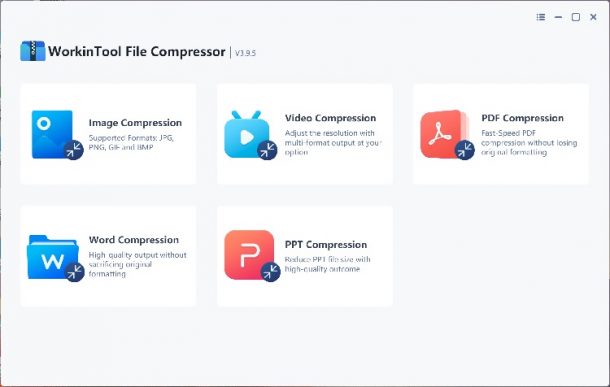
- Image Compression
- Video Compression
- Word Compression
- PPT Compression
- PDF Compression
It is powerful enough to cover almost all the necessary areas in modern society. What is worth specially mentioning is how easy to compress all the files it is able to shrink. Let’s take video compression as an example.
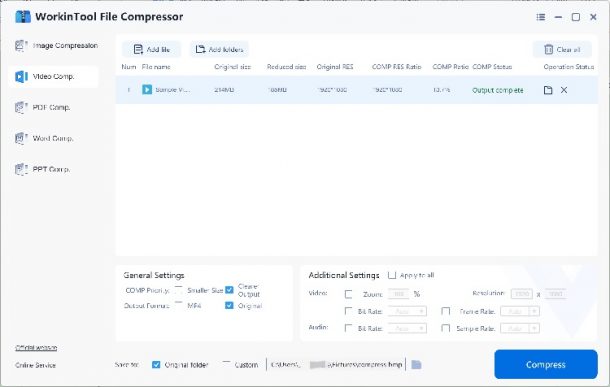
How to compress a video through WokrinTool File Compressor?
- Open WorkinTool and find Video Compression.
- Hit Add file to upload your video(s).
- Adjust the compression mode or the settings below and click Compress.
Notes
- . Two default compression modes are optional:
- Smaller Size: It allows you to compress your original video to the smallest size possible while imposing the slightest sacrifice on your final quality.
- Clearer Output: The primary aim of this function is to export an outcome with reduced size but without losing quality. It will not shrink a size as much as the above feature does.
- . Additional settings are there for you to customize your reduced file:
| Video | Audio |
| Zoom & Resolution It decides the definition and screen size of your output | Bit Rate The higher the bitrate of your audio is, the better its quality will be. |
| Bit Rate The higher the bitrate is, the better your video quality will be. | Sample Rate Just like bitrate, it also decides the ultimate quality of your audio. The higher, the better. |
| Frame Rate It decides the speed at which the images in your video are shown. The higher the frame rate is, the more still images are packed into each second of a video, which results in a larger size. |
- . Output Formats: You can choose the format of your compressed video- .mp4 or its original one.
- Batch compression is available in WorkinTool File Compressor. You can make and save multiple compressed videos with just one click.
How to compress a video for email via WorkinTool File Compressor?
- Open the tool and choose Video Compression.
- Upload your file by clicking Add file.
- Adjust the parameters in the Additional Settings and hit Compress.
(It is advisable to lower the resolution and bit rate.)
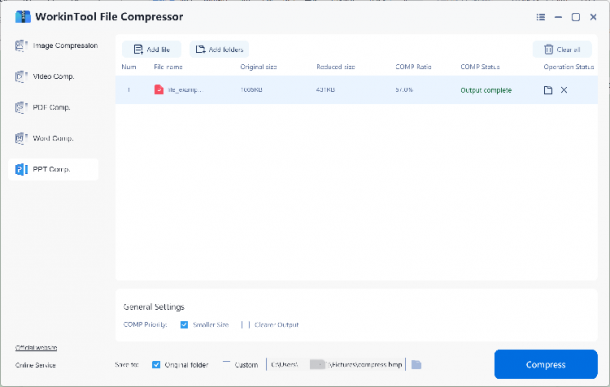
Let’s take PPT compression as another example.
With the assistance of this feature, you save the cumbersome process of reducing the sizes of the images or videos in your PowerPoint slideshows one by one. More significantly, it enables you to shrink multiple PowerPoint documents simultaneously.
How to compress a PowerPoint file by WorkinTool File Compressor?
- Open WorkinTool and select PPT Compression.
- Click Add file to upload your document(s).
- Choose the compression mode and press the Compress tab.
Conclusion
File compression has indeed become a critical technique. Therefore, it is helpful to have a powerful desktop tool on your PC or you have to find an online compressor and tolerate unpredictable situations like unstable compression speed and unsatisfactory reduction effect.
WorkinTool File Compressor is here to solve all your issues on file size reduction, from images and videos to office documents like Word, PowerPoint and PDF. The significant point is that all its features are accessible free of charge and you need to worry nothing about the intrusive watermark on your output.
Now, please give it a try and enjoy the great convenience of compressing your multi-formatted files.

Download Minecraft PE 1.21.131 APK for Android
Minecraft Bedrock 1.21.131 is a focused hotfix update — improved Spear combat, two important bug fixes, and better overall stability on Android. No new content, but a noticeably smoother experience.
Spear Knockback Improvement
The window during which a charged Spear attack can apply knockback has been extended. This makes combat feel more reliable — the attack now connects as expected without requiring pinpoint timing, especially useful when fighting multiple mobs at once.
Spear Animation Alignment
Charge attack animations now accurately sync with the Spear’s three gameplay phases: Engaged, Tired, and Disengaged. What you see on screen now matches what the game engine is actually doing — making combat more readable and reducing guesswork in fights.
Performance & Stability
Frame drops on mid-range Android hardware have been reduced. Memory handling improvements prevent sudden freezes during long play sessions. World loading and chunk generation are more reliable, reducing terrain “pop-in” when exploring or moving quickly.
Multiplayer Improvements
Backend updates improve session stability when players join or leave. Fewer disconnects and smoother synchronisation across Bedrock servers. Marketplace content and add-ons also load more consistently during multiplayer sessions.
Adventuring Time Achievement Fixed — The achievement no longer unlocks early. It now correctly requires visiting at least 17 biomes on PC, matching the intended design.
Marketplace Escape Key Fixed — Pressing Escape after using the Marketplace search now reliably returns players to the previous menu instead of getting stuck in a loop.
Add-on World Loading Fixed — A bug that triggered a “Block” error when loading or creating worlds with multiple add-ons installed has been resolved.
Download the APK
Tap one of the Download buttons above. Choose the Standard (no music) version if storage is limited, or the Full version for the complete experience. The ARM64 build is recommended for modern phones.
Enable “Install Unknown Apps”
Go to Settings → Security (or Privacy) → Install unknown apps. Enable the permission for your browser or file manager. Android requires this for any APK installed outside Google Play.
Open the APK File
Open your Downloads folder, find the Minecraft 1.21.131 APK, and tap it to launch the system installer. Follow the on-screen prompts.
Install Over Existing Version
In most cases you can install 1.21.131 directly over your existing Minecraft without losing any worlds or progress. If you see a signature conflict error, uninstall first — but back up your worlds beforehand.
Launch and Sign In
Open Minecraft, sign in with your Microsoft/Xbox Live account, and your existing worlds will load normally. Online multiplayer, Realms, and Marketplace content all work as before.
Download Minecraft PE 1.20 APK for Android
Get the full Minecraft Bedrock 1.20 (Trails and Tales) APK for Android. Supports Xbox Live sign-in. Multiple versions available — stable releases and preview builds.
Download the APK File
Tap the Download button above for the version you want. The APK file will save to your device’s Downloads folder.
Enable “Install Unknown Apps”
Go to Settings → Security or Privacy → Install unknown apps. Enable it for your browser or file manager. Android requires this for any APK installed outside of Google Play.
Open the Downloaded File
Open your Downloads folder (or tap the notification), find the Minecraft APK, and tap it to start the installer.
Confirm Installation
Tap Install and wait for the process to complete. If you see a “signature conflict” error, uninstall your existing Minecraft version first, then retry.
Launch and Sign In with Xbox Live
Open Minecraft, sign in with your Microsoft/Xbox Live account to access multiplayer, Realms, and cross-platform features.
-
 Guides7 years ago
6 Proven Ways to Get more Instagram Likes on your Business Account
-
Mainstream12 years ago
BioWare: Mass Effect 4 to Benefit From Dropping Last-Gen, Will Not Share Template With Dragon Age: Inquisition
-
 Mainstream8 years ago
How to Buy Property & Safe Houses in GTA 5 (Grand Theft Auto 5)
-

 Guides2 years ago
Free Fire vs PUBG: Comparing Graphics, Gameplay, and More
-

 Guides2 years ago
50+ Free Fire ID and Passwords Login List (Giveaway) 2025
-
 Casual3 years ago
8 Ways to Fix Over-Extrusion and Under-Extrusion in 3D Printing
-

 Other3 years ago
Ajjubhai UID: Free Fire Details & Earnings
-

 Features2 years ago
Exploring Valorant eSports Stats: Unveiling the Metrics Behind Competitive Excellence