
Guides
Get Free BGMI UC In Your BGMI Account

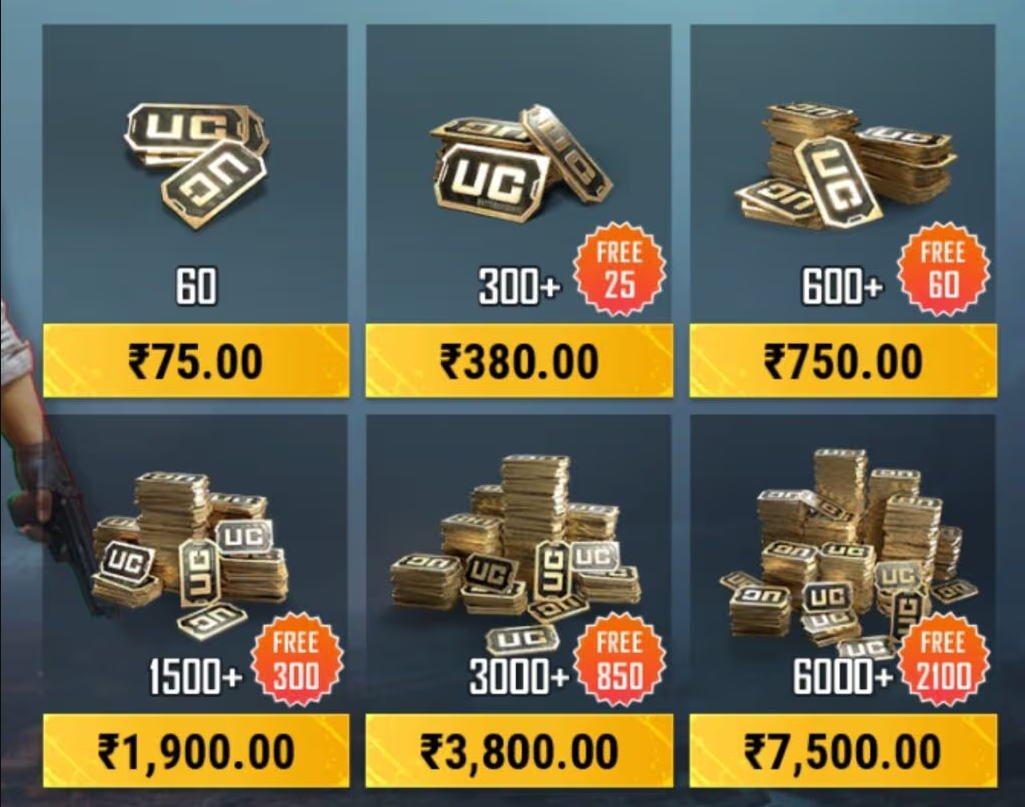
Battlegrounds Mobile India (BGMI) is one of the most popular battle royale games, and its in-game currency, Unknown Cash (UC), is essential for purchasing exclusive skins, Royale Passes, emotes, and other premium content. However, not everyone wants to spend real money to buy UC. Luckily, there are several legitimate ways to get Free BGMI UC, including redeem codes, giveaways, and reward-based platforms.
Here, we will explore the best methods to obtain free BGMI UC, provide a list of updated redeem codes, and guide you through using them safely. Additionally, we will cover tips, strategies, and potential pitfalls to help you maximize your chances of acquiring free UC.
What is BGMI UC? Why is it Important?
UC (Unknown Cash) is the premium in-game currency in BGMI that allows players to purchase various exclusive items and upgrades.
Why is UC Important?
- Customization – Players can buy unique weapon skins, outfits, and accessories.
- Royale Pass – Unlock premium rewards and level up faster.
- Crate Openings – Obtain legendary skins and rare items from loot crates.
- Emotes & Animations – Use special emotes to express yourself in-game.
- Exclusive Vehicles & Accessories – Special cars, bikes, and accessories that enhance the gaming experience.
- Lucky Draws & Spin Events – Participate in lucky draws to get rare and limited-time items.
- Character Upgrades – Unlock new characters and improve abilities for a more immersive experience.
Having UC enhances the gaming experience, making it more engaging and competitive. Players with UC can access premium content, making their gameplay more dynamic and stylish.
How to Get Free BGMI UC? (Legit & Safe Methods)
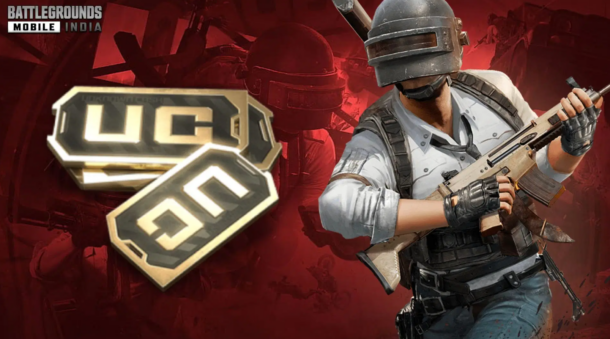
If you’re looking for ways to earn Free BGMI UC without breaking the game’s rules or risking your account, you’re in the right place. Below are some of the most effective and safest ways to get UC for free.
1. Participating in Giveaways & BGMI Events
One of the easiest ways to get free BGMI UC is by participating in giveaways and special events. Many gaming influencers, YouTubers, and BGMI streamers frequently organize UC giveaways to engage their audience.
How to Find Giveaways?
- Follow BGMI’s official social media pages on Twitter, Instagram, and Facebook.
- Subscribe to popular YouTube streamers who host giveaways.
- Join Discord servers of top BGMI influencers. Many Discord communities regularly give away UC codes.
- Keep an eye on BGMI in-game events, as Krafton often introduces promotional events that reward players with UC.
Tip: The more giveaways you enter, the higher your chances of winning free UC!
Also Read: PES 23 PPSSPP: Download PES 2023 PPSSPP ISO for Android
2. Google Opinion Rewards & Earning Play Store Credits
Google Opinion Rewards is a legitimate and safe method to earn a Google Play balance, which can be used to buy UC in BGMI.
How Does It Work?
- Install the Google Opinion Rewards app from the Play Store.
- Complete short surveys related to your preferences, travel, or shopping habits.
- Earn Google Play credit, which you can later use to purchase BGMI UC.
Tips to Earn More Surveys:
- Keep your location services enabled to get travel-related surveys.
- Answer surveys regularly to receive more in the future.
- Keep the app installed and check frequently for new survey notifications.
3. Using GPT (Get Paid To) Apps & Websites
Several GPT (Get Paid To) apps and websites allow users to complete simple tasks and earn rewards, which can be converted into Google Play gift cards to buy UC.
Best GPT Websites & Apps to Try:
- Swagbucks – Earn points by watching videos, shopping online, and answering surveys.
- PollPay – Get paid for completing quick surveys.
- FeaturePoints – Earn points by trying new apps and redeem them for gift cards.
- Mistplay (Android only) – Play games and earn Play Store credits.
- AppKarma – Get rewarded for playing mobile games and completing tasks.
How to Redeem Your Earnings for UC?
- Earn enough points to redeem a Google Play gift card.
- Use the gift card to add Play Store credit to your account.
- Open BGMI and buy UC using your Play Store balance.
Tip: Always use trusted GPT websites to avoid scams.
4. Joining BGMI Tournaments & Contests
BGMI tournaments are a great way to earn free UC if you have good gaming skills. Many gaming communities and platforms host competitions where you can win UC as a reward.
Where to Find BGMI Tournaments?
- Official BGMI eSports Events – Krafton organizes large-scale tournaments with cash prizes and UC rewards.
- PlayerZon – A popular platform where players can compete in BGMI matches for real money and UC.
- Gamerji – Another online tournament platform that hosts BGMI competitions with UC prizes.
- Esports Discord Servers & Facebook Groups – Many online gaming communities organize small-scale tournaments where winners receive free UC.
Tips to Win More Tournaments:
- Improve your shooting and survival skills.
- Play squad matches with skilled teammates.
- Participate in multiple tournaments to increase your chances of winning.
Also Read: Free Blox Fruits Accounts and Passwords (Tried & Tested)
5. Referral Programs & Cashback Offers
Many cashback and reward apps offer Google Play credits when you refer new users. You can use these credits to buy BGMI UC for free.
How to Use Referral Programs to Get Free UC?
- Apps like CashKaro, Paytm, and PhonePe offer cashback and referral bonuses that can be converted into Play Store credits.
- Some banking apps and credit cards provide reward points that can be used to redeem gift cards.
- Referral programs on platforms like Google Pay and Amazon Pay also provide credits that can be used to purchase UC.
Tip: Check promotional offers on cashback apps regularly. They often offer limited-time deals that can boost your earnings!
6. Watching Ads & Participating in Promotions
Many gaming-related apps reward users with UC, in-game items, or Google Play balance in exchange for watching ads.
How It Works:
- Download reward-based apps that offer in-game currency for watching video ads.
- Some mobile gaming platforms offer free UC trials during promotional campaigns.
- Occasionally, BGMI runs watch-and-earn events, where you can receive UC to view specific ads.
Best Apps for Watching Ads to Earn Rewards:
- Lucktastic – Watch ads and play lucky draws for gift cards.
- InboxDollars – Earn cash rewards for watching promotional videos.
- Rewarded Play – Earn points for interacting with advertisements and games.
Tip: Be consistent and patient—while watching ads won’t make you rich in UC overnight, it can help you accumulate rewards over time!
7. Following Limited-Time Promotions & Sales
From time to time, BGMI and Google Play run special promotions where users can earn UC bonuses or discounts on purchases.
Where to Find These Deals?
- Google Play Store Promotions – Occasionally, Google Play offers cashback or discounts on UC purchases.
- Festive Sales & Holiday Discounts – BGMI runs seasonal events where UC is available at a discounted price.
- Amazon Pay & Paytm Offers – Sometimes, mobile wallets offer cashback deals on in-game purchases, reducing the effective cost of UC.
Tip: Watch BGMI’s official announcements and payment apps’ promotional sections for limited-time offers.
Also Read: FIFA 2025 Mod FIFA 14 Apk Obb Data Offline Download
Free BGMI UC Redeem Codes

BGMI redeem codes are special promo codes that allow players to claim free UC or exclusive in-game items.
Here is the latest list of working BGMI UC Redeem Codes:
| Coupon Code | UC Amount |
| K8BM8HD7F2 | 100 UC |
| VEUY92P0UL3I | 50 UC |
| 1JAVS1AS88 | 200 UC |
| PDKR12AAACG | 300 UC |
| DI9WMDPWQI | 250 UC |
| UHMEHA90FG2 | 250 UC |
| JP91JH9UJAL | 300 UC |
| GGUGMBOL4BFZ | 1500 UC |
| 7H6RHMN814CO | 400 UC |
| LCQMNKQ1UZDO | 100 UC |
| A6BJ6Y1D92 | 600 UC |
| 3ZFBKM1O7LV | 700 UC |
| GWD8EFK9QZG | 600 UC |
| HU9VEY89HHFP | 500 UC |
| Y0DUEL4533KC | 400 UC |
| SGJQUYGT4OAD | 100 UC |
| ADI3J3686Y9L | 400 UC |
| ARQ1JHAV8W | 500 UC |
| HEO9OVFKWY06 | 600 UC |
| 5091104F3KL | 2000 UC |
Free Google Play Redeem Codes to Get BGMI UC
These promotional codes add Play Store credit to your account, which you can use to buy BGMI UC.
Here are some of the latest Google Play Redeem Codes:
- 5UDLGRZUA2L2JEUH
- 6XTZA6G6HGLGMPS2
- 55XD7A1GXAAB2DA2
- 7PAUELVYEGBLP3K9
- KMNRU916CYR997N0
- 303JB6HBPFPYCEYJ
- C32SW6WVC9T1P88U
- 3UMKZMAWUEMC35KH
- B4CN9EEW32AELNDT
- 3CM6BLGZGWMB8XM2
- JBSJ9SJN8WYE2BUM
- D1SVC0P14KC89K5W
- 40EXAJF3YN9SP7NK
- HWTB1VLPLXUYJMHJ
- EMNX4R6RKL8SBWRP
- 7CCHAJGM270M0UE0
Also Read: Free Minecraft Accounts & Passwords (Tried & Tested)
How to Redeem Free BGMI UC Codes?
Method 1: Redeeming BGMI UC Codes via BGMI Redemption Center
- Open a web browser and visit the BGMI Redemption Center.
- Enter your BGMI Character ID.
- Copy and paste the UC redeem code.
- Complete the captcha verification.
- Click Redeem to claim your UC.
Method 2: Redeeming Google Play Codes for Free UC
- Open Google Play Store > Tap Profile > Payments & Subscriptions.
- Click Redeem Code and enter your Google Play Redeem Code.
- The balance will be added to your Play Store wallet.
- Open BGMI > Click UC Purchase > Select Google Play Balance as payment.
- Complete the transaction and get your UC instantly.
Uses of BGMI UC in the Game
- Buying Weapon Skins, Vehicle Skins, Parachutes & Costumes – Enhance your gameplay with unique aesthetics.
- Unlocking Royale Pass – Get access to exclusive missions and rewards.
- Purchasing Emotes & Animations – Express yourself in-game with fun emotes.
- Opening Premium Crates – Get rare items and legendary skins.
Direct & Indirect Ways to Get BGMI UC for Free

Direct Ways:
- Buying from the BGMI Store – Purchase UC directly in the game.
- Using Google Play Balance & Gift Cards – Redeem for in-game purchases.
- Participating in Official BGMI Events – Win UC through limited-time promotions.
Indirect Ways:
- Survey Apps – Google Opinion Rewards and similar apps.
- Giveaways & Contests – Join YouTube, Discord, and tournament giveaways.
- Referral Programs – Earn Play Store balance by referring friends.
- Cashback Offers – Earn cashback that can be used for Play Store purchases.
Also Read: 50+ Free Fire ID and Passwords Login List (Giveaway) 2025
Beware of BGMI UC Scams & Fake Generators
- Many sites claim to offer unlimited UC but are scams.
- Such scams often steal personal data or inject malware.
- Avoid websites asking for login credentials.
- Never download third-party apps claiming to offer free UC.
- Use only official methods to obtain UC
- Protects your account from being banned.
- Ensures security and fair play.
- Guarantees that you receive real UC without risks.
Conclusion
Redeem codes, giveaways, Play Store rewards, and safe online earning methods can get you free BGMI UC. Stay updated with the latest UC codes and avoid fraudulent websites offering fake UC generators. By participating in events, completing surveys, and using Play Store credit effectively, players can enjoy BGMI premium content without spending real money.
Bookmark this page for the latest BGMI redeem codes and safe ways to earn UC without spending money!


Download Minecraft PE 1.21.131 APK for Android
Minecraft Bedrock 1.21.131 is a focused hotfix update — improved Spear combat, two important bug fixes, and better overall stability on Android. No new content, but a noticeably smoother experience.
Spear Knockback Improvement
The window during which a charged Spear attack can apply knockback has been extended. This makes combat feel more reliable — the attack now connects as expected without requiring pinpoint timing, especially useful when fighting multiple mobs at once.
Spear Animation Alignment
Charge attack animations now accurately sync with the Spear’s three gameplay phases: Engaged, Tired, and Disengaged. What you see on screen now matches what the game engine is actually doing — making combat more readable and reducing guesswork in fights.
Performance & Stability
Frame drops on mid-range Android hardware have been reduced. Memory handling improvements prevent sudden freezes during long play sessions. World loading and chunk generation are more reliable, reducing terrain “pop-in” when exploring or moving quickly.
Multiplayer Improvements
Backend updates improve session stability when players join or leave. Fewer disconnects and smoother synchronisation across Bedrock servers. Marketplace content and add-ons also load more consistently during multiplayer sessions.
Adventuring Time Achievement Fixed — The achievement no longer unlocks early. It now correctly requires visiting at least 17 biomes on PC, matching the intended design.
Marketplace Escape Key Fixed — Pressing Escape after using the Marketplace search now reliably returns players to the previous menu instead of getting stuck in a loop.
Add-on World Loading Fixed — A bug that triggered a “Block” error when loading or creating worlds with multiple add-ons installed has been resolved.
Download the APK
Tap one of the Download buttons above. Choose the Standard (no music) version if storage is limited, or the Full version for the complete experience. The ARM64 build is recommended for modern phones.
Enable “Install Unknown Apps”
Go to Settings → Security (or Privacy) → Install unknown apps. Enable the permission for your browser or file manager. Android requires this for any APK installed outside Google Play.
Open the APK File
Open your Downloads folder, find the Minecraft 1.21.131 APK, and tap it to launch the system installer. Follow the on-screen prompts.
Install Over Existing Version
In most cases you can install 1.21.131 directly over your existing Minecraft without losing any worlds or progress. If you see a signature conflict error, uninstall first — but back up your worlds beforehand.
Launch and Sign In
Open Minecraft, sign in with your Microsoft/Xbox Live account, and your existing worlds will load normally. Online multiplayer, Realms, and Marketplace content all work as before.
Download Minecraft PE 1.20 APK for Android
Get the full Minecraft Bedrock 1.20 (Trails and Tales) APK for Android. Supports Xbox Live sign-in. Multiple versions available — stable releases and preview builds.
Download the APK File
Tap the Download button above for the version you want. The APK file will save to your device’s Downloads folder.
Enable “Install Unknown Apps”
Go to Settings → Security or Privacy → Install unknown apps. Enable it for your browser or file manager. Android requires this for any APK installed outside of Google Play.
Open the Downloaded File
Open your Downloads folder (or tap the notification), find the Minecraft APK, and tap it to start the installer.
Confirm Installation
Tap Install and wait for the process to complete. If you see a “signature conflict” error, uninstall your existing Minecraft version first, then retry.
Launch and Sign In with Xbox Live
Open Minecraft, sign in with your Microsoft/Xbox Live account to access multiplayer, Realms, and cross-platform features.
-
 Guides7 years ago
6 Proven Ways to Get more Instagram Likes on your Business Account
-
Mainstream12 years ago
BioWare: Mass Effect 4 to Benefit From Dropping Last-Gen, Will Not Share Template With Dragon Age: Inquisition
-
 Mainstream8 years ago
How to Buy Property & Safe Houses in GTA 5 (Grand Theft Auto 5)
-

 Guides2 years ago
Free Fire vs PUBG: Comparing Graphics, Gameplay, and More
-

 Guides2 years ago
50+ Free Fire ID and Passwords Login List (Giveaway) 2025
-
 Casual3 years ago
8 Ways to Fix Over-Extrusion and Under-Extrusion in 3D Printing
-

 Other2 years ago
Ajjubhai UID: Free Fire Details & Earnings
-

 Features2 years ago
Exploring Valorant eSports Stats: Unveiling the Metrics Behind Competitive Excellence