
Guides
CS:GO 2 Review – What’s New?

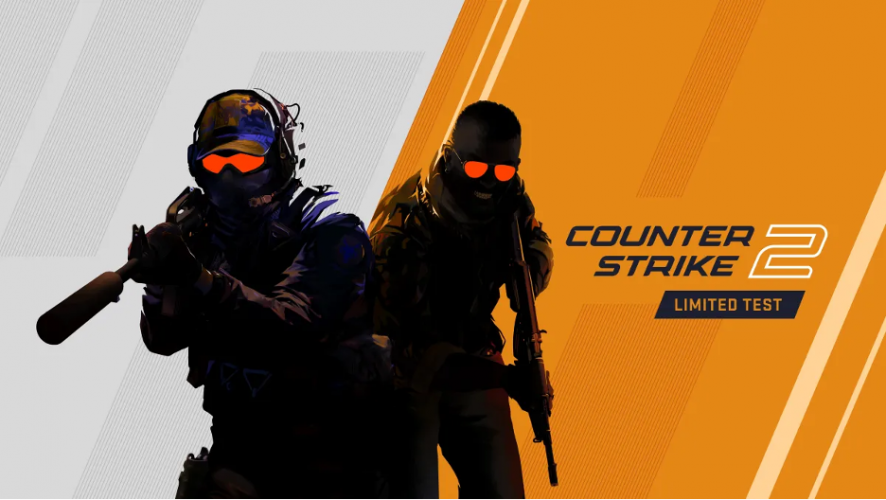
CS:GO, now CS:GO 2, is one of the most popular first-person shooter games in the world, with a massive following and a competitive Esports scene. The game has undergone several updates and changes since its initial release in 2012, but perhaps none have been as highly anticipated as the transition to the Source 2 engine. CS:GO 2 promises to bring a host of new features and improvements, including better graphics, improved optimization, and more accurate soundscapes.
In this article, we’ll take a closer look at the changes and upgrades that CS:GO 2 brings to the table. We’ll examine the game’s performance on the new engine, explore the new gameplay mechanics and features, and assess whether the transition to Source 2 has been a success.
Source 2 Engine
After years of anticipation, Counter-Strike: Global Offensive has finally made the transition to the Source 2 engine. This move has been long-awaited by fans of the game, as it promises to bring a host of improvements to the gameplay experience. Some of the most notable changes that Source 2 brought include improved graphics, better optimization, and increased performance.
The Source 2 engine has been used in other popular games such as Dota 2, and its implementation in CSGO is expected to make the game more competitive and visually stunning, just like it did for Dota.
One of the most significant changes in CSGO2 is the improvement in the game’s audio system. The new engine promises to deliver more accurate soundscapes, making it easier for players to locate enemies and plan their strategies accordingly. Additionally, the new engine brings significant improvements to the game’s lighting system, which should make the game more immersive and visually appealing. Overall, the transition to Source 2 is expected to breathe new life into CSGO, and the community is eagerly anticipating the new features and improvements that come with it.
Bye Bye 64-tick Servers
CS:GO players always had tick-related problems. The game was laggy, the ping too high, and the smokes wouldn’t always land the same way. That’s why a lot of CS:GO players used FACEIT which provided 128-tick rate servers. Other’s that were not die-hard fans and didn’t want to pay for third-party software transitioned to Valorant. Luckily, that ends with CS:GO 2.
Valve found a solution by redefining the netcode of Counter-Strike 2 with a Sub-Tick Engine. The new netcode will precisely detect when players move and fire their shots, making actions like peeking, jumping, and shooting at players much more responsive than the previous ’64-tick’ netcode design. Supposedly, player actions are no longer dependent on the server refresh rate. Servers now know the exact moment when the player makes an action, in other words, there are no tick rates.
New Responsive Smokes
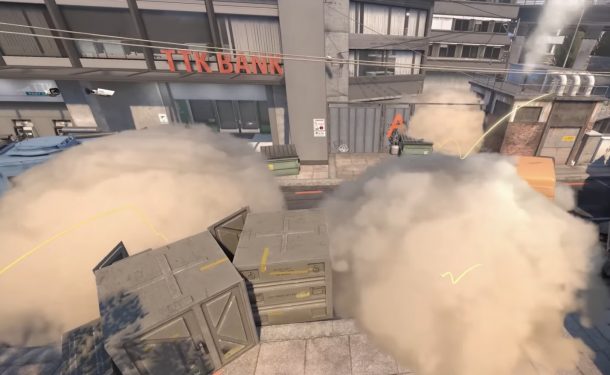
Players who are familiar with Counter-Strike’s smoke mechanics will find that they are entirely different in Counter-Strike 2. Although the game’s gunplay and mechanics remain unchanged, many players initially believed that the game’s meta would remain the same.
However, Valve has introduced a game-defining mechanic to Counter-Strike 2 that is forcing players to adapt their playstyles and strategies. This will surely make an impact on the professional CS:GO scene too, as the meta change almost always brings some new teams to the top.
From now on, shooting at smoke will cause the object to transform, and with repeated shots, players can create an aperture in the smoke that reveals any enemies hidden within it. The trajectory of the bullets will leave a small gap that is enough to see exactly what’s behind. Additionally, players can use an HE grenade to entirely remove the smoke, providing a few seconds of complete visibility.
VAC Update
Valve has employed the Valve Anti-Cheat (VAC) system across all its multiplayer games for a long time. Although VAC is consistently updated to help developers detect new hacks and improve the overall gameplay experience, Counter-Strike 2 will reportedly feature an upgraded anti-cheat system known as VAC Live.
VAC Live will be able to detect cheaters in an ongoing game. If a ban occurs, the match will immediately end. A similar feature is present in Valorant’s kernel-level Vanguard anti-cheat system, which notifies players that the match has been terminated due to the detection of a cheater.
Conclusion
In conclusion, CS:GO 2 has brought several exciting changes and upgrades to the popular game. The transition to the Source 2 engine has improved the game’s graphics, optimization, and audio system, making it more competitive and immersive. The new responsive smokes and redefined netcode have forced players to adapt their strategies and playstyles, and the upgraded VAC Live anti-cheat system is a welcome addition to ensure fair play. Overall, CS:GO 2 is an excellent update to the beloved game, and the community is excited to see how it will impact the competitive Esports scene.

Download Minecraft PE 1.21.131 APK for Android
Minecraft Bedrock 1.21.131 is a focused hotfix update — improved Spear combat, two important bug fixes, and better overall stability on Android. No new content, but a noticeably smoother experience.
Spear Knockback Improvement
The window during which a charged Spear attack can apply knockback has been extended. This makes combat feel more reliable — the attack now connects as expected without requiring pinpoint timing, especially useful when fighting multiple mobs at once.
Spear Animation Alignment
Charge attack animations now accurately sync with the Spear’s three gameplay phases: Engaged, Tired, and Disengaged. What you see on screen now matches what the game engine is actually doing — making combat more readable and reducing guesswork in fights.
Performance & Stability
Frame drops on mid-range Android hardware have been reduced. Memory handling improvements prevent sudden freezes during long play sessions. World loading and chunk generation are more reliable, reducing terrain “pop-in” when exploring or moving quickly.
Multiplayer Improvements
Backend updates improve session stability when players join or leave. Fewer disconnects and smoother synchronisation across Bedrock servers. Marketplace content and add-ons also load more consistently during multiplayer sessions.
Adventuring Time Achievement Fixed — The achievement no longer unlocks early. It now correctly requires visiting at least 17 biomes on PC, matching the intended design.
Marketplace Escape Key Fixed — Pressing Escape after using the Marketplace search now reliably returns players to the previous menu instead of getting stuck in a loop.
Add-on World Loading Fixed — A bug that triggered a “Block” error when loading or creating worlds with multiple add-ons installed has been resolved.
Download the APK
Tap one of the Download buttons above. Choose the Standard (no music) version if storage is limited, or the Full version for the complete experience. The ARM64 build is recommended for modern phones.
Enable “Install Unknown Apps”
Go to Settings → Security (or Privacy) → Install unknown apps. Enable the permission for your browser or file manager. Android requires this for any APK installed outside Google Play.
Open the APK File
Open your Downloads folder, find the Minecraft 1.21.131 APK, and tap it to launch the system installer. Follow the on-screen prompts.
Install Over Existing Version
In most cases you can install 1.21.131 directly over your existing Minecraft without losing any worlds or progress. If you see a signature conflict error, uninstall first — but back up your worlds beforehand.
Launch and Sign In
Open Minecraft, sign in with your Microsoft/Xbox Live account, and your existing worlds will load normally. Online multiplayer, Realms, and Marketplace content all work as before.
Download Minecraft PE 1.20 APK for Android
Get the full Minecraft Bedrock 1.20 (Trails and Tales) APK for Android. Supports Xbox Live sign-in. Multiple versions available — stable releases and preview builds.
Download the APK File
Tap the Download button above for the version you want. The APK file will save to your device’s Downloads folder.
Enable “Install Unknown Apps”
Go to Settings → Security or Privacy → Install unknown apps. Enable it for your browser or file manager. Android requires this for any APK installed outside of Google Play.
Open the Downloaded File
Open your Downloads folder (or tap the notification), find the Minecraft APK, and tap it to start the installer.
Confirm Installation
Tap Install and wait for the process to complete. If you see a “signature conflict” error, uninstall your existing Minecraft version first, then retry.
Launch and Sign In with Xbox Live
Open Minecraft, sign in with your Microsoft/Xbox Live account to access multiplayer, Realms, and cross-platform features.
-
 Guides7 years ago
6 Proven Ways to Get more Instagram Likes on your Business Account
-
Mainstream12 years ago
BioWare: Mass Effect 4 to Benefit From Dropping Last-Gen, Will Not Share Template With Dragon Age: Inquisition
-
 Mainstream8 years ago
How to Buy Property & Safe Houses in GTA 5 (Grand Theft Auto 5)
-

 Guides2 years ago
Free Fire vs PUBG: Comparing Graphics, Gameplay, and More
-

 Guides2 years ago
50+ Free Fire ID and Passwords Login List (Giveaway) 2025
-
 Casual3 years ago
8 Ways to Fix Over-Extrusion and Under-Extrusion in 3D Printing
-

 Other2 years ago
Ajjubhai UID: Free Fire Details & Earnings
-

 Features2 years ago
Exploring Valorant eSports Stats: Unveiling the Metrics Behind Competitive Excellence