
Guides
The 10 Hottest Game Characters: A definitive list


In the wide world of video games, characters come in all shapes, sizes , and personalities. Among these virtual heroes and heroines, few of them have made place in the people heart no just with their skills and stories, but also with their extraordinary looks. his article delves into the realm of digital allure, presenting a definitive list of the 10 hottest game characters who have left a lasting impression on players worldwide.
The 10 Hottest Game Characters
1. Lara Croft ( Tomb Raider Series)

She is the main protagonist of the Tomb Raider franchise. She is one of the most iconic,influential and important video game characters of all time. Lara’s physical appearance has also been a subject of admiration. Her sleek figure, combined with her confident demeanor and adventurous spirit, has made her a favorite among gamers since her debut.
Also Read: League Ranks in Order: Complete Guide to LoL Ranking System
2. Nathan Drake (Uncharted Series)

Nathan Drake, the charismatic treasure hunter and thrill-seeker, exudes a rugged charm that has captivated players throughout the Uncharted series. With his roguish good looks, witty banter, and ability to handle any perilous situation with style, Drake has become a modern-day swashbuckling hero and a heartthrob in the gaming community.
Nathan is a puckish rogue with a penchant for making jokes in the face of his enemies. While he’s generally a good guy who will only kill people for the sake of his own survival, he can come off as a bit insensitive, especially in the face of death.
3. Bayonetta (Bayonetta series)

Bayonetta is not just a powerful witch; she’s also a symbol of confidence and sensuality. Her provocative appearance, complete with long legs and stylish outfits that incorporate her magical hair, makes her a standout in the realm of video game characters. Bayonetta’s fierce combat skills and unapologetic personality further enhance her allure. She is a coquettish and mysterious Umbra Witch who possesses remarkable talent for bullet arts.She tends to enjoy using her sexuality as a means to an end in more instances than not, especially when it comes to taunting her enemies or teasing a man named Luka.
Also Read: Top 10 Phantom Skins in Valorant: A Must-Have Guide
4. Kratos (God of War series)

Kratos, the formidable Spartan warrior, is known for his imposing physique and relentless determination to achieve his goals. Beyond his god-slaying exploits, Kratos’s rugged features and powerful presence have made him a formidable figure in gaming. His journey through Norse mythology in recent installments has only added to his complex persona. He is known as “Ghosts of Sparta” because of his ash-white complexion. Driven by guilt and rage, Kratos is less a man and more an unstoppable avatar of anger and hate
5. Tracer (Overwatch)

Tracer, the spunky British hero with the ability to manipulate time, brings a youthful and energetic vibe to Overwatch. Her sleek design, including her iconic orange goggles and form-fitting armor, complements her playful personality and lightning-fast agility. Tracer’s charm and positivity have made her a beloved character among fans worldwide.
Also Read: How To Change Summoner Name In League Of Legends
6. Aloy (Horizon Zero Dawn)
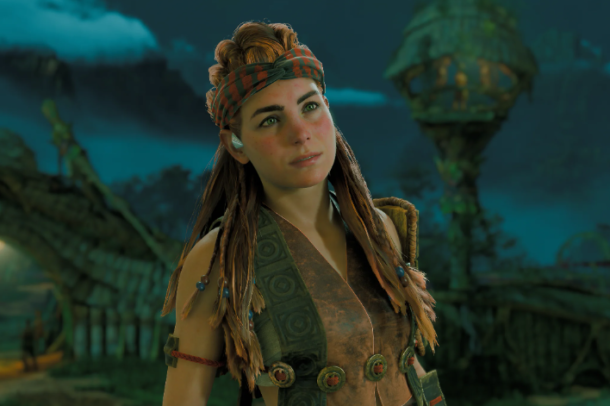
Aloy, the brave and resourceful hunter from a post-apocalyptic world overrun by robotic creatures, stands out not only for her skills but also for her distinctive appearance. With her striking red hair and determined expression, Aloy embodies resilience and independence. Her journey to uncovering the mysteries of her world has resonated deeply with players.
7. Geralt of Rivia (The Witcher series)
Geralt of Rivia, the stoic monster hunter with a troubled past, is as known for his rugged good looks as he is for his skill with a sword. His distinctive white hair and piercing eyes give him a brooding and mysterious aura that attracts both allies and admirers alike. Geralt’s complex relationships and moral dilemmas add depth to his character.
Also Read: Valorant Walkthrough: How To Lower Ping In Valaront?
8. Miranda Lawson (Mass Effect series)

Miranda Lawson, the genetically enhanced operative and expert in biotics, combines intelligence with physical perfection in the Mass Effect universe. Her sleek, tailored appearance and commanding presence make her a formidable ally and a compelling character in Shepard’s journey. Miranda’s loyalty and inner conflicts further enrich her character.
9. Tifa Lockhart (Final Fantasy VII)

Tifa Lockhart, the martial artist and childhood friend of Cloud Strife, is known for her kindness and unwavering support in Final Fantasy VII. With her athletic physique and caring demeanor, Tifa stands out as both a capable fighter and a symbol of loyalty. Her iconic martial arts moves and supportive role in the party have endeared her to fans.
10. Samus Aran (Metroid series)

Samus Aran, the intergalactic bounty hunter clad in her iconic powered armor, is a symbol of strength and resilience. Her mysterious persona, coupled with her powerful presence and agility, have made her a pioneer among female protagonists in gaming. Samus’s adventures across hostile alien worlds continue to inspire and captivate players.
Also Read: The Most Valuable Knife in CS:GO: A Collector’s Dream
Conclusion:
These 10 characters not only represent the pinnacle of gaming excellence but also embody a wide range of personalities, abilities, and, yes, attractiveness that have made them enduring icons in the gaming community. Whether they wield swords, guns, or magic, each of these characters has left an indelible mark on the gaming landscape, reminding us that in addition to saving worlds and defeating foes, they can also turn heads and capture our imaginations with their undeniable allure.


Download Minecraft PE 1.21.131 APK for Android
Minecraft Bedrock 1.21.131 is a focused hotfix update — improved Spear combat, two important bug fixes, and better overall stability on Android. No new content, but a noticeably smoother experience.
Spear Knockback Improvement
The window during which a charged Spear attack can apply knockback has been extended. This makes combat feel more reliable — the attack now connects as expected without requiring pinpoint timing, especially useful when fighting multiple mobs at once.
Spear Animation Alignment
Charge attack animations now accurately sync with the Spear’s three gameplay phases: Engaged, Tired, and Disengaged. What you see on screen now matches what the game engine is actually doing — making combat more readable and reducing guesswork in fights.
Performance & Stability
Frame drops on mid-range Android hardware have been reduced. Memory handling improvements prevent sudden freezes during long play sessions. World loading and chunk generation are more reliable, reducing terrain “pop-in” when exploring or moving quickly.
Multiplayer Improvements
Backend updates improve session stability when players join or leave. Fewer disconnects and smoother synchronisation across Bedrock servers. Marketplace content and add-ons also load more consistently during multiplayer sessions.
Adventuring Time Achievement Fixed — The achievement no longer unlocks early. It now correctly requires visiting at least 17 biomes on PC, matching the intended design.
Marketplace Escape Key Fixed — Pressing Escape after using the Marketplace search now reliably returns players to the previous menu instead of getting stuck in a loop.
Add-on World Loading Fixed — A bug that triggered a “Block” error when loading or creating worlds with multiple add-ons installed has been resolved.
Download the APK
Tap one of the Download buttons above. Choose the Standard (no music) version if storage is limited, or the Full version for the complete experience. The ARM64 build is recommended for modern phones.
Enable “Install Unknown Apps”
Go to Settings → Security (or Privacy) → Install unknown apps. Enable the permission for your browser or file manager. Android requires this for any APK installed outside Google Play.
Open the APK File
Open your Downloads folder, find the Minecraft 1.21.131 APK, and tap it to launch the system installer. Follow the on-screen prompts.
Install Over Existing Version
In most cases you can install 1.21.131 directly over your existing Minecraft without losing any worlds or progress. If you see a signature conflict error, uninstall first — but back up your worlds beforehand.
Launch and Sign In
Open Minecraft, sign in with your Microsoft/Xbox Live account, and your existing worlds will load normally. Online multiplayer, Realms, and Marketplace content all work as before.
Download Minecraft PE 1.20 APK for Android
Get the full Minecraft Bedrock 1.20 (Trails and Tales) APK for Android. Supports Xbox Live sign-in. Multiple versions available — stable releases and preview builds.
Download the APK File
Tap the Download button above for the version you want. The APK file will save to your device’s Downloads folder.
Enable “Install Unknown Apps”
Go to Settings → Security or Privacy → Install unknown apps. Enable it for your browser or file manager. Android requires this for any APK installed outside of Google Play.
Open the Downloaded File
Open your Downloads folder (or tap the notification), find the Minecraft APK, and tap it to start the installer.
Confirm Installation
Tap Install and wait for the process to complete. If you see a “signature conflict” error, uninstall your existing Minecraft version first, then retry.
Launch and Sign In with Xbox Live
Open Minecraft, sign in with your Microsoft/Xbox Live account to access multiplayer, Realms, and cross-platform features.
-
 Guides7 years ago
6 Proven Ways to Get more Instagram Likes on your Business Account
-
Mainstream12 years ago
BioWare: Mass Effect 4 to Benefit From Dropping Last-Gen, Will Not Share Template With Dragon Age: Inquisition
-
 Mainstream8 years ago
How to Buy Property & Safe Houses in GTA 5 (Grand Theft Auto 5)
-

 Guides2 years ago
Free Fire vs PUBG: Comparing Graphics, Gameplay, and More
-

 Guides2 years ago
50+ Free Fire ID and Passwords Login List (Giveaway) 2025
-
 Casual3 years ago
8 Ways to Fix Over-Extrusion and Under-Extrusion in 3D Printing
-

 Other2 years ago
Ajjubhai UID: Free Fire Details & Earnings
-

 Features2 years ago
Exploring Valorant eSports Stats: Unveiling the Metrics Behind Competitive Excellence