
Social Games
Storage Introduced to FarmVille, How Does It Work

 As it usually happens on Fridays, Zynga has added a host of goodies to FarmVille. We’ll start with Storage, a great addition that will allow us to customize our farms even more. Read on to find out more about the introduction of Farmville storage and how does this Storage thing actually works!
The developers of the game simply said about this: “We’ve heard some of you are feeling a bit cramped on your farm. FarmVille is proud to introduce STORAGE! Now you can decorate to your heart’s content while knowing that you have a place to store your stuff.”
So what does this mean, actually? It means that now you can store items in barns and tool sheds – each barn and tool shed has a specific capacity amount (a tool shed has 8 spots, a red barn can store 6 decorations and a hay barn – 8).
How does storage work? Simply- you can now store an item (decoration) by clicking on it and selecting the option to move it to your FarmVille storage. Therefore you won’t have to sell or throw away your favorite items (or just clutter them in a corner), but you can keep them for a later use. Please note that this storage option only works for decorations – but I guess that’s enough.
The best part is that you won’t have to do too much clicking either – something we all seem to do too much in Farmville. That goes because all the items are stored in “a central location”, so you won’t have to remember in which barn or tool shed you’ve placed your garden gnome. Really cool! Way to go Zynga for adding this great feature: the FarmVille storage!
Also, click here if you wish to learn more about a complete FarmVille guide that will help you improve your farm and playing technique!





It’s an exciting moment for the cryptocurrency gaming industry as innovative bonus buy options make an entrance at a popular destination for digital casino enthusiasts, bitcoincasino.us.
This comes amidst an increasing shift towards cryptocurrency in the procurement of online services and products, particularly where confidentiality, security, and ease of transactions are paramount. The innovative Bonus Buy Options at the Bitcoin Casino are setting new standards in the industry and offering undisputable value to gamers.
Bitcoin Casino US, well-renowned in the iGaming sector, has taken things up a notch by incorporating this unique feature into their platform. This paradigm-shifting initiative is poised to amplify the fun and rewards for players while enhancing their overall gaming experience.
The groundbreaking Bonus Buy feature is a testament to the flexibility and liberal nature of cryptocurrency casinos in comparison to traditional gambling sites. Traditionally, players would have to spend significant amounts of time to unlock bonuses. However, with the unique Bonus Buy feature, this problem is efficiently tackled. It allows players to bypass the usual gaming rounds and straight-up purchase bonus features in specific games.
This kind of innovation only comes naturally to a platform such as bitcoincasino.us that has already carved a unique niche for itself in the cryptocurrency gaming universe. They have been offering an extraordinary array of thrilling games, available to be enjoyed with the privacy and security only Bitcoin currency can provide. Now their innovation continues with the addition of novel Bonus Buy Options.
Let’s delve a little deeper into how this exciting new feature works. Bonus Buy Options allow players to access bonus rounds and special features of certain games instantly, as opposed to having to unlock them through prolonged gameplay. Getting to the bonus stage often requires a level of skill or sheer luck, which may not always be in favor of the player. With this offering, they can essentially shortcut to potentially lucrative bonus rounds for an upfront cost.
This would, of course, cost the player more than a regular spin but the benefits outweigh the costs. Imagine the potential of winning big without having to go through hours of gameplay. It certainly sounds tempting and is alluring enough to catch the attention of novices and seasoned players alike.
The innovative Bonus Buy Options are gaining popularity among players at Bitcoin Casino US. The ability to enter lucrative bonus rounds without the preceding wait and without depending on pure luck is proving to be an appealing feature. More players are seeing the value in paying a bit more to gain instant access to potentially big wins.
All games that have the innovative Bonus Buy feature are suitably marked, allowing players to easily identify which games they can purchase bonuses. Evoking both excitement and curiosity, players have flocked to their gaming roster not just to try the new feature but also to indulge in an ever-expanding collection of games.
The Bitcoin Casino platform represents a new era in online gaming. A platform where users can enjoy high-quality games with the added perks of Bitcoin transactions; earning them the tag of being cryptocurrency gaming forerunner.
The casino prides itself on the gaming liberty it provides to its users. By making the finest gaming options accessible to its players worldwide, it effortlessly manages to transform the online gaming experience into something akin to real-world gambling — within the comfort of your own home.
Not only does Bitcoin Casino US present a vast array of exciting games and opportunities to win, but they also ensure safe and secure transactions using Bitcoin and other cryptocurrencies. They guarantee complete anonymity and transparency to take the hassles out of online gambling and add generous doses of fun and excitement.
The introduction of such innovative features like the Bonus Buy Option is a clear indication of the casino’s commitment to its players”>entertainment. It goes to show that Bitcoin-centric gambling platforms are not just catering to a niche segment but are set on revolutionizing the entire online gaming industry.
hanges in the industry rarely go unnoticed, and innovative alterations such as what Bitcoin Casino US has introduced mark a significant step forward. These advancements show that a subtle shift is happening in the industry, putting the players”>needs at the forefront while adding dimensions of excitement and enjoyment. After all, that’s what gaming is all about!
As the innovative Bonus Buy Options become a norm in the crypto gaming world, it’s clear to see: this is just the beginning of innovative modulations that are set to redefine the landscape of online gaming. Watch this space for more groundbreaking innovations.

Gambling has always been a part of human life. After the collapse of the Soviet Union, casinos began to develop in the post-Soviet countries. Initially, they were located in basement-type rooms. Later, elite establishments for the middle and affluent class arose. With the introduction of restrictions in the gambling
business, the popularity of online casinos has increased rapidly. Such Internet resources provide users with a lot of opportunities, which will be discussed later.
Reasons For Popularity
The list of advantages of online casinos over offline establishments is huge. Let’s name the most important advantages:
- Anonymity;
- A wide range of games;
- Availability of bonuses and promotions;
- Efficiency, convenience of depositing/withdrawing funds;
- The opportunity to open a demo account and practice in a demo game.
Registration at the online casino takes a few minutes. By specifying the contact details (sometimes it is required to send a screenshot of the passport), the client gets access to the functionality of the site. He does not need to get to the land-based casino, wait for it to open, or take care of his appearance. Just log into the application (on the website), choose the game you like, and plunge into it with your head, experiencing similar emotions as in a regular casino.
Bonuses and Promotions
In pursuit of a client, companies give virtual users several bonuses. These can be:
an increase in winnings under certain conditions;
- Registration bonus;
- First deposit bonus;
- Bonus for re-replenishment of the account;
- The initial amount to the account;
- Cashback;
- Free spins, etc.
It is worth noting the online casino registration bonus, This is one of the simplest bonuses that are awarded for registration on the online casino website. Also, many online casinos arrange promotions timed to coincide with weekends or holidays. Most of them consist in accruing bonuses and increasing the amount of replenishment of the account. The available promotions can be found in the user’s account. Some companies send relevant notifications to the customer’s email and mobile number.
A Large Variety of Games
Online casinos have the same games as regular establishments. As an example, we can give:
- Roulette;
- Blackjack;
- The wheel of fortune;
- Slot machines.
The accessible interface makes the game process as accessible and comfortable as possible. You can familiarize yourself with the rules of the game on the websites, and if you have any questions, the support service will promptly answer them.
The Possibility of a Demo Game
If you are in doubt about whether it is worth playing at an online casino, or you want to work out one of the strategies, then many companies introduce the demo game option. It is no different from the standard game, with the only caveat that virtual money is at stake. After practicing and mastering the rules, the client decides whether it is advisable to use his financial resources for gambling.
Saving Time
Online casinos are a great alternative to offline establishments. They save time, and access to them is provided from anywhere in the world. To play, it is enough to have a mobile phone (computer, laptop, etc.). Your account and the functionality of the site open after you enter your username and password. It takes a few seconds. After completing a simple set of operations, the online casino client can play without time limits. You can also try to play on different sites of specific different countries, you don’t have to go anywhere. For example, why not try a Greek online casino, to diversify your experience?

Ways to Deposit/Withdraw Funds
Companies offer many options for adding funds to your account, in particular:
- With a VISA/MasterCard bank card;
- In cash via the payment terminal;
- Using various online wallets, etc.
Some online casinos have started accepting cryptocurrency. Withdrawal of funds is usually carried out in the same way as for replenishment.
In conclusion, online casinos are much more convenient, more functional, and more accessible than regular establishments. Their popularity continues to grow along with the development of computer technology. The number of users of such Internet portals is already several million and is gradually increasing.
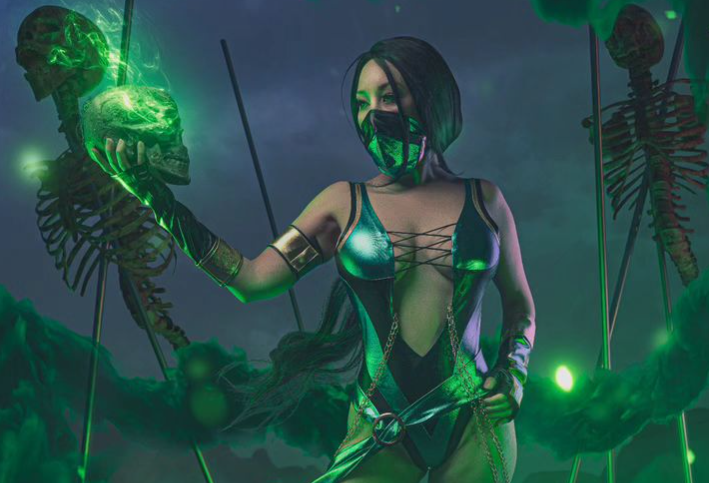
Cosplay influencers are all about bringing our favorite characters from movies, books and video games to life! Superheroes or villains, these awesome characters use costumes and makeup to tell a story in the coolest way possible. They’re not just cosplayers – they’re models, actors, and brand ambassadors who absolutely went on a fantasy anime culture.
And let me tell you, cosplay is exploding everywhere from Taiwan to America! With superhero movies becoming so popular, many women, including black women, are proudly expressing their love for comics and cosplay. These talented individuals, especially black female cosplayers, get major props for their amazing costumes at comic cons and tons of photoshoots
Not only are they making waves offline – these influencers are sounding on social media too! Platforms like Instagram and TikTok where they inspire and gather huge followings. It’s all about spreading the cosplay love and having a blast along the way!
Top 10 Sexiest Cosplay Girls
1. Alodia Gosiengfiao
Meet the fantastic Alodia Gosiengfiao! You might be familiar with her as the talented Filipino cosplayer, model, actress, singer, and TV presenter. She’s not just about dressing up as an anime character; She is also a global fan, spreading enthusiasm at events and even judging anime events around the world! Beyond cosplay, she’s landed cool brand deals and magazine features, all thanks to her lovely charm. With 1.7M Instagram followers, she shares snippets of her life and promotes everything from skin-whitening products to Japanese sushi bars, showcasing her talents and winning hearts everywhere!
2. Linda Le aka Vampy Bit Me
Meet Linda Le, or as you know her, Vampy Bit Me! She is an American cosplayer, model, and online sensation living in Los Angeles. She has over 365K Instagram followers known for her stunning costumes on display at Otacool 2. Linda works with awesome designers like Long Vo and Tim Miller, and is also sponsored by Mad Catz as a video gamer.
Also Read: How Old is Mitsuri: Every Main Characters Age, Birthday & Height
3. Yaya Han
Let us introduce you to Yaya Han! She is a Chinese-American cosplayer, model and fashion designer living in the United States. Yaya’s got a big heart for what she does, and it shows! You may have caught her on TV shows like Heroes of Cosplay and King of the Nerds, making everyone jealous with her amazing costumes. From anime to comics, she is a creative force! And hey, despite facing some challenges, she has taught us all to follow our passions, with over 600,000 followers encouraging her on Instagram. Plus, she’s also written a book called “Yaya Han’s World of Cosplay: A Guide to Fandom Costume Culture.” She is truly an inspiration to aspiring cosplayers everywhere!
4. Anna Faith Carlson
In 2014, Anna Faith Carlson shot to fame with her amazing Elsa cosplay from Frozen. Hailing from sunny Florida, she won the hearts of anime fans everywhere and even ranked as one of the top seven cosplayers of 2015. She has a following of over 800K on Instagram, the way Anna’s passion shines through with Harley She transforms into characters like Quinn and Queenie Goldstein, making her the perfect companion to introduce brand awareness to cosplay enthusiasts.
Also Read: Training Slayer Mod APK Download (Latest V50.0) For Android
5. Jessica Nigri
Hey, guess who’s been rocking the cosplay scene for over 12 years? It’s Jessica Nigri! Born in 1989, the American-New Zealand artist became famous for his “sexy Pikachu” cosplay at San Diego Comic-Con. With over 4 million Instagram followers, Jessica’s tutorials and creative care continue to engage fans. He also worked with gaming giant Ubisoft.
6. Marie-Claude Bourbonnais
Marie-Claude Bourbonnais has won with her stunning physique, charm and confident aura. Originally interested in making clothes for fun, her passion for tailoring blossomed into a career in fashion. Chosen by radio host Marto Napoli as the face of Dream Team Calendar in 2008, Mary’s journey from local competitions to global cosplay fame has been nothing short of inspiring
7. Stella Chuu
A vibrant personality in the acting and cosplay scene, Stella Chuu started her journey in 2011 by cosplaying Sakura from Naruto during her high school days. Her charming manners and elegant clothes soon made her famous. Designing her own costumes, she flawlessly brings characters like Psylocke and KDA Ahri to life. Featured on Kotaku and Nerdist, Stella’s new approach to cosplay shines brightly.
Also Read: Redo of Healer Season 2: Release Date, Cast, And Character
8. Amie Lynn
Before 2009, if you asked Amy about cosplay, she would draw a blank! But a simple cosplay of Code Geass changed everything! Addicted to the bad cosplay scene, Amy has since dived headfirst into the hobby, learning everything from basic garments to crafting incredible lightning weapons from Final Fantasy XIII is all about fun and creativity, and often experiments with cross-fusion and gender-swap cosplay .
9. Ely Cosplay
Ely Cosplay from Taiwan has been delighting fans with her amazing talent for over a decade. Known for her meticulous attention to detail, she truly brings characters like SAO’s Sinon to life, both in the game and in reality. Ellie’s passion shines through in her stunning images, capturing the hearts of fans not only in Taiwan, but throughout East Asia.
10. Reika
Hey there, let’s talk about the amazing cosplayer Reika from Japan! She’s not just your typical cosplayer—she’s known for her incredible talent for impersonating male characters. Whether it’s Levi from Attack on Titan or Genos from One Punch Men, she nails the masculine and beautiful side of each character. And her dress code? It is absolutely sublime! She is adored by fans of both sexes for her amazing cosplays!
Also Read: How Old is Reyna: All Valorant Agent’s Age, Name, & More
FAQs
What is cosplay?
Cosplay involves wearing costumes inspired by a variety of fans, spanning comics, TV shows, movies, YouTube animation and fan art.
Who Is the Famous Instagram Cosplay Girl?
An influential figure in American cosplay, Jessica Nigri has the most Instagram followers among her peers. With nearly 4 million (3.8M) followers, she is expanding beyond cosplay into roles as a promotional model, voice artist and content creator on YouTube.
Conclusion
I have put together a fantastic list of top female cosplayers that you absolutely must check out! These girls have made a name for themselves by stealing the show at conventions with their incredible acting and amazing cosplay outfits. And if you want to connect with the cosplay community and grow your brand, keep following them over social networks and over platforms.
-
 Guides4 years ago
6 Proven Ways to Get more Instagram Likes on your Business Account
-
 Mainstream9 years ago
BioWare: Mass Effect 4 to Benefit From Dropping Last-Gen, Will Not Share Template With Dragon Age: Inquisition
-
 Guides2 months ago
Explore 15 Most Popular Poki Games
-
 Mainstream11 years ago
New Assets Found for Half Life Episode 4
-
 Guides1 year ago
Gan Rubik’s Cube vs. Traditional Rubik’s Cube: Key Differences and Advantages
-
Mainstream14 years ago
How to Fix Modern Warfare 2 Problems/Freezings
-
 Casual5 months ago
8 Ways to Fix Over-Extrusion and Under-Extrusion in 3D Printing
-
Guides15 years ago
GTI Club+: Rally Cote d’Azur – PS3 Cheats
suzie Dalton
December 2, 2009 at 8:43 pm
I have put items in my barn which takes 8 items. When I went to click on my shed to put items in there, it showed it was full with the same items that are in my barn. Surely that cannot be right. I only have one of each items so it is not doubled.
Any explanation would be appreciated.
Calin
December 3, 2009 at 9:13 am
Suzie, the stored items are shown as a “per total” basis and not “per building”. Therefore, you can’t store an item into a barn and another into a shed – all the storage buildings give you a general capacity (16 in your case) and can be accessed from any type of storage building, and the items you store will be also stored in a “general” place.
suzie Dalton
December 8, 2009 at 9:55 pm
I am sorry to come across as thick however am I understanding this correct. If I have a barn and a shed I can store a total of 16 items. If that is the case then there is something wrong. I have a shed and a barn. I put 8 different items (of which I only own 1 of each) in the shed. When I went to put another 8 items in the barn, it showed as full with, the items I had just put in my shed.
Cory
December 20, 2009 at 12:19 am
Are there any news on this? I have two toolsheds and one barn and only a total storage of 10. Whats going on there?! Does anyone know if this will be fixed?
Miriam Neill
December 29, 2009 at 4:30 am
I am having the same issue……please explain the problem….I have a red barn and a tool shed and can only store 8 items….should be more according to upper post
Dawniebee
January 18, 2010 at 4:43 am
Hope this clears things up. The Red Barn holds 6 items. The Tool Shed holds 2 items.
If you have both buildings 6 + 2 = 8.
If you have two Red Barns 6 + 6 = 12.
If you have two Tool Sheds 2 + 2 = 4. Etc.
When you click on either the barn or the shed, it shows the total combined storage of both buildings NOT the individual building you clicked on.
Cindy Ingram
April 11, 2010 at 6:06 pm
In reference to buying storage units…i.e. barns, tool sheds….I purchased a red barn and 2 tool sheds..under the impression that they would be separate units…and never in life have I stored something in one place and have it turn up in another……sooooo I feel like I could have saved those fv coins…since my combined storage items remain at 10…..what was the point in buing extra storage units….how misleading….I want a refund….:D
Cheryl Becker
December 6, 2010 at 9:15 pm
i want to get the things i put instorage back, but i lost my storage building, help??
Renee Spitznagel
June 16, 2011 at 8:56 pm
I have room in my storage on farmville. When I put something in storage.. my game says out of sync. I refresh the game and the stuff I put in storage is back out……I repeat and the same thing happens over and over. Why?